• You've discovered RedGuides, an EverQuest multi-boxing and scripting community 🧙‍♀️⚙️. We want you to play several EQ characters at once, come join us and say hello! 👋

  • A TLP without truebox has thawed (Very Vanilla ready)
    Frostreaver
AlphaBuff - The Ultimate Buff & Song Windows

Release AlphaBuff - The Ultimate Buff & Song Windows (1 Viewer) 3.5.3

No permission to download
Well I looked around my Lua settings and MQ settings and even the MQ Console and I can't for the life of me figure out where you get these statistics from. I see where Frame Limiter In MQ settings has something very similar but just overall FPS and CPU for that character. Can someone please explain how to get there from the in game UI?

Thanks in advance for any help.

Vrak
 
Well I looked around my LUA settings and MQ settings and even the MQ Console and I can't for the life of me figure out where you get these statistics from. I see where Frame Limiter In MQ settings has something very similar but just overall FPS and CPU for that character. Can someone please explain how to get there from the in game UI?

Thanks in advance for any help.

Vrak
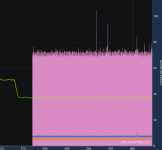
Are you asking where to get to the info like what was posted in the screenshots?
If so it's EQ Button > Macroquest > Settings > Frame Limiter
 
Its roughly double-triple the CPU usage of base EQ which probably means the overlay is updating far too often. Other than that the only other thing I can think of is some loop that it runs through that's eating a ton of processing power.

The only things that really effect FPS in EQ are proximity to other player models, far clip plane, advanced lighting / shadows, actor clip plane. Any modern game runs far smoother than EQ because of optimizations that EQ simply doesn't have
 
1714277981863.png

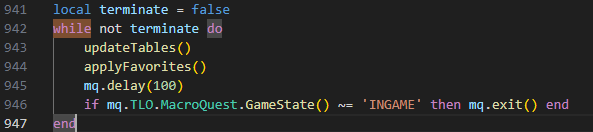
Try changing line 945 to a delay of 1000 (1 second) and see if that impacts your metrics. Updating buffs 10 times per second seems a bit excessive
 
In the MQ console, under Inspectors menu, there is a benchmark tool, clicking each of the labels on the left will show/hide that on the chart. I am not an expert at troubleshooting Lua imgui performance, but wanted to point your attention to that in case it helps.
 
1714429707569.png
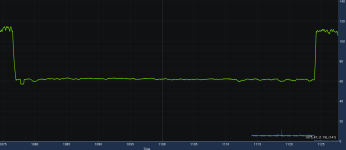
1714429718702.pngRender Simulation is spiking and frames are dropping when Alphabuff is enabled, so weird. This is with Framelimiter totally off in mq2's gui
1714431831855.png
The trough is with me staring at a wall again, with Alphabuff on as the low point, off is the normal framerate (Cool inspectors tool btw!)
 
Last edited:
Bug involving different ranks of buffs being applied at the same time. In particular, the Cleric's spell haste buff will stack with it's other ranks. The problem then is if you try to remove either of them, it will remove the higher rank one every time. I have to open my default UI's buff window to fix it, and you can't block the lower ranks because it will block all of the other ranks with it.
 
Hello all, this Lua is something I can't live without in EQ. Today, all of my toons, this is not working. I reinstalled it and it's loaded, but I get this error message on the top of my screen:

MQOverlay Paused
The overlay is paused due to an ImGui error.
Please fixt the problem before resuming.
Resume overlay.

Not sure what to do as I don't know what an ImGui is.

Thank you
 
all, this Lua is something I can't live without in EQ. Today, all of my toons, this is not working. I reinstalled it and it's loaded, but I get this error message on the top of my screen:

MQOverlay Paused
The overlay is paused due to an ImGui error.
Please fixt the problem before resuming.
Resume overlay.

Not sure what to do as I don't know what an ImGui is.

Thank you
 
all, this Lua is something I can't live without in EQ. Today, all of my toons, this is not working. I reinstalled it and it's loaded, but I get this error message on the top of my screen:

MQOverlay Paused
The overlay is paused due to an ImGui error.
Please fixt the problem before resuming.
Resume overlay.

Not sure what to do as I don't know what an ImGui is.

Thank you

ImGui is the macroquest ui.

There will be an error in the chat/console. that is the important information.
 
Thank you for the re-factor. Absolutely stellar! Very minimal loss in framerate!

So excited to be using this regularly again. Ten Thumbs up!
 
I'd love to see a "Detrimental Only" and "Favorites + Detrimental" setting if you get the time. Great work on this - thank you!
 
I am loving AlphaBuff! Its very performant in its latest revision.

It has earned a permanent place in my IMGui command center docked amongst some greats! Thank you for the effort!
 
love this Lua. now if i could some how integrate this with mq2buffme so i can ask for one of my toons to hit with my missing buff that would put the icing on the cake. otherwise love and thanks alot.
 
I've run into something.

It has been a while since I needed to block a buff, and I just leveled up a persona to 125 and am doing content. The blocked spells on the persona are nonexistent. When I went to block some illusions (Form of Great Wolf and Form of Mana) by right clicking on the buff and selecting block spell, it wouldn't do anything. At least in the songs window. I did not try in the normal window.

I eventually had to pull up the short duration buffs xml and block it from there.

So, I am not sure if it is me, the fact I am on a persona or if there is something wrong.
 
I think there is an EQ bug regarding blocking buffs right now.

Edit: You can use /blockspell add me spellID
 
Is there a way to have different favorite lists for personas?
Or should I just make backups and swap in/out the Alphabuff_CoolToonName.Lua file
based on which persona I'm going to play?
 
Release AlphaBuff - The Ultimate Buff & Song Windows

Users who are viewing this thread

Back
Top
Cart