I have had some success setting up buttons on buttonmaster but can not get it to do mimic me. not sure how to proceed. last attemt was /dgge /docommand /timed $\{Math.Rand[20, 120] /say line 2 /dgge /docommand /timed $\{Math.Rand[20, 120] /keypress HAIL. it appears hail line works but will not do anything when I say something. I am sure it is something easy I am missing. I also did not know where to put this so hope it is in right spot.

-
 Hail, we're RedGuides. We want you to play six (yes, 6!) EverQuest characters at once. We have scripts and a friendly community to help, please join our playstyle and say hello! 👋
You are using an out of date browser. It may not display this or other websites correctly.
You should upgrade or use an alternative browser.
You should upgrade or use an alternative browser.

Release Button Master 2026-10-03
- Thread starter SpecialEd
- Start date

i moved your butotnmaster question to the buttonmaster threadI have had some success setting up buttons on buttonmaster but can not get it to do mimic me. not sure how to proceed. last attemt was /dgge /docommand /timed $\{Math.Rand[20, 120] /say line 2 /dgge /docommand /timed $\{Math.Rand[20, 120] /keypress HAIL. it appears hail line works but will not do anything when I say something. I am sure it is something easy I am missing. I also did not know where to put this so hope it is in right spot.
telling your dudes to do a keypress hail wouldn't have them mimic you

Shadow
Ultimate seasoned veteran member
Use this: https://www.redguides.com/community/resources/dont-make-me-say-it.2399/I have had some success setting up buttons on buttonmaster but can not get it to do mimic me. not sure how to proceed. last attemt was /dgge /docommand /timed $\{Math.Rand[20, 120] /say line 2 /dgge /docommand /timed $\{Math.Rand[20, 120] /keypress HAIL. it appears hail line works but will not do anything when I say something. I am sure it is something easy I am missing. I also did not know where to put this so hope it is in right spot.
Buttonmaster is amazing for all sorts of things, but what I linked is more along the lines of what you are thinking and 99% of the time, after you Hail, the responses are auto filled for you.
so those buttons are part of mq2groupinfo - not really something for > button master < you can't really duplicate that "mimic me" functionality in button master.Well not sure what to type for dannet comand have tried /dgge /MinicMe ON, MinicMe, and a few others none worked. only info I found was someone saying this worked for them. So back to the drawing board
now, you *can* make a button on buttonmaster to
/groupinfo mimicme on and one for /groupinfo mimicme off you absolutely do NOT want your entire crew turning mimic me on - otherwise you will just feedack loop insanity
I have an interesting problem ..I have lost my buttonmaster ui on a toon and it seems to load fine but no ui i have tried /btn ../mqoverlay resume, logging out and restarting eq and VV, renaming the ini and tried to get it to set a fresh ini ...and a few more things i am sure ...but in the end it works fine on all other accounts AND works on all other toons on that account i am stumped
update ... after logging that toon off to check another on the same account and logging it back in the ui finally worked ....dont know what prevented it from opening up but it must have untangled the coding on its own
update ... after logging that toon off to check another on the same account and logging it back in the ui finally worked ....dont know what prevented it from opening up but it must have untangled the coding on its own
Last edited:
Several people asked if I could share my ini, so here it is.
Hi rawmotion, I have a question on your button "drop invis", which does 'dosocial "visible"'. Can you explain what command you have in that social? Many thanks!
likely /makemevis - being broadcast to whatever amount of people you want (group or everyone) using eqbc or dannetHi rawmotion, I have a question on your button "drop invis", which does 'dosocial "visible"'. Can you explain what command you have in that social? Many thanks!
I have an example in my hotkey guide in my signature

I made a new tab, and every time i try to edit button 1 i get this error.
buttonmaster error code
buttonmaster error code
Code:
ImGui Failure:
Y:\mqnext\lua\buttonmaster.lua:179: sol: no matching function call takes this number of arguments and the specified types
stack traceback:
    [C]: in function 'MenuItem'
    Y:\mqnext\lua\buttonmaster.lua:179: in function 'DrawContextMenu'
    Y:\mqnext\lua\buttonmaster.lua:402: in function 'DrawButtons'
    Y:\mqnext\lua\buttonmaster.lua:438: in function 'DrawTabs'
    Y:\mqnext\lua\buttonmaster.lua:454: in function <Y:\mqnext\lua\buttonmaster.lua:446>
ImGui Critical Failure: Mismatched Begin/BeginChild vs End/EndChild calls: did you forget to call End/EndChild?
Plugin ImGui has been temporarily paused. To resume imgui, run: /mqoverlay resume
Ending lua script 'buttonmaster' with PID 9 and status -1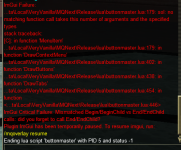
the TLDR is you have a label set as a number. open the ButtonMaster.ini, look for something like thisView attachment 39808
Also getting this error, but this is out of the box for me.
I've never tried using it before today.
Label=1 Then delete it. You can not set labels as numbers, and if you open a new label and dont save it, it will error to a number.That was it. Thanks Aipoc!the TLDR is you have a label set as a number. open the ButtonMaster.ini, look for something like thisLabel=1Then delete it. You can not set labels as numbers, and if you open a new label and dont save it, it will error to a number.
I no longer have a buttonmaster window. it also has taken out maui and dontmakemesay it windows. have tried to load buttonmaster on other toons and as soon as I do it takes out maui window. on my remaining toons theat are still functioning can bring up maui and dontmakemesayit windows but know if I start buttonmaster they will leave. also when I try to run buttonmaster it says already running not starting another.
You probably had an imgui crash.
It would have given you red error text and told you to /mqoverlay reset
It would have given you red error text and told you to /mqoverlay reset
Shadow
Ultimate seasoned veteran member
It does for me every time. Position where you want, camp out fully. come back in, should be fine.Is there a way to get the window location to save so after you /lua stop buttonmaster its in the same location it was when you closed it?
Thanks!
thank you!It does for me every time. Position where you want, camp out fully. come back in, should be fine.
Silverspaceman
Seasoned veteran member
I have had issues with Lua plugins and display working; sometimes /reloadui works to get everything back up if I have run /mqoverlay reset and the Lua is running again, but not showing up.did reset then reloaded but none will come u. tried buttonmaster, maui and dontmakemesayit and none came up even though it said it reloaded dont and buttonmaster. and said maui was already running so si /maui show and nothing.
if you have any potential desktop overlays like nahimic they can and will cause conflicts (nahimic in particular which is why the launcher warns you about it)I have had issues with LUA plugins and display working; sometimes /reloadui works to get everything back up if I have run /mqoverlay reset and the LUA is running again, but not showing up.
you can go to mqsettings and then reset your overlay stuff (which will reset locations) --- imgui overlays would need to be functional to open that settings window unfortunately - but that means if you can see that, then it is a buttonmaster issue and not imgui/overlay issue
but it is pretty much a: did you need to mqoverlay reset b: is the overlay thing actually running? c: if a and b then restart this particular character
Hi
I was wondering if there is a way to edit the label and/or command lines of a particular button via a macro / command. Something close to this was asked very early in this thread about being able to read the pressed/unpressed status of the button, and it was suggested to use sic's hotkeys.
But, lets suppose I have a simple macro that casts invis and also breaks invis. If my char is invis, then the button label could read "Break Invis' and conversely, if my char is not invis, then the label can be changed to "Cast Invis". Although this is a simple example and may be done through other means, or by two distinct hotbuttons, it gets more cumbersome if the choices are more than 2.. like suppose I want to cycle through all stances a merc can be set one by one. Or suppose your hotkey triggers a /doability that increments or decreases the value of an int variable. I'd like to change the label each time to reflect the currrent value of the variable so that the macro is more intiutive.
I tried to do this manually by altering the ini file directly, but it doesnt seem to work that way.. or.. the ini command isn't equipped to do what I want it to do.
Thanks!
I was wondering if there is a way to edit the label and/or command lines of a particular button via a macro / command. Something close to this was asked very early in this thread about being able to read the pressed/unpressed status of the button, and it was suggested to use sic's hotkeys.
But, lets suppose I have a simple macro that casts invis and also breaks invis. If my char is invis, then the button label could read "Break Invis' and conversely, if my char is not invis, then the label can be changed to "Cast Invis". Although this is a simple example and may be done through other means, or by two distinct hotbuttons, it gets more cumbersome if the choices are more than 2.. like suppose I want to cycle through all stances a merc can be set one by one. Or suppose your hotkey triggers a /doability that increments or decreases the value of an int variable. I'd like to change the label each time to reflect the currrent value of the variable so that the macro is more intiutive.
I tried to do this manually by altering the ini file directly, but it doesnt seem to work that way.. or.. the ini command isn't equipped to do what I want it to do.
Thanks!
I have a question on activating Chase Mode for a group that is a mix of CWTN and kissassist.
[Button_1234]
Cmd1=/noparse /dgz /docommand /${Me.Class.ShortName} mode 2
Label=Chase Mode (ALL)
This I believe activates chase mode for my CWTN group members. What do I need to add for my bard and wizard?
Many thanks
[Button_1234]
Cmd1=/noparse /dgz /docommand /${Me.Class.ShortName} mode 2
Label=Chase Mode (ALL)
This I believe activates chase mode for my CWTN group members. What do I need to add for my bard and wizard?
Many thanks
you would need something that puts them in the respective chase. I have examples for kiss/cwtn in my hotkey guide in my signatureI have a question on activating Chase Mode for a group that is a mix of CWTN and kissassist.
[Button_1234]
Cmd1=/noparse /dgz /docommand /${Me.Class.ShortName} mode 2
Label=Chase Mode (ALL)
This I believe activates chase mode for my CWTN group members. What do I need to add for my bard and wizard?
Many thanks

I have a question on activating Chase Mode for a group that is a mix of CWTN and kissassist.
[Button_1234]
Cmd1=/noparse /dgz /docommand /${Me.Class.ShortName} mode 2
Label=Chase Mode (ALL)
This I believe activates chase mode for my CWTN group members. What do I need to add for my bard and wizard?
Many thanks
| /chase [on|off] | [charname] | ON will abandon camp and have your group follow the MA - good for manual pulling, or Hunter mode. CharcterName is optional, and can be used to change who you want to chase. The chase(WhoToChase) no longer has to be the MA. .ini section: [General] |
| /chasedistance <#> | Sets/resets ChaseDistance to the specified number. .ini section: [General] |
| /chaseoff | Turns Chase off. Updates ChaseAssist=0 in .ini file. |
| /chaseon | Turns Chase on. Updates ChaseAssist=1 in .ini file. |

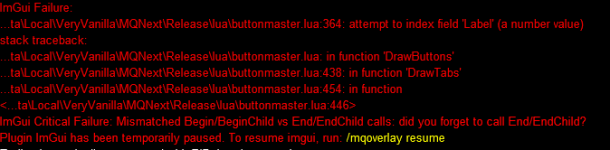
you have a button with a label that is a number instead of a stringHey guys. Every time I open Buttonmaster, and try to resize the window I get the following error message, and have to clear my ImGUI settings to even get the LUA window to come back. Any help would be greatly appreciated.
View attachment 41672


- Commits
- 2
I don't know if it is me and lag or buttonmaster, but since last patch my lines are processing backwards.
/do one thing
/do second thing
coming up second thing done
then first thing done.
I do see where my previous buttons all had /timed in them them to offset. I missed this one.
/do one thing
/do second thing
coming up second thing done
then first thing done.
I do see where my previous buttons all had /timed in them them to offset. I missed this one.
Last edited:
Found a bug. If you remove a tab group (say primary), then click settings and add set the one you removed, and then click on that new tab that was added back, you get an imgui error and it crashes.
Also being able to reorder tab groups with drag and drop would be nice!
Also being able to reorder tab groups with drag and drop would be nice!
- Commits
- 2
Line 418Found a bug. If you remove a tab group (say primary), then click settings and add set the one you removed, and then click on that new tab that was added back, you get an imgui error and it crashes.
Also being able to reorder tab groups with drag and drop would be nice!
Code:
if ImGui.BeginTabBar("Tabs", ImGuiTabBarFlags.Reorderable) then
FIxed some stuff:
- Fixed incorrect setting of nil when removing a tab. This caused indexes to be incorrect and adding a new tab and selecting it would cause the script to crash.
- Fixed issue where the script would crash if you renamed the tab but didn't change the name and hit save.
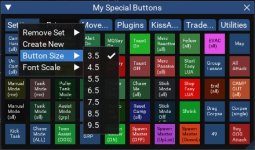
- Added button size to settings (3-10)
- Added checkmarks for current button size and font size value in menu.
Attachments
- Commits
- 2

Rare Spawn
Well-known member
Button Master is in the must-have category for me. It's like the Frank's Red Hot commercials... I put that S on everything.
Feature Request - can we get the ability to have button toggles? Would be great to have a single button pause AND un-pause, or Invis/drop invis.
Thanks!
Feature Request - can we get the ability to have button toggles? Would be great to have a single button pause AND un-pause, or Invis/drop invis.
Thanks!

Users who are viewing this thread
Total: 1 (members: 0, guests: 1)
Share: