• Hail, we're RedGuides. We want you to play six (yes, 6!) EverQuest characters at once. We have scripts and a friendly community to help, please join our playstyle and say hello! 👋
  • We've added LLM sections to our Terms & Rules and Resource Rules, for everyone's sanity & in-game safety.
    Read more
    a. Do not replace your voice with an LLM. This goes for your posts and your scripts. Drafting and editing with a tool is fine, but don't take you out of what you share.
    b. Do not replace your EQ character's voice with an LLM. We don't want scripts that speak over /ooc, /shout or other public channels. This has been an unwritten rule that's kept casino scripts off the site for decades, but we're now compelled to make it clear: keep automated communication private.

    Why Does RG Review Scripts?
    Nearly every LLM-written Lua script we see is making your character do impossible things, and rarely in a way that's beneficial to you. We've seen heavy server hammering, /target over impossible distances when /nav spawn would passively accomplish the same thing, a spawn search that fires 20+ times per second, and other pointless actions that are likely annoying GMs.

    You are welcome to use LLMs as a tool to structure, draft, and edit your work, but please read critically before hitting /lua run

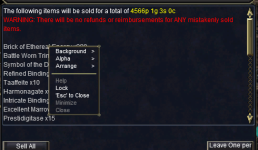
Problem - what is providing this window?

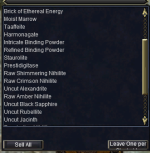
Hi all, The title says it all. I'm running on emu (aegis of norrath). I have stopped rgmercs and lootnscoot. Looking at /plugin list, I don't see anything sell-related. Can anyone help? Things ARE getting sold, I'm just paranoid it will sell something I really need.

Edit: it pops up whenever I open a vendor. The only way to close it is to close the vendor's window, then click the "Leave One per" button.

Thanks in advance.
1767486727196.png
 
Did you lock those items? That new feature

Thanks for replying

I did a (admittedly quick) search on google and couldn't find anything about this. Also did an image search (first time doing this, so it's possible I screwed it up). Is it specific to emu?

Logged in without any automation (no MQ).

The window still pops up. R or L-clicking on the items in the list doesn't offer any options - other than the regular window's menu:

1767535788598.png
 
Thanks for replying

I did a (admittedly quick) search on google and couldn't find anything about this. Also did an image search (first time doing this, so it's possible I screwed it up). Is it specific to emu?

Logged in without any automation (no MQ).

The window still pops up. R or L-clicking on the items in the list doesn't offer any options - other than the regular window's menu:

View attachment 74026
Thats just a list of *vendor* sale items. Can go into reg bags, ctrl + shift + left click to each item you dont want sold and will *lock* it.
 
Whew, thanks! Is this documented somewhere? Sorry for the barrage of questions.
oops, wrote too soon. ctrl + shift + left click on an item in a bag just brings up the bazaar search window with the item's name in the search slot.

Is there any way to turn this off?
 
Whew, thanks! Is this documented somewhere? Sorry for the barrage of questions.


Highlights:

Added the ability to lock items in bags from being moved or accidentally sold by shift + right-clicking an inventory slot. See the UI section for details.
- Added a new item flag: CASH LOOT. See the UI section for details.

Added the ability to lock slots inside bags in the inventory, bank, and shared bank. You can lock / unlock a slot by shift + right-click. You'll see a red lasso around locked slots. You can also change this color in the options window (and it will change the color of the associated messages).
- Added a new flag to items: "CASH LOOT". Items with this flag are intended solely for selling for coin, and appropriate vendors will have a button to sell all cash loot in your inventory all at once.
 
Problem - what is providing this window?

Users who are viewing this thread

Back
Top
Cart