

• Hail, we're RedGuides. We want you to play six (yes, 6!) EverQuest characters at once. We have scripts and a friendly community to help, please join our playstyle and say hello! 👋
  • We've added LLM sections to our Terms & Rules and Resource Rules, for everyone's sanity & in-game safety.
    Read more
    a. Do not replace your voice with an LLM. This goes for your posts and your scripts. Drafting and editing with a tool is fine, but don't take you out of what you share.
    b. Do not replace your EQ character's voice with an LLM. We don't want scripts that speak over /ooc, /shout or other public channels. This has been an unwritten rule that's kept casino scripts off the site for decades, but we're now compelled to make it clear: keep automated communication private.

    Why Does RG Review Scripts?
    Nearly every LLM-written Lua script we see is making your character do impossible things, and rarely in a way that's beneficial to you. We've seen heavy server hammering, /target over impossible distances when /nav spawn would passively accomplish the same thing, a spawn search that fires 20+ times per second, and other pointless actions that are likely annoying GMs.

    You are welcome to use LLMs as a tool to structure, draft, and edit your work, but please read critically before hitting /lua run

Problem - Weird Undefined Variable, no such a variable been ever used/claimed in any macros/inc

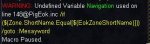
ChatWithThisName PeteSampras william12 Redbot Here is a problem I found in my own macro,
Bug.jpg

However, the weird situation is:

1. Somehow it did not always appear, it only happened when I just zoned into the instance, and every time it showed the exactly same information, aka same line on the same inc file (the 148th line of pigeok.inc).

2. I can not find the word "Navigation" in any of my macro file including the inc files. The notepad++ said there always 0 hits in all of my projects.

I would suspect this is plugin related issue, such as I used to use some variable in my HUD, and it spammed the hell out of me by tons of undeclared variable information in the very 1st line of the code..

And I did not load any plugins like MQ2Nav and MQ2Navigation, I do have MQ2Bot loaded somehow...

Any clues? Thanks!
KA
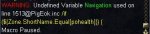
 
hmmmm, I tried to dig more and reproduce the bug, and now it also have a chance to appear at a new line (1513).
Bug1.jpg


I've noticed that it seems only appears when this TLO is used

Code:
${Zone.ShortName.Equal[XXXX]}

Any more clues please??
 
Just load MQ2Nav to get rid of the error. Without looking into the code and doing some debugging I wouldn't be able to find why that is popping up. If you want to send me the code on discord for a look through. But you'll also want to include a copy of the INI's for your modified files such as any HUD/Caption/MQ2Melee holy/down flags

If it's mq2bot related you could just try /plugin mq2bot unload

Note that when you use ${Navigation.SomeMember} as opposed to just ${Navigation} it will still report that ${Navigation} is undefined.
 
as far as your plugins it is relevant to finding a solution for your issue. You can go into your MacroQuest.ini and find your plugin list there, Loaded plugins will have the name=1, the unloaded but once loaded prior plugins will have their name =0
 
Problem - Weird Undefined Variable, no such a variable been ever used/claimed in any macros/inc

Users who are viewing this thread

Back
Top
Cart