
-
 Hail, we're RedGuides. We want you to play six (yes, 6!) EverQuest characters at once. We have scripts and a friendly community to help, please join our playstyle and say hello! 👋
You are using an out of date browser. It may not display this or other websites correctly.
You should upgrade or use an alternative browser.
You should upgrade or use an alternative browser.
RedGuides - website issues (release: blueguides)
- Thread starter Redbot
- Start date


GKD1231
Well-known member
I am logged in, and level 2, but I keep getting a login box when I click on forums. I can cancel it and keep clicking on posts, but it continues to pop us every time I click on Forums. If I try to put in my login and password, it does nothing and does not go away. Any ideas?
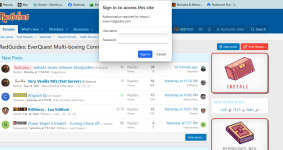

yep,I am logged in, and level 2, but I keep getting a login box when I click on forums. I can cancel it and keep clicking on posts, but it continues to pop us every time I click on Forums. If I try to put in my login and password, it does nothing and does not go away. Any ideas?
View attachment 75075
i merged your brand new thread into the existing discussion about the new site and any issues happening with it.
it is known - it isn't anything you're doing - ignore it as best as you can
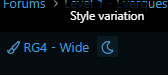
(btw if that white hurts your eyes, scroll down all the way on the left and check out either a: the diff styles or b: the style variations (light / dark)

knave23
Cookie Champion 2022
glad I checked here first before going to discord. had a screenshot of the popup all ready to go lolThe login that is popping up is an error, I am pretty sure. You can ignore it. We discussed it in discord earlier and Sic said that is the popup they get for admin login.
if it's any diagnostic help though, I was not seeing the popup on my phone earlier
There are some issues with pulling up the posts. I have a shortcut saved for the items with new posts I havent read, and I normally open each link up in a new tab to go through them. When I open the links, in the list of 5 now posts, I get the following error message on about 2-3 of the 5 posts (random number to be honest) . This post was one of those at first, then I refreshed it and it loaded. So there may still be some cutover pains.View attachment 74865
Can you DM me next time you get a few of these? I want to see if it's cloudflare or something on our end. We'll get it fixed!
not sure if expected and def not a huge deal, but I had to manually switch back to dark mode (in case you were expecting seamless settings transition)
The "RG4" style should switch from dark to light depending on your device settings.
Not a bug, not an issue but this blue is very hard on my old eyes. It blurs.
But I don't see my little green circle on my picture to the right that shows I am logged in here. Now it shows
No preview of the discord at the bottom anymore?
No more discord for the moment, though I'm thinking about adding it to the "Chat" tab. Is there demand?
and when we get some time we'll add other color combos, you're not the only EQ player with old eyes.
You may be aware, but (custom) name colorations don't seem to be working, at least on chrome/android
I was not aware, TY!
diggin the inky neriak vibes.. edit are we still allowed to say inky these days?
the headers/(nav bar?) in the cwtn class plugin subforum and all of the threads in there are still orange. maybe intentional but it's a little pumpkinish
I'm considering reverting the styles in RGMercs / CWTN subforums since they're a bit of an eyesore but will discuss with the mods
That's really odd, and you get it when opening several in rapid success right? We should be able to handle them all easily.I am still getting a lot of errors when I try to go and open an updated thread. I have cleared my cache on Chrome, tried an incognito window on Chrome, and also tried a session on Edge, and the errors have been pretty consistent. When this happen, I just keep hitting refresh until the page actually loads. You can see in the second screenshot, I am opening the links in new tabs so I can then go to them, but most of them are coming up with the errors on the other tabs. It also happens if I open the tabs in the same window one at a time. Let me know if I can help with any other troubleshooting information.
View attachment 74986
Good find, TY!I am currently seeing a user's redcents listed twice, at least in a forum post.
View attachment 74988
That was intentional, I wanted to keep one color red, but you're right it doesn't really fit. The material design wants a deep purple there.Not sure if intended or not but current page on posts still seems to use red highlighting. Its fine, but it almost looks like its from the previous setup so not sure if intended. Sorry if so!
View attachment 74991
the basic auth popup is fixed. I had some icon images that were being pulled from the dev forum. ty for the reports you've been a huge help!The login that is popping up is an error, I am pretty sure. You can ignore it. We discussed it in discord earlier and Sic said that is the popup they get for admin login.
GKD1231
Well-known member
Oh, thank you for that tip... I didn't care for all that brightness!(btw if that white hurts your eyes, scroll down all the way on the left and check out either a: the diff styles or b: the style variations (light / dark)
View attachment 75076
also I forgot to mention that @ChatWithThisName fixed up the old "Red Dark" style if you prefer the red. If there's demand I'll bring the old icons back for it.
some folks definitely use it - either cause of not wanting to use their discord account on their pc cause that is where their guild is etc - or just cause various reasons. it does provide enough of a challenge to give support (they can't screen snip or files or whatnot), that folks end up doing *something else*, but still probably worthwhile to have so they can at least get some direction.No more discord for the moment, though I'm thinking about adding it to the "Chat" tab. Is there demand?




It ended up being my Avast antivirus. I added an exception for the site, and it hasn't happened since.Can you DM me next time you get a few of these? I want to see if it's cloudflare or something on our end. We'll get it fixed!


https://www.redguides.com/community/resources/categories/kissassist-ini-library.18/Unless I am totally missing it--on the old site you could filter .ini by class and level (was very helpful to fitler down). I do not see that ability here.
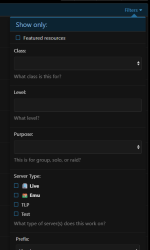

No, you're not. New setup doesn't have itOld site used to have a templates section for saving generic postings for sure later. Am I missing it here on the new site somehow?

I've been setting up some ! (Bangs) Tho like on discord.
I'll make a "new" bang in the next day or two

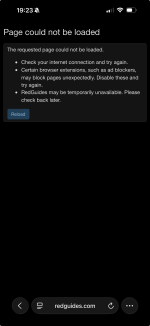
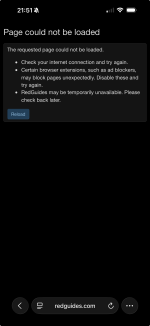
Glad this thread is up. This is a small issue, but for some reason, every time I try and go to RG on my phone I get this error message and have to refresh the page. After hitting refresh it goes through and I don’t have any other problems, but I’ll get this error religiously.
It’s only RG doing it; no other sites (including ECT) are giving me this error. Wasn’t going to mention it until I saw this post up.
Attachments
Last edited:
Is that after typing the address and going to redguides or is it when you bring your browser up on your phone and the site was already there the last time you used your browser?Glad this thread is up. This is a small issue, but for some reason, every time I try and go to RG on my phone I get this error message and have to refresh the page. After hitting refresh it goes through and I don’t have any other problems, but I’ll get this error religiously.
It’s only RG doing it; no other sites (including ECT) are giving me this error. Wasn’t going to mention it until I saw this post up.
Is that after typing the address and going to redguides or is it when you bring your browser up on your phone and the site was already there the last time you used your browser?
Typing it in. So I’ll be on ect or Gmail, type in redguides and hit enter and receive that message. It only just started happening recently so I figured it was my WiFi or something, but again, no other sites have given me issues.
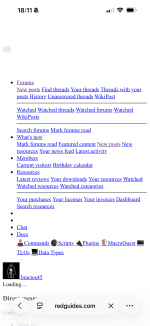
I also get this occasionally too. Refreshing doesn’t fix it; have to close out the tab and “go again”. (Just got it now)
Oh.. you got TextGuides, ol TextBot has a funny ascii game called {@ForevorQuest} @Redbot your evil bro is at it again, with his curlyboi ways..Typing it in. So I’ll be on ect or Gmail, type in redguides and hit enter and receive that message. It only just started happening recently so I figured it was my WiFi or something, but again, no other sites have given me issues.
View attachment 77015
I also get this occasionally too. Refreshing doesn’t fix it; have to close out the tab and “go again”. (Just got it now)
Users who are viewing this thread
Total: 1 (members: 0, guests: 1)
Share: