
Install the app
How to install the app on iOS
Follow along with the video below to see how to install our site as a web app on your home screen.
Note: This feature may not be available in some browsers.
-
 Hail, we're RedGuides. We want you to play several EQ characters at once with scripts to help, come join our playstyle and say hello! 👋
You are using an out of date browser. It may not display this or other websites correctly.
You should upgrade or use an alternative browser.
You should upgrade or use an alternative browser.

Vanilla - Very Vanilla MQ (Test Server) 3.1.52472.16
No permission to download
- Thread starter Redbot
- Start date

They said they were looking into it but test is in "as is" status now and may or may not get fixed or even any updates period now.Appreciate all the Test support; however, I am crashing as well with the new test build. Using all CWTN plugins, and nothing seems to be working right. No automation, chase, come to me, pulling, buffing, etc. Thanks for any feedback.
View attachment 77879

this looks like from clicking an item link? i believe ncellular already took care of that - just waiting on thumbs up for a rebuildAppreciate all the Test support; however, I am crashing as well with the new test build. Using all CWTN plugins, and nothing seems to be working right. No automation, chase, come to me, pulling, buffing, etc. Thanks for any feedback.
View attachment 77879
I did notice and forgot to report it but yeah, clicking any links from a imgui window will insta crash me too(CWTN output windows for example). I didn't check normal links in chat windows, etc.this looks like from clicking an item link? i believe ncellular already took care of that - just waiting on thumbs up for a rebuild

DoNotReply updated Very Vanilla MQ (Test Server) with a new update entry:
3.1.52472.8
Read the rest of this update entry...
3.1.52472.8
Automated release for test
Read the rest of this update entry...
Same behavior on this new build, unfortunately. Sometimes they load up and will chase/cast/buff/attack and everything seems fine but other toons will not. Thanks for keeping at it guys.
Going to try unloading some plugins and see if any specific one is causing any of the issues.
Unloading pretty much every plugin doesn't change anything. One thing I did notice is if you zone it has a chance to unbugger them and they will work completely fine until you zone again. Sometimes it takes 1 zone and other times 3-4.
Going to try unloading some plugins and see if any specific one is causing any of the issues.
Unloading pretty much every plugin doesn't change anything. One thing I did notice is if you zone it has a chance to unbugger them and they will work completely fine until you zone again. Sometimes it takes 1 zone and other times 3-4.
Last edited:
i can confirm the above
I'm not sure what availability ncellular or boxbuddy (he did a couple of fixes that built above - like fixing crashing from clicking links) - but having an "as narrowed down as possible" thing would help them tremendously.Same behavior on this new build, unfortunately. Sometimes they load up and will chase/cast/buff/attack and everything seems fine but other toons will not. Thanks for keeping at it guys.
Going to try unloading some plugins and see if any specific one is causing any of the issues.
Unloading pretty much every plugin doesn't change anything. One thing I did notice is if you zone it has a chance to unbugger them and they will work completely fine until you zone again. Sometimes it takes 1 zone and other times 3-4.
let me explain.
there was an issue that got fixed, mq.TLO.Me.Casting.ID() was just returning null regardless of what you were doing - that's obviously wrong and a problem and broke everything
being able to point specifically to "a thing" in this case a tlo member, narrows down where they can look / point their clanker towards.
so if you end up being able to see where something like that fails, that'd be huge towards getting it fixed.
Test is gonna really rely on as much help/support as it can get.
thanks for the replies davros / bigbuck
I'll play around with it more tomorrow and see if I can figure out any specifics. I'm pretty good atI'm not sure what availability ncellular or boxbuddy (he did a couple of fixes that built above - like fixing crashing from clicking links) - but having an "as narrowed down as possible" thing would help them tremendously.
let me explain.
there was an issue that got fixed, mq.TLO.Me.Casting.ID() was just returning null regardless of what you were doing - that's obviously wrong and a problem and broke everything
being able to point specifically to "a thing" in this case a tlo member, narrows down where they can look / point their clanker towards.
so if you end up being able to see where something like that fails, that'd be huge towards getting it fixed.
Test is gonna really rely on as much help/support as it can get.
thanks for the replies davros / bigbuck

So. Just to add to this because I've been playing around a bit today.
When I log/zone in and it's not working right, it triggers a voicetell to the client that is no longer working right. Similar to an mq2rez notification - "Help"
Outside of that it appears completely random. I've logged in a group and had 100% of them operational with cwtn - until I zone - in which none of them worked. Or 50/50, etc, etc...
Can't really find anything other than the above to help troubleshoot, but I'll keep looking
When I log/zone in and it's not working right, it triggers a voicetell to the client that is no longer working right. Similar to an mq2rez notification - "Help"
Outside of that it appears completely random. I've logged in a group and had 100% of them operational with cwtn - until I zone - in which none of them worked. Or 50/50, etc, etc...
Can't really find anything other than the above to help troubleshoot, but I'll keep looking
It's hard to pin down any specific thing that is causing it as it's so random. Toons will fully work 100% until you zone or go back to char select and come back in. You can log in 6 and sometimes all 6 are completely fine until a zone/camp and other times several are not working. It sometimes takes 1 zone/camp to get a toon working again and other times it takes 10.
Pretty sure I've excluded any single plugin causing it already. I'm working on TLO/member comparisons between bugged and non bugged states now. Made a little Lua to capture 300+ of them and spit out any changes between bugged and non bugged states. It's not a comprehensive list but so far I can't find any differences that makes me say yea, this one is the problem. I'll keep adding more and testing.
Edit: I'll add that I don't expect them to fix this or even work on it(especially since we'll have another patch in a few days lol). Oddly, I enjoy trying to figure this stuff out and maybe learn something along the way. I'm just glad we have people willing to attempt to get it working still for test. Thank you all that have contributed!
Pretty sure I've excluded any single plugin causing it already. I'm working on TLO/member comparisons between bugged and non bugged states now. Made a little Lua to capture 300+ of them and spit out any changes between bugged and non bugged states. It's not a comprehensive list but so far I can't find any differences that makes me say yea, this one is the problem. I'll keep adding more and testing.
Edit: I'll add that I don't expect them to fix this or even work on it(especially since we'll have another patch in a few days lol). Oddly, I enjoy trying to figure this stuff out and maybe learn something along the way. I'm just glad we have people willing to attempt to get it working still for test. Thank you all that have contributed!
Yay, think I found it.
mq.TLO.Me.Hovering is returning true on the bugged toons and false on ones that are working. Looks like zoning and/or camping will sometimes flip it either way. I'm assuming that jacks things up pretty bad if MQ thinks you are dead and hovering. Well, hovering anyway. Me.Dead is returning correctly either way.Me.State is returning HOVER on bugged toons as well. Returns normally on non bugged ones. Standing, sitting, feigned, etc.
Last edited:
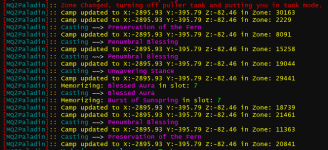
Found an issue, seems like its grabbing a .ID randomly. Most of the time i cant find anything to match the ID in MobList. Once it was the last snip, and once it was my Pallys ID. Sorry i'm not super tech savvy to help more. This might happen once every 45 mins or it might fire off 8 times in 2 mins, it seems to be super random.

DoNotReply updated Very Vanilla MQ (Test Server) with a new update entry:
3.1.52472.11
Read the rest of this update entry...
3.1.52472.11
Automated release for test
Read the rest of this update entry...
DoNotReply updated Very Vanilla MQ (Test Server) with a new update entry:
3.1.52472.12
Read the rest of this update entry...
3.1.52472.12
Automated release for test
Read the rest of this update entry...
Excellent work boxbuddy and whoever else worked on this update. Everything seems to be working fine in the little bit I've tested. Whole group is chasing/assisting/casting/healing/clickies, etc with the cwtn plugins.
Only 2 things I have noticed is once I zoned one time all toons have an "LD" to the right of their name but it appears to only be a visual thing and doesn't impact anything as far as I can tell(Might be something to do with some custom captions I have, I'll explore tomorrow). The other is the CWTN plugins are casting auras in non combat zones, i.e. Bastion of Divinity, Aura of the Persistent, bard aura, etc. Unless this behavior was changed in the plugins, I don't think they did before. Again, neither really matter in any meaningful way, just wanted to report them.
Edit: It's the .Linkdead member. It's returning true randomly. Some toons it's false, others it's true and changes which ones on zoning.
Only 2 things I have noticed is once I zoned one time all toons have an "LD" to the right of their name but it appears to only be a visual thing and doesn't impact anything as far as I can tell(Might be something to do with some custom captions I have, I'll explore tomorrow). The other is the CWTN plugins are casting auras in non combat zones, i.e. Bastion of Divinity, Aura of the Persistent, bard aura, etc. Unless this behavior was changed in the plugins, I don't think they did before. Again, neither really matter in any meaningful way, just wanted to report them.
Edit: It's the .Linkdead member. It's returning true randomly. Some toons it's false, others it's true and changes which ones on zoning.
Last edited:

Thanks for the heads up.Edit: It's the .Linkdead member. It's returning true randomly. Some toons it's false, others it's true and changes which ones on zoning.
Are they spam casting them?The other is the CWTN plugins are casting auras in non combat zones
No, they are not spamming them. Neither issue is causing any kinds of problems with normal gameplay or plugin/script operation as far as I can tell. I'm not even sure something didn't change with the cwtn plugins and they do now cast in non combat zones or something. I'm just going off memory that they didn't used to. I'm not even sure how they are detecting non combat zones vs combat ones. Is it just a list they manually added and go by or is there some non combat zone TLO member that I am unaware of? Maybe Sic will reply later on and let us know for sure.
we did not change it, but i did let boxbuddy know wwhat we use for it - we just use a curated list of zone ids and check it against the zone id we're inMaybe Sic will reply later on and let us know for sure.
Cool, thanks for that. It's very much not even a problem either way. Nor is the .Linkdead thing. Build works for everything I've needed it for so far. Thanks once again everyone that takes the time to help keep test MQ going for us. Ya'll are freakin' awesome.we did not change it, but i did let boxbuddy know wwhat we use for it - we just use a curated list of zone ids and check it against the zone id we're in
DoNotReply updated Very Vanilla MQ (Test Server) with a new update entry:
3.1.52472.13
Read the rest of this update entry...
3.1.52472.13
Automated release for test
Read the rest of this update entry...
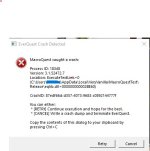
Thanks. That fixed the LD thing. I did have a random crash earlier on one character. It happened as soon as I clicked my /dgza /makemevisible hotkey but not sure if that was even related or not. It hasn't happened in the couple hours since though. Could have just been a one off. I'll report back if it happens more often.
EverQuest Crash Detected
---------------------------
MacroQuest caught a crash:
Process ID: 8740
Version: 3.1.52472.13
Location: IsMarkedNPC+0 (E:\MacroQuest-test\MQ2Main.dll+0000000000048BF0)
CrashID: 3433fd8d-7fda-45e5-8cb1-3e94b4233161
i'm gonna merge this into the easyfind discussion thread - tho it could be an issue with the test build.
you provided the smallest amount of information that allowed you to press "post".
where were you and what did you type to travelto?
you provided the smallest amount of information that allowed you to press "post".
where were you and what did you type to travelto?
/dgae travelto is not valid/dgae /travelto poknowledge is validI can confirm /travelto isn't working with that error(on test). Just tried it from lobby to PoK and PoK to lobby and got this. Using find to control or control+shift click works fine.
[EasyFind] Traveling to: The Plane of Knowledge
[EasyFind] Unable to find the next zone to travel to!
[EasyFind] Navigating to Zone Connection: The Plane of Knowledge
[EasyFind] Traveling to: Guild Lobby
[EasyFind] Unable to find the next zone to travel to!
cool, thanks dav - it is weird both boxbuddy and i did our normal stuff - but assuming grymm is using a correct command, then the issue is the test buildI can confirm /travelto isn't working with that error(on test). Just tried it from lobby to PoK and got this. Using find to control or control+shift click works fine.
@boxbuddy
Wondering if it's the same issue that is causing the CWTN plugins to cast aura's in non combat zones. Something with zone names/id's maybe. I'll investigate when I can, see if I can figure it out. I don't use /travelto much so I would have never found this one myself. I'll post any more discussion about it to the test thread.

well, yes we know that now, and i need to move it out. we didn't at first because i didn't know what command the op used (and what he said he used was still not a valid command). i moved it out - thanks for the reminderSorry, but I don't want any bug posts regarding test server in this thread anymore. Those are going to be issues with the test update and not this plugin.
Player2bnamedl8r
Active member
I was curious if anyone else is having issue with the mq2groupinfo buttons no longer showing up in group window?
I have the new UI engine turned off and validated the plugin is loaded.
I have run though the /groupinfo show commands and validate it is toggling the MQ2GroupInfo.ini back and forth.
ShowMimicMeButton=1
ShowComeToMeButton=1
ShowFollowMeButton=1
ShowHotButtons=1
Typing /groupinfo followme and clicking enter will allow me to toggle follow on and off. I was just curious if it was just me or a small bug, we will have to deal with for a bit.
Much appreciation to everyone that is helping keep test running!!!
I have the new UI engine turned off and validated the plugin is loaded.
I have run though the /groupinfo show commands and validate it is toggling the MQ2GroupInfo.ini back and forth.
ShowMimicMeButton=1
ShowComeToMeButton=1
ShowFollowMeButton=1
ShowHotButtons=1
Typing /groupinfo followme and clicking enter will allow me to toggle follow on and off. I was just curious if it was just me or a small bug, we will have to deal with for a bit.
Much appreciation to everyone that is helping keep test running!!!
Yeah, the groupinfo plugin is broken atm with this build. Targetinfo plugin is also a little buggy too depending on the UI you use. I've seen it cut off or limit how many buff icons show on some and work fine on others. I don't use either plugin so it really hasn't affected me. I just know from other people telling me and I tried loading them myself to test and confirm.
I also have this gigantic "Never Loot" button on the bottom right of my find item search box but haven't figured out what is causing that one yet lol. Just stuff we have to deal with for a test build right now as they are learning and improving their process.

I also have this gigantic "Never Loot" button on the bottom right of my find item search box but haven't figured out what is causing that one yet lol. Just stuff we have to deal with for a test build right now as they are learning and improving their process.
Player2bnamedl8r
Active member
Thanks for confirmation. I figured that was the case but hadn't seen anyone post anything about it.Yeah, the groupinfo plugin is broken atm with this build. Targetinfo plugin is also a little buggy too depending on the UI you use. I've seen it cut off or limit how many buff icons show on some and work fine on others. I don't use either plugin so it really hasn't affected me. I just know from other people telling me and I tried loading them myself to test and confirm.
I also have this gigantic "Never Loot" button on the bottom right of my find item search box but haven't figured out what is causing that one yet lol. Just stuff we have to deal with for a test build right now as they are learning and improving their process.
View attachment 78078
DoNotReply updated Very Vanilla MQ (Test Server) with a new update entry:
3.1.52472.14
Read the rest of this update entry...
3.1.52472.14
Automated release for test
Read the rest of this update entry...
Thanks again boxbuddy! Groupinfo/targetinfo working and that weird Never Loot button offset in find fixed. No more zone ID/name issues either and /travelto is working again. Excellent work man.
Out of curiosity was the /travelto / Zone problem linked to
Out of curiosity was the /travelto / Zone problem linked to
pLocalPlayer->GetZoneID() ? I was trying to figure it out myself and that one stuck out along with the Zone field offset.The diff will tell ya ;pThanks again boxbuddy! Groupinfo/targetinfo working and that weird Never Loot button offset in find fixed. No more zone ID/name issues either and /travelto is working again. Excellent work man.
Out of curiosity was the /travelto / Zone problem linked topLocalPlayer->GetZoneID()? I was trying to figure it out myself and that one stuck out along with theZonefield offset.
But yea, the way I was checking originally was using the ingame Lua TLOs, which are different than what plugins are able to use/have access to. Once I learned that, things started to click a bit more. Group/target info was just a mixup of X/Ys.
I appreciate the kind words!
Users who are viewing this thread
Total: 1 (members: 0, guests: 1)
Share: