
-
 Hail, we're RedGuides. We want you to play six (yes, 6!) EverQuest characters at once. We have scripts and a friendly community to help, please join our playstyle and say hello! 👋
You are using an out of date browser. It may not display this or other websites correctly.
You should upgrade or use an alternative browser.
You should upgrade or use an alternative browser.

Vanilla - Very Vanilla MQ (Live Servers) 3.1.52471.42
- Thread starter Knightly
- Start date
I tried going outside but it was scary. Now what?[2:07 PM] brainiac:
update for live patch is going to be done tonight, take the afternoon off and do some things you've been neglecting to do lately
brainiac:
https://www.redguides.com/tip/brainiac
Reply to this thread after donating for your

Serious - - Tip the MacroQuest Developer: brainiac
Redbot's edit: When your tip is confirmed, you'll get a "🧠" on your post from brainiac. If you enjoy using MacroQuest, please show the developer @brainiac some appreciation for their efforts in creating such fun software. QUICK CONTRIBUTE: https://www.redguides.com/tip/brainiac OR To...www.redguides.com
 (tipped)
Last edited:

i am going to work in an hour be gone all night sadly i get to play very little recently

Redbot updated Very Vanilla MQ (Live Servers) with a new update entry:
20251015
Read the rest of this update entry...
20251015
October 15, 2025:
- live: Update for live patch
October 12, 2025:
- test: Update for test patch
September 24, 2025:
- test: Update for test patch
Read the rest of this update entry...
Redbot updated Very Vanilla MQ (Live Servers) with a new update entry:
20251016
Read the rest of this update entry...
20251016
Automated release. Commit hashes:
vv: e60ada4d79ee3b2cb740cf2f228b4e94ef20e9b4
cwtn: cf81aa0c3025d7d487d49de0023caf8de04db006
eqlib: 9cce0eb76e573fcb4f7938c02acb6e54af09e2c0
Read the rest of this update entry...
Redbot updated Very Vanilla MQ (Live Servers) with a new update entry:
20251016
Read the rest of this update entry...
20251016
Automated release. Commit hashes:
vv: 70d24de3fdee57561852e67ea59a6cdca7f5f130
cwtn: cf81aa0c3025d7d487d49de0023caf8de04db006
eqlib: 9cce0eb76e573fcb4f7938c02acb6e54af09e2c0
Read the rest of this update entry...
Redbot updated Very Vanilla MQ (Live Servers) with a new update entry:
20251024
Read the rest of this update entry...
20251024
Automated release. Commit hashes:
vv: 92c6c801ce813933b577c15210aafb4e748d7b21
cwtn: ae1ebc12697ef5b988470494c25d8293d1ff8fc5
eqlib: 9cce0eb76e573fcb4f7938c02acb6e54af09e2c0
Read the rest of this update entry...
Redbot updated Very Vanilla MQ (Live Servers) with a new update entry:
20251027
Read the rest of this update entry...
20251027
Automated release. Commit hashes:
vv: fbc9cda71ce5528b57daed664cb8407e98c41abd
cwtn: de91d118790d9bc7c5155fe2abfc4b189c249083
eqlib: 9cce0eb76e573fcb4f7938c02acb6e54af09e2c0
Read the rest of this update entry...

Hiya, I have a UI question, I'm boxing 5 accounts and 3 of the 5 have no UI problems (sometimes their chats reset or basic stuff). But for some reason at random 2 of my 5 accounts keep having all the display settings to max and turning back on the new UI (I have use new UI uncheck). is there a way to permanently set your display and chat settings Example: text color, show or not show text?

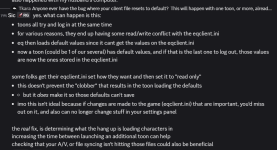
this happens cause EQ sucksHiya, I have a UI question, I'm boxing 5 accounts and 3 of the 5 have no UI problems (sometimes their chats reset or basic stuff). But for some reason at random 2 of my 5 accounts keep having all the display settings to max and turning back on the new UI (I have use new UI uncheck). is there a way to permanently set your display and chat settings Example: text color, show or not show text?
some folks make their eqclient.ini readonly so those defaults dont end up getting saved - and you can sometimes alleviate the issue by increasing your autologin delay between clients - but it is purely an eq issue
Cairbrae is a dev who confirmed (the thing we already knew)
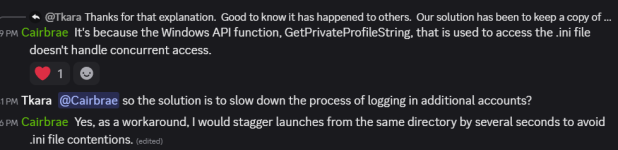
Thank you I will span out my login times longer. I don't have read me checked so I don't think it was that. Thanks again.this happens cause EQ sucks
some folks make their eqclient.ini readonly so those defaults dont end up getting saved - and you can sometimes alleviate the issue by increasing your autologin delay between clients - but it is purely an eq issue
View attachment 72509
Cairbrae is a dev who confirmed (the thing we already knew)
View attachment 72510
Redbot updated Very Vanilla MQ (Live Servers) with a new update entry:
20251111
Read the rest of this update entry...
20251111
October 27, 2025:
- Added network capability for actors
Add any peers to a new \[NetworkPeers\] section in your ini in the format \<ip\>=\<port\>
Setting port to 0 assumes that the remote peer uses the same port as the local peer (default to 7781)
Can change the NetworkPeerPort entry in the \[MacroQuest\] section of the ini to change the connected port
Everything else should be completely transparent and function like the current actor system
Read the rest of this update entry...
Redbot updated Very Vanilla MQ (Live Servers) with a new update entry:
20251111
Read the rest of this update entry...
20251111
Automated release. Commit hashes:
vv: c51e4408be99227daaae4cd278cb920f7179eddf
cwtn: 76feef8e0c25788644782221fbe650da0931038f
eqlib: 37cff3f660e0928870cc37531c1a5584de495a80
Read the rest of this update entry...
Redbot updated Very Vanilla MQ (Live Servers) with a new update entry:
20251111
Read the rest of this update entry...
20251111
Automated release. Commit hashes:
vv: cda69c1d8891173ae9205286bc773acc8f9cc7f7
cwtn: 76feef8e0c25788644782221fbe650da0931038f
eqlib: 37cff3f660e0928870cc37531c1a5584de495a80
Read the rest of this update entry...
Redbot updated Very Vanilla MQ (Live Servers) with a new update entry:
20251112
Read the rest of this update entry...
20251112
## Live Patch Update 11/12/2025
- Includes all changes from previous test patches.
## Test Patch Update 11/6/2025
- Added new EquipmentItem TLO that provides access to the new equipment keyring. Usage is
the same as other keyrings.
- Locked Items are added to the client, but access through MQ is not available yet.
- Added CashLoot member to Item type
## Previous Updates
November 1, 2025:
- test: Update for test patch
Read the rest of this update entry...
Posted this in Discord last night, but wanted to put it here for posterity and because I've narrowed it down some more. This seems to be happening when trying to access items in the Activated Keyring (not the new Equipment Keyring). I have LEMs setup to do clickies from that keyring and turning off LEM before zoning has alleviated these crashes.
Code:
---------------------------
EverQuest Crash Detected
---------------------------
MacroQuest caught a crash:

Process ID: 117748
Version: 3.1.1.3422
Location: mq::datatypes::MQ2ItemType::MakeVarPtr+0 (C:\Games\MQ\MQ2Main.dll+0000000000090580)

CrashID: c4e6be6d-d53f-403d-9dba-a0b0be5394fcdid you already re-patch? because mq was updatedPosted this in Discord last night, but wanted to put it here for posterity and because I've narrowed it down some more. This seems to be happening when trying to access items in the Activated Keyring (not the new Equipment Keyring). I have LEMs setup to do clickies from that keyring and turning off LEM before zoning has alleviated these crashes.
Code:--------------------------- EverQuest Crash Detected --------------------------- MacroQuest caught a crash: Process ID: 117748 Version: 3.1.1.3422 Location: mq::datatypes::MQ2ItemType::MakeVarPtr+0 (C:\Games\MQ\MQ2Main.dll+0000000000090580) CrashID: c4e6be6d-d53f-403d-9dba-a0b0be5394fc
hrm looks like mq did update, but didn't tag live so it didn't rebuild, my mistake on thatMaybe Redfetch isn't pulling it then? I ran it about 6 hours ago and just now and MQ has not been updated on my machine.
Redbot updated Very Vanilla MQ (Live Servers) with a new update entry:
20251113
Read the rest of this update entry...
20251113
## Live Patch Update 11/12/2025
- Includes all changes from previous test patches.
Additional fixes:
- Fix crash when inspecting cash loot bag.
## Test Patch Update 11/6/2025
- Added new EquipmentItem TLO that provides access to the new equipment keyring. Usage is
the same as other keyrings.
- Locked Items are added to the client, but access through MQ is not available yet.
- Added CashLoot member to Item type
## Previous Updates
Read the rest of this update entry...
Thanks for looking into that. Still crashing with the latest, unfortunately.
Code:
---------------------------
EverQuest Crash Detected
---------------------------
MacroQuest caught a crash:

Process ID: 27344
Version: 3.1.1.3425
Location: mq::datatypes::MQ2ItemType::MakeVarPtr+0 (C:\Games\MQ\MQ2Main.dll+0000000000090580)

CrashID: f5fb4e3f-8751-4b4b-95fb-5ea1bbe96b90

You can either:
 * [RETRY] Continue execution and hope for the best.
 * [CANCEL] Write a crash dump and terminate EverQuest.

Copy the contents of this dialog to your clipboard by pressing Ctrl+C

---------------------------
Retry   Cancel
---------------------------I confirmed you have the latest MQ version, so I'm not sureThanks for looking into that. Still crashing with the latest, unfortunately.
Code:--------------------------- EverQuest Crash Detected --------------------------- MacroQuest caught a crash: Process ID: 27344 Version: 3.1.1.3425 Location: mq::datatypes::MQ2ItemType::MakeVarPtr+0 (C:\Games\MQ\MQ2Main.dll+0000000000090580) CrashID: f5fb4e3f-8751-4b4b-95fb-5ea1bbe96b90 You can either: * [RETRY] Continue execution and hope for the best. * [CANCEL] Write a crash dump and terminate EverQuest. Copy the contents of this dialog to your clipboard by pressing Ctrl+C --------------------------- Retry Cancel ---------------------------
what is your lem, what is it doing exactly?All good. For now I can stop LEM before zoning and run it once I'm zoned and that works. I'm sure if I took all the activated items out of the keyring I could forego that too.
Redbot updated Very Vanilla MQ (Live Servers) with a new update entry:
20251114
Read the rest of this update entry...
20251114
## Update 11/13/2025
Updated for live hotfix.
- Fix achievements not reading properly
- Fix Item.CashLoot not returning the proper value
- Fix FindItemWnd additional columns overlapping existing columns
## Live Patch Update 11/12/2025
- Includes all changes from previous test patches.
Additional fixes:
- Fix crash when inspecting cash loot bag.
## Test Patch Update 11/6/2025
- Added new EquipmentItem TLO that provides access to the new equipment keyring. Usage is
the same as other...
Read the rest of this update entry...
Redbot updated Very Vanilla MQ (Live Servers) with a new update entry:
20251114
Read the rest of this update entry...
20251114
## Update 11/14/2025
- loader: Fix SendSetForegroundWindow - should help resolve some issues with focus swapping
## Update 11/13/2025
Updated for live hotfix.
- Fix achievements not reading properly
- Fix Item.CashLoot not returning the proper value
- Fix FindItemWnd additional columns overlapping existing columns
## Live Patch Update 11/12/2025
- Includes all changes from previous test patches.
Additional fixes:
- Fix crash when inspecting cash loot bag.
## Test Patch Update 11/6/2025
-...
Read the rest of this update entry...
Redbot updated Very Vanilla MQ (Live Servers) with a new update entry:
20251117
Read the rest of this update entry...
20251117
## Update 11/17/2025
Updated for live hotfix.
## Update 11/14/2025
- loader: Fix SendSetForegroundWindow - should help resolve some issues with focus swapping
## Update 11/13/2025
Updated for live hotfix.
- Fix achievements not reading properly
- Fix Item.CashLoot not returning the proper value
- Fix FindItemWnd additional columns overlapping existing columns
## Live Patch Update 11/12/2025
- Includes all changes from previous test patches.
Additional fixes:
- Fix crash when inspecting cash...
Read the rest of this update entry...
Redbot updated Very Vanilla MQ (Live Servers) with a new update entry:
20251119
Read the rest of this update entry...
20251119
Automated release. Commit hashes:
vv: 757ccb40f75be3949de733848384f36ee789bcc3
cwtn: 76feef8e0c25788644782221fbe650da0931038f
eqlib: 28d686cfb8310f622e8692fa80c83b064d9cbc5c
Read the rest of this update entry...

crazednut
New member
To whom it may concern , for some reason when even i launch MQ2 it tells me the versions between everquest and MQ2 are incompatible ..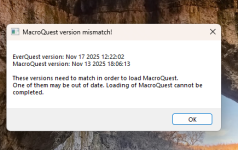 so i downloaded kissassist again thinking maybe there was a patch i didn't know about from EQ , and it worked fine .....then i tried to launch again today and same box with same dates pops up .....but i just redownloaded very vanilla yesterday which was the 18th ....so not sure whats going on but , very frustrating downloading it and having to reset INI's and everything. what can i do to address this please
so i downloaded kissassist again thinking maybe there was a patch i didn't know about from EQ , and it worked fine .....then i tried to launch again today and same box with same dates pops up .....but i just redownloaded very vanilla yesterday which was the 18th ....so not sure whats going on but , very frustrating downloading it and having to reset INI's and everything. what can i do to address this please
knave23
Cookie Champion 2022
News - - New Live Patch - OPTIONAL - Nov 17, 2025 - DO NOT UPDATE UNTIL MQ IS PATCHED
Ner client was just pushed!!
www.redguides.com

blahblahblah84
Well-known member
Every time I log into EQ with a mercenary active on my one character, the mercenary gets auto suspended and I have to wait five minutes to un-suspend. This does not happen on other characters, although I rarely use mercenaries so I've only checked on three other characters.
I'm not sure if this an EQ thing or a macroquest thing. I'm not running Kissassist or any other macros at the time. I use autologin to login. Sorry if this is the wrong forum for this post.
I'm not sure if this an EQ thing or a macroquest thing. I'm not running Kissassist or any other macros at the time. I use autologin to login. Sorry if this is the wrong forum for this post.
Redbot updated Very Vanilla MQ (Live Servers) with a new update entry:
20251201
Read the rest of this update entry...
20251201
Automated release. Commit hashes:
vv: f405fa70a7dbcd2bd83adbb75c05eb2d45c89d11
cwtn: f384f63bd68f8164b209ec95006a887c0bbcfda0
eqlib: 28d686cfb8310f622e8692fa80c83b064d9cbc5c
Read the rest of this update entry...
shaney78009
Active member
Since I am still relatively new to Redguides. What is the anticipated downtime for being able to use Very Vanilla going to be after the expansion patch tomorrow?
That somewhat depends on if they made additional changes that they didn't already make on beta/test - which is very possible. For a good majority of the year @brainiac has MQ back up before servers are even up. If I were a betting man, I'd bet brain has it done tomorrow before servers are up - but if he doesn't I'm not gonna be upset about it. It'll be up the moment it is available to be up.Since I am still relatively new to Redguides. What is the anticipated downtime for being able to use Very Vanilla going to be after the expansion patch tomorrow?
What to expect on patch days?
When eq patches MQ has to be rebuilt. (you also have to patch EQ --- this way you avoid "Version Mismatch" issues)
Once MQ is updated RG can build - we now have an automated system that rebuilds RG as soon as it is updated - which means our previous method of "let's give it a quick test" is no longer there, and sometimes there ends up being another smaller patch later to correct if something got missed - so re-check on patch days if you are having issues.
EQ could change literally anything and it would require the way MQ interacts with that portion of EQ to be completely reworked. It is normally just offsets, sometimes struct changes --- with the large changes eq has been making over the past few months (updates and backend improvements) there are more things than just offset changes that are happening, so it can certainly be a lot of work for the devs.
Curious when Very Vanilla will be updated?
You'll get a web notification (if we have permission), site notification, and email (optional)
Click to watch
MacroQuest for Live servers:
MacroQuest for Test server
EQ patches go like this: (in theory)
2nd* tue/wed = test "real" patch
3rd* wed = live patch
4th* tue/wed = test "true up"
the tue over the wed is a more recent thing (I suspect klanderso has more to do with that, and having time to ensure working stuff before the weekend and upset people - klanderso is pretty awesome)
* holidays subject to cause shifts in days or even week
Test is notorious for being like "oops we forgot the 'dont crash plz' file, gotta patch again", or "woops we added +1 to crashing, we meant -1", so "on paper" it is double the patches, but very frequently ends up being more than double the work (i imagine, I'm not doing the work - I'd love to learn enough at some point to help facilitate doing so, however).
Test also introduces new stuff before it goes to live - over the past couple of years EQ has been making a lot of substantial code changes - not just a "here's a monthly patch" where they adjusted an aoe value or something simple. On top of that, once you get into October/November you start seeing stuff from the expansion going onto the test server, even if that stuff isn't released yet. The good news is that gives the MQ dev(s) more time to implement it, the bad news is that it is more work. Thankless unnoticed (for the most part) work.
MQ itself is open source and by volunteer(s) - RG which builds and distributes that is obviously paid for. When MQ is updated, RG does the best it can to immediately build and make available an updated build
If you wanted to show your appreciation to the main MQ dev for their volunteer work:
brainiac:
https://www.redguides.com/tip/brainiac
Reply to this thread after donating for your

Serious - - Tip the MacroQuest Developer: brainiac
Redbot's edit: When your tip is confirmed, you'll get a "🧠" on your post from brainiac. If you enjoy using MacroQuest, please show the developer @brainiac some appreciation for their efforts in creating such fun software. QUICK CONTRIBUTE: https://www.redguides.com/tip/brainiac OR To...
www.redguides.com
shaney78009
Active member
I am not complaining as you guys seem to be Johnny on the spot when it comes to patches. I was just wondering, is all.
i responded to your question with the answers and information that answers your question - I wasn't assigning emotional or moral judgment to the question or the answer.I am not complaining as you guys seem to be Johnny on the spot when it comes to patches. I was just wondering, is all.
Users who are viewing this thread
Total: 1 (members: 0, guests: 1)
Share: