bloommeister
New member
So I closed bluestacks android emulator and it worked perfectly first time, no idea why that would lock any eq files but its working now



Nov 15, 2023:
- live: Fix spell display window (#782).
- autologin: Enable /camp fast when switching characters
- live: Updated for latest patch
Nov 22, 2023:
- Update vcpkg dependencies
Nov 19, 2023:
- Add ability to create textures from image files. See examples/texture.lua for example usage.
Automated release. Commit hashes:
vv: de40addd5134292c5950d02092dab403f9e4d3ca
cwtn: 3c393f2f21a4b889de575b11d21e1eaeeb460bd3
eqlib: 8c7513169c0333f23daa821ad078a9e5c2418c0f
Automated release. Commit hashes:
vv: a4b66b321f63d3cabc6e11c746eb523c16413468
cwtn: a4ac18b34efde6424ff5fd99efbf92d9bbcdc71c
eqlib: 8c7513169c0333f23daa821ad078a9e5c2418c0f
Automated release. Commit hashes:
vv: 45fc74f9b58c774c74162c95cff0813b8bbcd6f4
cwtn: a4ac18b34efde6424ff5fd99efbf92d9bbcdc71c
eqlib: 8c7513169c0333f23daa821ad078a9e5c2418c0f
Automated release. Commit hashes:
vv: 6830bcfe077e0ef2f13a3cd5024ac0d091466bfd
cwtn: 63e8c93656a482ef7d5eaaefacb1c8c26aa0f948
eqlib: 8c7513169c0333f23daa821ad078a9e5c2418c0f
Nov 28, 2023:
- Actors are now live for use in plugins, see https://docs.macroquest.org/plugins/developing/actors/
- Actors are also now live for use in lua scripts, see examples/buffbeg.lua for example usage.
Automated release. Commit hashes:
vv: 7dd4adc0e4cdb6a1cc5399880c8d9fb800c92f7f
cwtn: 490c2de48e7e2f4d62b2466fd07f8d721571d672
eqlib: c8a4a7f9fcd8d901a57747f5fe663fd24bb71ffd
Automated release. Commit hashes:
vv: 84523325f46b837ded97586d219efbbd5e2b9ce3
cwtn: b4ea3a5f5eab4a2efe72edc1e970d29232f076ed
eqlib: c8a4a7f9fcd8d901a57747f5fe663fd24bb71ffd
Automated release. Commit hashes:
vv: 5c3704e68d7c18271628c75516af0dff32f02cbf
cwtn: ce554c8616f45ef30c6da1adf1fce753c35ae379
eqlib: c8a4a7f9fcd8d901a57747f5fe663fd24bb71ffd
Automated release. Commit hashes:
vv: fa220a15d0eb1cdb3aac52182d350b79ad6d7a8e
cwtn: d0c6633c939599ad266342737d1301fcec61cbe4
eqlib: c8a4a7f9fcd8d901a57747f5fe663fd24bb71ffd
Automated release. Commit hashes:
vv: 26bae36f44c1685eb762bdaa975782823579b179
cwtn: 8593e9c324a24de2c7387cda22d948c01f75cc9c
eqlib: c8a4a7f9fcd8d901a57747f5fe663fd24bb71ffd
Dec 5, 2023:
- live: Updated for latest expansion
Dec 4, 2023:
- test: Fix ZoneGuide
- Add Me.PersonaLevel - takes class shortname as param, returns level of that class persona.
e.g. ${Me.PersonaLevel[DRU]} returns level of druid class persona.
Dec 2, 2023:
- test: Updated for latest patch

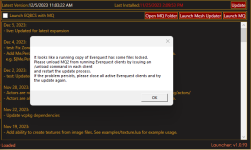
I am trying to update and am getting this message. I do not have any version of EQ running. What am I doing wrong, please?
Automated release. Commit hashes:
vv: 8c18759ac3da020c2b072007732dd07b032ca116
cwtn: 31c639fa940256b310c5d0e36d944e9d7cfdb52b
eqlib: cf0de6e5ed8fd2bb4251dc7342a9a539eb7d33f2
Automated release. Commit hashes:
vv: fd6b69035794fd0d233dad67485cac7af17fa3f9
cwtn: fd7783ac8fdaa571d02572279816fbe0cc61ecd1
eqlib: cf0de6e5ed8fd2bb4251dc7342a9a539eb7d33f2
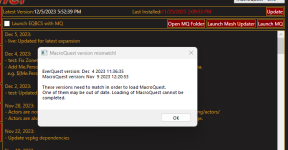
I checked and they are not, i have restarted my computer. Now I get a pop up stating my files are out of sync? I hit the update. I am not tech savvy, I apologize in advance. But it was working just perfectly yesterday and today...not so much.check you don't have antivirus or file syncing holding files hostage
restart your PC
try again
I checked and they are not, i have restarted my computer. Now I get a pop up stating my files are out of sync? I hit the update. I am not tech savvy, I apologize in advance. But it was working just perfectly yesterday and today...not so much.
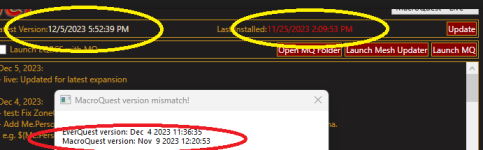
I have hit the update button and i get the other screenshot posted.View attachment 54048
yes, you need to hit the update button, you're trying to use a verion for november, but eq is now december.
well. that means that something has those files.I have hit the update button and i get the other screenshot posted.
Automated release. Commit hashes:
vv: 0e8e3e6fae61b14a55fb1e4d0d4d799ddf6f3a8f
cwtn: 404d9c22303536a9e514f07ed56040eb545ee6dc
eqlib: cf0de6e5ed8fd2bb4251dc7342a9a539eb7d33f2
Automated release. Commit hashes:
vv: f01e1c539b965be6ebcd4c78ac6375d92e1c6ff7
cwtn: 17db6dd5207d5ecac5268f0ab4b3c08003de1039
eqlib: cf0de6e5ed8fd2bb4251dc7342a9a539eb7d33f2
Automated release. Commit hashes:
vv: f9728a3fe1ba5c58193264c2a0acdb0126677b8c
cwtn: e2b065d5cd7e8ebf6146669bdf033769e4f1dc17
eqlib: cf0de6e5ed8fd2bb4251dc7342a9a539eb7d33f2
Automated release. Commit hashes:
vv: 64a94bda84771db50353d3ccb983b452e97a58d8
cwtn: 1045223363e09f976c1dc405dcda615e8e04bbcf
eqlib: cf0de6e5ed8fd2bb4251dc7342a9a539eb7d33f2
Dec 8, 2023:
- live: Fix spawn manager crash

Your computer restarts? That doesn't sound eq/mq relatedI have been following the crash threads and following the instructions. I deleted GameFace frome the .ini file, do not use MQ2Maps and turned off the MQ2Spawn.....(something or other). The crashes were few and far, figured they were manageable and waited for updates. These three came out last night and now when there is an MQ2 crash, my computer forcibly restarts. I wish I had time to copy the crash id, but it barely has time to flash on the screen before everything restarts.
Will do that as a second step. I found out how to turn off Autorestart on crash. Hoping that will give me time to copy the ID before anything else.Yeah a full restart sounds odd. Try playing all your accounts without MQ for a few hours (painful idea, I know) and see if you get any reboots.
Automated release. Commit hashes:
vv: 265be7593974afebac0214647a8a08797ecb84d9
cwtn: e51e6f81582275c32c1e734e69e06d232882bd3b
eqlib: 2242035daeaa93615237013badd97c52f2edd64f


Or Brain lost hours of sleep, and got it figured outNot sure where to post this, of its helpful, but with regards to crashing. I multibox 6, and can cause crashes by using the Brave web browser (eqresource.com + redguides were only tabs open). It hung the web browser too, couldn't close it, change tabs, type etc. I stopped trying to run the browser too and things worked smoothly.
 50/50
50/50