
It does. As long as it was already installed and you don't have anything preventing it from doing so, like file locking due to antivirus or defender or file syncingAutomatic Updates of Plugins:
If I rememer right, there has been a time, that the launcher, once he has updated himself, he automatically checked all plugins and triggered the update of outdated plugins by himself.
Its just a matter of qol, but on my pc since serveral updates I miss this behavior.
Is there something I can do to get the plugins automatically updated after an update of the launcher, or is this feature of automatic updates of plugins generally gone?

-
 Hail, we're RedGuides. We want you to play six (yes, 6!) EverQuest characters at once. We have scripts and a friendly community to help, please join our playstyle and say hello! 👋
You are using an out of date browser. It may not display this or other websites correctly.
You should upgrade or use an alternative browser.
You should upgrade or use an alternative browser.

Vanilla - Very Vanilla MQ (Live Servers) 3.1.52471.42
- Thread starter Knightly
- Start date

Redbot updated Very Vanilla MQ (Live Servers) with a new update entry:
20221206
Read the rest of this update entry...
20221206
December 6, 2022:
- live: Update for expansion patch
- Added ${TradeskillDepot}, see the docs for full description of the members:
https://docs.macroquest.org/reference/top-level-objects/tlo-tradeskilldepot/
- lua: Running "/lua run scriptname" will now prefer lua/scriptname/init.lua over
lua/scriptname.lua. this is to make it easier to transition to the new directory layout.
Read the rest of this update entry...
Redbot updated Very Vanilla MQ (Live Servers) with a new update entry:
20221206
Read the rest of this update entry...
20221206
December 6, 2022:
- live: Update for expansion patch
Read the rest of this update entry...
Redbot updated Very Vanilla MQ (Live Servers) with a new update entry:
20221208
Read the rest of this update entry...
20221208
December 8, 2022:
- live: updated for patch
Read the rest of this update entry...

Thank You to all involved fixing us up, greatly appreciated!Redbot updated Very Vanilla MQ (Live Servers) with a new update entry:
20221208
Read the rest of this update entry...
ScooterEWU99
Member
Since patch day, when 6 boxing and using all MQ2 Plugins for SK, Cleric, Beast, Zerker, Enchanter, and Mage, there is quite a bit of lag time when characters follow in any mode (like chase) or even when auto following and attacking. Did I miss a setting somewhere?
Isn't new with the latest patch nor is it anything to do with the class plugins. I've had this issue for a while. Especially on characters without focus.Since patch day, when 6 boxing and using all MQ2 Plugins for SK, Cleric, Beast, Zerker, Enchanter, and Mage, there is quite a bit of lag time when characters follow in any mode (like chase) or even when auto following and attacking. Did I miss a setting somewhere?
ScooterEWU99
Member
It was working just fine, no issues, until we came back from patch. Now, its almost unplayable. I have characters roaming around instead of attacking. I have to pop over to each of their screens to get them to line up.Isn't new with the latest patch nor is it anything to do with the class plugins. I've had this issue for a while. Especially on characters without focus.
ScooterEWU99
Member
Updating my .ini file fixed this. Thank you.
Redbot updated Very Vanilla MQ (Live Servers) with a new update entry:
20230106
Read the rest of this update entry...
20230106
January 6, 2023:
- lua: Added mq/Icons.lua for Icon usage in imgui
- tlo: Added Spell.Dispellable which returns true if a spell can be dispelled (#655)
Read the rest of this update entry...
Redbot updated Very Vanilla MQ (Live Servers) with a new update entry:
20230109
Read the rest of this update entry...
20230109
January 8, 2023:
- fix /removeaug (#669).
- imgui: Fix nested BeginDisabled calls (#672).
Read the rest of this update entry...
Redbot updated Very Vanilla MQ (Live Servers) with a new update entry:
20230118
Read the rest of this update entry...
20230118
January 18, 2023:
- live: Updated for live patch
January 17, 2023:
- Add Item.Inspect method to open item display window on a particular item.
Read the rest of this update entry...
Redbot updated Very Vanilla MQ (Live Servers) with a new update entry:
20230119
Read the rest of this update entry...
20230119
January 19, 2023:
- live: Fix for broken world container
Read the rest of this update entry...
Redbot updated Very Vanilla MQ (Live Servers) with a new update entry:
20230127
Read the rest of this update entry...
20230127
January 23, 2023:
- Add /executelink command that will simulate a click from raw link text.
- spell datatype: Add Link member to generate clickable link text.
- spell datatype: Add Inspect method to open the spell display window.
- spell datatype: Added /vardata and /varset support for spell variables. Assigning
a string or number will reassign the spell variable by spell name or id.
- achievement datatype: Add Inspect method to open achievement display window.
- emu: Fix crash when...
Read the rest of this update entry...
Redbot updated Very Vanilla MQ (Live Servers) with a new update entry:
20230211
Read the rest of this update entry...
20230211
January 30, 2023:
- lua: calling mq.delay from an imgui thread will now throw an error (#692).
- added missing RecommendedLevel to item (#691).
January 28, 2023:
- Frame limiter is now called Frame Limiter in the settings panel (previously FPS Limiter)
- MQ Console: Fixed last \ax so that it uses the previous default color instead of white
- Missing plugins will now report when the file is not found rather than the LoadLibrary error
Read the rest of this update entry...
Sic updated Very Vanilla MQ (Live Servers) with a new update entry:
rollin back
Read the rest of this update entry...
rollin back
rollin back to previous build
Read the rest of this update entry...

Knightly updated Very Vanilla MQ (Live Servers) with a new update entry:
Rollback to 1142
Read the rest of this update entry...
Rollback to 1142
Rollback to 1142
Read the rest of this update entry...
Redbot updated Very Vanilla MQ (Live Servers) with a new update entry:
20230226
Read the rest of this update entry...
20230226
February 24, 2023:
- Fix CryptAcquireContext error when importing Autologin profiles
February 21, 2023:
- GetSpellDuration now returns correct duration. Deprecated EQGetSpellDuration.
February 20, 2023:
- emu: MQ Console will now allow GM commands (#zone)
Read the rest of this update entry...
Redbot updated Very Vanilla MQ (Live Servers) with a new update entry:
20230315
Read the rest of this update entry...
20230315
March 15, 2023:
- live: Updated for patch
March 8, 2023:
- test: Updated for patch
February 24, 2023:
- Fix CryptAcquireContext error when importing Autologin profiles
Read the rest of this update entry...
OH YEAH BABY !!! Go TIME!Redbot updated Very Vanilla MQ (Live Servers) with a new update entry:
20230315
Read the rest of this update entry...
Redbot updated Very Vanilla MQ (Live Servers) with a new update entry:
20230315
Read the rest of this update entry...
20230315
March 15, 2023:
Read the rest of this update entry...
Redbot updated Very Vanilla MQ (Live Servers) with a new update entry:
20230425
Read the rest of this update entry...
20230425
April 24, 2023:
- Fix an issue where the loader would spam the log file with an error if more than
64 eqgame.exe processes were running. Instead, it will swap to the WMI process
monitor to retain functionality.
- Add experimental feature that resizes the game's render viewport to fit the central
docking area when imgui windows are docked to edges of the screen. This can be enabled
in Settings under Overlay (/mqsettings overlay).
Read the rest of this update entry...

manydills
Well-known member
The overlay/viewport options make possible some VERY cool UI configuration options. Looking forward to playing with these!Redbot updated Very Vanilla MQ (Live Servers) with a new update entry:
20230425
Read the rest of this update entry...

- Commits
- 2
Updated this morning and getting mq2main dll errors. any way to rollback to before I updated?
What is the error.Updated this morning and getting mq2main dll errors. any way to rollback to before I updated?
Usually means you have files locked with antivirus.
Could also be things like "installed test in my live folder" or "installed mq on my eq folder"
- Commits
- 2
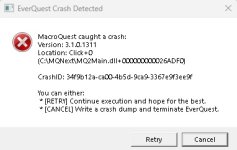
Usually I back up my MQ folder before hitting update. This morning half sleep I hit the update in the launcher. Logged in all my toons and they started crashing randomly one by one with mq2main.dll errors. After logging them back in, they been running without errors for about 30 minutes now. Well see how it goes from here.What is the error.
Usually means you have files locked with antivirus.
Could also be things like "installed test in my live folder" or "installed mq on my eq folder"
- Commits
- 2
Yah, didn't last long. Was fine for a week until I updated this morning.
Code:
Unhandled exception at 0x00007FFC1187B2E7 (MQ2Main.dll) in 34eb5ec6-bc00-4948-a85d-e8113b35abf1.dmp: 0xC0000005: Access violation reading location 0xFFFFFFFFFFFFFFFF.
D 2023-04-30 08:41:20.187402 [mq] MQ2Overlay: InvalidateDeviceObjects
D 2023-04-30 08:41:20.187413 [mq] MQ2Overlay: CreateDeviceObjects
Attachments
- Commits
- 2
Good chance it's related to a custom Lua script I am running. Crashing pretty much in the same place on each occasion.Yah, didn't last long. Was fine for a week until I updated this morning.
Code:Unhandled exception at 0x00007FFC1187B2E7 (MQ2Main.dll) in 34eb5ec6-bc00-4948-a85d-e8113b35abf1.dmp: 0xC0000005: Access violation reading location 0xFFFFFFFFFFFFFFFF. D 2023-04-30 08:41:20.187402 [mq] MQ2Overlay: InvalidateDeviceObjects D 2023-04-30 08:41:20.187413 [mq] MQ2Overlay: CreateDeviceObjects

- Commits
- 2
Yah, I was just waiting for you to comment on it.Rather than posting a picture and useless log file just ctrl-c the dialog and paste that, thanks
Also, if you speak of the mq window, it actually freezes up the client and have to force close to log back in.
Or do you mean some other dialog in the crash files?
What? The thing you took a screenshot ofYah, I was just waiting for you to comment on it.
Also, if you speak of the mq window, it actually freezes up the client and have to force close to log back in.
Or do you mean some other dialog in the crash files?
Updated this morning and getting mq2main dll errors. any way to rollback to before I updated?
You crashed in /click switch left
The switch that had been targeted was no longer valid. This isn't a new issue.
Redbot updated Very Vanilla MQ (Live Servers) with a new update entry:
20230504
Read the rest of this update entry...
20230504
May 4, 2023:
- Disable previous launcher change pending further refinement. For now, the log
spam should be disabled. (#717)
Read the rest of this update entry...
Redbot updated Very Vanilla MQ (Live Servers) with a new update entry:
20230517
Read the rest of this update entry...
20230517
May 17, 2023:
- test: Updated for test patch
- live: Updated for live patch. This patch introduces the new UI system,
there may be issues involving UI components.
May 14, 2023:
- test: Updated for test patch
- test: Fixed Me.Combat again
May 13, 2023:
- Fix issue where OnRemoveSpawn would be called twice in some instances
May 4, 2023:
- Disable previous launcher change pending further refinement. For now, the log
spam should be disabled. (#717)
April 26, 2023:
- test: Updated for...
Read the rest of this update entry...
justice4all
Member
Went through the update procedure on 2 computers. One went through smooth and is back up running. The other is throwing an error after trying to launch the game after running MQ. Screenshot below: Any suggestions are appreciated. I can launch EQ, but not with MQ running.
I went ahead and updated my wife's computer and her's is also running with no problems. The two that are working properly are running Windows 10, the one that MQ is crashing on is running Windows 11. It was running fine before the patch.
I went ahead and updated my wife's computer and her's is also running with no problems. The two that are working properly are running Windows 10, the one that MQ is crashing on is running Windows 11. It was running fine before the patch.
Attachments

Last edited:
justice4all
Member
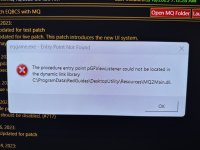
Not sure if this is the proper forum for this post. Still not able to launch MQ since the patch update. i've attached a screenshot below.
Any help is greatly appreciated.
The message is:
eqgame.exe - Entry Point Not Found
"The procedure entry point pGFViewlistener could not be locked in the dynamic library
C:\ProgramData\Redguides\DesktopUtility\Resources\MQ2Main.dll
Any help is greatly appreciated.
The message is:
eqgame.exe - Entry Point Not Found
"The procedure entry point pGFViewlistener could not be locked in the dynamic library
C:\ProgramData\Redguides\DesktopUtility\Resources\MQ2Main.dll
Attachments
I bet you installed MQ into your EQ directoryNot sure if this is the proper forum for this post. Still not able to launch MQ since the patch update. i've attached a screenshot below.
Any help is greatly appreciated.
The message is:
eqgame.exe - Entry Point Not Found
"The procedure entry point pGFViewlistener could not be locked in the dynamic library
C:\ProgramData\Redguides\DesktopUtility\Resources\MQ2Main.dll
justice4all
Member
No, it's under C:\programdata\redguides\desktoputility\resourcesI bet you installed MQ into your EQ directory
It worked before the patch. I can get EQ to load without MQ, just not with MQ. I have two other computers working fine that have Windows 10, this one has Windows 11, but it worked fine before the patch.
Last edited:
Check for a eqlib.dll or mq2main.dll in your eq folderNo, it's under C:\programdata\redguides\desktoputility\resources
It worked before the patch. I can get EQ to load without MQ, just not with MQ. I have two other computers working fine that have Windows 10, this one has Windows 11, but it worked fine before the patch.
justice4all
Member
Those files were in the folder, but they were dated 4/26 while the same files on my other computers were 5/17 and 5/18. I copied those files from my other computer and replaced the ones on the computer that was messing up. It worked and I'm able to login with MQ.....fingers crossed everything works well. Thanks for the help!Check for a eqlib.dll or mq2main.dll in your eq folder
Users who are viewing this thread
Total: 1 (members: 0, guests: 1)
Share: