
-
 Hail, we're RedGuides. We want you to play six (yes, 6!) EverQuest characters at once. We have scripts and a friendly community to help, please join our playstyle and say hello! 👋
You are using an out of date browser. It may not display this or other websites correctly.
You should upgrade or use an alternative browser.
You should upgrade or use an alternative browser.

Vanilla - Very Vanilla MQ (Live Servers) (1 Viewer) 3.1.52471.42
- Thread starter Knightly
- Start date

this came from mq2targetinfo they are now 3 pluginsI did the migration seem to have everything working but I lost the Nav tools in my group window anyone know how to get them back??
Code:
/plugin mq2targetinfo
/plugin mq2groupinfo
/plugin mq2xtarinfoWait, why are you using WinEQ?
I still use wineq2 for the monitor management of certain characters load on certain monitors. If you develop a plugin or make autologin give me that configurability, I'll gladly stop using wineq2 and paying for it.

While true, brainiac implemented any functionality that plugin has (and more) in core MQ:
Code:New TLO: ${Achievement} is now available for accessing achievements, achievement categories, and objectives. New DataTypes: achievementmgr, achievement, achievementcat, achievementobj For more details on these new types, please see the documentation at https://docs.macroquest.org
DataType:achievement - MacroQuest
docs.macroquest.org
This is useful, 2 questions.
How do I get the Artisan Wares achievement, I have a macro that is kind of half assed and I wanted to check the achievement instead of just what is in the inventory.
The text says "Each achievement has an icon associated with it. This icon id represents a cell in the A_DragItem texture. To access the cell, subtract 500 from the icon id. "
But I do not understand how to reverse engineer a number from this? in particular I assume the first number is the Expansion number? But what number is Artisan Wares associated with?
The other question is How do I open the specific achievement, tab?
Specifically I wanted to use @jande's shiny macro that works based on the tab of the achievement's window that is open?
the achievement inspector is what you'd want to open from the mq console -This is useful, 2 questions.
How do I get the Artisan Wares achievement, I have a macro that is kind of half assed and I wanted to check the achievement instead of just what is in the inventory.
The text says "Each achievement has an icon associated with it. This icon id represents a cell in the A_DragItem texture. To access the cell, subtract 500 from the icon id. "
But I do not understand how to reverse engineer a number from this? in particular I assume the first number is the Expansion number? But what number is Artisan Wares associated with?
The other question is How do I open the specific achievement, tab?
Specifically I wanted to use @jande's shiny macro that works based on the tab of the achievement's window that is open?
control-`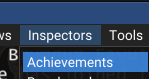
then you see info on those things
Veil of Alaris is category id 1900, everything for VoA is going to be under that
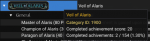
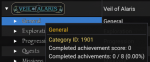
General is the 1st item under the Veil of Alaris, and as such the category ID is 1901
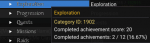
Exploration being the 2nd at 1902
here is where it starts to get a little more complicated
Master of Alaris is 1900210
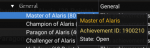
Champion of Alaris is 1900065
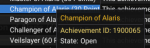
I actually just added some stuff to mq2status using the achievement api.
These obviously don't answer your question about how to do what you want to do, but they just demonstrate how it is possible
so using the above you can do
/status achievement 1900065 or /status achievement champion of alarisThis is spammy looking because this character is a newb and has nearly nothing done, but you can see here Champion of Alaris is incomplete, and then i spit out all the components that are incomplete

if you are searching by name it is going to grab the first achievement it finds with that name - so
/status achievement Hunter of Cobalt Scar is going to return information about the first one if finds, which is in Scars of Velious and not in Claws of Veeshan.in macro code:
/echo ${Achievement[Hunter of Cobalt Scar].ObjectiveByIndex[1].Completed}This checks the first achievement for Hunter of Cobalt Scar, then the first objective, and then tells me if it is completed or not
/echo ${Achievement[Hunter of Cobalt Scar]}/echo ${Achievement[Hunter of Cobalt Scar].ObjectiveByIndex[1]}/echo $Achievement[Hunter of Cobalt Scar].ObjectiveByIndex[1].Completed}if you wanted to check specifically for the CoV cobalt scar you would use the achievement ID

/echo ${Achievement[2807101]}/echo ${Achievement[2807101].ObjectiveByIndex[1]}/echo $Achievement[2807101].ObjectiveByIndex[1].Completed}mq2status can also check if you're missing a shiny now.
/status collected item name (has to be specifically by name since i'm not verifying via item database, or find item that what you're putting in exists, i'm just scanning all the collection achievements and see if any of the requirements of that achievement match the item that i'm checking by collection/status collected rusted cliffs glory's fury
> Here < and > Also Here < is some achievement info with Lua and macro code examples
yes, you can download it through the VV launcherSo is this program basically a install like we got now with MQ2? and you just add the RGMercs to it?
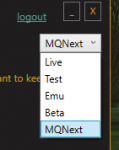
and you can use Knightly's > MQ "Next" Migrator Utility < to move all your settings and macros and such
Ok, I took the plunge and went 100% to MQnext, using Danet also for the first time.
I am thinking if I am doing this let us go 100% into it.
/dgzexecute /target mytankname
/dgzexecute /mac kissassist
They load up and but no one does anything, no buffing or anything.
What did I miss?
I am thinking if I am doing this let us go 100% into it.
/dgzexecute /target mytankname
/dgzexecute /mac kissassist
They load up and but no one does anything, no buffing or anything.
What did I miss?
did you use the migrator and move all your inis over?Ok, I took the plunge and went 100% to MQnext, using Danet also for the first time.
I am thinking if I am doing this let us go 100% into it.
/dgzexecute /target mytankname
/dgzexecute /mac kissassist
They load up and but no one does anything, no buffing or anything.
What did I miss?
> Next Migrator <
did you use the migrator and move all your inis over?
> Next Migrator <
Yes. I also turn Danet on each kiss.ini


Why are you all messing with my muscle memory?! /sEasyFind should now be available in the next release.
Please try /easyfind ui or /easyfind help for some information. This plugin is feature packed but not identical to the old version.
Thanks for the hard work!
EasyFind should now be available in the next release.
Please try /easyfind ui or /easyfind help for some information. This plugin is feature packed but not identical to the old version.
Thank you. This is the one feature I was waiting on. I use easyfind a lot in moving my groups around.

/plugin mq2targetinfois there a way to get the 6 buttons (3 preset) in the group window back with next? Been using next and i really miss those spots. The ones in mq2 that had follow, come to me, mimic me with 3 empty
/plugin mq2groupinfo
/plugin mq2xtarinfo
Got those back using:is there a way to get the 6 buttons (3 preset) in the group window back with next? Been using next and i really miss those spots. The ones in mq2 that had follow, come to me, mimic me with 3 empty
INI:
/plugin mq2targetinfo
/plugin mq2groupinfo
/plugin mq2xtarinfo@@burdsjm got the distance back as well, after activating the 3 plugins and /reloadui
Not sure what I am doing wrong. I have them loaded and see the options but the distances for group members is still missing.

Yes once i loaded the 3 that Sic and others pointed to, my buttons came back. Now just jonesing for mq2easyfind for Next. Loving everyting on everything else thoughDo you see the group member buttons?
easyfind is in the latest. it is still in "beta" and you have to manually download the .yaml from the git, but it should be in the latest build just load it upYes once i loaded the 3 that Sic and others pointed to, my buttons came back. Now just jonesing for mq2easyfind for Next. Loving everyting on everything else though
ah, on tuesday evening brain said it wasn't in the build, which was after the last build went outyaml is in RG's distro since Monday.
MQ2GearScore was renamed to MQ2ItemScore. I got the latest code from dewey and posted it up. He said it's untested on Next so you'll have to let us know how it goes. MQ2ItemScore will be in the next build.mq2gearscore still needs to be ported over to next. It appears to be removed from mq2itemdisplay.
The yaml they were talking about is in resources\EasyFind\ZoneConnection.yaml. You should have it already.It looks like I have a EasyFind.yaml in the config directory but it is empty. Is this the one that needs to be download from git? if so is it the Zoneconnection.yaml that gets renamed to Easyfind.yaml? Or is there another file I should be looking for?
DittoAny word on the autologin and wineq2 bug fix?
Did you try it? What bug are you having?Ditto
Hey knightly, the Autologin Wineq2 bug.Did you try it? What bug are you having?
Gonna need more description than that. You are using the current version of MQ and autologin does what?Hey knightly, the Autologin Wineq2 bug.
I had probs with aoutologin using ISBoxer. Got the information here, that launching "next" after all EQ-Accounts is a workaround for ISBoxer.
Works well for me.
As WinEQ comes from the same source as far as I know, did you try if this helps?
Works well for me.
As WinEQ comes from the same source as far as I know, did you try if this helps?
I see the buttons but still no distances.Do you see the group member buttons?
Are you using the default skin or a different skin? DoesI see the buttons but still no distances.
/groupinfo show distance on change things? What does just typing /groupinfo show you for distance?Gonna need more description than that. You are using the current version of MQ and autologin does what?
Tested after last update, working like a charm! many thanks guys!.
Users who are viewing this thread
Total: 2 (members: 0, guests: 2)
Share: