
• You've discovered RedGuides, an EverQuest multi-boxing and scripting community 🧙‍♀️⚙️. We want you to play several EQ characters at once, come join us and say hello! 👋

  • A TLP without truebox has thawed (Very Vanilla ready)
    Frostreaver
Very Vanilla MQ (Emulated servers)

Vanilla - Very Vanilla MQ (Emulated servers) 3.1.52474.5

No permission to download
Redbot updated Very Vanilla MQ (Emulated servers) with a new update entry:

20230108

January 8, 2023:
- fix /removeaug (#669).
- imgui: Fix nested BeginDisabled calls (#672).
- emu: Fix TradeReady flags (#666).
- emu: Fix /itemnotify when matching invslot is also in a hotbutton.

January 6, 2023:
- lua: Added mq/Icons.lua for Icon usage in imgui
- tlo: Added Spell.Dispellable which returns true if a spell can be dispelled (#655)

December 8, 2022:
- live: updated for patch

Read the rest of this update entry...
 
Mq2 very vanilla on emu servers works fine for about an hour then stops responding randomly for a nice wipe in baddy land is super fun. Servers ive tried mq2 on - Retribution, Project Lazarus, FVP,EQ titan all work fine for around an hour then stop for no apparent reason that i can see im just pulling for an hour nothing changed but stops.
 
Mq2 very vanilla on emu servers works fine for about an hour then stops responding randomly for a nice wipe in baddy land is super fun. Servers ive tried mq2 on - Retribution, Project Lazarus, FVP,EQ titan all work fine for around an hour then stop for no apparent reason that i can see im just pulling for an hour nothing changed but stops.
if you actually mean the old legacy "MQ2" that is unsupported, out of date, and will not receive future updates.

this is the MQ thread that was called "next".

the distinction is important - because figuring out an MQ issue is something folks can help with - and MQ2 issue is not
 
so you only cover retail then? wth is the point in that? im out
huh? MQ for EMU is supported and working fine. This thread is the supported MQ for EMU release, like sic said.
The point is that MQ2 and MQ are two different things when referring to EMU servers. MQ2 is old and outdated. MQ is very much alive.

MQ2 and MQ on their own also aren't automating your toons in a group setting. You didn't mention what automation you're running such as kissassist, muleassist, rgmercs, something else. Any answers/help to your group stopping working after an hour would depend on what automation you're running and how its configured, which would likely belong under the discussion section of the respective macro you're running. (or possibly cwtn plugin if you are in fact still on the old outdated MQ2)
 
Hey guys, anyone know why it seems like all of my toons are running on fast forward button?! I built a new PC and got things setup and it seems I had the Nahimic Service thing, so I went through and got rid of that, but I cant seem to find anything to help get rid of the fast forward style stuff i am seeing. It makes EQ basically not playable. I am on the emulated servers and MQ build so i figured i would post here.
 
Hey guys, anyone know why it seems like all of my toons are running on fast forward button?! I built a new PC and got things setup and it seems I had the Nahimic Service thing, so I went through and got rid of that, but I cant seem to find anything to help get rid of the fast forward style stuff i am seeing. It makes EQ basically not playable. I am on the emulated servers and MQ build so i figured i would post here.
i don't have an ansqwer for you - but what do you mean "fast forward" it makes me think of back years ago when i got a new motherboard/cpu combo and some motherboard driver i had made eq2 run at double speed - i was so afraid i was going to get banned because i was double speed, and double abilities, and could jump super far --- was something whacky with cpu driver, once i updated it was all fixed.
 
i don't have an ansqwer for you - but what do you mean "fast forward" it makes me think of back years ago when i got a new motherboard/cpu combo and some motherboard driver i had made eq2 run at double speed - i was so afraid i was going to get banned because i was double speed, and double abilities, and could jump super far --- was something whacky with cpu driver, once i updated it was all fixed.
It seems like you are describing the same thing I am currently encountering! All of the animations and everything is running much faster than normal. When moving around it is bard speed x 5 it seems. I didn't end up doing anything in game because of it.

New PC hardware:
* CPU: AMD Ryzen 7950x
* Mobo: Asus Rog Strix B650E-E
* GPU: PowerColor Red Devil 7900 XTX

Any ideas on how to investigate what could be causing this?
 
Last edited:
MQ very vanilla , doesnt work on multiple servers , or does and stops responding for a nice wipe. Servers tried on = Retribution , FVP, Eqtitan, EQmight, Enine's ProFusion... idk what you mean by it works none of those servers it works on good luck
 
MQ very vanilla , doesnt work on multiple servers , or does and stops responding for a nice wipe. Servers tried on = Retribution , FVP, Eqtitan, EQmight, Enine's ProFusion... idk what you mean by it works none of those servers it works on good luck
@E9er ?
 
Redbot updated Very Vanilla MQ (Emulated servers) with a new update entry:

20230127

January 23, 2023:
- Add /executelink command that will simulate a click from raw link text.
- spell datatype: Add Link member to generate clickable link text.
- spell datatype: Add Inspect method to open the spell display window.
- spell datatype: Added /vardata and /varset support for spell variables. Assigning
a string or number will reassign the spell variable by spell name or id.
- achievement datatype: Add Inspect method to open achievement display window.
- emu: Fix crash when...

Read the rest of this update entry...
 
Redbot updated Very Vanilla MQ (Emulated servers) with a new update entry:

20230127

January 23, 2023:
- Add /executelink command that will simulate a click from raw link text.
- spell datatype: Add Link member to generate clickable link text.
- spell datatype: Add Inspect method to open the spell display window.
- spell datatype: Added /vardata and /varset support for spell variables. Assigning
a string or number will reassign the spell variable by spell name or id.
- achievement datatype: Add Inspect method to open achievement display window.
- emu: Fix crash when...

Read the rest of this update entry...
 
I could see some issues with custom timers and items but overall it reads most fine. Most likely would need more details on zones it happens in and if it throws errors to decompile. MMost issues for my server I've noticed with some builds its the mq2nav randomly crashing on zone. Not had reports of it flat crashing when engaged with npc. Also be helpful to know the item that was being used during said wipe. Profusion is coded for the most part to run along side pretty much any eq build with minimal issues which is why if it is an item on my server it def can be adjusted to the mq ways of doing things. Which is how it is intended to be very mq friendly.
 
Currently checking in my discord I have players who use current Redguides/old redguides/mmobugs/e3/legacy builds with no reports to me of crashing in a long time.
 
Redbot updated Very Vanilla MQ (Emulated servers) with a new update entry:

20230214

January 30, 2023:
- lua: calling mq.delay from an imgui thread will now throw an error (#692).
- added missing RecommendedLevel to item (#691).

January 28, 2023:
- Frame limiter is now called Frame Limiter in the settings panel (previously FPS Limiter)
- MQ Console: Fixed last \ax so that it uses the previous default color instead of white
- Missing plugins will now report when the file is not found rather than the LoadLibrary error

Read the rest of this update entry...
 
Redbot updated Very Vanilla MQ (Emulated servers) with a new update entry:

20230221

February 20, 2023:
  • emu: MQ Console will now allow GM commands (#zone)
February 15, 2023:
  • live: Update for patch
February 10, 2023:
  • Made some improvements to the performance of the mq console window.
  • Added an option to the mq console window to adjust the number of lines of history that are stored.
  • Fix bug where a file dialog could be docked in another window, resulting in the window flickering and becoming unusable.
  • lua: Calling mq.delay...

Read the rest of this update entry...
 
Redbot updated Very Vanilla MQ (Emulated servers) with a new update entry:

20230429

April 24, 2023:
- Fix an issue where the loader would spam the log file with an error if more than
64 eqgame.exe processes were running. Instead, it will swap to the WMI process
monitor to retain functionality.
- Add experimental feature that resizes the game's render viewport to fit the central
docking area when imgui windows are docked to edges of the screen. This can be enabled
in Settings under Overlay (/mqsettings overlay).

April 19, 2023:
- live: Updated for patch

March 15...

Read the rest of this update entry...
 
Redbot updated Very Vanilla MQ (Emulated servers) with a new update entry:

20230517

May 17, 2023:
- test: Updated for test patch
- live: Updated for live patch. This patch introduces the new UI system,
there may be issues involving UI components.

May 14, 2023:
- test: Updated for test patch
- test: Fixed Me.Combat again

May 13, 2023:
- Fix issue where OnRemoveSpawn would be called twice in some instances

May 4, 2023:
- Disable previous launcher change pending further refinement. For now, the log
spam should be disabled. (#717)

April 26, 2023:
- test: Updated for...

Read the rest of this update entry...
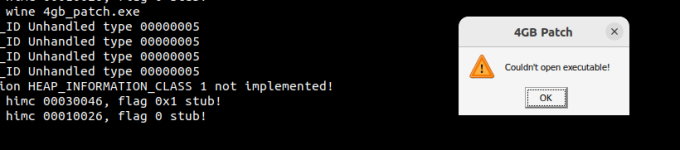
 
A few issues I have experienced over the past few days while running MQ on an ROF2 client (linux/wine) on my own up to date EMU server (linux).

1. When MQ is running any client that has a toon zone into POK crashes while loading the zone. 100% repeatable on all accounts/systems I have tried on. If I do a clean log in with no MQ injection the toons load into POK just fine. (I recall this bug on Live about a year or so ago)

2. Ctrl+Left Click while holding a bag of items to try to move the items to a new bag causes the client to crash as soon as you click on the bag you intend the items to go into. (This was happening on Live too but intermittently, noticed more on bazaar mules when moving items around. On EMU it happens 100% of the time on the first click, does not happen when MQ is not loaded.)
 
A few issues I have experienced over the past few days while running MQ on an ROF2 client (linux/wine) on my own up to date EMU server (linux).

1. When MQ is running any client that has a toon zone into POK crashes while loading the zone. 100% repeatable on all accounts/systems I have tried on. If I do a clean log in with no MQ injection the toons load into POK just fine. (I recall this bug on Live about a year or so ago)

2. Ctrl+Left Click while holding a bag of items to try to move the items to a new bag causes the client to crash as soon as you click on the bag you intend the items to go into. (This was happening on Live too but intermittently, noticed more on bazaar mules when moving items around. On EMU it happens 100% of the time on the first click.)
and neither of those happen without MQ running? (especially the #2?)
 
thedank -- Are you running the 4GB patch for the client? PoK is notorious bad on Emu servers on our 32 bit clients, even with the memory patch. This is a common problem over on the Laz server too. It's not usually MQ's fault, just an after effect.
 
I am using the RoF2 client provided by the PEQ team on their forums. I have also tried with the original RoF2 client that I have. Both have the same issue. POK crashes when MQ is running but works fine when MQ is not running. I can't even load into POK if I unload it on a client and zone. Have to start the client fresh with no injection to get in.
 
thedank -- Are you running the 4GB patch for the client? PoK is notorious bad on Emu servers on our 32 bit clients, even with the memory patch. This is a common problem over on the Laz server too. It's not usually MQ's fault, just an after effect.
Also where is this 4GB patch you speak of?
 
1684770528741.png
Patch does not like Wine. Guess I will have to stand up a windows VM, patch the client there, then move it back over to the linux system.
 
Patched the client in a windows 10 VM, pushed to Linux box. When I run it I get through server select and the client crashes very shortly after when loading to character select. I do not think that Linux/Wine likes the patched EXE.

Also I do not think this is related to the client not being patched for 4G since POK works flawlessly when I do not load MQ. It is only when the clients have been injected that causes the crashing. Same goes for the bag bug.
 
Patched the client in a windows 10 VM, pushed to Linux box. When I run it I get through server select and the client crashes very shortly after when loading to character select. I do not think that Linux/Wine likes the patched EXE.

Also I do not think this is related to the client not being patched for 4G since POK works flawlessly when I do not load MQ. It is only when the clients have been injected that causes the crashing. Same goes for the bag bug.
Did you try working through any of these issues on windows first?
POK with MQ running works fine on a number of emu servers. If you're crashing then the crash must be giving some hint as to why? At least what dll its crashing in or something?
Maybe you could try logging into an emu server known to work, like laz, and see if it reproduces there.
 
A few issues I have experienced over the past few days while running MQ on an ROF2 client (linux/wine) on my own up to date EMU server (linux).

1. When MQ is running any client that has a toon zone into POK crashes while loading the zone. 100% repeatable on all accounts/systems I have tried on. If I do a clean log in with no MQ injection the toons load into POK just fine. (I recall this bug on Live about a year or so ago)

2. Ctrl+Left Click while holding a bag of items to try to move the items to a new bag causes the client to crash as soon as you click on the bag you intend the items to go into. (This was happening on Live too but intermittently, noticed more on bazaar mules when moving items around. On EMU it happens 100% of the time on the first click, does not happen when MQ is not loaded.)
I run the Akk stack version of emu server on my home server and am running standard (no extra patches) RoF2 client from Windows. I just updated to latest PEQ code and am not seeing any issues going into PoK. Tried a few tests and couldn't reproduce that.

I do see the same issue that you describe with mass dropping bag items into another bag. However, I get this even if MQ isn't loaded. I feel like I've had this since I started running the EMU server (over a year). I'll do some more testing on this one when I get a chance but definitely seeing it even if MQ is not running/injected.
 
Other things to try:
1. Unload plugins your not really using.
2. Switching off Luclin Models.
3. Grab one of the GlobalLoads files that have been put together, to reduce memory footprint.
 
I run the Akk stack version of emu server on my home server and am running standard (no extra patches) RoF2 client from Windows. I just updated to latest PEQ code and am not seeing any issues going into PoK. Tried a few tests and couldn't reproduce that.

I do see the same issue that you describe with mass dropping bag items into another bag. However, I get this even if MQ isn't loaded. I feel like I've had this since I started running the EMU server (over a year). I'll do some more testing on this one when I get a chance but definitely seeing it even if MQ is not running/injected.
You are correct on the bags, I duplicated that without MQ running as well. The PoK issue may be a Wine/Linux memory thing when MQ is loaded.
 
Other things to try:
1. Unload plugins your not really using.
2. Switching off Luclin Models.
3. Grab one of the GlobalLoads files that have been put together, to reduce memory footprint.
Ill give these a try when I have some time thanks for the suggestions
 
Tested on the official PEQ server and still had crashing when going into POK. Now it is happening more often without MQ loaded. So this seems to be a Linux/Wine / Memory issue. When MQ is loaded the crashes happen ALL the time, without it the crashes zoning into POK are intermittent or I may get in there move a few feet then crash.
 
Update:

I tested with many different versions of wine, originally was using the wine-staging installed by apt under Ubuntu 22.04 which is 8.8. Using a 32 bit prefix under 8.8 staging causes crashes when zoning into POK intermittently without MQ loaded and all the time with MQ loaded. Switching to launching under Steam and using Proton 7 with no MQ I found I could zone into and out of POK with no issues. So I then installed playonlinux and started downloading some of the staging binaries you can get through the interface to test with. Using them at the command line I found some stability with 7.4-staging under x86, however still had crashing when using MQ and zoning into POK. I tested under a few other variations, then decided to try some of the Lutris wine runners. For the life of me I cannot get the game to launch from the Lutris menu, however I installed a few versions of wine, specifically the GE proton versions, then used them from the command line. I am finding lutris-GE-Proton8-7-x86_64 to be quite stable with the vanilla RoF2 client (no 4G patch) and MQ. I have zoned in and out of PoK multiple times with no crashes. Here is how I got this running:

1. apt-get install lutris
2. load lutris then go to hamburger menu -> preferences -> runners -> wine -> click wrench -> Manage Wine Runners -> check lutris-GE-Proton8-7 and it will auto install
3. close lutris, command line is better!
4. the new wine version resides in: $HOME/.local/share/lutris/runners/wine/lutris-GE-Proton8-7-x86_64/bin/wine
5. Do the following to create a new prefix to run the game from using the lutris proton GE version (no need to create a 32 bit prefix):

Code:
WINEPREFIX="$HOME/Games/everquest-rof2-prefix" "$HOME/.local/share/lutris/runners/wine/lutris-GE-Proton8-7-x86_64/bin/wine" wineboot
WINEPREFIX="$HOME/Games/everquest-rof2-prefix" env WINE=$HOME/.local/share/lutris/runners/wine/lutris-GE-Proton8-7-x86_64/bin/wine sh /usr/bin/winetricks dxvk

Run the game from game directory with:
Code:
WINEPREFIX="$HOME/Games/everquest-rof2-prefix" "$HOME/.local/share/lutris/runners/wine/lutris-GE-Proton8-7-x86_64/bin/wine" eqgame.exe patchme &

Run MQ from MQ directory with:
Code:
WINEPREFIX="$HOME/Games/everquest-rof2-prefix" "$HOME/.local/share/lutris/runners/wine/lutris-GE-Proton8-7-x86_64/bin/wine" MacroQuest.exe &
 
Last edited:
Vanilla - Very Vanilla MQ (Emulated servers)

Users who are viewing this thread

Back
Top
Cart