• You've discovered RedGuides, an EverQuest multi-boxing and scripting community 🧙‍♀️⚙️. We want you to play several EQ characters at once, come join us and say hello! 👋

  • A TLP without truebox has thawed (Very Vanilla ready)
    Frostreaver
Very Vanilla MQ (Emulated servers)

Vanilla - Very Vanilla MQ (Emulated servers) 3.1.52474.5

No permission to download
ok.. i've been running April 2021 version and decided to update to latest MQ.. After getting autologin working.. I'm finding that my pullers aren't pulling.. tried 2 different tanks.. they seem to think there are no mobs close.. but I see them on map and pull settings look correct..
any other place I should look? I'm in old seb and have at least one group here 24X7

Here is one example KA (paladin) ini pull section.
[Pull]
PullWith=Holy Might
PullMeleeStick=0
MaxRadius=250
MaxZRange=150
UseWayPointZ=0
PullWait=5
PullRadiusToUse=90
PullRoleToggle=0
ChainPull=0
ChainPullHP=90
PullPause=30|2
PullLevel=1|60
PullArcWidth=0
PullOnReturn=0
bleh... looks like I"m starting over with this new mq.. had to update the mesh files...
 
ok.. i've been running April 2021 version and decided to update to latest MQ.. After getting autologin working.. I'm finding that my pullers aren't pulling.. tried 2 different tanks.. they seem to think there are no mobs close.. but I see them on map and pull settings look correct..
any other place I should look? I'm in old seb and have at least one group here 24X7

Here is one example KA (paladin) ini pull section.
[Pull]
PullWith=Holy Might
PullMeleeStick=0
MaxRadius=250
MaxZRange=150
UseWayPointZ=0
PullWait=5
PullRadiusToUse=90
PullRoleToggle=0
ChainPull=0
ChainPullHP=90
PullPause=30|2
PullLevel=1|60
PullArcWidth=0
PullOnReturn=0
Did you move config files to the config folder?

bleh... looks like I"m starting over with this new mq.. had to update the mesh files...
The stuff we linked earlier has some important info, click the emu section and then the banner message.


Good news! MQ is now on the launcher for our EMU build!

the good things this brings are too numerous to put in an update message!

There are a couple of small, yet important changes with MacroQuest vs the old MQ2 as explained > HERE <

Moving to MacroQuest mental notes:
1. mq2map click is Control+Shift+Click
2. new easyfind self travel is Control+Click (reminder in find window title bar)
3. new easyfind group travel is Control+Shift+Click
4. If you selected a destination in your zone guide and want to activate it you /travelto activate
5. /yes and /no are now aliases
6. your ini configuration files (like for kissassist) now reside in your "Config" folder and not your "Macro" folder
7. if you want the functionality of the MQ2 "MQ2TargetInfo" - They are now in 3 separate plugins: /plugin groupinfo /plugin targetinfo /plugin xtarinfo

Unfortunately, we dropped the ball on a couple of things.
- the launcher doesn't have a method to migrate from old emu to new emu
- the launcher doesn't install MQ for emu into a different directory than your existing MQ2 emu directory
- We also didn't announce :(

We're (RG) really sorry for any confusion or pain points on this.

In case you *really* want to use MQ2 instead of the new awesome MQ - you can check the > history < tab and manually download a legacy build. Keep in mind using the launcher will update to MQ.

- CWTN plugins are not currently on EMU >>> CWTN Plugins & MQ Emu <<<
 
Last edited:
Forgive my ignorance.. I've been searching.. but now that I've moved to the new MQ version for emu.. the PC bogs down at 12 instances.. didn't notice it at 9... I was able to run 24 instances no problem with April 2021 version... I thought it might be mq2fps but that doesn't appear to be in this version...
I had already done cpu affinity stuff back when I first installed MQ... so don't think it is that.
There was mention of some other mq2wire mac, but that is not longer supported it seems.
Any suggestions? Not seeing any settings for fpu in other areas.
Thanks.
 
Am I running MQ Next when I updated to latest EMU version? I saw that post, but thought I'm on some other software (and revs).
 
Am I running MQ Next when I updated to latest EMU version? I saw that post, but thought I'm on some other software (and revs).
MQNext and MQ2 are no longer at RG's. What live, test and EMU get is MQ. So quick answer, that was its name during development, but MQNext = Current MQ you use.
 
MQNext and MQ2 are no longer at RG's. What live, test and EMU get is MQ. So quick answer, that was its name during development, but MQNext = Current MQ you use.
Ah... that explains how I screwed up.. as I should have been following guides to upgrade to mqnext.. instead of just clicking update.. which then installed in same directory... /oh well...
 
Thanks all.. I decided to start over.. I had saved a backup of old MQ folder... followed directions... and everything but autologin worked, which I knew the fix from yesterday.
The frame thing didn't seem to be working.. but eventually I went into eq client and advanced options and move background fps to cpu min.. and that fixed everything...
 
I got framelimiter working... GPU % is down.. but an odd thing occurs when I switch to background sessions.. it appears that I get a whole bunch of spell effects - like they have been saved up for me.. and takes 5 seconds or so to clear.. switch to another toon.. same thing... anyone know what setting this might be for background to not save up these spell effects? I already have everything set for low in the eq client.. and just have it set for group effects...
 
I got framelimiter working... GPU % is down.. but an odd thing occurs when I switch to background sessions.. it appears that I get a whole bunch of spell effects - like they have been saved up for me.. and takes 5 seconds or so to clear.. switch to another toon.. same thing... anyone know what setting this might be for background to not save up these spell effects? I already have everything set for low in the eq client.. and just have it set for group effects...
Eq queues the spell effects, which then get processed when going to that instance. You'll likely want to turn down your spell effects if you don't want that to happen
 
I can't get to character select even with MQ running from the start. I can kill MQ, then get into the game fully, and then restart MQ just fine though. After that point macros seem to work just fine and stuff too. Any thoughts on what could be causing this issue? Tried to auto login as well with my old MQ2AutoLogin.ini and that failed too. It almost looks like it flashes 1 frame of the char select screen with a black background and then goes back to server select.
 
I can't get to character select even with MQ running from the start. I can kill MQ, then get into the game fully, and then restart MQ just fine though. After that point macros seem to work just fine and stuff too. Any thoughts on what could be causing this issue? Tried to auto login as well with my old MQ2AutoLogin.ini and that failed too. It almost looks like it flashes 1 frame of the char select screen with a black background and then goes back to server select.
if it doesn't select server at server select, you have wrong long name. if it backs out of character select to server select, its got the wrong short name.

 
I can't get to character select even with MQ running from the start. I can kill MQ, then get into the game fully, and then restart MQ just fine though. After that point macros seem to work just fine and stuff too. Any thoughts on what could be causing this issue? Tried to auto login as well with my old MQ2AutoLogin.ini and that failed too. It almost looks like it flashes 1 frame of the char select screen with a black background and then goes back to server select.

Can try those links
 
Thank you Sic and aquietone, you were both correct. Turns out it was the ez server change of name at login screen. Come back to playing after a few months and everything changes!
 
Load the plugin /plugin nav

Finally found my issue. It may be niche, but hopefully it helps others if in the same boat.

MQ2Nav is loaded but typing /nav does nothing. Says command not recognized.

Lots of debugging later - turns out to be my eqclient.ini, went through each individually setting and found the one causing problems

WindowedMode=FALSE

If set to FALSE - /nav doesn't work.

If TRUE - it all works as it should.

No idea why, but that's what's happening to me. And can replicate it easily by putting it back to FALSE and it breaks - very strange!
 
Should the EQBCS box shows clients as they login and connect in this new MQ version? If I don't see that.. what are my steps to remove the service that might still be running from older version of MQ?
 
After upgrading to newest version you'll need to migrate your old config or set things up again. Likely need to run the /bccmd connect setup as if brand new install. Not an issue with eqbcs box but your accounts/characters aren't configured to connect yet.
 
I am experiencing more strangeness with MQ2AutoLogin now. I use Innerspace to launch the toons and all, and its almost like it randomly selects only 'some' of the toons to start the login process. Some it just leaves at the EULA screen doing nothing, others it goes straight into the game on. This is happening after a random power outage in the middle of running my mini army. I tried a fresh install of MQ and making sure innerspace was all up to date too. Any ideas?
 
I am experiencing more strangeness with MQ2AutoLogin now. I use Innerspace to launch the toons and all, and its almost like it randomly selects only 'some' of the toons to start the login process. Some it just leaves at the EULA screen doing nothing, others it goes straight into the game on. This is happening after a random power outage in the middle of running my mini army. I tried a fresh install of MQ and making sure innerspace was all up to date too. Any ideas?
Would check you have your inner space profiles setup correctly.

Since you're saying it doesn't always put in the info correctly, it would lead me to believe they are not setup correctly there.

If you haven't already, check this answer out also.

 
Last edited:
After upgrading to newest version you'll need to migrate your old config or set things up again. Likely need to run the /bccmd connect setup as if brand new install. Not an issue with eqbcs box but your accounts/characters aren't configured to connect yet.
I did do the migration.. I did do the /bccmd connect.. but my question is if I should see clients connecting inside the EQBCS box that pops up now? I don't see anything there.
Autologin works fine for me.. autoaccept is having issues.. so trying to figure out why there might be issues.
 
Would check you have your inner space profiles setup correctly.

Since you're saying it doesn't always put in the info correctly, it would lead me to believe they are not setup correctly there.

If you haven't already, check this answer out also.

Well, to be clear, it just sits at the EULA screen and doesn't even get to a spot where it COULD enter information in. Its like auto login didn't hook in or something on those clients. The ones it does work on is not consistent either. They all take turns working / not working. In any case, I can still get in the game, just a bit slower. And once in, everything seems to work fine, all plugins I expect to be on are on.
 
I did do the migration.. I did do the /bccmd connect.. but my question is if I should see clients connecting inside the EQBCS box that pops up now? I don't see anything there.
Autologin works fine for me.. autoaccept is having issues.. so trying to figure out why there might be issues.
I had some EQBCS issues when updating, it's a little embarrassing, but in case you have the same issue, it may help.... /plugin mq2EQBC load

I only noticed it was not loaded when I was using mq2PluginManager... as soon as I activated mq2eqbc... bam, all my EQBCS issues resolved.
 
I had some EQBCS issues when updating, it's a little embarrassing, but in case you have the same issue, it may help.... /plugin mq2EQBC load

I only noticed it was not loaded when I was using mq2PluginManager... as soon as I activated mq2eqbc... bam, all my EQBCS issues resolved.
Yes, that plugin is running.. and I see it in the .ini to load too.
 
Here is my screenshot... should this have clients connecting on this screen?
If not.. how to I remove whatever they are connecting to now?
 

Attachments

  • screenshot.jpg
    screenshot.jpg
    420.1 KB · Views: 4
Here is my screenshot... should this have clients connecting on this screen?
If not.. how to I remove whatever they are connecting to now?
The EQBC plugin gives you commands you can just run and see whether eqbc is working or not without worrying about what is going on in the eqbcs window. But yes, that would normally show your connecting toons:
Code:
EQBCS (EQ Box Chat Server) 1.7
Waiting for connections on port: 2112...
-- Client connection: fd 252 (127.0.0.1)
-- Name1 has joined the server.

Code:
> /bccmd connect
# Connecting to 127.0.0.1 2112...
# Connected!
# - Name1 has joined the server.
# Requesting names...
# - Local Echo: ON
# - Names: name1.

Code:
> /bccmd status
# MQ2Eqbc Status: ONLINE - 127.0.0.1 - 2112
# Allow Control: ON, Auto Connect: OFF
# IRC Compat Mode: ON, Reconnect: ON: (every 15 secs)

Code:
> /bccmd names
# Requesting names...
# - Names: name1.

Autoaccept is just based on a list of names you've configured in the list to allow autoaccepting from for a given toon.
You can see that with
Code:
> /autoaccept list
User list contains 29 entries
1: name1
...

Don't think EQBC actually has anything to do with autoaccept besides that you might send commands over EQBC to initially setup autoaccept.
 
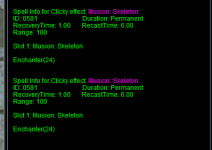
Small bug with iteminfo i noticed, item click info is listed twice on any item with clicky, aon pic as example
 

Attachments

  • dup info.PNG
    dup info.PNG
    14 KB · Views: 4
The EQBC plugin gives you commands you can just run and see whether eqbc is working or not without worrying about what is going on in the eqbcs window. But yes, that would normally show your connecting toons:
Code:
EQBCS (EQ Box Chat Server) 1.7
Waiting for connections on port: 2112...
-- Client connection: fd 252 (127.0.0.1)
-- Name1 has joined the server.

Code:
> /bccmd connect
# Connecting to 127.0.0.1 2112...
# Connected!
# - Name1 has joined the server.
# Requesting names...
# - Local Echo: ON
# - Names: name1.

Code:
> /bccmd status
# MQ2Eqbc Status: ONLINE - 127.0.0.1 - 2112
# Allow Control: ON, Auto Connect: OFF
# IRC Compat Mode: ON, Reconnect: ON: (every 15 secs)

Code:
> /bccmd names
# Requesting names...
# - Names: name1.

Autoaccept is just based on a list of names you've configured in the list to allow autoaccepting from for a given toon.
You can see that with
Code:
> /autoaccept list
User list contains 29 entries
1: name1
...

Don't think EQBC actually has anything to do with autoaccept besides that you might send commands over EQBC to initially setup autoaccept.

Yes, my toons show online when I type in /bccmd status...
What I think has occurred from a previous version of MQ is that it is running as a service.. not through the box... My question is how do I get it go back to the box.. since I was told this was the correct one to be using for the latest MQ. How do I remove the service?
 
MQ2AutoLogin issues still going on for me.

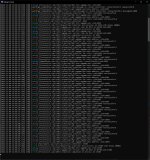
I tried logging in 2 toons; 1 worked and the other did not. I first turned on the Debug Console too so we have something to look at. That is here:
error.jpg

Here is the first one i logged in's log.
[CODE title="Character that worked"]D 2022-11-09 14:05:31.473285 [mq] Logging Initialized
I 2022-11-09 14:05:31.496302 [mq] Starting NamedPipeClient thread for \\.\pipe\mqpipe
I 2022-11-09 14:05:31.503206 [mq] Toggle console keybind: ctrl+`
I 2022-11-09 14:05:31.543805 [mq] Connected to named pipe server.
D 2022-11-09 14:05:31.543910 [mq] Created PipeConnection: connectionId=1 pid=3828
D 2022-11-09 14:05:31.582951 [mq] Initializing module: FrameLimiter
D 2022-11-09 14:05:31.583606 [mq] Initializing module: DeveloperTools
D 2022-11-09 14:05:31.584503 [mq] Initializing module: Windows
D 2022-11-09 14:05:31.584858 [mq] Initializing module: ImGuiAPI
D 2022-11-09 14:05:31.585027 [mq] Initializing module: Spells
D 2022-11-09 14:05:31.585119 [mq] Initializing module: DataAPI
D 2022-11-09 14:05:31.585129 [mq] Initializing module: GroundSpawns
D 2022-11-09 14:05:31.585137 [mq] Initializing module: Spawns
D 2022-11-09 14:05:31.601495 [mq] Initializing module: Items
I 2022-11-09 14:05:31.655739 [mq] IDirect3DDevice9::EndScene: TestCooperativeLevel was successful, reacquiring device.
D 2022-11-09 14:05:31.655777 [mq] MQ2Overlay: InvalidateDeviceObjects
D 2022-11-09 14:05:31.655785 [mq] MQ2Overlay: CreateDeviceObjects
I 2022-11-09 14:05:31.682317 [mq] Received crashpad pipe name: \\.\pipe\crashpad_12748_XJDCXDPHYFJKZHCQ
I 2022-11-09 14:05:31.682709 [mq] Enabling shared crash reporter. Crash report guid: 65766169-5d0d-49d5-a74f-d9470a48eae8
D 2022-11-09 14:05:31.682879 [mq] Launcher process ID: 12748
I 2022-11-09 14:05:34.804697 [mq] IDirect3DDevice9::Reset hook: device instance is the acquired device.
D 2022-11-09 14:05:34.804720 [mq] MQ2Overlay: InvalidateDeviceObjects
I 2022-11-09 14:05:34.805128 [mq] IDirect3DDevice9::Reset hook: device instance is the acquired device.
D 2022-11-09 14:05:34.805137 [mq] MQ2Overlay: InvalidateDeviceObjects
I 2022-11-09 14:05:35.402143 [mq] IDirect3DDevice9::EndScene: TestCooperativeLevel was successful, reacquiring device.
D 2022-11-09 14:05:35.402164 [mq] MQ2Overlay: CreateDeviceObjects
I 2022-11-09 14:05:40.661471 [mq] MQ2Overlay: Resetting overlay
D 2022-11-09 14:05:40.661488 [mq] MQ2Overlay: InvalidateDeviceObjects
I 2022-11-09 14:05:40.750377 [mq] IDirect3DDevice9::EndScene: TestCooperativeLevel was successful, reacquiring device.
D 2022-11-09 14:05:40.750400 [mq] MQ2Overlay: InvalidateDeviceObjects
D 2022-11-09 14:05:40.750408 [mq] MQ2Overlay: CreateDeviceObjects
W 2022-11-09 14:05:49.038961 [eqlib] A window was created that is not being tracked: 'PotionBeltWnd' at 0xe0fc1c
W 2022-11-09 14:05:49.038983 [eqlib] A window was created that is not being tracked: 'PointMerchantWnd' at 0x10642f8
W 2022-11-09 14:05:49.038984 [eqlib] A window was created that is not being tracked: 'NewPointMerchantWnd' at 0x10640b8
W 2022-11-09 14:05:49.038985 [eqlib] A window was created that is not being tracked: 'GroupMentorWindow' at 0x1061670
W 2022-11-09 14:05:49.038987 [eqlib] A window was created that is not being tracked: 'LeadershipWindow' at 0x1063be8
I 2022-11-09 14:05:51.792133 [mq] MQ2Overlay: Resetting overlay
D 2022-11-09 14:05:51.792152 [mq] MQ2Overlay: InvalidateDeviceObjects
I 2022-11-09 14:05:52.416288 [mq] IDirect3DDevice9::EndScene: TestCooperativeLevel was successful, reacquiring device.
D 2022-11-09 14:05:52.416314 [mq] MQ2Overlay: InvalidateDeviceObjects
D 2022-11-09 14:05:52.416322 [mq] MQ2Overlay: CreateDeviceObjects
[/CODE]

Here is the second characters' log, that did not work.
[CODE title="Character that did not work"]D 2022-11-09 14:06:32.608393 [mq] Logging Initialized[/CODE]

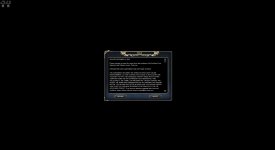
I also took a screenshot of where the non-working toon, here:
Non-working toon screen.jpg

It's almost like it didn't notice that another instance was launched, and therefor didn't inject or something. I could be completely wrong about how that works, but that's my crude description. On the characters that work, the AutoLogin status box thing seems to appear. The ones that don't work never get that. The MQ2AutoLogin.ini is the same one I have used for a long time, minus the more recent changes needed for EZ Server changes. Also, it seems almost at random as to which launch will work, favoring the non-working side pretty heavily.
 
Last edited by a moderator:
Redbot updated Very Vanilla MQ (Emulated servers) with a new update entry:

20221116

November 16, 2022:
- live: Updated for latest patch
- Updated MQ2TargetInfoPHs.txt (#661)
- Updated Fish.mac (#605)
- Added refcounting to item and itemspell datatypes. This should fix a crash where a lua script
consumes the last charge of an item causing it to disappear.
- plugins: Deprecated old item spell enum values. See deprecation warnings for replacements.
- lua: Added imgui bindings for TableGetColumnFlags (#658)

November 9, 2022:
- test: Updated for patch

November 3, 2022:
-...

Read the rest of this update entry...
 
Thanks! For others, @aquietone made the change to allow for easyfind to work on emu servers. Thank you aquietone!

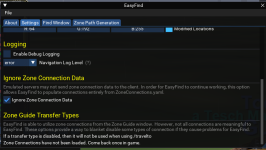
Use /easyfind ui to bring up the menu, then check the box to ignore zone connection data:

1669102276283.png


Most emu servers won't have stuff in the find menu so you will need to manually configure locs in the resources/EasyFind/ZoneConnections.yaml file (many are already configured)
 
Last edited:
Redbot updated Very Vanilla MQ (Emulated servers) with a new update entry:

20221129

November 29, 2022:

  • emu: Fix PctExp and PctAAExp calculations
  • tlo: Added BazaarItem.FullName
  • lua: Fixed bug where /lua pause would not pause imgui thread
  • lua: added :on and :off arguments to /lua pause
November 28, 2022:

  • Huge update to settings window for MQ2Map plugin settings - /mqsettings plugin/map (#657)
  • lua: Many more improvements to imgui bindings for lua.
  • lua: Consolidated imgui demo scripts into examples/imgui_demo
  • lua: Scripts can now...

Read the rest of this update entry...
 
Redbot updated Very Vanilla MQ (Emulated servers) with a new update entry:

20221206

December 6, 2022:
- live: Update for expansion patch
- Added ${TradeskillDepot}, see the docs for full description of the members:
https://docs.macroquest.org/reference/top-level-objects/tlo-tradeskilldepot/
- lua: Running "/lua run scriptname" will now prefer lua/scriptname/init.lua over
lua/scriptname.lua. this is to make it easier to transition to the new directory layout.

Read the rest of this update entry...
 
Thanks! For others, @aquietone made the change to allow for easyfind to work on emu servers. Thank you aquietone!

Use /easyfind ui to bring up the menu, then check the box to ignore zone connection data:

View attachment 43540


Most emu servers won't have stuff in the find menu so you will need to manually configure locs in the resources/EasyFind/ZoneConnections.yaml file (many are already configured)
Is this included in the vanilla EMU download I can't seem to find the mq2easyfind plugin anywhere?
 
Vanilla - Very Vanilla MQ (Emulated servers)

Users who are viewing this thread

Back
Top
Cart