
-
 Hail, we're RedGuides. We want you to play six (yes, 6!) EverQuest characters at once. We have scripts and a friendly community to help, please join our playstyle and say hello! 👋
-
 We've added LLM sections to our Terms & Rules and Resource Rules, for everyone's sanity & in-game safety.
Read more
a. Do not replace your voice with an LLM. This goes for your posts and your scripts. Drafting and editing with a tool is fine, but don't take you out of what you share.
b. Do not replace your EQ character's voice with an LLM. We don't want scripts that speak over/ooc,/shoutor other public channels. This has been an unwritten rule that's kept casino scripts off the site for decades, but we're now compelled to make it clear: keep automated communication private.
Why Does RG Review Scripts?
Nearly every LLM-written Lua script we see is making your character do impossible things, and rarely in a way that's beneficial to you. We've seen heavy server hammering,/targetover impossible distances when/nav spawnwould passively accomplish the same thing, a spawn search that fires 20+ times per second, and other pointless actions that are likely annoying GMs.
You are welcome to use LLMs as a tool to structure, draft, and edit your work, but please read critically before hitting/lua run
You are using an out of date browser. It may not display this or other websites correctly.
You should upgrade or use an alternative browser.
You should upgrade or use an alternative browser.
Very Vanilla installer & updater discussion (1 Viewer)
- Thread starter Redbot
- Start date
- Status
- Not open for further replies.
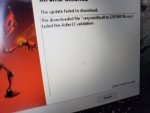

That's a new one. Are you running antivirus?I am getting the message when I try to update any ideas?
Download olduser_live.zip from this post:First I have seen it. Just got it when trying to do the new update
and extract it to your Release folder, overwriting the 2 files already in place.
Update: I was able to resolve this by running as administrator.
I'm getting an error after I log into the updater:
System.ComponentModel.Win32Exception (0x80004005): The system cannot find the file specified
at System.Diagnostics.Process.StartWithShellExecuteEx(ProcessStartInfo startInfo)
at System.Diagnostics.Process.Start()
at System.Diagnostics.Process.Start(ProcessStartInfo startInfo)
at LoginChecker.Form1.button1_Click(Object sender, EventArgs e)
at System.Windows.Forms.Control.OnClick(EventArgs e)
at System.Windows.Forms.Button.OnClick(EventArgs e)
at System.Windows.Forms.Button.OnMouseUp(MouseEventArgs mevent)
at System.Windows.Forms.Control.WmMouseUp(Message& m, MouseButtons button, Int32 clicks)
at System.Windows.Forms.Control.WndProc(Message& m)
at System.Windows.Forms.ButtonBase.WndProc(Message& m)
at System.Windows.Forms.Button.WndProc(Message& m)
at System.Windows.Forms.Control.ControlNativeWindow.OnMessage(Message& m)
at System.Windows.Forms.Control.ControlNativeWindow.WndProc(Message& m)
at System.Windows.Forms.NativeWindow.Callback(IntPtr hWnd, Int32 msg, IntPtr wparam, IntPtr lparam)


Joshua got sorted out - last time I saw someone with this issue (which was also recently) it was due to a download issue with their internet connection - not sure if related, but Joshua said he reinstalled then re-ran updater and is sorted
Seeing this error with the latest update. Running as administrator and have had no problem updating for years. No appreciable changes made to PC so this is not easily attributed to something changing that I am aware of.
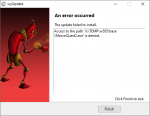
Please reboot and try againSeeing this error with the latest update. Running as administrator and have had no problem updating for years. No appreciable changes made to PC so this is not easily attributed to something changing that I am aware of.
View attachment 18241
Same situation after a reboot. Moved TEMP off of RAM drive to see if the something wonky was happening there but same problem when using standard SSD drive temp locationPlease reboot and try again

Good call... will give it a look when back home. I believe I whitelisted MQ2 but likely not the TEMP directory folder used during installation. Thanks for the tip because I was about out of ideas!What antivirus do you use? Check your quarantine and confirm your antivirus isn't picking up that file specifically.
And I think you may be dead on. I was able to remotely check the quarantine and sure enough macroquest2.exe is in there coming from the TEMP directory. Thanks, Knightly.Good call... will give it a look when back home. I believe I whitelisted MQ2 but likely not the TEMP directory folder used during installation. Thanks for the tip because I was about out of ideas!
I'm closing this thread, because the old Update.exe is being put to rest.
It had a good run, 2015-2019. I'm proud and amazed it made it this long, my first and last C# project.
The RedGuides Launcher is far superior, you'll find it here:

 www.redguides.com
And a quick video tutorial for the launcher is found in the first video here:
www.redguides.com
It had a good run, 2015-2019. I'm proud and amazed it made it this long, my first and last C# project.
The RedGuides Launcher is far superior, you'll find it here:
Unmaintained - RedGuides Launcher
This software is deprecated. Please use redfetch instead. What the heck is this thing? A desktop app that manages software found on RedGuides, including: Very Vanilla (MacroQuest), MySEQ, KissAssist, Nav, plugins, macros, and many other...
www.redguides.com
And a quick video tutorial for the launcher is found in the first video here:
Unmaintained - Multiboxing EverQuest: The Red Guide (videos)
Parts of this guide may be out of date. Please use the new user guide instead. These videos are made to get absolute beginners running a full group in ~30 minutes. Please watch them in order as some concepts build on one another. If you have...
www.redguides.com
- Status
- Not open for further replies.
Users who are viewing this thread
Total: 2 (members: 0, guests: 2)
Share: