not just MQ2chat is off, other plugins were not there either, MQ2maps,MQ2melee,MQ2moveutils, several others were as if they were not loaded.
I will try your suggestion Redbot
EDIT
I tired without MQ2autologin and the same thing happen. I get the Everquest Crash Report Sending detected before eq window even opens.
2nd EDIT
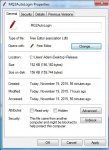
So when i run with MQ2autologin off and run MQ2 as Admin, i get no more crashes. I tried to go to the .dll file and click "Unblock" but i do not have an Unblock option. So i log in and everything seems to be working, but my MQ2 chat window is not there and all mq2 chat is going to the regular chat window. So i decided to test things. Map is working fine the extra info on items worked. So i went out and attacked a mob and as soon as i turn auto attack on the game freezes until auto attack turns off when the mobs is dead. I thought maybe it was just a weird fluke. Tested it again. I used my bow to pull a mob back and waited for it to get to me. Everything working fine up to this point. As soon as i hit q to turn on autoattack, game freezes. 20-30 secs later the game catches up and the mob is dead at my feet.
So going forward i am going to turn off all plugins and turn them on one at a time and see which one is causing the problems. Will repost with my findings.
3rd EDIT
Ok so i got everything to work the way it was before update and started to load the plugins 1 at a time. After i verified that the plugin worked i would camp put, close MQ2 from the task bar, and turn on the next plugin from the updater. Here is the list of plugins that caused any issues. Once an issues was detected i follow the same process and turned it off and logged back in. My findings are listed next to the plugin:
MQ2AutoSize - Crashed report detected when loaded/Back to normal once it was unloaded
MQ2EQBugFix - No abnormal problems but it gave me my extended target window back on Progression server

MQ2Medley - Caused EQ to freeze when Kissassist Mac was started/Back to normal once it was unloaded
So here is a copy of my MacroQuest.ini, but after doing this process, everything is fixed. looks like it was Autosize causing the problem. Not to worries about this, since i have never used it and only was going to try it.
Rich (BB code):
[Caption Colors]
PC=OFF
PC-Color=ff00ff
PCCon=OFF
PCPVPTeam=OFF
PCRaid=OFF
PCRaid-Color=ff7f
PCClass=OFF
PCGroup=OFF
PCGroup-Color=ffff00
PCTrader=ON
PCTrader-Color=ff7f00
NPC=OFF
NPC-Color=ff0000
NPCCon=ON
NPCClass=OFF
NPCMerchant=ON
NPCMerchant-Color=ff7f00
NPCBanker=ON
NPCBanker-Color=c800ff
NPCAssist=ON
NPCAssist-Color=ffff00
NPCMark=ON
NPCMark-Color=ffff00
PetNPC=OFF
PetNPC-Color=ff0000
PetPC=OFF
PetPC-Color=ffff00
PetClass=OFF
PetClass-Color=ff0000
Corpse=OFF
Corpse-Color=ff0000
CorpseClass=OFF
CorpseClass-Color=ff0000
[Plugins]
mq2aaspend=1
mq2advpath=1
mq2autoaccept=1
mq2autoforage=1
mq2autologin=1
mq2cast=1
mq2charnotes=1
mq2chatwnd=1
mq2debuffs=1
mq2eqbc=1
mq2eqbugfix=1
mq2events=1
mq2exchange=1
mq2feedme=1
mq2fps=1
mq2gmcheck=1
mq2headshot=1
mq2hud=1
mq2hudmove=1
mq2itemdisplay=1
mq2labels=1
mq2map=1
mq2melee=1
mq2moveutils=1
mq2navigation=0
mq2netbots=1
mq2netheal=1
mq2nonagwindows=1
mq2plattracker=1
mq2rez=1
mq2search=1
mq2spawnmaster=1
mq2targets=1
mq2viewport=1
mq2xptracker=1
mq2posse=1
[Key Binds]
MELEE_Nrm=Z
RANGE_Nrm=X
MUTILS_FWD_Nrm=W
MUTILS_BCK_Nrm=S
MUTILS_LFT_Nrm=A
MUTILS_RGT_Nrm=D
MUTILS_STRAFE_LFT_Nrm=clear
MUTILS_STRAFE_RGT_Nrm=clear
MUTILS_AUTORUN_Nrm=`
MUTILS_FWD_Alt=Up
MUTILS_BCK_Alt=Down
MUTILS_LFT_Alt=Left
MUTILS_RGT_Alt=Right
MUTILS_STRAFE_LFT_Alt=clear
MUTILS_STRAFE_RGT_Alt=clear
MUTILS_AUTORUN_Alt=clear
MQ2CSCHAT_Nrm=/
EQBC_Nrm=clear
WORST_TARGET_Nrm=W
WORST_CYCLE_Nrm=E
[MacroQuest]
HUDMode=Normal
TimeStampChat=0
[Aliases]
/a=/anonymous
/addfriend=/echo AddFriend
/addignore=/echo AddMobIgnore
/addpull=/echo AddMobPull
/afktoolson=/echo Reset AFKTools AFKToolsOn
/assistat=/echo Reset Melee AssistAt
/autofireon=/echo toggle AutoFireOn
/autorezon=/echo toggle AutoRezOn
/b=/bazaar
/ba=/bazaar
/backoff=/echo backoff
/buffson=/echo toggle BuffsOn
/c=/consider
/campfire=/echo Summon Campfire
/camphere=/echo toggle ReturnToCamp
/campradius=/echo Reset General CampRadius
/cha=/channel
/chase=/echo toggle ChaseAssist
/chasedistance=/echo Reset General ChaseDistance
/chaseoff=/echo Reset General ChaseAssist 0
/chaseon=/echo Reset General ChaseAssist 1
/d=/duel
/debug=/echo toggle Debug
/debugall=/echo DebugAll
/debugbuffs=/echo toggle DebugBuffs
/debugcombat=/echo toggle DebugCombat
/debugheal=/echo toggle DebugHeal
/debugmez=/echo toggle DebugMez
/debugmove=/echo toggle DebugMove
/debugpull=/echo toggle DebugPull
/dpsinterval=/echo Reset DPS DPSInterval
/dpson=/echo Reset DPS DPSOn
/dpsskip=/echo Reset DPS DPSSkip
/dpsspam=/echo toggle DPSSpam
/f=/feedback
/fa=/fastdrop
/g=/gsay
/gu=/guildsay
/healson=/echo Reset Heals HealsOn
/key=/keys
/kisscheck=/echo KissCheck
/kissedit=/echo kissedit
/load=/loadspells
/looton=/echo Reset General LootOn
/m=/msg
/maxradius=/echo Reset Pull MaxRadius
/maxzrange=/echo Reset Pull MaxZRange
/medcombat=/echo toggle MedCombat
/medstart=/echo Reset General MedStart
/meleedistance=/echo Reset Melee MeleeDistance
/meleeon=/echo toggle MeleeOn
/mercassistat=/echo Reset Merc MercAssistAt
/mezon=/echo Reset Mez MezOn
/newif=/if
/peton=/echo toggle PetOn
/pettoyson=/echo toggle PetToysOn
/pettoysplz=/echo PetToysPlease
/r=/reply
/rebuffon=/echo toggle RebuffOn
/setae=/echo Set AE
/setaggro=/echo Set Aggro
/setbuffs=/echo Set Buffs
/setburn=/echo Set Burn
/setcure=/echo Set Cure
/setdps=/echo Set DPS
/setheals=/echo Set Heals
/switch=/echo Switch Target
/t=/tell
/ta=/tap
/w=/who
[MacroQuest]
TimeStampChat=0
BeepOnTells=0
FlashOnTells=0




 Anyone else or should i just redl everything?