• You've discovered RedGuides, an EverQuest multi-boxing and scripting community 🧙‍♀️⚙️. We want you to play several EQ characters at once, come join us and say hello! 👋

  • A TLP without truebox has thawed (Very Vanilla ready)
    Frostreaver

Vanilla - Very Vanilla Compile 20151119 - Welcome to The Broken Mirror

Status
Not open for further replies.

Maskoi

old and salty
Joined
Sep 28, 2005
RedCents
82,796¢
attachment.php

Very Vanilla Compile 20151119

HUG YOUR MQ2 DEV

[TABLE="width: 600, align: left"]
[TR]
[TD="align: center"]Check out this Month's Poll

[/TD]
[TD="align: center"]Check out this
Month's Contest
[/TD]
[TD="align: center"][/TD]
[/TR]
[/TABLE]

NOTES

NEW EXPANSION TODAY PLEASE REPORT BUGS
  • MQ2Autologin Fixed
  • /Range Crash fixed.


New version: RGUpdate 1.3 Download Here
  • Fixed settings, will now remember your loaded plugins.
  • Will continue to read old MacroQuest.ini files, and upon saving will update to the new format.


Lost?
Watch our easy MQ2 install video, featuring the RedGuides Updater


(Click here to download the RedGuides Updater)

ka8sm.png


The simple & powerful all-class macro, KissAssist 8 is included in this compile

Instructions

  1. Use the Patchme command to bypass the SOE Launcher
  2. Download the Very Vanilla compile zip file at the bottom of this post.
  3. Download the RGUpdater.
  4. Use the RGUpdater to update your MacroQuest files. Instructions are here.
  5. Run MacroQuest2.exe from that folder
  6. Run EverQuest.exe
  7. In-Game, type "/plugin <plugin name>" to add all plugins you wish to use
  8. Click Here for Plugin Commands/Descriptions.

--11/18/2015--
Updated for today's patch and New Expansion


Attachments

Last edited:
Re: Very Vanilla Compile 20151118 - Welcome to The Broken Mirror

Think I got the first download ><
 
Re: Very Vanilla Compile 20151118 - Welcome to The Broken Mirror

Getting unhandled exception error :( Anyone else or should i just redl everything?
 
Re: Very Vanilla Compile 20151118 - Welcome to The Broken Mirror

Does MQ2 inject if you just hit OK?
 
Re: Very Vanilla Compile 20151118 - Welcome to The Broken Mirror

For those beta testing the new updater, just run "update.exe" and you'll be auto-updated.
 
Re: Very Vanilla Compile 20151118 - Welcome to The Broken Mirror

Neither my old RG update or the new updater are even loading now lol. Everything has worked fine up until this point. Going to try a few things
 
Re: Very Vanilla Compile 20151118 - Welcome to The Broken Mirror

Neither my old RG update or the new updater are even loading now lol. Everything has worked fine up until this point. Going to try a few things

What is giving you the error, RGUpdate, the new update, or Macroquest2?

Also, can you cut & paste any details of the error?
 
Re: Very Vanilla Compile 20151118 - Welcome to The Broken Mirror

Originally the RGUpdate had given my the error message. Deleted to redownload new RGupdate, now when I try and load the application it won't even load. Obviously something going on on my side just not sure what
 
Re: Very Vanilla Compile 20151118 - Welcome to The Broken Mirror

Can you paste the details of the error?

Make sure you have .net installed (check windows update,) and make sure mq2eqbcs, macroquest2, and any other EQ-related apps are closed.
 
Re: Very Vanilla Compile 20151118 - Welcome to The Broken Mirror

Error is sent to pm to avoid more spam :P .net installed and everything else is closed.

- - - Updated - - -

Well I created an entire new folder to extract the new compile to and that did the trick. Will just have to transfer macros and etc over to new folder. Not sure what was wrong with old MQ folder
 
Re: Very Vanilla Compile 20151118 - Welcome to The Broken Mirror

Autologins not working for me. Everything else working normally after I manually log in, though. So it seems at the moment.
 
Re: Very Vanilla Compile 20151118 - Welcome to The Broken Mirror

So every time my SK tries to pull a mob he crashes... Completely deleted and reinstalled updater/compile/etc... No dice
 
Re: Very Vanilla Compile 20151118 - Welcome to The Broken Mirror

Pullertank mode is working if PullWith=melee, but it crashes if I use a bow.

Kissasst starts, targets a mob, turns my toon to face, then crashes. If I swap to a different bow, same result. If I use melee to pull, works just fine.
I'm going to try to re-install all into a new folder as Bayne did.

Edit: After re-install into new MacroQuest2 folder, same result of crashing. I haven't tried to pull with a thrown item yet. That's up next.
 
Re: Very Vanilla Compile 20151118 - Welcome to The Broken Mirror

Pullertank mode is working if PullWith=melee, but it crashes if I use a bow.

Kissasst starts, targets a mob, turns my toon to face, then crashes. If I swap to a different bow, same result. If I use melee to pull, works just fine.
I'm going to try to re-install all into a new folder as Bayne did.

This is my problem exactly. PullWith=Melee works as well as PullWith=spellname
 
Re: Very Vanilla Compile 20151118 - Welcome to The Broken Mirror

Autologins not working for me. Everything else working normally after I manually log in, though. So it seems at the moment.

Reported and known error. Devs are checking it out.
 
Re: Very Vanilla Compile 20151118 - Welcome to The Broken Mirror

Expect errors with new expansion it always takes a few days to shake out all the bugs.
 
Re: Very Vanilla Compile 20151118 - Welcome to The Broken Mirror

/range is causing crashes. Devs are working will post a new compile tomorrow after its fixed.
 
Re: Very Vanilla Compile 20151118 - Welcome to The Broken Mirror

Not sure what ability you are using but pulling with melee or a spell on my warrior crashes her
 
Re: Very Vanilla Compile 20151118 - Welcome to The Broken Mirror

unloading mq2aaspend fixed my crash problems
 
Re: Very Vanilla Compile 20151118 - Welcome to The Broken Mirror

anyone know why there is allways that 'failed to inject' error? buthe does inject..
 
Re: Very Vanilla Compile 20151118 - Welcome to The Broken Mirror

I have seen the failed to inject and it happens when you start eqgame as admin and Windows pops up the "are you sure you want to run this program as admin" box

It's basically a Windows bug, macroquest detects that eqgame has started a millisecond before that box comes up, then it tries to inject but the process is no longer valid. When you click ok, a new process of eqgame is created and it injects into that one.
A solution would be for me to add a slight delay to he injector I guess, but well I haven't gotten around to it, and if everything else fails there is always the "reinject" option in the tasktray menu if you right lick the macroquest icon...
 
Re: Very Vanilla Compile 20151118 - Welcome to The Broken Mirror

I think you can disable that popup message if you go into your User Account Control Settings and turn it off(Never Notify).
 
Re: Very Vanilla Compile 20151118 - Welcome to The Broken Mirror

NEW Compile Uploaded Very Vanilla Compile 20151119

MQ2Autologin Fixed
/Range Crash fixed
.
 
Re: Very Vanilla Compile 20151118 - Welcome to The Broken Mirror

NEW Compile Uploaded Very Vanilla Compile 20151119

MQ2Autologin Fixed
/Range Crash fixed
.

MQ2AutoLogin still not working for me. I just updated it a few minutes ago via RGUpdater too.

Load up EQ and nothing happens.

- - - Updated - - -

Yes it's =1 in the ini file too.
 
Working for me no problem. Delete the dll and update again please
 
Working for me no problem. Delete the dll and update again please

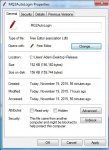
Here's the issue, I unblocked it and now it works just fine. Never seen this issue before and it's the only .dll that I use that has it. Just a heads up for those other folks who can't get Autologin to work.

Untitled.jpg
 
Even with 20151119 i recieve a Everquest Crash Report Sending detected before eq opens and if i do not click yes or no, eq loads up, autologs in and then stops at the server select screen. I then can select my server and log in. On the character select screen i see the MQ2 notes windows but my mq2 chat window is not there. I logged on to a character and MQ2 was not present. I have tried running MQ2 as admin/eq as admin MQ2 as admin/eq not as admin etc. Any suggestions as to my problem?


If i run MQ2 not as admin and EQ not as admin it now autologs in as normal to the character select screen like i have it set up, but when i log in on a character MQ2 is not running. Or at least no plugins are working.
 
Even with 20151119 i recieve a Everquest Crash Report Sending detected before eq opens and if i do not click yes or no, eq loads up, autologs in and then stops at the server select screen. I then can select my server and log in. On the character select screen i see the MQ2 notes windows but my mq2 chat window is not there. I logged on to a character and MQ2 was not present. I have tried running MQ2 as admin/eq as admin MQ2 as admin/eq not as admin etc. Any suggestions as to my problem?


If i run MQ2 not as admin and EQ not as admin it now autologs in as normal to the character select screen like i have it set up, but when i log in on a character MQ2 is not running. Or at least no plugins are working.

Try running without MQ2Autologin (edit your MacroQuest.ini and set "MQ2AutoLogin = 0") and report back. If that helps, then you have a couple options:

*) go to your MQ2 folder, right-click MQAutoLogin.DLL and select "properties" - at the bottom, click "Unblock"
*) try beta testing the new installer / updater

I haven't tried MQ2AutoLogin this patch, so please report back!
 
Are you sure MQ2 not running or is the MQ2 chat window just "off screen".

I have had the window go "off screen". I usually have to do a new/fresh download...new file, etc.. Have you tied this?
 
not just MQ2chat is off, other plugins were not there either, MQ2maps,MQ2melee,MQ2moveutils, several others were as if they were not loaded.


I will try your suggestion Redbot

EDIT

I tired without MQ2autologin and the same thing happen. I get the Everquest Crash Report Sending detected before eq window even opens.

2nd EDIT

So when i run with MQ2autologin off and run MQ2 as Admin, i get no more crashes. I tried to go to the .dll file and click "Unblock" but i do not have an Unblock option. So i log in and everything seems to be working, but my MQ2 chat window is not there and all mq2 chat is going to the regular chat window. So i decided to test things. Map is working fine the extra info on items worked. So i went out and attacked a mob and as soon as i turn auto attack on the game freezes until auto attack turns off when the mobs is dead. I thought maybe it was just a weird fluke. Tested it again. I used my bow to pull a mob back and waited for it to get to me. Everything working fine up to this point. As soon as i hit q to turn on autoattack, game freezes. 20-30 secs later the game catches up and the mob is dead at my feet.

So going forward i am going to turn off all plugins and turn them on one at a time and see which one is causing the problems. Will repost with my findings.

3rd EDIT
Ok so i got everything to work the way it was before update and started to load the plugins 1 at a time. After i verified that the plugin worked i would camp put, close MQ2 from the task bar, and turn on the next plugin from the updater. Here is the list of plugins that caused any issues. Once an issues was detected i follow the same process and turned it off and logged back in. My findings are listed next to the plugin:

MQ2AutoSize - Crashed report detected when loaded/Back to normal once it was unloaded
MQ2EQBugFix - No abnormal problems but it gave me my extended target window back on Progression server :)
MQ2Medley - Caused EQ to freeze when Kissassist Mac was started/Back to normal once it was unloaded

So here is a copy of my MacroQuest.ini, but after doing this process, everything is fixed. looks like it was Autosize causing the problem. Not to worries about this, since i have never used it and only was going to try it.

Rich (BB code):
[Caption Colors]
PC=OFF
PC-Color=ff00ff
PCCon=OFF
PCPVPTeam=OFF
PCRaid=OFF
PCRaid-Color=ff7f
PCClass=OFF
PCGroup=OFF
PCGroup-Color=ffff00
PCTrader=ON
PCTrader-Color=ff7f00
NPC=OFF
NPC-Color=ff0000
NPCCon=ON
NPCClass=OFF
NPCMerchant=ON
NPCMerchant-Color=ff7f00
NPCBanker=ON
NPCBanker-Color=c800ff
NPCAssist=ON
NPCAssist-Color=ffff00
NPCMark=ON
NPCMark-Color=ffff00
PetNPC=OFF
PetNPC-Color=ff0000
PetPC=OFF
PetPC-Color=ffff00
PetClass=OFF
PetClass-Color=ff0000
Corpse=OFF
Corpse-Color=ff0000
CorpseClass=OFF
CorpseClass-Color=ff0000
[Plugins]
mq2aaspend=1
mq2advpath=1
mq2autoaccept=1
mq2autoforage=1
mq2autologin=1
mq2cast=1
mq2charnotes=1
mq2chatwnd=1
mq2debuffs=1
mq2eqbc=1
mq2eqbugfix=1
mq2events=1
mq2exchange=1
mq2feedme=1
mq2fps=1
mq2gmcheck=1
mq2headshot=1
mq2hud=1
mq2hudmove=1
mq2itemdisplay=1
mq2labels=1
mq2map=1
mq2melee=1
mq2moveutils=1
mq2navigation=0
mq2netbots=1
mq2netheal=1
mq2nonagwindows=1
mq2plattracker=1
mq2rez=1
mq2search=1
mq2spawnmaster=1
mq2targets=1
mq2viewport=1
mq2xptracker=1
mq2posse=1
[Key Binds]
MELEE_Nrm=Z
RANGE_Nrm=X
MUTILS_FWD_Nrm=W
MUTILS_BCK_Nrm=S
MUTILS_LFT_Nrm=A
MUTILS_RGT_Nrm=D
MUTILS_STRAFE_LFT_Nrm=clear
MUTILS_STRAFE_RGT_Nrm=clear
MUTILS_AUTORUN_Nrm=`
MUTILS_FWD_Alt=Up
MUTILS_BCK_Alt=Down
MUTILS_LFT_Alt=Left
MUTILS_RGT_Alt=Right
MUTILS_STRAFE_LFT_Alt=clear
MUTILS_STRAFE_RGT_Alt=clear
MUTILS_AUTORUN_Alt=clear
MQ2CSCHAT_Nrm=/
EQBC_Nrm=clear
WORST_TARGET_Nrm=W
WORST_CYCLE_Nrm=E
[MacroQuest]
HUDMode=Normal
TimeStampChat=0
[Aliases]
/a=/anonymous
/addfriend=/echo AddFriend
/addignore=/echo AddMobIgnore
/addpull=/echo AddMobPull
/afktoolson=/echo Reset AFKTools AFKToolsOn
/assistat=/echo Reset Melee AssistAt
/autofireon=/echo toggle AutoFireOn
/autorezon=/echo toggle AutoRezOn
/b=/bazaar
/ba=/bazaar
/backoff=/echo backoff
/buffson=/echo toggle BuffsOn
/c=/consider
/campfire=/echo Summon Campfire
/camphere=/echo toggle ReturnToCamp
/campradius=/echo Reset General CampRadius
/cha=/channel
/chase=/echo toggle ChaseAssist
/chasedistance=/echo Reset General ChaseDistance
/chaseoff=/echo Reset General ChaseAssist 0
/chaseon=/echo Reset General ChaseAssist 1
/d=/duel
/debug=/echo toggle Debug
/debugall=/echo DebugAll
/debugbuffs=/echo toggle DebugBuffs
/debugcombat=/echo toggle DebugCombat
/debugheal=/echo toggle DebugHeal
/debugmez=/echo toggle DebugMez
/debugmove=/echo toggle DebugMove
/debugpull=/echo toggle DebugPull
/dpsinterval=/echo Reset DPS DPSInterval
/dpson=/echo Reset DPS DPSOn
/dpsskip=/echo Reset DPS DPSSkip
/dpsspam=/echo toggle DPSSpam
/f=/feedback
/fa=/fastdrop
/g=/gsay
/gu=/guildsay
/healson=/echo Reset Heals HealsOn
/key=/keys
/kisscheck=/echo KissCheck
/kissedit=/echo kissedit
/load=/loadspells
/looton=/echo Reset General LootOn
/m=/msg
/maxradius=/echo Reset Pull MaxRadius
/maxzrange=/echo Reset Pull MaxZRange
/medcombat=/echo toggle MedCombat
/medstart=/echo Reset General MedStart
/meleedistance=/echo Reset Melee MeleeDistance
/meleeon=/echo toggle MeleeOn
/mercassistat=/echo Reset Merc MercAssistAt
/mezon=/echo Reset Mez MezOn
/newif=/if
/peton=/echo toggle PetOn
/pettoyson=/echo toggle PetToysOn
/pettoysplz=/echo PetToysPlease
/r=/reply
/rebuffon=/echo toggle RebuffOn
/setae=/echo Set AE
/setaggro=/echo Set Aggro
/setbuffs=/echo Set Buffs
/setburn=/echo Set Burn
/setcure=/echo Set Cure
/setdps=/echo Set DPS
/setheals=/echo Set Heals
/switch=/echo Switch Target
/t=/tell
/ta=/tap
/w=/who
[MacroQuest]
TimeStampChat=0
BeepOnTells=0
FlashOnTells=0
 
Last edited by a moderator:
not just MQ2chat is off, other plugins were not there either, MQ2maps,MQ2melee,MQ2moveutils, several others were as if they were not loaded.


I will try your suggestion Redbot

EDIT

I tired without MQ2autologin and the same thing happen. I get the Everquest Crash Report Sending detected before eq window even opens.

ok, please post your MacroQuest.ini and let's have a look
 
Vanilla - Very Vanilla Compile 20151119 - Welcome to The Broken Mirror
Status
Not open for further replies.

Users who are viewing this thread

Back
Top
Cart