
-
 Hail, we're RedGuides. We want you to play six (yes, 6!) EverQuest characters at once. We have scripts and a friendly community to help, please join our playstyle and say hello! 👋
You are using an out of date browser. It may not display this or other websites correctly.
You should upgrade or use an alternative browser.
You should upgrade or use an alternative browser.

Release TsC – Automated Inventory Management & Consolidation For Your Whole Crew 4.1.6
- Thread starter raw
- Start date

- Seller
- #482
Remove them from your TSC toons config file (next/config/tsc/toons.Lua)I have an issue with it seeing characters i do not have on my peers list and its causing it to hang. these are characters i have had on before, but someone else has on in zone.
- Seller
- #484
raw updated TsC – Automated Inventory Management & Consolidation For Your Whole Crew with a new update entry:
4.1.0
Read the rest of this update entry...
4.1.0
 Commits
Read the rest of this update entry...

- Seller
- #486
Weird. I will look into it.@raw
Thanks for the update.
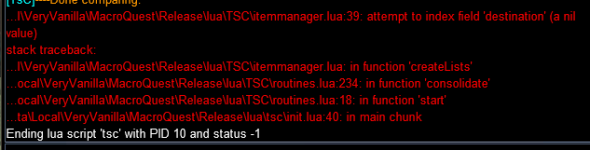
I had some weird errors when i originally ran the new code. But based on your earlier comment I tried to change everything to default ui and tried again and i still get this error below.
View attachment 72831
This was the original error.
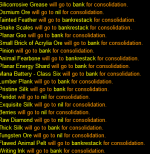
View attachment 72832
The lines prior to the error
View attachment 72834
For the lines that say item will go to nil for consolidation, can you tell me where your toon is currently storing them (e.g., bank + inventory, or plots + depot, etc.)?
Thanks.
- Seller
- #488
raw updated TsC – Automated Inventory Management & Consolidation For Your Whole Crew with a new update entry:
4.1.1
Read the rest of this update entry...
4.1.1
Bug Fixes
- Items that need to be restacked in the bank should no longer cause problems
(7d8f714) ~rawmotion
Read the rest of this update entry...
- Seller
- #489
If someone else is playing your toons, the only thing I can think of is to run TSC in another zone or temporarily remove them from your config file.Id prefer not to, I might need to load them again in the near future.
You can back up their entries in the pignore.Lua (personal ignore) and hoard.Lua to save their item preferences.
- Seller
- #490
Can you check if this is solved with the last update?@raw
Thanks for the update.
I had some weird errors when i originally ran the new code. But based on your earlier comment I tried to change everything to default ui and tried again and i still get this error below.
View attachment 72831
This was the original error.
View attachment 72832
The lines prior to the error
View attachment 72834

It still seems to be picking up some no-trade items. It wants to trade a couple of the trophies between characters. It also seeems to be catching tools to trade between characters, like their filleting knives, which I do not remember it doing that before.

- Seller
- #492
Are you using the default skin?It still seems to be picking up some no-trade items. It wants to trade a couple of the trophies between characters. It also seeems to be catching tools to trade between characters, like their filleting knives, which I do not remember it doing that before.
View attachment 72841
In the last patch, they moved the "Location" column in the find window from col4 to col5.
If your skin doesn't reflect this change, TSC won't know where the item is located.
And if it doesn't know where it's located, it can't perform checks like whether it's no drop (e.g.
mq.TLO.FindItemBank('...').NoDrop())If you're feeling brave, you can update your XML files yourself
eq/uifiles/skinname/EQUI_FindItemWnd.xml and add an empty 4th column:
XML:
<Columns>
       <Heading>L</Heading>
       <Width>60</Width>
</Columns>I will have to check, and possibly reload. I do use a Custom UI, but had moved the FindItemWnd xml file out of the Custom UI directly. Is it using a different window to search for the items?
- Seller
- #494
It uses the find item window, so you should be good if you've updated. You're on 4.1.1?I will have to check, and possibly reload. I do use a Custom UI, but had moved the FindItemWnd xml file out of the Custom UI directly. Is it using a different window to search for the items?
I reset all my UI's on all toons, and it has not done it since. I will keep an eye out, and let you know if it happens again. Thanks!
Yes, I am on 4.1.1.
Yes, I am on 4.1.1.

- Seller
- #498
It is intended. I figure if you put them on the ignore list, it means you don't intend to trade them.I don't know if it's the intended behavior or not, but I notice that items that are on the Consolidation Ignore list don't show up when using the Search & Deliver feature.
Do you think it makes more sense to include them?
For the purpose of a "Search and Delivery", I would say they should be included. Example is your force feed food to keep you from eating your stat food, you might need some for skill ups or even Artisan recipes, but don't want them consolidated under normal conditions. But that's just my thoughts, others might feel differently. 
- Seller
- #500
raw updated TsC – Automated Inventory Management & Consolidation For Your Whole Crew with a new update entry:
4.1.2
Read the rest of this update entry...
4.1.2

Read the rest of this update entry...

- Seller
- #502
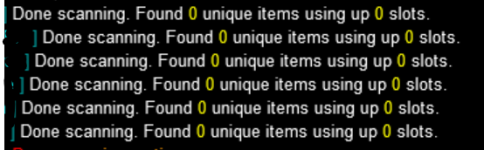
I can see that you're using and old version. Can you update to 4.1.2 and see if that fixes it?View attachment 72878
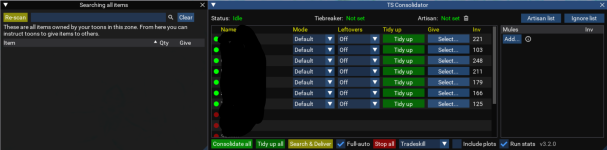
It runs the scan across all my toons but it doesn't find anything. There are many duplicates on all toons in inventory and in banks but is comes back with zero.
Any idea what I might be doing wrong? (it also finds no items when doing search and deliver)
View attachment 72879
I can see that you're using and old version. Can you update to 4.1.2 and see if that fixes it?
That was exactly the problem, thank you!

- Seller
- #505
It should, yes, if they are the same item located in 2 separate plots.Is it within the scope of the lua to be able to consolidate collectibles across properties? For example, I have 4 plots with multiple stacks of the same collectable across them. Can it consolidate them onto one property?
This hasn't been tested as throroughly as some other parts of the tool, so let me know how it goes.

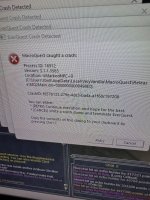
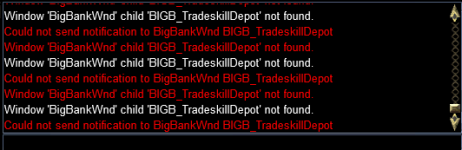
I think I have isolated a couple of things that are problems. One is that the name of the tradeskill depot button in the bank UI has changed, as has the auto button name. TradeskillDepot.Count(), .FindItem(), .FindItemCount() all appear to be a root potential cause of the crash. Removing those calls will make it stable again, but obviously that causes issues with understanding how much room (if any) is available in the tradeskilldepot.
It seems to be stable in the character trading portion without any changes, but the banking/depot portions are likely the most glaring issue folks will run into.
Edit: Removed Capacity() as a potential cause, as that seems to work without crashing.
It seems to be stable in the character trading portion without any changes, but the banking/depot portions are likely the most glaring issue folks will run into.
Edit: Removed Capacity() as a potential cause, as that seems to work without crashing.
Last edited:
Having somewhat of a similar issue with the tradeskill Lua, so I thought I would check this out. Went to clean all and as soon as it tried to load the depot got 7 crashes. Tradeskill Lua guys are saying disable depot and that will run but since this uses the depot, figured I would check it out.
Attachments
- Seller
- #514
raw updated TsC – Automated Inventory Management & Consolidation For Your Whole Crew with a new update entry:
4.1.3
Read the rest of this update entry...
4.1.3
Read the rest of this update entry...
- Seller
- #516
raw updated TsC – Automated Inventory Management & Consolidation For Your Whole Crew with a new update entry:
4.1.4
Read the rest of this update entry...
4.1.4
Read the rest of this update entry...

- Seller
- #518
Latest version of MQ? Default skin?I just tried to clean my toon and is crashed
Ran this morning, a give all on collectibles and a tradeskill consolidate all. Didn't see any problems...
One item of note that's been happening since expansion release is it attempts to consolidate the new evolving TS mask. Hadn't brought it up because it just moves right past it without stopping.

Thanks for the fixes!
One item of note that's been happening since expansion release is it attempts to consolidate the new evolving TS mask. Hadn't brought it up because it just moves right past it without stopping.
Thanks for the fixes!
Users who are viewing this thread
Total: 1 (members: 0, guests: 1)
Share: