
-
 Hail, we're RedGuides. We want you to play six (yes, 6!) EverQuest characters at once. We have scripts and a friendly community to help, please join our playstyle and say hello! 👋
You are using an out of date browser. It may not display this or other websites correctly.
You should upgrade or use an alternative browser.
You should upgrade or use an alternative browser.

Release TsC – Automated Inventory Management & Consolidation For Your Whole Crew (1 Viewer) 4.1.6
- Thread starter raw
- Start date


- Seller
- #282
Oh boy. I'll look into it when I get back home in a couple days. Thanks for letting me know.There is a small issue with the IMGUI display:
View attachment 55186
and also, putting items in the TS depot does no longer work for me, if I dont manually click the mouse button.
I haven't used the tool in a week or two - but running into a couple issues.
It won't deposit into the depot - says to watch for Lua blocking windows etc. But everything is clear, restarted Lua a few times. If I do a manual left click of mouse, it deposits and puts next item on cursor but requires a manual left click. Essentially breaking the Lua for being useful.
Another thing I noticed and not sure when this arrived because I don't always use 12 toons. But the window size/scrolling seems to be defaulting so that the buttons needed to make the app work can be hidden. If I didn't know from previous use these buttons were here/hidden I wouldnt not know how to use the Lua.
Scrolling for a large list of characters seems fine, its the outter window size that can potentially hide the buttons needed to start consolidation. Not sure if there is a universal fix for this with so many varied screen sizes, but this is something I've never noticed before. So i'm not sure if one of you last few updates changed something with window size/layout.
This is how window should look:

This is how it can be scrolled by accident - is there no way to make that outer window always max size, or somehow make sure buttons are visible. Won't be an issue for me, but seems a problem for new users having the main functions hidden if they dont see they need to scroll 1 of 2 scroll bars 1/4 of an inch. And now matter how large i try to resize the outter window, it snaps down to having a tiny amount of scroll available.

It won't deposit into the depot - says to watch for Lua blocking windows etc. But everything is clear, restarted Lua a few times. If I do a manual left click of mouse, it deposits and puts next item on cursor but requires a manual left click. Essentially breaking the Lua for being useful.
Another thing I noticed and not sure when this arrived because I don't always use 12 toons. But the window size/scrolling seems to be defaulting so that the buttons needed to make the app work can be hidden. If I didn't know from previous use these buttons were here/hidden I wouldnt not know how to use the Lua.
Scrolling for a large list of characters seems fine, its the outter window size that can potentially hide the buttons needed to start consolidation. Not sure if there is a universal fix for this with so many varied screen sizes, but this is something I've never noticed before. So i'm not sure if one of you last few updates changed something with window size/layout.
This is how window should look:
This is how it can be scrolled by accident - is there no way to make that outer window always max size, or somehow make sure buttons are visible. Won't be an issue for me, but seems a problem for new users having the main functions hidden if they dont see they need to scroll 1 of 2 scroll bars 1/4 of an inch. And now matter how large i try to resize the outter window, it snaps down to having a tiny amount of scroll available.

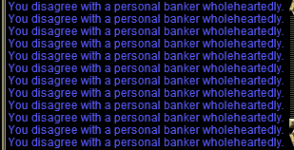
Just as a datapoint for the depot issue, I am getting this response back from the banker when I am doing this process. I can left click manually and deposit the items.
- Seller
- #287
raw updated TS Consolidator (now supports Real-Estate) with a new update entry:
2.1.2
Read the rest of this update entry...
2.1.2
v2.1.2 2024-01-03
- Fixed UI formatting issue
Read the rest of this update entry...
- Seller
- #288
@foromoro @a_moss_snake @LrdDread @oldtimer @Nightmare327
Quick update: The window formatting issue should be fixed.
As for the depot deposit, it looks like it's an MQ issue from the latest patch.
I need to wait for Braniac to check/fix something related to mouse handling before I can get it to work again.
Sorry for the wait!
Quick update: The window formatting issue should be fixed.
As for the depot deposit, it looks like it's an MQ issue from the latest patch.
I need to wait for Braniac to check/fix something related to mouse handling before I can get it to work again.
Sorry for the wait!


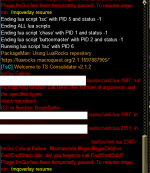
Having some issues with the imgui failing on loading this.
Weirdly enough chase and buttonmaster (and tcn) all run fine, its only this one that fails. I tried disabling all the other scripts just in case, and it still gave the error
ok it looks like whatever change you made on wednesday was causing it - I just downloaded the one from december and it is working
- Seller
- #292
@foromoro @a_moss_snake @LrdDread @oldtimer @Nightmare327
Quick update: The window formatting issue should be fixed.
As for the depot deposit, it looks like it's an MQ issue from the latest patch.
I need to wait for Braniac to check/fix something related to mouse handling before I can get it to work again.
Sorry for the wait!
The mouse issue that made the depot routine stop working should be fixed.
You just need to update VeryVanilla via the RG launcher.
- Seller
- #293
Do you have the latest version of MQ?ok it looks like whatever change you made on wednesday was causing it - I just downloaded the one from december and it is working
Edit: Yeah, I'm quite sure this is due to not having the latest version of VV. You just need to update via the rg launcher.
Last edited:
- Seller
- #294
raw updated TS Consolidator (now supports Real-Estate) with a new update entry:
2.1.3
Read the rest of this update entry...
2.1.3
v2.1.3 2024-01-06
- Various ImGui 1.90 updates
Read the rest of this update entry...
Looks like you were correct - Thanks!
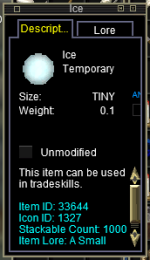
I ran into a bug with the tidy routine, though it may impact other portions. I had Ice, which is a temporary item, and when I was tidying up, it kept trying to deposit the item, but it was not allowed
- Seller
- #297
Hey. Thanks for the report! I'll see if I can fix this tomorrow.I ran into a bug with the tidy routine, though it may impact other portions. I had Ice, which is a temporary item, and when I was tidying up, it kept trying to deposit the item, but it was not allowed
View attachment 56082

Hi raw,
Small thing: if you first start the tsc matching progesss (Consolidate All -> Consolidate All) and then a few seconds after close the tsc window with the right side "X" you get to exit to desktop:
Small thing: if you first start the tsc matching progesss (Consolidate All -> Consolidate All) and then a few seconds after close the tsc window with the right side "X" you get to exit to desktop:
Code:
---------------------------
EverQuest Crash Detected
---------------------------
MacroQuest caught a crash:

Process ID: 19084
Version: 3.1.0.2172
Location: OnUnloadPlugin+0 (C:\Users\x\AppData\Local\VeryVanilla\MacroQuest\Release\Plugins\mq2lua.DLL+000000000043F7B0)

CrashID: 9fd63208-a6a9-4dc4-bf9c-88beff644cf4- Seller
- #299
raw updated TS Consolidator (now supports Real-Estate) with a new update entry:
2.1.4
Read the rest of this update entry...
2.1.4
v2.1.4 2024-01-19
- TSC now correctly skips over temporary items
Read the rest of this update entry...
one other small thing:

Interestingly enough:
---------------------------
EverQuest Crash Detected
---------------------------
MacroQuest caught a crash:
Process ID: 8996
Version: 3.1.0.2221
Location: RaiseException+0 (C:\WINDOWS\System32\KERNELBASE.dll+0000000000064D20)
CrashID: cbc75928-5d72-4815-86a9-75ddc843c643
So not sure what might have caused this :-) as I was not able to reproduce
Interestingly enough:
---------------------------
EverQuest Crash Detected
---------------------------
MacroQuest caught a crash:
Process ID: 8996
Version: 3.1.0.2221
Location: RaiseException+0 (C:\WINDOWS\System32\KERNELBASE.dll+0000000000064D20)
CrashID: cbc75928-5d72-4815-86a9-75ddc843c643
So not sure what might have caused this :-) as I was not able to reproduce

- Seller
- #302
So, it would do everything except compare toons against each other?Any chance we can get a "Tidy All" feature that just goes through all the toons and does what the Leftovers is set at? maybe just give a warning to not touch your computer while its going on.
As in, compare and consolidate each toons' own bank/inv/depot with itself, ignoring other toons? And then run leftovers?
The other item that would be cool, is to do a give all to one toon from all connected toons. I do this on my bots manually for each one as they have been collecting overseers and getting rewards, and I need to quickly consolidate all the rewards onto my main character.
- Seller
- #305
raw updated TS Consolidator (now supports Real-Estate) with a new update entry:
2.2.0
Read the rest of this update entry...
2.2.0
v2.2.0 2024-02-05
- By popular request, added a "Tidy All" feature
Read the rest of this update entry...
- Seller
- #306
There ya goAny chance we can get a "Tidy All" feature that just goes through all the toons and does what the Leftovers is set at? maybe just give a warning to not touch your computer while its going on.

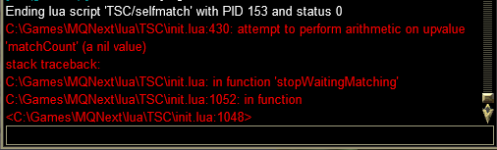
I am getting an error when I am running the Tidy Up on a single character.
- Seller
- #309
Ah. Thanks. I'll look into it.
Just as an additional datapoint, if I ran the Tidy All, it worked for everyone.
Hi Raw,
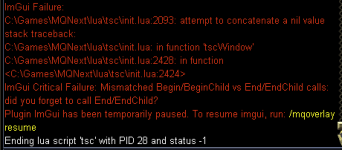
Getting the following error regularly during the initial gather stage of the script. Doesn't seem to affect the script completing all its functions though (that I can tell ).
).
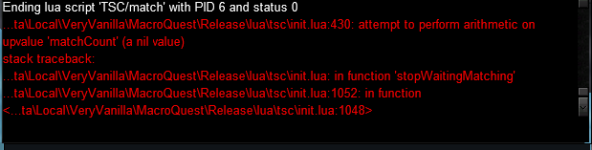
Getting the following error regularly during the initial gather stage of the script. Doesn't seem to affect the script completing all its functions though (that I can tell
).- Seller
- #312
raw updated TS Consolidator (now supports Real-Estate) with a new update entry:
2.2.1
Read the rest of this update entry...
2.2.1
v2.2.1 2024-02-08
- Squashed tidy up bugs from last update
Read the rest of this update entry...
- Seller
- #313
Should be fixed nowHi Raw,
Getting the following error regularly during the initial gather stage of the script. Doesn't seem to affect the script completing all its functions though (that I can tell
View attachment 57240
- Seller
- #315
Hmm. I haven't encountered it. When does it happen?
- Seller
- #317
So, the line that is crashing is the tooltip when you hover over the green or yellow dot and it says "Online and in-zone. Inv: xxx"
For some reason, one of your toons is returning a nil value for their inventory.
If you hover over the dots on all your toons, does that also cause the crash?
For some reason, one of your toons is returning a nil value for their inventory.
If you hover over the dots on all your toons, does that also cause the crash?
- Seller
- #320
raw updated TS Consolidator (now supports Real-Estate) with a new update entry:
2.2.2
Read the rest of this update entry...
2.2.2
v2.2.2 2024-02-21
- Added nil check for inventories
Read the rest of this update entry...
Users who are viewing this thread
Total: 2 (members: 0, guests: 2)
Share: