
-
 Hail, we're RedGuides. We want you to play six (yes, 6!) EverQuest characters at once. We have scripts and a friendly community to help, please join our playstyle and say hello! 👋
You are using an out of date browser. It may not display this or other websites correctly.
You should upgrade or use an alternative browser.
You should upgrade or use an alternative browser.

Release TsC – Automated Inventory Management & Consolidation For Your Whole Crew 4.1.6
- Thread starter raw
- Start date


- Seller
- #163
rawmotion updated TS Consolidator V1 (Out-of-Beta) with a new update entry:
20230827
Read the rest of this update entry...
20230827
Read the rest of this update entry...
New issue using the latest release. I prefer doing my consolidating in the banker/vendor/TS area right at the entrance to guild Neighborhood. No toon was able to target the banker without manual intervention. As soon as right clicked on the banker it started placing items in the depot. I rebooted, passed some items around, and tried again, same results.

Also getting this issue in guild hall since last update.
- Seller
- #166
Fix incoming.New issue using the latest release. I prefer doing my consolidating in the banker/vendor/TS area right at the entrance to guild Neighborhood. No toon was able to target the banker without manual intervention. As soon as right clicked on the banker it started placing items in the depot. I rebooted, passed some items around, and tried again, same results.
View attachment 50539
- Seller
- #167
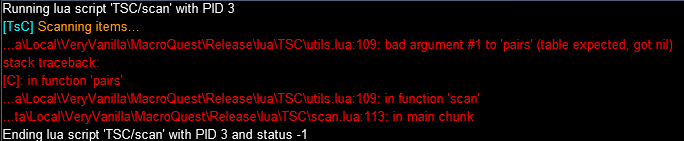
Sorry, I was on vacation. If you're still getting this error, can you send me a DM and I'll try to debug it.@raw - I wanted to reach out to talk about an issue I am having with the LUA. This issue seems to hit as soon as I run the script. This is the error code. Do you have any advice on how to fix the issue?
View attachment 50433
- Seller
- #168
rawmotion updated TS Consolidator V1 (Out-of-Beta) with a new update entry:
20230828
Read the rest of this update entry...
20230828
Read the rest of this update entry...
- Seller
- #169
Send me a DM and I'll try to figure out what's going wrong.I'm getting stuck on grabbing stuff (fish scales...) from the depot, I guess calculation of free inventory slots is done before taking different stack sizes in account (1 in TSD, maybe 10 in inventory)?
- Seller
- #170
rawmotion updated TS Consolidator V1 (Out-of-Beta) with a new update entry:
20230828
Read the rest of this update entry...
20230828
Commits
(90aad70) ~rawmotion1Fixed bug with picking up items
Fixed bug with toons with low inventory space
Read the rest of this update entry...

- Seller
- #172
Not sure I understand the question. It will use whatever's available. Check out the resource descriptionwill this only use depot,or will it use ts bags once depot is full
I have been getting the consolidator hanging up on me lately when scanning toons. Sometimes a character That is grabbing something gets hung up bc of an open vendor window or something .
This Lua is a great time saver thank you for all of your effort and time you put into making this!
This Lua is a great time saver thank you for all of your effort and time you put into making this!
I am sure I am doing something wrong but cannot sort it out.
I purchased this Lua today and downloaded through the launcher. Started the Lua in game. The issue is only one of my toons is getting the green dot to the left of their name. All others show up greyed out with server_name and red dot to the left of name. I have stop and restarted the Lua a few times and the issue persists. Again I am sure it is stupid simple but I cannot see anything in the instructions or this thread that covers this.
Thanks,
I purchased this Lua today and downloaded through the launcher. Started the Lua in game. The issue is only one of my toons is getting the green dot to the left of their name. All others show up greyed out with server_name and red dot to the left of name. I have stop and restarted the Lua a few times and the issue persists. Again I am sure it is stupid simple but I cannot see anything in the instructions or this thread that covers this.
Thanks,

@a_moss_snake something to do with dannet channels i think.. AMS, HALP!I am sure I am doing something wrong but cannot sort it out.
I purchased this LUA today and downloaded through the launcher. Started the lua in game. The issue is only one of my toons is getting the green dot to the left of their name. All others show up greyed out with server_name and red dot to the left of name. I have stop and restarted the lua a few times and the issue persists. Again I am sure it is stupid simple but I cannot see anything in the instructions or this thread that covers this.
Thanks,
That was my thought as well. They are all in the same channel in dannet, in the all channel there, as other dannet commands work fine. /dgge etc.@a_moss_snake something to do with dannet channels i think.. AMS, HALP!

Hey there! You have to switch fullnames off with dannet for it to work properly:That was my thought as well. They are all in the same channel in dannet, in the all channel there, as other dannet commands work fine. /dgge etc.
/dnet fullnames offThank you very much. Did I somehow miss it in the directions?Hey there! You have to switch fullnames off with dannet for it to work properly:/dnet fullnames off
This was it.
No, not sure what the default is for Dannet, but we just found out yesterday that this was the problem in a similar caseThank you very much. Did I somehow miss it in the directions?
This was it.
Ok good. I was just afraid i missed it. One pc worked fine out of the box and one did not. It is possible I changed the default somehow.I will add this in the resource description. I thought default was "off" but it seems like a lot of people have it on.
Thank you folks.
Is there a minimum suggested amount of empty inventory space to have on the toon? Does it move items already in trade depot, there?
yes, 8 :-) it switches stuff to/from depot. You might need a couple of runs to clear things up at firstIs there a minimum suggested amount of empty inventory space to have on the toon? Does it move items already in trade depot, there?
Could an "organize" option be implemented into this Lua where it will organize all items in depot inventory or bank by icon? Like all the ores organized all spices and so on vs them all being scattered around
- Seller
- #185
Sounds nice, but would be very difficult to manage and implement. It's outside the scope of this program.Could an "organize" option be implemented into this lua where it will organize all items in depot inventory or bank by icon? Like all the ores organized all spices and so on vs them all being scattered around
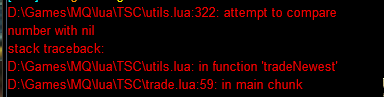
Loving this tool so far...i have 6 accounts with far more trade skill items than i should have, however, getting used to the logic flow (my own fault) has been difficult....however i've gotten this error several times:
- Seller
- #187
Send me a DM and I'll try to debug it for you.Loving this tool so far...i have 6 accounts with far more trade skill items than i should have, however, getting used to the logic flow (my own fault) has been difficult....however i've gotten this error several times:
View attachment 50654
- Seller
- #188
rawmotion updated TS Consolidator V1 (Out-of-Beta) with a new update entry:
20230908
Read the rest of this update entry...
20230908
Read the rest of this update entry...

Sorry for the dumb question..can i use this when i am wrapping up my grind session with no bank in zone just to click give, to give all my TS items to one person for banking?
- Seller
- #193
Yep. The give feature works without a banker in the zone.Sorry for the dumb question..can i use this when i am wrapping up my grind session with no bank in zone just to click give, to give all my TS items to one person for banking?
Thanks!
Would it also be possible to add a feature to consolidate all coins also on each character to 1 character ?

- Seller
- #197
If you have an item in both the bank and the depot, it should consolidate to the depot — never the other way around.So i was using this today. I noticed that it love to take stuff out of the depot to put it in the bank. when you have 70k or an item and it leaves 70 stacks in the bank and put an item that has 2 in the depot isnt good.
Though, I think I know why that might have happened in this case... I'll put out a fix for it soon.
Any chance for when you select a "give" from one to another, after it collects the items its going to turn over, the option to add to the ignore list?
- Seller
- #199
Yeah, this is on my list of things to do. Can't give an exact timeframe yet though.Any chance for when you select a "give" from one to another, after it collects the items its going to turn over, the option to add to the ignore list?
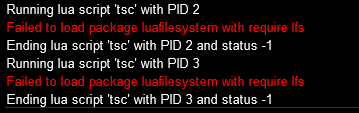
Thanks for the feedback.Luarocks are included with the Lua for MQ plugin. You can find them in your next folder/modules/
Why, is it not installing properly for you? What's the issue?
There are no files in my Next/Modules folder.
Only a luarocks.exe in Next main folder.
any pointer where i can get it?
Users who are viewing this thread
Total: 1 (members: 0, guests: 1)
Share: