• You've discovered RedGuides, an EverQuest multi-boxing and scripting community 🧙‍♀️⚙️. We want you to play several EQ characters at once, come join us and say hello! 👋

  • A TLP without truebox has thawed (Very Vanilla ready)
    Frostreaver
TsC – Automated Inventory Management & Consolidation For Your Whole Crew

Release TsC – Automated Inventory Management & Consolidation For Your Whole Crew (1 Viewer) 4.1.6

Is there a command to consolidate all the items to ONE toon? I have multiple accounts, and each separate account holds TS items for me (toon A has all the smithing, toon B has all the baking, toon C has all the brewing, etc). Now that I have a robust tradeskill depot on my main toon, I would like to transfer all these items to my main toon. Obviously, my main will have none or almost none of these items, so from your description, they will siphon off the few tradeskill items I have, which will not work. The only items I would not want moved are the Rogue poison only items or the tinkering only items that I would prefer to stay with their respective classes.
 
I can do both! 3 files attached for the race/class restricted trade skills.
Better yet, if you shared your method, I might try to incorporate it for every skill.

I assume you are a fellow TCN user/subscriber based on yesterday's update to improve artisan processing. Part of TCN installs SQL Lite, a public domain database, on your computer. I use the DB Browser app to run queries directly to the database. Great for information not easily displayed by the TCN GUI in game. All credit to @jb321 author of TCN for building the tables and filling it with data, as well as his sources (EQ Trader's Corner, etc) for publishing recipes etc.

In this case, here is the query I used to extract just the Tinkering Only materials:
[CODE lang="sql" title="DB Query"]Select ItemName FROM
(Select ItemName, Skill, Count(distinct Skill) as Foo FROM MasterCompTable INNER JOIN MasterRecipeTable on MasterCompTable.RecipeID = MasterRecipeTable.RecipeID
GROUP BY MasterCompTable.ItemID)
Where Skill is "Tinkering" and Foo = 1
ORDER BY ItemName[/CODE]

Change Tinkering to any trade skill name and there you have it.

Please note I am not coder/developer. I just roleplay one while I play EQ :)
 

Attachments

Oh I forgot to mention, there are several *.db files, Artisan.db is the one I used to query.
 
Is there a command to consolidate all the items to ONE toon? I have multiple accounts, and each separate account holds TS items for me (toon A has all the smithing, toon B has all the baking, toon C has all the brewing, etc). Now that I have a robust tradeskill depot on my main toon, I would like to transfer all these items to my main toon. Obviously, my main will have none or almost none of these items, so from your description, they will siphon off the few tradeskill items I have, which will not work. The only items I would not want moved are the Rogue poison only items or the tinkering only items that I would prefer to stay with their respective classes.

The command /tsc toonA toonB will tell toonA to give all of the TS mats in their inventory to toonB, no questions asked.
And /tsc toonA toonB all will tell toonA to give all their TS mats to toonB, including from their bank/depot.

There is currently no way to filter out poison-only or tinkering-only mats.
 
I can do both! 3 files attached for the race/class restricted trade skills.


I assume you are a fellow TCN user/subscriber based on yesterday's update to improve artisan processing. Part of TCN installs SQL Lite, a public domain database, on your computer. I use the DB Browser app to run queries directly to the database. Great for information not easily displayed by the TCN GUI in game. All credit to @jb321 author of TCN for building the tables and filling it with data, as well as his sources (EQ Trader's Corner, etc) for publishing recipes etc.

In this case, here is the query I used to extract just the Tinkering Only materials:
[CODE lang="sql" title="DB Query"]Select ItemName FROM
(Select ItemName, Skill, Count(distinct Skill) as Foo FROM MasterCompTable INNER JOIN MasterRecipeTable on MasterCompTable.RecipeID = MasterRecipeTable.RecipeID
GROUP BY MasterCompTable.ItemID)
Where Skill is "Tinkering" and Foo = 1
ORDER BY ItemName[/CODE]

Change Tinkering to any trade skill name and there you have it.

Please note I am not coder/developer. I just roleplay one while I play EQ :)
You say you're not a coder, but you know more about manipulating databases than I do =)
Do you have a link to the DB browser app you mentioned? I might start playing with it.
 
You say you're not a coder, but you know more about manipulating databases than I do =)
Do you have a link to the DB browser app you mentioned? I might start playing with it.
It's included with TCN it is called DBBrowser
 
Pro tip: You can drop bags at a time into the TS Depot, and it will put all Depot-placeable items in and leave non-Depot items in the bag. You then straight /autobank the rest and they will stack as needed. No need for a 3rd party tool to handle what's already in the game.

I also use ItemSorter to parcel stuff out to certain TS mules.
 
I know this is in beta, but is there a way to make toons dump the stuff they've been given into your bank? I had so much stuff it filled 8 TS satchels and it got stuck trying to trade items with no bag space. I believe an option to count the open bank space, bag space, and then dump stuff when it exceeds maximum of either would be a good idea. Like you have 46 spots in the bank, but the program wants to give you 80, so we'll reverse these ones to the lower of the two cause there's going to be nowhere to put it.
 
btw, used this today to consolidate shit across 10 mules. Overall, once i got the hang of it, was pretty helpful, but I had to run it 7 times to finally get all the items done and consolidated. I may have set a record for the amount of space i saved at over 800 tradeskill bag slots. So thanks for the kewl Lua.
 
Two issues that still bug me:

1.) sometimes I have to open the TS depot by hand (not only move the mouse) - it would be great to get a message on the "driver" toon that something has to be done on the "active" toon.
2.) if you have a vendor / tribute window open at one of the participating toons, interesting stuff is happening. Maybe better close those windows?

It's such a great tool, saved me a lot of space! Look forward to assigning item names with wildcard per toon (*silk*, *ore*, ...) :-D
 
@Myysterio @a_moss_snake I am working on a total refactor of the entire program with additional options, features, and checks. It should also be a lot faster (simultaneous scanning, etc.).
Lots of the issues you mentioned will be addressed, but keep em coming so I can factor them in.
 
First of all, awesome resource! Something that happened to me when running it is one of the toons I had listed was not online, when it got to that toon to have it start scanning it got stuck there as if it was waiting for the toon to report even though the toon wasn't online. I just deleted the toon from the ini and that fixed it.
 
Sharing my ignore list to give someone a jump on it.


Code:
return {
    [1] = 'Loaf of Bread',
    [2] = 'Water Flask',
    [3] = 'Malachite',
    [4] = 'Pearl',
    [5] = 'Emerald',
    [6] = 'Mechanized Lockpicks',
    [7] = 'Emblem of the Maestro',
    [8] = 'Emblem of the Deceiver',
    [9] = 'Mortar and Pestle',
    [10] = 'Emblem of the Overlord',
    [11] = 'Water Flask',
    [12] = 'Velium Smithy Hammer',
    [13] = 'Diamondized Velium Ore Nugget',
    [14] = 'Emblem of the Arch Convoker',
    [15] = 'Emblem of the Archon',
    [16] = 'Fresh Fish',
    [17] = 'Emblem of the Coercer',
    [18] = 'Peridot',
    [19] = 'Liquid Nightmare',
    [20] = 'Tiny Dagger',
    [21] = 'Deluxe Toolbox',
    [22] = 'Spit',
    [23] = 'Mixing Bowl',
    [24] = 'Emblem of the Feral Lord',
    [25] = 'Emblem of the Arch Lich',
    [26] = 'Emblem of the Prophet',
    [27] = "Cat's Eye Agate",
    [28] = 'Tiny Jade Inlaid Coffin',
    [29] = 'Bat Wing',
    [30] = 'Fish Scales',
    [31] = 'Bone Chips',
    [32] = 'Dairy Spoon',
    [33] = 'Cake Round',
    [34] = 'Pot',
    [35] = 'Non-Stick Frying Pan',
    [36] = 'Muffin Tin',
    [37] = 'Smoker',
    [38] = 'Mixing Bowl',
    [39] = 'Filleting Knife',
    [40] = 'Casserole Dish',
    [41] = 'Velium Smithy Hammer',
    [42] = 'Bread Tin',
    [43] = 'Water Flask',
    [44] = "Jeweler's Kit",
    [45] = 'Emblem of the Prophet',
    [46] = 'The Bone Rod',
    [47] = 'Peridot',
    [48] = 'Blue Diamond',
    [49] = 'Emblem of the Coercer',
    [50] = 'Velium Empowerment Medium',
    [51] = 'Pliers',
    [52] = 'Sewing Needle',
    [53] = 'Corking Device',
    [54] = 'Geerlok Fermentation Device',
    [55] = 'Skinning Knife',
    [56] = 'Spit',
    [57] = 'Skewers',
    [58] = 'Spell Research Kit',
    [59] = 'Tiny Dagger',
    [60] = 'Fishing Bait',
    [61] = 'Hydrolyzed Ether',
    [62] = 'Emerald',
    [63] = 'Pearl',
    [64] = 'Blessed Fishing Rod',
    [65] = 'Simple Sewing Needle',
    [66] = 'Wok',
    [67] = 'Bucket',
    [68] = 'Crab Cracker',
    [69] = 'Gutting Knife',
    [70] = 'Emblem of the Archon',
    [71] = 'Fletching Kit',
    [72] = 'Tackle Box',
    [73] = 'Deluxe Toolbox',
    [74] = 'Prayer Writing Kit',
    [75] = 'Chisel Set',
    [76] = 'Deluxe Sewing Kit',
    [77] = 'Smithy Hammer',
    [78] = 'Planar Jewelers Kit',
    [79] = 'Duo Setting Tool',
    [80] = 'File',
    [81] = 'Scaler',
    [82] = 'Pear Cut Tool',
    [83] = 'Emblem of the Dread Suzerain',
    [84] = 'Liquid Nightmare',
    [85] = 'Bone Chips',
    [86] = 'Tiny Jade Inlaid Coffin',
    [87] = 'Emblem of the Arch Convoker',
    [88] = 'Mana Battery - Class Five',
    [89] = 'Malachite',
    [90] = 'Smithing Chisel',
    [91] = 'Extraplanar Trade Satchel',
    [92] = 'Sculpting Tools',
    [93] = 'Diamond',
    [94] = 'Whittling Blade',
    [95] = 'Absinthe Spoon',
    [96] = 'Pie Tin',
    [97] = 'Enchanted Velium Powder',
    [98] = 'Mechanized Lockpicks',
    [99] = 'Fresh Fish',
    [100] = 'Brandy',
    [101] = 'Misty Thicket Picnic',
    [102] = 'Fishbone Dart Tool',
    [103] = 'Dihydrous Oxide Glaciator',
    [104] = 'Round Cut Tool',
    [105] = 'Pod of Water',
    [106] = 'Roots',
    [107] = 'Jasper',
    [108] = 'Oval Cut Tool',
    [109] = 'Reinforced Jewelers Kit',
    [110] = 'Planing Tool',
    [111] = 'Opal',
    [112] = 'Star Ruby',
    [113] = 'Fire Opal',
    [114] = 'Sapphire',
    [115] = 'Ruby',
    [116] = 'Fire Emerald',
    [117] = "Cat's Eye Agate",
    [118] = 'Fire Beetle Eye',
    [119] = 'Bat Wing',
    [120] = 'Rain Water',
    [121] = 'Anizoks Minimizing Device',
    [122] = 'Dessicated Vegetables',
    [123] = 'Dessicated Fruit',
    [124] = 'Dessicated Berries',
    [125] = 'Dessicated Roots',
    [126] = 'Habanero Pepper',
    [127] = 'Tanaan Embroidery Needle',
    [128] = 'Combine Smithy Hammer',
    [129] = 'Tanaan Smithing Hammer',
    [130] = 'Embroidering Needle',
    [131] = 'Bile Spine Needle',
    [132] = 'Emblem of the Maestro',
    [133] = 'Frostfell Biting Doll Kit',
    [134] = 'Lockpicks',
    [135] = 'Raw Underfoot Copper',
    [136] = 'Jewelers Glass',
    [137] = 'Etching Stone',
}
 
I know this is in beta, but is there a way to make toons dump the stuff they've been given into your bank? I had so much stuff it filled 8 TS satchels and it got stuck trying to trade items with no bag space. I believe an option to count the open bank space, bag space, and then dump stuff when it exceeds maximum of either would be a good idea. Like you have 46 spots in the bank, but the program wants to give you 80, so we'll reverse these ones to the lower of the two cause there's going to be nowhere to put it.
Unfortunately, there's currently no way to know how many free slots you have in the bank. Hoping the MQ devs add this datatype.
There will be an option in the upcoming version to put everything that's left over into your bank or depot after all the consolidation is complete.
 
First of all, awesome resource! Something that happened to me when running it is one of the toons I had listed was not online, when it got to that toon to have it start scanning it got stuck there as if it was waiting for the toon to report even though the toon wasn't online. I just deleted the toon from the ini and that fixed it.
This will be addressed in the upcoming non-beta version (no release date yet).
 
Two issues that still bug me:

1.) sometimes I have to open the TS depot by hand (not only move the mouse) - it would be great to get a message on the "driver" toon that something has to be done on the "active" toon.
2.) if you have a vendor / tribute window open at one of the participating toons, interesting stuff is happening. Maybe better close those windows?

It's such a great tool, saved me a lot of space! Look forward to assigning item names with wildcard per toon (*silk*, *ore*, ...) :-D
Depositing items into the depot will be fully automated in the new non-beta version. Issues with open vendor windows will be fixed too.
 
For the toons.Lua, I did a guild export and pasted it into ChatGPT with a copy of the toon.Lua. It did all the hard work for all the people with alot of toons.
 
I dont have all of my mules on autoaccept with 400 other toons i have access too... it turns into a giant mess :P
400?! This script must take hours to complete for you...
Anyway, in the new non-beta version I'm working on (no release date yet), it will use Dannet to tell receivers to accept trades if autoaccept is not running.
 
400?! This script must take hours to complete for you...
Anyway, in the new non-beta version I'm working on (no release date yet), it will use Dannet to tell receivers to accept trades if autoaccept is not running.
No, i have auto accept setup for all the people in my guild who have given me access to their accounts for one reason or other. My mq2autoaccept.ini file is a mile long.
 
@Myysterio Dang - I can barely handle managing TS components for one crafter across a group + a couple farmers.

Can't wait for the non-beta!
 
Teaser: Some new things coming up in the new edition:
  • Toons now scan, grab, and bank simultaneously instead of one toon at a time.
  • Depositing items into the depot is now fully automated (no user intervention required).
  • Statistics are now reported at the end, showing you how many slots you saved.
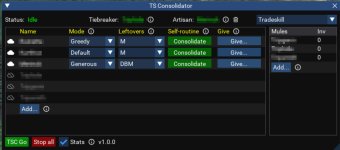
  • Added Generous and Greedy modes. You can set the mode for each toon individually.
    • Default: If more than one toon has an item, you will give or receive based on QTY
    • Generous: If more than one toon has an item, you will always give
    • Greedy: If more than one toon has an item, you will always take
    • Artisan rules still trump above rules (see the decision tree for exact logic)
  • You can add personal ignore files for individual toons (in addition to global ignore).
  • If not all your toons are online or in-zone, you can now run it with just the currently available toons
  • Added a leftovers option to get rid of items still in your inventory after consolidation. You can set this for each toon individually.
    • Mode1: Depot, if depot full then bank
    • Mode2: Depot, if depot full then mules
    • Mode3: Mules, if one is full then move to the next
    • (Mules are defined in settings. They can be, but don’t have to be part of your toons.Lua)
  • Huge speed increase when artisan list is present
  • Bug fixes, general improved performance and reliability
 
Anytime this goes to pull something out of a TS depot, it just freezes up for me. Is there anyway I can make it ignore the depot entirely or is there a fix for this?
 
Looks really great! ATtempted to use it, but since I don't have NOS (Or the TS depot), it just strokes out in a corner with an error message.

Any chance there'd be an option in future versions to disable the scanning of expansion locked storage? Say uncheck using the TS Depot. or Uncheck Dragon hoard (I have this but only for 1 of 6 toons), etc.

Would lvoe to cleanup my bags/banks someday and was hoping this would do it :)
 
rawmotion updated TS Consolidator V1 (Out-of-Beta) with a new update entry:

V1.0 Out-of-Beta Release

  • Rebuilt from scratch with a full GUI.
  • No more need to mess with config files.
  • Toons now scan, grab, and bank simultaneously instead of one toon at a time.
  • Toons trade 8 items at a time instead of 1 at a time
  • Added Collectables mode with all the same features
  • Depositing items into the depot is now fully automated (no user intervention required).
  • Bulk add, and add from file to ignore and artisan lists
  • Statistics are now reported at the end, showing you how many...

Read the rest of this update entry...
 
On the instructions you have this...maybe i am reading this wrong, or misunderstanding....but isnt it the same depot on the same account?
  • You have 35 Opals in your depot, but another toon has 50 in theirs. You’ll grab yours and give them to the other toon, who’ll add them to their depot.
 
Hi.
Yes, this consolidates items across the toons you play on separate accounts that are logged in simultaneously.
It doesn't consolidate between toons on the same account.
 
Release TsC – Automated Inventory Management & Consolidation For Your Whole Crew

Users who are viewing this thread

Back
Top
Cart