• You've discovered RedGuides, an EverQuest multi-boxing and scripting community 🧙‍♀️⚙️. We want you to play several EQ characters at once, come join us and say hello! 👋

  • A TLP without truebox has thawed (Very Vanilla ready)
    Frostreaver
TsC – Automated Inventory Management & Consolidation For Your Whole Crew

Release TsC – Automated Inventory Management & Consolidation For Your Whole Crew (1 Viewer) 4.1.6

Thanks for the observations. There's still a lot to improve, and this helps.

Holding your mouse over the Personal Depot window is unfortunately necessary. MQ isn't currently able to deposit items.

Not sure what's going on with the exquisite silk. I'll look into it... It could be that if you manually clicked it into the depot, it didn't register (you only need to position your mouse over the depot, it will do the clicking). But either way, I'll see if I can create some better checks.

Different items with identical names are not something I considered. I think it's going to try to stack them. But if it does, it shouldn't cause any errors. I'll take note of it as something to look into.

Thanks.
Hi,

Yes I have been clicking the items into the depot. Just positioning the cursor over the open depot windows doesn't seem to be enough ... or it might just be me being impatient, I waited at least 5 seconds before I decided it wasn't going to happen, so I was just clicking them in.
I'll try waiting a bit longer.

As for stacking, there's no functional issue, it's just less efficient. The fix would be to use item id's, but I understand that would require some refactoring, meaning return on time spent would likely be small.

Update: Holding the cursor over the tradeskill depot during that phase does work ... sometimes. And sometimes not 😥
 
Last edited:
I was wondering if you could handle the grab utility a little different, instead of clicking through each item in find and checking. instead create and array of the find, compare it to the grablist and then only call the listselect if you need the item?

the reason I ask this is I had it running on my 8 TS toons, and it took 2-3 hrs per toon. but the majority of the time it was just because it was clicking through every item.

The other thing it seemed was that it would take multiple passes, as Toon1 would trade an item to toon2 but toon3 would then trade the same item to toon1.. so then needed another pass to get toon1 to get stack to toon2. then multiply that out to 8 toons.
(at least that's what it seemed was happening) I think this would be solved though when you had the feature of allowing only one direction of trade.

Thanks for your work on this.
 
I was wondering if you could handle the grab utility a little different, instead of clicking through each item in find and checking. instead create and array of the find, compare it to the grablist and then only call the listselect if you need the item?

the reason I ask this is I had it running on my 8 TS toons, and it took 2-3 hrs per toon. but the majority of the time it was just because it was clicking through every item.

The other thing it seemed was that it would take multiple passes, as Toon1 would trade an item to toon2 but toon3 would then trade the same item to toon1.. so then needed another pass to get toon1 to get stack to toon2. then multiply that out to 8 toons.
(at least that's what it seemed was happening) I think this would be solved though when you had the feature of allowing only one direction of trade.

Thanks for your work on this.
Something really weird is going on there. It shouldn't take nearly that long, regardless of how many items you have. What version are you using?
For the second issue. All trades are determined beforehand. There are no situations in which toon1 would pass to toon2, and then toon2 would pass to toon3. Something else must be happening, but it's hard to imagine what without more details.
 
Hi,

Yes I have been clicking the items into the depot. Just positioning the cursor over the open depot windows doesn't seem to be enough ... or it might just be me being impatient, I waited at least 5 seconds before I decided it wasn't going to happen, so I was just clicking them in.
I'll try waiting a bit longer.

As for stacking, there's no functional issue, it's just less efficient. The fix would be to use item id's, but I understand that would require some refactoring, meaning return on time spent would likely be small.

Update: Holding the cursor over the tradeskill depot during that phase does work ... sometimes. And sometimes not 😥
Sorry to hear. It works over here on all my toons. The window needs to be in focus while that particular toon is trying to deposit.
I'm thinking of removing support for Depot entirely.. At least until the devs figure out a way to deposit items.
Right now, holding your cursor over the depot window while the script does /click left is the only way.
I wonder if different skins could also affect things here. Are you using default EQ skin?
 
version = '0.3.3'

I switched it to just go between my 2 main toons, its currently at 3hrs and still going 1 item at a time though its on the "s"'s on second toon so probably only an hr or 2 left till it starts trading.
the listsize on this 2nd toon is 882 just for reference.
 
Sorry to hear. It works over here on all my toons. The window needs to be in focus while that particular toon is trying to deposit.
I'm thinking of removing support for Depot entirely.. At least until the devs figure out a way to deposit items.
Right now, holding your cursor over the depot window while the script does /click left is the only way.
I wonder if different skins could also affect things here. Are you using default EQ skin?
I am using the Zliz skin kindly provided by Sic and Kaen.
I wouldn't have thought it would have any affect on a left click initiated by script though.
 
I am using the Zliz skin kindly provided by Sic and Kaen.
I wouldn't have thought it would have any affect on a left click initiated by script though.
Hmm. Yeah, I also doubt it makes a difference. I'm not sure what's going on here...
If I encounter the same issue and can reproduce it, then I'll see if there's some way to improve it.
 
I'll be in Italy for the next week so if there are any bugs they'll have to wait! Sorry, not sorry. :xd:
 
the Grabbing routine was 1000x times faster for me, but there was one issue. it wasn't able to open the TSdepot to grab the items, once I manually opened the depot it went fine.

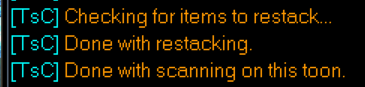
also I noticed that it didn't do any restacking: for instance it said
1682694992117.png
but right in the window where it was scanning I could see several items that weren't stacked like:
1682695025438.png
 
after running it through a few more toons, I think it might just be a timing thing causing the tsdepot to not pickup. I saw it pickup multiple items then get stuck.. so timing all I can think it is.

Also would it be possible to have all toons do there inventory search at the same time, rather then one at a time?
 
Thanks this saves me sooo much work! Thank you!!

It was only an hour for all 16 toons.

It would be great if a toon returned to their starting location. I had 16 toons all crowded around the banker.

I had the same problem with the depot as previously reported. I needed to click the item into the depot. There were times it was enough just to have it hove over the depot. The first time the depot was called it always happen. Later it was being clicked in by the script. Later still I needed to click the item. I need to check the sequencing a bit.

The script did confuse a familiar with the main toon. I needed to get rid of the familiar. I didn't try a banking familiar.

The script never consolidated items into the depot at the end. I ran /tsc toonname on a few of the toons to remedy the situation.

I've included my ignore file. Except for the bread. They are reagents used by the toons. They need them.
return {
[1] = 'Loaf of Bread',
[2] = 'Essense Emerald',
[3] = 'Tiny Jade Inlaid Coffin',
[4] = 'Jaspar',
[5] = 'Emerald',
[6] = 'Fire Beetle Eye',
[7] = 'Malachite',
[8] = 'Essence Emeralds',
[9] = 'Bloodstone',
[10] = 'Pearl',
[11] = 'Fulligan Soulstone of Innoruuk',
[12] = 'Cloudy Stone of Veeshan',
[13] = 'Tiny Dagger',
[14] = 'Peridot',
[15] = 'Opal',
[16] = 'Gnomish Escape Rocket Fuel',
}

I did have a problem with one of the regents. It has an apostrophe in the name. The script flagged it as an error and I needed to delete the entry. How do you handle "Cat's Eye Agate"?
 
Last edited:
Does this allow you to block specific items from consolidation?

I don't want my casters trading around the spell reagents that they need to cast runes, CoH, mage pet, etc.
 
Does this allow you to block specific items from consolidation?

I don't want my casters trading around the spell reagents that they need to cast runes, CoH, mage pet, etc.
Yes, there is an ignore file. The instructions explain how to use it.
 
Thanks this saves me sooo much work! Thank you!!

It was only an hour for all 16 toons.

It would be great if a toon returned to their starting location. I had 16 toons all crowded around the banker.

I had the same problem with the depot as previously reported. I needed to click the item into the depot. There were times it was enough just to have it hove over the depot. The first time the depot was called it always happen. Later it was being clicked in by the script. Later still I needed to click the item. I need to check the sequencing a bit.

The script did confuse a familiar with the main toon. I needed to get rid of the familiar. I didn't try a banking familiar.

The script never consolidated items into the depot at the end. I ran /tsc toonname on a few of the toons to remedy the situation.

I've included my ignore file. Except for the bread. They are reagents used by the toons. They need them.
return {
[1] = 'Loaf of Bread',
[2] = 'Essense Emerald',
[3] = 'Tiny Jade Inlaid Coffin',
[4] = 'Jaspar',
[5] = 'Emerald',
[6] = 'Fire Beetle Eye',
[7] = 'Malachite',
[8] = 'Essence Emeralds',
[9] = 'Bloodstone',
[10] = 'Pearl',
[11] = 'Fulligan Soulstone of Innoruuk',
[12] = 'Cloudy Stone of Veeshan',
[13] = 'Tiny Dagger',
[14] = 'Peridot',
[15] = 'Opal',
[16] = 'Gnomish Escape Rocket Fuel',
}

I did have a problem with one of the regents. It has an apostrophe in the name. The script flagged it as an error and I needed to delete the entry. How do you handle "Cat's Eye Agate"?

Hmm. Good to know about the familiar. Hadn't thought of that.
To add an item with an apostrophe, use a backslash to escape the character. E.g., "Cat\'s Eye Agate"
 
after running it through a few more toons, I think it might just be a timing thing causing the tsdepot to not pickup. I saw it pickup multiple items then get stuck.. so timing all I can think it is.

Also would it be possible to have all toons do there inventory search at the same time, rather then one at a time?
The reason they don't do it at the same time is that they all need to read and write to the same file.
There's definitely a way around this, but it's beyond my capacity at the moment as it would require some significant reworking of the code.
 
the Grabbing routine was 1000x times faster for me, but there was one issue. it wasn't able to open the TSdepot to grab the items, once I manually opened the depot it went fine.

also I noticed that it didn't do any restacking: for instance it said
View attachment 48150
but right in the window where it was scanning I could see several items that weren't stacked like:
View attachment 48151
The restacking routine only applies to multiple incomplete stacks in your inventory.
Say you have 5 bone chips in a bag and 3 bone chips in another bag. It would restack them.
Consolidating stuff in your inventory with stuff in your depot happens later on.
 
Slight modifications from tradeskill to collections and made consolidation of my collection mules a breeze. Thanks again for sharing.
 
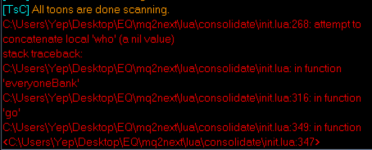
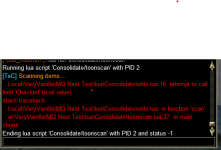
Will not having the personal TS depot cause this to crash? I don't have the latest expansions on my all of my characters, so don't have the depot yet. Getting this error and crash:

1685082771493.png
 
Not saying this error is caused by that, however, yes, since your asking it to scan a invalid data field, i think its going to be unhappy.
 
Interesting tool! I am trying understand how it decides if something is to be consolidated or not. Does it only work on Tradeskill items? If so, how is that filtered? I found this part, but don't see where the TS comes into play.

if item.NoDrop() or item.Container() ~= 0 or not item.Stackable() then
skip = true

What I am hoping for is to figure out how to move just the Tinkering items to a Gnome, and the poison items to a Rogue.
 
rawmotion updated TS Consolidator (Beta) with a new update entry:

New features

This update has several features I added to make managing TS items in combination with TCN, and the Artisan Prize quests easier. They make sense for my specific setup but may not for yours.

I wanted the toon I'm working on for the AP to completely dump all his TS items onto mules, EXCEPT for the items he still needs for the AP combines. In addition, during consolidation, I wanted all mules to give TS items to my AP toon regardless of other considerations.

In other words, I...

Read the rest of this update entry...
 
On it! My dad had a Dr appointment... It's made it past the error and is doing the compare listing.
 
Last edited:
That's not possible. There's no way to tell which trade skill an item is for.
I love yesterdays update, especially the part with the artisan.Lua file.

To do this, I had to create a massive list of TS items my AP toon still needs. I added support for this in a config file called artisans.lua.

The good news is I have already figured out how to tell which trade skill items are exclusive to a trade skill. If I provide you with a Tinkering.Lua, Poison.Lua and Alchemy.Lua, will do you the rest?
 
The good news is I have already figured out how to tell which trade skill items are exclusive to a trade skill. If I provide you with a Tinkering.lua, Poison.lua and Alchemy.lua, will do you the rest?
Better yet, if you shared your method, I might try to incorporate it for every skill.
 
Release TsC – Automated Inventory Management & Consolidation For Your Whole Crew

Users who are viewing this thread

Back
Top
Cart