• You've discovered RedGuides, an EverQuest multi-boxing and scripting community 🧙‍♀️⚙️. We want you to play several EQ characters at once, come join us and say hello! 👋

  • A TLP without truebox has thawed (Very Vanilla ready)
    Frostreaver

Progression Server Truebox

Kramernaut

Member
Joined
Feb 3, 2020
RedCents
31¢
This is not really a redguides/macroquest question, just curious. Do any of you play on the truebox server, and if so, what kind of setup do you use for boxing?
Not looking for anything that lets me run redguides, or MQ2, or VPN or anything.

Mostly looking for, for your multiple computers, do you run a mouse/keyboard for each, us some kind of KVM software, or some other type of cool setup or solution I haven't thought of.
I have always just done a single box on these servers, but am considering 2 or 3 boxing, and am curious what kind of setups people are using.

Thanks
 
I played a bit on True box server

As far as I know, nothing works on those servers.

I have 2 computers side by side and play SK and cleric , that is the best I came up with
 
I have a 3 computer set up on a true box and use Multiplicity seamless. 2 monitors side by side and one above in the middle. I started with 2 computers after I got used to it I added a 3rd. Looking to add a fourth if I can handle it.
 
/nod, multiplicity is the best I saw so far as well. Still looking, I hope to find a solution that would include the monitor as well.
Has anyone tried remote desktop and just alt tab between windows? Any reason that would not be allowed?
 
A little bit more of an involved solution with some investment but when I played on Mangler I would 6 box with multiplicity. I have a Logitech G510s with the 18 G Key bank and I would assign the G-Keys custom hotkeys combined with multiplicity hotkeys. So, for example, I would essentially just pilot the tank and I would set a G Key to hit the defined multiplicity hotkey to focus a given window, have it do whatever hotkey press there, then refocus back on the main window. Timing wise this was almost seamless so it was about as close to having EQBC as I could get, and you can break it out into 3 banks of 18 so you have a lot of options you can switch to on the fly. It wasn't perfect, but it was very effective. It got to a point where I wouldn't really look at any other windows but did have a 3 monitor setup with at least the three important characters. This was back in Kunark / Velious though, so I imagine in later expansions this would be more challenging as the game speeds up (relatively).

Edit - Sorry, forgot to include 6 PCs (Bought some minis). No circumvention of any DBG rules here.
 
Last edited:
I played a bit on mangler, boxing Sk (main, also driving char) and a shaman. Sk on my desktop and shaman on a laptop next to it. I would run a software (the name escapes me atm) that would let me drag the mouse (from desktop computer) over to the laptop screen, and by doing so the keyboard would switch to my laptops computer. It wasent perfect, it wasent always super seemless either... But it worked for me then and there.
 
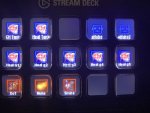
I started out with streamdeck and parsec which I really liked for my druid. You can configure basic macros with it but the really cool part is configuring the icons with eq spell gems. The biggest issue I had was cost, I cannot afford to buy one of these for each of my boxes. The other complaint I have with it was you can only send commands to the system the streamdeck is plugged into.

I tried multiplicity but moving the mouse from screen to screen was a bit slow and I kept doing it accidently. Someone in my guild suggested I check out input director. You can configure key bindings that directly press other keys on the target system. For example, you can bind num pad 0 to click 1 on your target system. This will keep you from being true boxed from pressing the same key on multiple systems at once as well as allow you to cast spells without moving your mouse to another screen. This configured with some decent in game macros and audio triggers can really make things a lot easier. It also supports KVM features similar to multiplicity.

There are a couple downsides to the application, you cannot edit key bindings (delete and recreate are the only option) and you can only bind one key to one other target system. This can be overcome if you have a keyboard that supports macros. For example, I configured one of my keyboard keys to click both f22 and f22 this then sends key presses to cast champion on the sham pc and DS on the druid PC.

Parsec pro tip, you can open multiple instances of parsec if you use the portable app. Just copy and paste the portable parsec folder and launch both.
09046060-A838-44FD-AC32-C79EAA1D46F3.jpeg
 
6 computers. 1 a main desktop, 3 laptops of varying quality throughout the years, and 2 surface gen 1's I got for free. Each keyboard is lined up, labeled for the character, and each has hotkeys to do the job. Clerics have /target #normaltank (so Bob, or Bill) plus 2-3 others for the other favorite tanks. Shamans have /assist #normaltank. /pause 15, /cast 3 (for malo or slow) type deals. My truebox for most of coirn/agn was war/cler/enc/mag/mag/sham. Lots of easy automation with assist, cast and nuke buttons I could just cycle through on the keyboards in front of me. I kept it straight 99 style.. except I didn't get disconnected when someone called.
 
6 computers. 1 a main desktop, 3 laptops of varying quality throughout the years, and 2 surface gen 1's I got for free. Each keyboard is lined up, labeled for the character, and each has hotkeys to do the job. Clerics have /target #normaltank (so Bob, or Bill) plus 2-3 others for the other favorite tanks. Shamans have /assist #normaltank. /pause 15, /cast 3 (for malo or slow) type deals. My truebox for most of coirn/agn was war/cler/enc/mag/mag/sham. Lots of easy automation with assist, cast and nuke buttons I could just cycle through on the keyboards in front of me. I kept it straight 99 style.. except I didn't get disconnected when someone called.
I got carpal tunnel just reading this post
 
Hotkeynet been working since phinny for broadcasting. Just use a VPN on your other machines so you don't get the instant dc for sending keystrokes at the same time from same ip.

If you're cheap and don't want to pay for a VPN you can just vary the key it broadcasts, so an example would be...

Press 1 on main machine that sends:
6 to pc2
9 to pc3
3 to pc4
7 to pc5

And so on.
 
I had good luck with hotkeynet back in the day in eq. To send multiple keypress you can do for example <key Lctrl I> would send left ctrl + i. I did have to use a VPN on each machine though or I'd get trueboxed like someone mentioned.
 
I used Hotkeynet for macros and hotkey broadcasts + Synergy for mouse+keybord sharing with 5 laptops+1main pc.
What's priceless about hotkeynet is that you can write down long macros to be sent to each computer, like rebuffing, mage reclaim energy monster summon trick.
Problem about Hotkeynet is that it can't send keystrokes to foreground windows, in case you play on Live. I find it better than Isboxer for things like macros or mashing buttons like mad.
 
I know i'm a little late on this post, but I have a 49" curved main monitor, i run my main toon on left half the screen, all other toons (I currently 5 box) run on laptops. I use google remote desktop to connect to 3 of the other laptops on the right hand side of my screen and overlap the windows (middle one higher than the other two and left and right stick out from middle one) so i can easily click to switch between the three windows. I also have USB keypads above my keyboard that and have keystrokes bound to hotbar 1, keys 1-0. Most of the time, I pull a mob, and just hit 1 on the 3 keypads and 1 on the physical laptop to my right and it assists, sends pets in, slows, dots, etc.
 
/nod, multiplicity is the best I saw so far as well. Still looking, I hope to find a solution that would include the monitor as well.
Has anyone tried remote desktop and just alt tab between windows? Any reason that would not be allowed?

I have used Spashtop Personal in the past so I can have multiple EQs running on multiple computers but I remote control them all on one system, thus they are all controlled on one monitor and keyboard / mouse.

Program a G15 with Splashtop Keyboard shortcuts and easy-peasy. https://support-splashtopbusiness.splashtop.com/hc/en-us/articles/4409438267547-Keyboard-Shortcuts
 
Doesnt seem like there is much need to program your keyboard when you could incorporate it in an Ini or react, or did i miss something?
 
Doesnt seem like there is much need to program your keyboard when you could incorporate it in an Ini or react, or did i miss something?
mq does not work as is not supported on a truebox server, this thread was about other things you can do that aren't mq
 
Progression Server Truebox

Users who are viewing this thread

Back
Top
Cart