
-
 Hail, we're RedGuides. We want you to play six (yes, 6!) EverQuest characters at once. We have scripts and a friendly community to help, please join our playstyle and say hello! 👋
You are using an out of date browser. It may not display this or other websites correctly.
You should upgrade or use an alternative browser.
You should upgrade or use an alternative browser.
Resource icon
Release Tradeskill Construction Set NeXt (4 Viewers) 4.1991b
- Thread starter jb321
- Start date

- Seller
- #4,962
the download tracker confirms u now have the latest TCN version DL'dI've just updated RedGuides and 4.199b1 came down, but when trying to update TCN itself by the resource ID, just 4.199 comes down.
- Seller
- #4,964
Have you updated MQ (live) also?Failed again
View attachment 74661
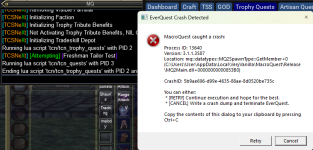
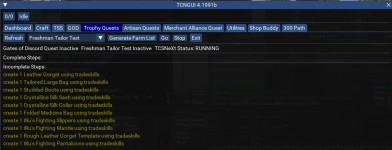
Since the update for TCN this morning - now running tcn crashes the character - get to trophy section and when I hit go
View attachment 74675

Last edited by a moderator:
- Seller
- #4,967
Are you on the latest MQ? 1/25/2026?Since the update for TCN this morning - now running tcn crashes the character - get to trophy section and when I hit go
View attachment 74675
yesAre you on the latest MQ? 1/25/2026?
was working fine yesterday
- Seller
- #4,970
Prior versions of TCN are available for DL for testing.was working fine yesterday
ok, previous version worked, so must have been the latest version is bugged - but it now had a problem with the bank - so downloaded the next version before the latest and that one workedPrior versions of TCN are available for DL for testing.
Attachments
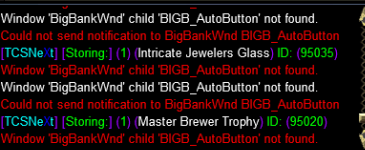

Still not work doing trophy quest baking
--------------------------
EverQuest Crash Detected
---------------------------
MacroQuest caught a crash:
Process ID: 14896
Version: 3.1.1.3587
Location: mq::datatypes::MQ2SpawnType::GetMember+0 (C:\Users\xxx\AppData\Local\VeryVanilla\MacroQuest\Release\MQ2Main.dll+00000000000853B0)
CrashID: 62bde1c0-627f-42ae-9e08-8dfd2325f074
You can either:
* [RETRY] Continue execution and hope for the best.
* [CANCEL] Write a crash dump and terminate EverQuest.
Copy the contents of this dialog to your clipboard by pressing Ctrl+C
--------------------------
EverQuest Crash Detected
---------------------------
MacroQuest caught a crash:
Process ID: 14896
Version: 3.1.1.3587
Location: mq::datatypes::MQ2SpawnType::GetMember+0 (C:\Users\xxx\AppData\Local\VeryVanilla\MacroQuest\Release\MQ2Main.dll+00000000000853B0)
CrashID: 62bde1c0-627f-42ae-9e08-8dfd2325f074
You can either:
* [RETRY] Continue execution and hope for the best.
* [CANCEL] Write a crash dump and terminate EverQuest.
Copy the contents of this dialog to your clipboard by pressing Ctrl+C
Everything seems to be working for me now with latest MQ Live and Latest TCN. Recipes work, missing items list works, all functions I used before patch no longer throw errors. I can get items from my depot automatically during crafting again. Let me know if there's anything in my config you'd need to look at to see why things are OK for me and not others.
- Seller
- #4,974
I have brought this to the attention of the dev-collective.Still not work doing trophy quest baking
--------------------------
EverQuest Crash Detected
---------------------------
MacroQuest caught a crash:
Process ID: 14896
Version: 3.1.1.3587
Location: mq::datatypes::MQ2SpawnType::GetMember+0 (C:\Users\xxx\AppData\Local\VeryVanilla\MacroQuest\Release\MQ2Main.dll+00000000000853B0)
CrashID: 62bde1c0-627f-42ae-9e08-8dfd2325f074
You can either:
* [RETRY] Continue execution and hope for the best.
* [CANCEL] Write a crash dump and terminate EverQuest.
Copy the contents of this dialog to your clipboard by pressing Ctrl+C
- Seller
- #4,976
Shop buddy is not the way, shop buddy is a feature that was meant to take other toons lists and shop those lists or your lists for you..Misty Thicket Picnic Basket is hand crippling exhausting to make all of the individual purchases for the subcombines. Please someone save me and briefly explain how to use shop buddy. I definitely need to set a purchase amount and have TcN purchase for me.
You can batch them, or standard.
Standard, you select say 400 and it will buy enough for 400 and use the UI and it will try to make em all.
I believe in standard and batch you have 'solo' shop also, where you can just buy all the stuff and hold onto it.
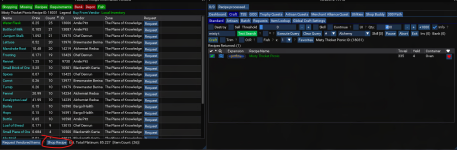
As a note: TCN is the sub-combine machine, it does all the combines and makes the tools as needed.
Last edited:

---------------------------
EverQuest Crash Detected
---------------------------
MacroQuest caught a crash:
Process ID: 23032
Version: 3.1.1.3583
Location: mq::datatypes::MQ2SpawnType::GetMember+0 (C:\Users\rhick\Desktop\MQ\MQ2Main.dll+0000000000085C20)
CrashID: 8bd6e877-bcb4-488d-ac40-e867eaa7025f
You can either:
* [RETRY] Continue execution and hope for the best.
* [CANCEL] Write a crash dump and terminate EverQuest.
Copy the contents of this dialog to your clipboard by pressing Ctrl+C
---------------------------
Retry Cancel
---------------------------
I am fully updated.
EverQuest Crash Detected
---------------------------
MacroQuest caught a crash:
Process ID: 23032
Version: 3.1.1.3583
Location: mq::datatypes::MQ2SpawnType::GetMember+0 (C:\Users\rhick\Desktop\MQ\MQ2Main.dll+0000000000085C20)
CrashID: 8bd6e877-bcb4-488d-ac40-e867eaa7025f
You can either:
* [RETRY] Continue execution and hope for the best.
* [CANCEL] Write a crash dump and terminate EverQuest.
Copy the contents of this dialog to your clipboard by pressing Ctrl+C
---------------------------
Retry Cancel
---------------------------
I am fully updated.
- Seller
- #4,978
---------------------------
EverQuest Crash Detected
---------------------------
MacroQuest caught a crash:
Process ID: 23032
Version: 3.1.1.3583
Location: mq::datatypes::MQ2SpawnType::GetMember+0 (C:\Users\rhick\Desktop\MQ\MQ2Main.dll+0000000000085C20)
CrashID: 8bd6e877-bcb4-488d-ac40-e867eaa7025f
You can either:
* [RETRY] Continue execution and hope for the best.
* [CANCEL] Write a crash dump and terminate EverQuest.
Copy the contents of this dialog to your clipboard by pressing Ctrl+C
---------------------------
Retry Cancel
---------------------------
I am fully updated.
It appears you are a couple MQs behind...
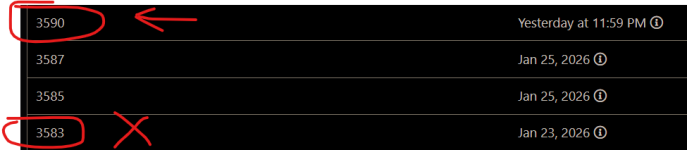
I will check that now...I did update
was able to confirm I am full up to date. I was talking to sic about it
Are you sure you have the latest TCN? I would either manually download it now to update or (better) click Watch (above) and make sure Redfetch is updating.
All works fine here - but I admit to not using Tradeskill Depot for anything I'm doing. If you are on the latest version, I think it would help if you were clearer about when you crash (are you getting stuff from the bank, for example).
EDIT: Never mind! We cross-posted. Glad you are sorted!
All works fine here - but I admit to not using Tradeskill Depot for anything I'm doing. If you are on the latest version, I think it would help if you were clearer about when you crash (are you getting stuff from the bank, for example).
EDIT: Never mind! We cross-posted. Glad you are sorted!
- Seller
- #4,983
Redfetch does things I know not about, and this is the second time that I am aware the result were amiss.Are you sure you have the latest TCN? I would either manually download it now to update or (better) click Watch (above) and make sure Redfetch is updating.
All works fine here - but I admit to not using Tradeskill Depot for anything I'm doing. If you are on the latest version, I think it would help if you were clearer about when you crash (are you getting stuff from the bank, for example).
EDIT: Never mind! We cross-posted. Glad you are sorted!
I still update using the John Henry method.
Last edited:
- Seller
- #4,985
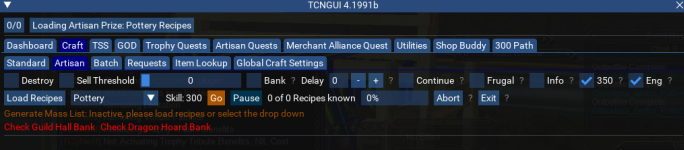
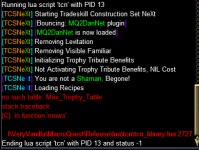
This it the tall tale sign of not running /Lua run tcgsetup.LuaSo TCN isnt working today - current version loaded - I load up pottery click 350 and have craft and artisan ticked - when I click load recipes it crashes - - or when I click go - or when I don't click anything - obviously Im doing something wrong
View attachment 74786
View attachment 74787
alternatively you can extract the prize.db file to the \Lua\tcn directory, the prize.zip file is in that dir.
TCN must not be running at all..
ok I redid setup and it added prize - so when I went to load recipes it didnt loas any so I hit generate mass list it started to load some (see 14/1685) - then crashedThis it the tall tale sign of not running /lua run tcgsetup.lua
alternatively you can extract the prize.db file to the \lua\tcn directory, the prize.zip file is in that dir.
TCN must not be running at all..
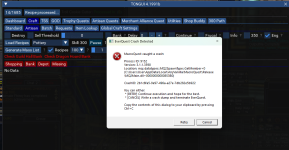
Is there a youtube which shows step by step - I have watched the overview but that hasnt helpedok I redid setup and it added prize - so when I went to load recipes it didnt loas any so I hit generate mass list it started to load some (see 14/1685) - then crashed
View attachment 74807
Attachments
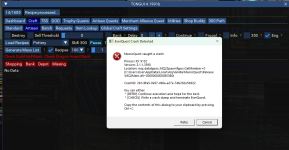
- Seller
- #4,988
please update to latest MQ, a new version was just pushed out.Is there a youtube which shows step by step - I have watched the overview but that hasnt helped
Thanks, you are a LEGENDplease update to latest MQ, a new version was just pushed out.


- Seller
- #4,993
yep, the cause is I referenced a recipe in another pack, when I should have referenced the recipe in that pack, they both would work but you would need LSO for the the 39608 recipe. I will correct.

IssuingSometimes I'll get stuck running to a crafting container. The script pauses itself or whenever I press pause myself the UI disappears. How do I bring the UI back without restarting the script?
Code:
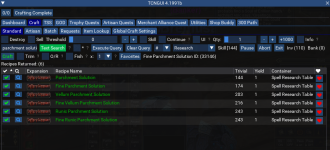
/lua pause tcnI would really like to know if there is a guide that shows you how to craft an item - I have put it in what I think and then hit execute (also tried hitting craft) - I have looked at the basic guide but its not a step by step - I want to know how to put in the name of the item (eg fine parchment solution) to be made, then make it - sorry I'm a dumbass
- Seller
- #4,997
You have 110 in inventory so a quantity of 1 is satisfied. I added Inv and Bank on the side so you could see at a glance how many you already have.I would really like to know if there is a guide that shows you how to craft an item - I have put it in what I think and then hit execute (also tried hitting craft) - I have looked at the basic guide but its not a step by step - I want to know how to put in the name of the item (eg fine parchment solution) to be made, then make it - sorry I'm a dumbass
View attachment 74959
It is a control so if you say I wanted 100 vegetables it would make what you want and stop and if you tried again after that it would not do anything because you already have the count.
Last edited:
- Seller
- #4,999
Question (which I'm sure is obvious but i missed it), what is the difference between recipe Riven Arcana Transmogrifant Patch in "Loom" and Riven Arcana Transmogrifant Patch in "Forge". The crafting components are identical but the crafting method is different.
One answer is it is a 350 artisan prize recipe to knock out, to my knowledge you can use either one for any higher craft.
Thanks bro, I'm at 345 so hopefully it's close enough. I was just worried one was for plate armor and the other was for cloth armor. If it doesn't matter then that is even better!One answer is it is a 350 artisan prize recipe to knock out, to my knowledge you can use either one for any higher craft.
Users who are viewing this thread
Total: 5 (members: 0, guests: 5)
Share: