• You've discovered RedGuides, an EverQuest multi-boxing and scripting community 🧙‍♀️⚙️. We want you to play several EQ characters at once, come join us and say hello! 👋

  • A TLP without truebox has thawed (Very Vanilla ready)
    Frostreaver
Resource icon

Release Tradeskill Construction Set NeXt 4.1991b

So any other imgui apps using MQ work, or just windows in general?
I can type just fine in general EQ windows, MQ, and LEM. It just seems to be the text search box in TCNGUI being affected. Also tried reinstalling TCN. Issue still persists.
 
I've noticed that when changing personas, tcn seems to forget what was in the tradeskill depot, possibly other places. Manually reopening the depot lets it reload and work normally, but I'm not sure if this is something that's particuarlly fixable unless tcn reloads or just rechecks the depot upon persona change.
 
I've noticed that when changing personas, tcn seems to forget what was in the tradeskill depot, possibly other places. Manually reopening the depot lets it reload and work normally, but I'm not sure if this is something that's particuarlly fixable unless tcn reloads or just rechecks the depot upon persona change.
☠️
 
Wanted to check in and let you know the search function works now. Running into a bit of an issue though and wondering if there's a setting I can change on my end that can help resolve?

When it comes to make the combine, it hits 'experiment' and opens the bag to pull the firs item. I'm not sure if it's just too slow opening the specific items? But it misses the first item - resulting in a failed combine. It then repeats this ad naseum for every other combine.

It seems it can do vendor shopping and banking ok, but it's right at that first item, like the bag isn't opened, then inserts the remainder of the ingredients, but since the first is missing it doesn't work.

Anything I can change on my end? It's likely my own settings somewhere causing it.
 
Wanted to check in and let you know the search function works now. Running into a bit of an issue though and wondering if there's a setting I can change on my end that can help resolve?

When it comes to make the combine, it hits 'experiment' and opens the bag to pull the firs item. I'm not sure if it's just too slow opening the specific items? But it misses the first item - resulting in a failed combine. It then repeats this ad naseum for every other combine.

It seems it can do vendor shopping and banking ok, but it's right at that first item, like the bag isn't opened, then inserts the remainder of the ingredients, but since the first is missing it doesn't work.

Anything I can change on my end? It's likely my own settings somewhere causing it.
When I see stuff like this without knowing your environment and also not knowing the server, but also the possibility of intermittent lag, these are hard to pinpoint. I've put in a lot of delays and checks to mitigate and it has worked for a long time (at least I think it has).
 
On batch mode, with continue checked, I was making a Nascent Chest as the first entry in the batch list. It failed the final combine, and cleaned the container, but then went onto the next piece in the batch list. I wasnt sure if this was something I was doing, or if it was a bug/feature.
 
Kind of minor but would it be possible to add a notification or a beep or something when getting stuck in the environment? I know it will crouch and /rewind but that doesn't always fix the problem. I've had a group of people on my server standing in front of the kiln in PoK making a chokepoint, I'm assuming, on purpose.
 
Kind of minor but would it be possible to add a notification or a beep or something when getting stuck in the environment? I know it will crouch and /rewind but that doesn't always fix the problem. I've had a group of people on my server standing in front of the kiln in PoK making a chokepoint, I'm assuming, on purpose.
as a WA, try to use the GH for crafting. I do have code to randomize craft stations but it adds time, but I can also see about making it an option. I am sure a beep is not out of the realm of possibilities.

Just a note: GH is preferred in today's climate for crafting.
 
Last edited:
JB - with 4.18b, I still have periods of crafting that Continue being checked will not continue on a fail. Ran a tinkered belt three times and it would fail partway through, then go store things instead of continuing and trying again. 4th one failed, but is doing a continue. it seems like it is randomly not always continuing.

Also, the imgui crash i periodically get when opening TCN and clicking the craft tab looks like this. No idea what's causing it:


Code:
---------------------------
EverQuest Crash Detected
---------------------------
MacroQuest caught a crash:

Process ID: 19200
Version: 3.1.1.2960
Location: ImGui::IsKeyPressed+0 (C:\Users\<redacted>\Desktop\MQ\imgui-64.dll+000000000001FEE0)

CrashID: 27d4a563-9cf4-46a6-b932-367044641bef

You can either:
 * [RETRY] Continue execution and hope for the best.
 * [CANCEL] Write a crash dump and terminate EverQuest.

Copy the contents of this dialog to your clipboard by pressing Ctrl+C

---------------------------
Retry   Cancel   
---------------------------
 
JB - with 4.18b, I still have periods of crafting that Continue being checked will not continue on a fail. Ran a tinkered belt three times and it would fail partway through, then go store things instead of continuing and trying again. 4th one failed, but is doing a continue. it seems like it is randomly not always continuing.

Also, the imgui crash i periodically get when opening TCN and clicking the craft tab looks like this. No idea what's causing it:


Code:
---------------------------
EverQuest Crash Detected
---------------------------
MacroQuest caught a crash:

Process ID: 19200
Version: 3.1.1.2960
Location: ImGui::IsKeyPressed+0 (C:\Users\<redacted>\Desktop\MQ\imgui-64.dll+000000000001FEE0)

CrashID: 27d4a563-9cf4-46a6-b932-367044641bef

You can either:
 * [RETRY] Continue execution and hope for the best.
 * [CANCEL] Write a crash dump and terminate EverQuest.

Copy the contents of this dialog to your clipboard by pressing Ctrl+C

---------------------------
Retry   Cancel
---------------------------

I should probably remove those references or re-tool them for keypressing as the way I have it implemented now no longer works the way it did.

As far as continue being random, if there is at any time during a calculation that it doesn't receive the data it needs, I can see that happening, based on general lag or DBG being DBG or some other option.
 
Last edited:
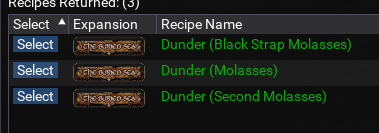
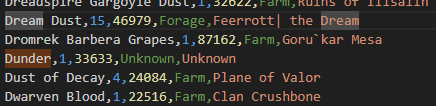
wierd in the artisan tab it kept skipping punch until i made dunder manually then it instantly made it. in the shopping list i made for brewing it also lists it as unknown
1739034725984.png
 
wierd in the artisan tab it kept skipping punch until i made dunder manually then it instantly made it. in the shopping list i made for brewing it also lists it as unknown
View attachment 68314
If I remembering correctly this is one of those government decisions where I can make it so it will always use a recipe and not give you a choice. I think there are 3 ways, maybe more, I can try to determine the "easiest" one of them all.
 
1739409250604.png
Getting this message since patch when trying to run research recipes through AP tab. I'm on aradune and have access to all 12 bag slots.
 
View attachment 68421
Getting this message since patch when trying to run research recipes through AP tab. I'm on aradune and have access to all 12 bag slots.
I am also getting this same message when creating items, Instead of grabbing the item and placing it into the tradeskill container, it opens up the bag containing the item. This makes the combine fail because it does not have the correct items in there to combine.

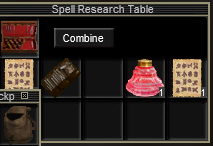
Doing some further research on the issue, the problem first started when making 'Round Cut Voidstone Crystal'. So I manually made a couple of those, now trying to make the Nascent Mystic's Gem. When putting items into the Spell Research Table, it put all of the items into the container except the round cut voidstone crystal. I stopped TCN as it failed so I could see exactly what was missing, and manually put the crystal in the missing spot. From the SS below, you can see it just skipped that slot in placing items in the container, and opened the bag.

I was trying to make a batch of 3 items, so I kind of limped along, pausing TCN every time I got the message about not able to combine these items, and manually adding in the missing pieces. Painful, but got those 3 items done.

1739449542981.png
 
Last edited:
I am also getting this same message when creating items, Instead of grabbing the item and placing it into the tradeskill container, it opens up the bag containing the item. This makes the combine fail because it does not have the correct items in there to combine.

Doing some further research on the issue, the problem first started when making 'Round Cut Voidstone Crystal'. So I manually made a couple of those, now trying to make the Nascent Mystic's Gem. When putting items into the Spell Research Table, it put all of the items into the container except the round cut voidstone crystal. I stopped TCN as it failed so I could see exactly what was missing, and manually put the crystal in the missing spot. From the SS below, you can see it just skipped that slot in placing items in the container, and opened the bag.

I was trying to make a batch of 3 items, so I kind of limped along, pausing TCN every time I got the message about not able to combine these items, and manually adding in the missing pieces. Painful, but got those 3 items done.

View attachment 68425
Getting the same effect making any form of the spell tablets this morning at research table.
 
have you tried not having the combineable container in your inventory? im mid doing brewing on everyone so im hoping it doesnt effect me
 
TCN ignored the fact that I had a scaler in the bank, attempted to make a new one, failed the combine by not putting all the metal bits in the container and making a dairy spoon instead. Weird.
 
TCN ignored the fact that I had a scaler in the bank, attempted to make a new one, failed the combine by not putting all the metal bits in the container and making a dairy spoon instead. Weird.

Whatever people are describing does not sound "normal" , TCN has not changed fundamentally, but over time, I have made changes as EQ or MQ changes, this might be another one of those times, I am currently gathering info.
 
View attachment 68421
Getting this message since patch when trying to run research recipes through AP tab. I'm on aradune and have access to all 12 bag slots.

View attachment 68421
Getting this message since patch when trying to run research recipes through AP tab. I'm on aradune and have access to all 12 bag slots.
Could be DBG thing or could be the way TCN manipulates bags, or could be option C. I did a quick test to see the behavior. It applies to even the most basic of recipes, but that really is not a surprise.

It looks like the slot is initializing when TCN is trying to grab from the bag, and, yeah this is new, and looks DBGy

It still looks DBGy, I put in a mega delay and it still has the same container message, I think (guess, wonder, ponder), they will put out an update unless I can find something else.

Note: It grabs the subsequent item from the slot but not the initial one.


Ok, the way it "used" to work, it would open the bag when grabbing an item, and now it appears to not. So I modified it to open the bag first when something is in a bag rather than the "old" way, will put this out for now and adjust as needed. It was a "clean" way to not clutter the screen.
 
Last edited:
it seems to make some items like it made vegetables and quinine for me but it gets stuck trying to make anything that has more then 2-3 ingredients.

should of refreshed the thread i didnt see jb321s post
 
Okay, spent the last 7 hours trying to do tinkering on 4.182b and 4.183b, and fails out of the gate. At least for tinkering, this is 100% unusable. it seems related to the recent change in "opening all bags" nonsense.

Currently if you have a toolbox/deluxe toolbox, it tries to us that to combine and skips the actual container we're working with, rendering (at least tinkering) absolutely unable to be used. Took far longer than I'd like to realize that was the issue.
Realistically this means no container bag could be open for fear it may bone a combine.

Secondary issue:

ive mentioned continue mode failing repeatedly, and I think i have some further information on it.

Code:
[TCSNeXt] [Crafting] [Bloodied Luclinite Board]
[TCSNeXt] Missing: [Bloodied Luclinite Board] Have: (3) Need: (4)
can't make 27649 notification (out of materials
[TCSNeXt] Craft Results:
[TCSNeXt] Wanted: 1 Have: 0
[TCSNeXt] Moving to bank to store items

In the above instance, i was crafting a ToL shield, had plenty of the bloodied wood on me. However it saw a failure and went "F this im out bitches", stored everything at the banker, and decided to quit at life. The can't make ####### is a LDoN crafted item that has no relevance to the combine attempted. I have seen this exact same combine failure with a random, irrelevant, classic era item# being thrown, relatively frequently. Despite having enough raw/midgrade materials on hand.

So the above is what i'm seeing why TCN fails to "continue" in fletching, smithing, and tinkering - not having resources to make a classic item when attempting to make a very not classic item with a very different item ID. Maybe that error is a red herring, I'm not sure. As a user I can only provide the experience i'm receiving and not knowing the underlying mechanations.


But I am seeing tinkering not functions 100% because of the opn bag thing now. which means i either go buy backpacks or quit using the tinker.
 
Follow on:

After a lot of raging, throwing things, taking JBs name in vain, yelling at MQ, more whiskey, i was able to get tinkering to work - after banking every single toolbox so we dont open a TS bag by mistake anf cuk everything to all hell and back.

moral of the story.. TS containers are a no go currently.
 
Having some issues with using the "UI" checkbox - it's not able to use the search box it seems.

"Could not send notification to COMBW_SearchArea COMBW_SearchTextEdit"

Any way of fixing this?
 
Follow on:

After a lot of raging, throwing things, taking JBs name in vain, yelling at MQ, more whiskey, i was able to get tinkering to work - after banking every single toolbox so we dont open a TS bag by mistake anf cuk everything to all hell and back.

moral of the story.. TS containers are a no go currently.
ok so for me, I am running a ts quest and it is using a ts container just fine, I am asking for clarification if the container does not work specifically for tinkering if it is a toolbox, anything that isn't a quest shouldn't be using any of the containers.

(batch) I have tried continue randomly and it appears to work, but I did make a change a couple of months ago that would abort if it did not have the supplies but would then skip to the next craft, or at least that is the thought. Prior to, if you ran out of materials it would just loop over and over.
 
Having some issues with using the "UI" checkbox - it's not able to use the search box it seems.

"Could not send notification to COMBW_SearchArea COMBW_SearchTextEdit"

Any way of fixing this?
What server are you using? I just tested this on live and it is working. latest MQ
 
Okay, spent the last 7 hours trying to do tinkering on 4.182b and 4.183b, and fails out of the gate. At least for tinkering, this is 100% unusable. it seems related to the recent change in "opening all bags" nonsense.

Currently if you have a toolbox/deluxe toolbox, it tries to us that to combine and skips the actual container we're working with, rendering (at least tinkering) absolutely unable to be used. Took far longer than I'd like to realize that was the issue.
Realistically this means no container bag could be open for fear it may bone a combine.

-- Ok this is tracking now - I only got it to crap out when I purposely had the toolbox closed and bags open, and it failed on trying to clean the container. Other than that it appears to be working fine for quests. I even made it clean the container too, that worked.

Note: the container should be in the bottom right slot, 99% of the time, which it tries to do, the container should never be above bags, as it will allow the container to fill up with junk. I do not support multiple tradeskill containers of the same kind in inventory. For new toons I go to PoT and buy backpacks from the Metroid guy or mule/share/currency good bags

Secondary issue:

ive mentioned continue mode failing repeatedly, and I think i have some further information on it.

Code:
[TCSNeXt] [Crafting] [Bloodied Luclinite Board]
[TCSNeXt] Missing: [Bloodied Luclinite Board] Have: (3) Need: (4)
can't make 27649 notification (out of materials
[TCSNeXt] Craft Results:
[TCSNeXt] Wanted: 1 Have: 0
[TCSNeXt] Moving to bank to store items

In the above instance, i was crafting a ToL shield, had plenty of the bloodied wood on me. However it saw a failure and went "F this im out bitches", stored everything at the banker, and decided to quit at life. The can't make ####### is a LDoN crafted item that has no relevance to the combine attempted. I have seen this exact same combine failure with a random, irrelevant, classic era item# being thrown, relatively frequently. Despite having enough raw/midgrade materials on hand.

So the above is what i'm seeing why TCN fails to "continue" in fletching, smithing, and tinkering - not having resources to make a classic item when attempting to make a very not classic item with a very different item ID. Maybe that error is a red herring, I'm not sure. As a user I can only provide the experience i'm receiving and not knowing the underlying mechanations.


But I am seeing tinkering not functions 100% because of the opn bag thing now. which means i either go buy backpacks or quit using the tinker.
 
Last edited:
Correct. So in the instance of my tinkerer, I haven't gone the extra mile to stuff it with good bags, so it uses 8 deluxe toolboxes, which for gnomes, kinda does throw a problem when it is going to the tinkering table. This I think is partly gnome specific and partly form the regent change you had with bags being open, which was done to combat a different bug/problem/issue. When I went back to just using a Backpack* and no toolboxes, things went swimmingly. This was tinkering in batch mode.

For the continue issue, as linked above, it has happened across several different characters, expansions, and tradeskills. It fails a subcombine, has enough materials to re-make what it needs, but then throws a "out of materials" with an extremely random - i assume - itemID, then stands at dogle pitt, instead of actually continuing and re-attempting. int he instance above, i was crafting a ToL tower shield, had more than plenty materials in my physical bags, did not use the TS depot, did not have any settings beyond stock install. it gave the "can't make 27649 notification (out of materials" error. Which i find odd it's truncated and doesnt have a trailing ) or the [tcsnext] prefix, makes me think there's something not quite right there, but not the chief complaint.

The 27649, if that is the item id, is a Large Calcified Steel Collar from LDoN, and has absolutely nothing to do with making a bloodied luclinite board (141776). The board is made from the bloodied luclinite corrupted timber (141762) which we had plenty of. In that particular instance, i hit execute batch again, and it went from dogle pit, grabbed the planing tool, and made the item from the materials in the bags. But i see this behaviour rather frequently when we have materials on hand and it gives out a 5 digit number, again I assume itemID it thinks its missing. Each time i look that number up0 it's some random item that is unrelated, so i dont really know how to diagnose the actual problem to further assist
 
Correct. So in the instance of my tinkerer, I haven't gone the extra mile to stuff it with good bags, so it uses 8 deluxe toolboxes, which for gnomes, kinda does throw a problem when it is going to the tinkering table. This I think is partly gnome specific and partly form the regent change you had with bags being open, which was done to combat a different bug/problem/issue. When I went back to just using a Backpack* and no toolboxes, things went swimmingly. This was tinkering in batch mode.

For the continue issue, as linked above, it has happened across several different characters, expansions, and tradeskills. It fails a subcombine, has enough materials to re-make what it needs, but then throws a "out of materials" with an extremely random - i assume - itemID, then stands at dogle pitt, instead of actually continuing and re-attempting. int he instance above, i was crafting a ToL tower shield, had more than plenty materials in my physical bags, did not use the TS depot, did not have any settings beyond stock install. it gave the "can't make 27649 notification (out of materials" error. Which i find odd it's truncated and doesnt have a trailing ) or the [tcsnext] prefix, makes me think there's something not quite right there, but not the chief complaint.

The 27649, if that is the item id, is a Large Calcified Steel Collar from LDoN, and has absolutely nothing to do with making a bloodied luclinite board (141776). The board is made from the bloodied luclinite corrupted timber (141762) which we had plenty of. In that particular instance, i hit execute batch again, and it went from dogle pit, grabbed the planing tool, and made the item from the materials in the bags. But i see this behaviour rather frequently when we have materials on hand and it gives out a 5 digit number, again I assume itemID it thinks its missing. Each time i look that number up0 it's some random item that is unrelated, so i dont really know how to diagnose the actual problem to further assist


Just looking over it, it has a flag set, and then it checks if it can make a single recipe for the item, which from the looks of it is checking to see if it can make the final product and not everything involved, that looks like an issue, I actually have thought of other ways to do this that are clunky

so confirmed it checks the main recipe and not the sub-recipes and as such will always punt. But this was my first go at stopping the merry go round, without using a counter, or a checkbox to allow or disallow unlimited attempts.

All that being said.. I have ideas.
 
For new toons I go to PoT and buy backpacks from the Metroid guy or mule/share/currency good bags

Where do you buy backpacks from in POT? I went to everyone on find, but did not see any for sale.

Never mind, I found the NPC. Only 8 slots, but better than the 4 slot small bags from the tutorial. I guess I need some more hunter raids where I get my tutorial characters their hunter bags :)
 
Last edited:
Where do you buy backpacks from in POT? I went to everyone on find, but did not see any for sale.

Never mind, I found the NPC. Only 8 slots, but better than the 4 slot small bags from the tutorial. I guess I need some more hunter raids where I get my tutorial characters their hunter bags :)
because life is too short if you have alts, FV is the way for trading damn near everything. Including currency from missions to buy era bags.
 
I am taking a gander at the code and asking who wrote it, then answering that question.
 
Release Tradeskill Construction Set NeXt

Users who are viewing this thread

Back
Top
Cart