
-
 Hail, we're RedGuides. We want you to play six (yes, 6!) EverQuest characters at once. We have scripts and a friendly community to help, please join our playstyle and say hello! 👋
You are using an out of date browser. It may not display this or other websites correctly.
You should upgrade or use an alternative browser.
You should upgrade or use an alternative browser.
Resource icon
Release Tradeskill Construction Set NeXt (9 Viewers) 4.1991b
- Thread starter jb321
- Start date

- Seller
- #4,002
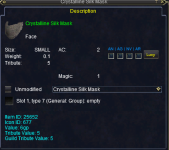
The item ID is 'off'
- Seller
- #4,003
What's this all about?Rogue 1.5 Step 10. I make it Anson MeBale and say " I need ot see Stanos" and Stanos pops but with an *. When I hail him he does not follow the 1.5 script of 'Ha, the prodigy returns. So good to see you, ______. I always consider it an honor to have your company, and we have much to talk about!'... BUt Rather, "Ah, the pouch. this is the first step, Anson... then in light blue to click to talk with him are.. Hanns, who we are, Deal, Story. when I run to
Vorla Diensk'- she say she does nto walk to talk to me... Am I missing something?
Vorla Diensk stares at you blankly. She is wearing a pendant that resembles a sun occluded by the horizon.
You say, 'The sun is setting on the horizon.'
Vorla Diensk nods in your direction, 'He said you would come, ______. Listen closely to what I have to say. We do not have time for dilly-dally and I don't appreciate having to repeat myself to any old Dark Elf. Your services came highly recommended and so I doubt there will be any problems, hm? Our mutual acquaintance, Stanos, has various contacts around Norrath. Through these eyes and ears some disturbing information has surfaced. Word is that someone is attempting to forge a weapon of unmatched prowess - a blade of assassination, potentially capable of slaying even the most powerful creatures. We know the perpetrator is an outsider. They are not a member of any of any rival thieving guild, and we cannot trust such a weapon to exist out in the open without knowing its true purpose. Do you know [how we deduced this information]?'
You say, 'How did you deduce this information?'
Vorla Diensk leans in closer and continues, 'Thieves guilds have their secrets - this is not in dispute. The most treasured secrets reside in the hands of the most senior members and they guard these secrets carefully. Because of this, an uneasy balance is maintained between the different sects. That balance has been disrupted. What we have discovered is that an unknown party has managed to pry the most guarded information on how best to craft a blade from thieves around the world. To what end this knowledge will be used for is unknown, as is the method they used to coerce these pillars of the community. But it does not bode well. Stanos knew this. Due to his past he no doubt believes that the blade will be used for a dark purpose, and who are we to argue? He has a special insight into such matters. At any rate, this is [where you come in].'
You say, 'Where do I come in?'
Vorla Diensk says 'You must find these rogues and deal with them.' She chuckles, 'Don't worry, you needn't cause them harm. Deal with them diplomatically. Here, take this pendant so that they recognize your status. Your name is inscribed on the pendant in symbols that they will understand. Many of these individuals are legendary members of the rogue community, or at the very least . . . Infamous. Causing them grief will solve nothing. Find out what they know. We can use this knowledge to [craft another blade]. If you can, find out who they spoke to. Use whatever methods you have at your disposal - these blaggards are not necessarily beneath bribery.'
You receive an Occluded Sun Pendant, which identifies as "The proof of loyalty." It raises faction with Miners Guild 628, Deeppockets, Rogues of the White Rose, and Guardians of Shar Vahl.
You say, 'Craft another blade?'
Vorla Diensk says 'We have multiple reasons for wanting to forge a duplicate blade: Firstly, we want to find out what we're up against. Second, it only makes sense to carry comparable weaponry in case you have to tangle with the assassin. Third, it will help us to uncover who was behind the creation of the original.'

EQ Button --> MacroQuest --> Overlay --> Click the "Clear Saved ImGui Window Settings" buttonI did something dumb and I can't seem to fix it. I overlayed the TCNRecipeInformation window (what you get when you click the INFO checkmark) on top of the TCN Main window to consolidate them into one header bar. And it turned the TCN window all white and took away all the menu items in it. And it prevents me from doing anything in any LUA window. Like close them with the "X" or open them with the arrow. I can't seem to be able to "drag" the info window off the TCN window into it's own separate window, like usual. All I can do is to log out the toon and back in and then TCN works until I open that "Info" window again.
Any ideas on how to fix it?
Vrak
Is the two Lua's on one bar thing? Just hold and drag one off to seperate them. Like a chrome browser drag off.EQ Button --> MacroQuest --> Overlay --> Click the "Clear Saved ImGui Window Settings" button
- Seller
- #4,006
Pretty sure this is the way...EQ Button --> MacroQuest --> Overlay --> Click the "Clear Saved ImGui Window Settings" button
Oh yeah I remember that from the last time it happened. Well just trying to help you make an even more badass Lua so thanks!The item ID is 'off'
- Seller
- #4,009
In my defense it was either scraped and if it wasn't I copied and pasted the ID's from the site, I didn't type them, so there is that.Oh yeah I remember that from the last time it happened. Well just trying to help you make an even more badass Lua so thanks!
LrdDread
That did the trick, thank you. However there is always a price to pay isn't there? I use 8 Lua's and by clearing the window settings it cleared them all lol. It has taken like 5 logins to get my UI back to normal. <sigh>.
Vrak
EQ Button --> MacroQuest --> Overlay --> Click the "Clear Saved ImGui Window Settings" button
That did the trick, thank you. However there is always a price to pay isn't there? I use 8 Lua's and by clearing the window settings it cleared them all lol. It has taken like 5 logins to get my UI back to normal. <sigh>.
Vrak
Yeah, I've had it happen 2 or 3 times, and luckily I don't use many Lua, but it still makes me extremely cautious that I don't lock or "dock" any UIs togetherLrdDread
That did the trick, thank you. However there is always a price to pay isn't there? I use 8 Lua's and by clearing the window settings it cleared them all lol. It has taken like 5 logins to get my UI back to normal. <sigh>.
Vrak
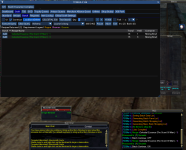
I'm having an issue with TCN where it won't continue past Batch Continue: On ( or OFF ) . See my attached screenshot. This seems to be character specific because I am able to run the recipe just fine on another toon. I rebooted my machine and made sure everything was up to date. Thought maybe it was an inventory space issue but I have open slots. Tried EQ Button --> MacroQuest --> Overlay --> Click the "Clear Saved ImGui Window Settings" button. Tried reloading mesh in MQ2NAV. UPDATE: Now it seems to be doing it on other characters as well.
- Seller
- #4,013
I can't really gather much, but, what are you trying to make, and how many are you trying to make? If it is what I am seeing on the screen then it won't make anything, you want 1, you have 2, it won't make anything.I'm having an issue with TCN where it won't continue past Batch Continue: On ( or OFF ) . See my attached screenshot. This seems to be character specific because I am able to run the recipe just fine on another toon. I rebooted my machine and made sure everything was up to date. Thought maybe it was an inventory space issue but I have open slots. Tried EQ Button --> MacroQuest --> Overlay --> Click the "Clear Saved ImGui Window Settings" button. Tried reloading mesh in MQ2NAV. UPDATE: Now it seems to be doing it on other characters as well.
View attachment 60885
jb321
Again since I am new to this IMGui could you please give a brief explanation of "Batch". Like what is it's function? And how to set it up? Maybe an example?
And maybe explain "Execute Query". What does that do?
Thanks for being patient with this noob.
Vrak
Again since I am new to this IMGui could you please give a brief explanation of "Batch". Like what is it's function? And how to set it up? Maybe an example?
And maybe explain "Execute Query". What does that do?
Thanks for being patient with this noob.
Vrak
- Seller
- #4,015
Query is to display recipes for the selected tradeskill and selected expansion, and also to search if you type a partial recipe name in the box.jb321
Again since I am new to this IMGui could you please give a brief explanation of "Batch". Like what is it's function? And how to set it up? Maybe an example?
And maybe explain "Execute Query". What does that do?
Thanks for being patient with this noob.
Vrak
Once you find the recipe or recipes you want you make sure to set the count for each one, unless you want to make the same amount and click add it will create a list you can save, load, or just use at the time. There is an option on the window that appears when you add an item that will give you the opportunity to create a list of all the items you are missing or you can just go for it and execute.
- Seller
- #4,017
jb321 updated Tradeskill Construction Set NeXt with a new update entry:
Fix ID for Crystalline Silk Mask
Read the rest of this update entry...
Fix ID for Crystalline Silk Mask
5/1/2024
4.16b - ChangeLog
Modified: Item ID for Crystalline Silk Mask.
Read the rest of this update entry...
jb.. I love this tool I would gladly pay a bit more for some of these things to be added.
Any possibility of adding more to pull down for the recipes or maybe an all, so we can export a full file of what needs to be farmed.
Housing support for those that can't afford to keep getting slots for TS Depot?
Bazaar support,
allow to buy from the baz, with a price limit in Craft Settings.
Optimizing recipe lookup for post 300, to look at inventory/bank/TS Depot and craft what you currently have in those vs skipping recipes. giving those some sort of priority, over non inventory recipes.
Any possibility of adding more to pull down for the recipes or maybe an all, so we can export a full file of what needs to be farmed.
Housing support for those that can't afford to keep getting slots for TS Depot?
Bazaar support,
allow to buy from the baz, with a price limit in Craft Settings.
Optimizing recipe lookup for post 300, to look at inventory/bank/TS Depot and craft what you currently have in those vs skipping recipes. giving those some sort of priority, over non inventory recipes.
- Seller
- #4,020
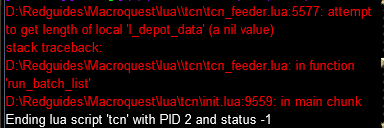
It makes tools as needed afaik, you don't need to add tools to batch.. as a side note, try your best not to put tools in depot also, it is inefficient and also causes issues.Jewelers glass is a recipe that is crashing the lua. I went through and deleted each recipe i had in the batch till it started working and that was the one that was crashing it. Here is a picture of the error.
View attachment 61130
Got ya, well I was just finishing out my JC and saw that the glass covered 4 recipes. Didn't think of just destroying the one I had and seeing if it would make it or purchase it. Thanks for the info.It makes tools as needed afaik, you don't need to add tools to batch.. as a side note, try your best not to put tools in depot also, it is inefficient and also causes issues
So I just deleted my glass while doing a batch run and it did indeed make the glass and knocked out 4 recipes in the process. TY for that I appreciate you and will soon be max AP on 6 toons.It makes tools as needed afaik, you don't need to add tools to batch.. as a side note, try your best not to put tools in depot also, it is inefficient and also causes issues.
- Seller
- #4,023
I added it to the instructions, to make it explicit, people think of ways I didn't think of or imagine.So I just deleted my glass while doing a batch run and it did indeed make the glass and knocked out 4 recipes in the process. TY for that I appreciate you and will soon be max AP on 6 toons.
Lol, I just kept it in my bank and the plugin would just grab it as needed. It wasn't until I needed those last 2 recipes to get to 350 that I found the glass on the list of recipes I was missing.I added it to the instructions, to make it explicit, people think of ways I didn't think of or imagine.
- Seller
- #4,025
my understanding is you de-select the recipe count adherence in Artisan and then generate list and then you can save a complete farmed list, is that what you are talking about, or is it something else?jb.. I love this tool I would gladly pay a bit more for some of these things to be added.
Any possibility of adding more to pull down for the recipes or maybe an all, so we can export a full file of what needs to be farmed.
SomedayHousing support for those that can't afford to keep getting slots for TS Depot?
Bazaar support,
allow to buy from the baz, with a price limit in Craft Settings.
Someday Sooner
Optimizing recipe lookup for post 300, to look at inventory/bank/TS Depot and craft what you currently have in those vs skipping recipes. giving those some sort of priority, over non inventory recipes.
This one mystifies me, all I do is run every skill once or twice and it knocks out all the shoppable recipes.
That last comment you made. Please explain. I've tried using Artisan mode but it keeps crashing, so I've been just building all my own batches and running from that. I would love to get all the shoppable recipes for research done though. Dread starting that one lol.my understanding is you de-select the recipe count adherence in Artisan and then generate list and then you can save a complete farmed list, is that what you are talking about, or is it something else?
Someday
Someday Sooner
This one mystifies me, all I do is run every skill once or twice and it knocks out all the shoppable recipes.
- Seller
- #4,027
Is it because it can't find max trophy table?That last comment you made. Please explain. I've tried using Artisan mode but it keeps crashing, so I've been just building all my own batches and running from that. I would love to get all the shoppable recipes for research done though. Dread starting that one lol.
Yes, yes it is.... I bet it's an easy fix and I've been making things harder than they needed huh lolIs it because it can't find max trophy table?
- Seller
- #4,029
yes, it means prize.db has a 0 byte value most likely. If you just installed TCN without running setup, it will do that..Yes, yes it is.... I bet it's an easy fix and I've been making things harder than they needed huh lol
you have to exit out of all instances and then run /Lua run tcgsetup
So I've been working post 300 and I would have never done TS without this, it's just fantastic. I am sure this would require a major rework to how you process the recipes but I've noticed that when crafting in Artisan mode, that my characters will run to the same vendor between crafts and sometimes even buy the same item. Any thoughts on making it buy from the vendor all at once when crafting in Artisan to avoid the multiple trips to the same vendor? I imagine this would result in a longer uptime to get crafting started but would significantly reduce the overall time spent. The most notificable area so far has been tinkering where I have to go to Barren coast. That run takes a few minutes by itself.
- Seller
- #4,032
You generate a list for say 100 recipes and then you pre-shop and then you run the list. or at least, that is how I do it..So I've been working post 300 and I would have never done TS without this, it's just fantastic. I am sure this would require a major rework to how you process the recipes but I've noticed that when crafting in Artisan mode, that my characters will run to the same vendor between crafts and sometimes even buy the same item. Any thoughts on making it buy from the vendor all at once when crafting in Artisan to avoid the multiple trips to the same vendor? I imagine this would result in a longer uptime to get crafting started but would significantly reduce the overall time spent. The most notificable area so far has been tinkering where I have to go to Barren coast. That run takes a few minutes by itself.
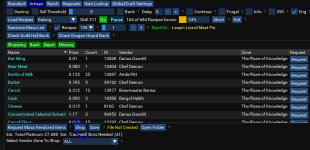
You can even pick the zone to shop from if there are multiple.
JB first I wanted to say thanks, this thing is absolutely fantastic.
One issue I ran into when trying to figure it out, I had found an older post asking about a better instruction set, and you had posted a link to the redguides wiki. It looks like it doesn't exist any longer. I'm not sure if there's an updated guide somewhere?
Might be worth recreating since it seems there's a ton of folks with "I didn't know I could do that!".
Thanks!
One issue I ran into when trying to figure it out, I had found an older post asking about a better instruction set, and you had posted a link to the redguides wiki. It looks like it doesn't exist any longer. I'm not sure if there's an updated guide somewhere?
Might be worth recreating since it seems there's a ton of folks with "I didn't know I could do that!".
Thanks!
- Seller
- #4,036
to be fair to some of myself, some people were also running it in a broken state, and were accepting that alsoJB first I wanted to say thanks, this thing is absolutely fantastic.
One issue I ran into when trying to figure it out, I had found an older post asking about a better instruction set, and you had posted a link to the redguides wiki. It looks like it doesn't exist any longer. I'm not sure if there's an updated guide somewhere?
Might be worth recreating since it seems there's a ton of folks with "I didn't know I could do that!".
Thanks!

The link is in the overview of the resource: https://www.redguides.com/community/data/video/35/35177-b37111e183ed8477699ba51f430c15f7.mp4
A full fledged manual, I supposed I should bite the bullet, or bribe someone with a free copy of the next recipe pack to write one.

New purchaser/happy customer.
I've played EQ on and off since launch and have never crafted. Just found this resource and bought almost immediately.
Can someone with wisdom in tradeskilling give me some advice. I'm looking to just max out skills with this and trophy(?)
If you started with a new character what would be the route? Run TSS quests then GOD quests then Trophy Quests or would Trophy Quests get you the skills and such?
I kinda just need guidance on what to do in order. I know it's probably in this 101 page discussion thread but...
I've played EQ on and off since launch and have never crafted. Just found this resource and bought almost immediately.
Can someone with wisdom in tradeskilling give me some advice. I'm looking to just max out skills with this and trophy(?)
If you started with a new character what would be the route? Run TSS quests then GOD quests then Trophy Quests or would Trophy Quests get you the skills and such?
I kinda just need guidance on what to do in order. I know it's probably in this 101 page discussion thread but...
Lusec
Just started the TS thing myself but here is what I have been doing. Use TCN for what you stated above. TSS, then your trophy. Then you can do the GoD stuff if you want. Not necessary if your only going to 300, if not then yes do the GoD stuff also.
Tip: I found out real quick it is better to do a little pre planning BEFORE you start TCN. Know what recipe your going to do and pre buy the mats from the vendors. If you don't it will do 1 combine and then go buy the mats 1 at a time, again. Over and over. Whereas if you pre buy then the whole process goes much more efficiently. Don't get me wrong here. TCN does a great job of going to all the right vendors and buys stuff for you. Works great but it just drives me nuts watching it.
Tip: Hope you have some plat saved up. This is gonna cost you, big time.
Tip: Research is your friend. Look ahead and see what mats are NOT vendor bought. You might have to:
1. Buy them from a vendor NOT in PoK. (PITA travel all over the place and if you buy a limited amount you can guarantee you DID'NT buy enough and your going to have to come back lol)
2. Buy them in the Bazaar. (expensive)
3. Set up a buyer and be patient. (Preferred method).
Use these websites for starters:
Bonzz
TC Complete TS guide
EQ Traders Corner
EQProgression (under the Tradeskill PoP header)
GL and have fun as in this: TS is fun
Vrak
Just started the TS thing myself but here is what I have been doing. Use TCN for what you stated above. TSS, then your trophy. Then you can do the GoD stuff if you want. Not necessary if your only going to 300, if not then yes do the GoD stuff also.
Tip: I found out real quick it is better to do a little pre planning BEFORE you start TCN. Know what recipe your going to do and pre buy the mats from the vendors. If you don't it will do 1 combine and then go buy the mats 1 at a time, again. Over and over. Whereas if you pre buy then the whole process goes much more efficiently. Don't get me wrong here. TCN does a great job of going to all the right vendors and buys stuff for you. Works great but it just drives me nuts watching it.
Tip: Hope you have some plat saved up. This is gonna cost you, big time.
Tip: Research is your friend. Look ahead and see what mats are NOT vendor bought. You might have to:
1. Buy them from a vendor NOT in PoK. (PITA travel all over the place and if you buy a limited amount you can guarantee you DID'NT buy enough and your going to have to come back lol)
2. Buy them in the Bazaar. (expensive)
3. Set up a buyer and be patient. (Preferred method).
Use these websites for starters:
Bonzz
TC Complete TS guide
EQ Traders Corner
EQProgression (under the Tradeskill PoP header)
GL and have fun as in this: TS is fun
Vrak
Vrakenor,
Thanks for the tips! I really appreciate it!
No bazaar on my server right now. I'm still on ragefire waiting for it to die. I don't raid or really play with anyone but my brother's so it doesn't matter to me that it's dead. (I have 4 brothers that play with me on and off. I MQ their characters when they aren't playing so that they can just hop on and off at will).
Thanks for the tips! I really appreciate it!
No bazaar on my server right now. I'm still on ragefire waiting for it to die. I don't raid or really play with anyone but my brother's so it doesn't matter to me that it's dead. (I have 4 brothers that play with me on and off. I MQ their characters when they aren't playing so that they can just hop on and off at will).
Users who are viewing this thread
Total: 10 (members: 0, guests: 10)
Share: