• You've discovered RedGuides, an EverQuest multi-boxing and scripting community 🧙‍♀️⚙️. We want you to play several EQ characters at once, come join us and say hello! 👋

  • A TLP without truebox has thawed (Very Vanilla ready)
    Frostreaver
Resource icon

Release Tradeskill Construction Set NeXt 4.1991b

Batch Continue: ON is causing this (error message is a bit cryptic), and it would of course be great to differentiate between "hey, Im out of components, but I have that stuff in bank/tsd" (continue) "hey, Im out of components but I have auto vendor shop on and this can be bought" (continue) and "hey, Im out but either auto vendor shop is off, or I need to farm bazaar" (die, move to next item)

I don't see how that accounts for the continual recursion attempt and lack of MISSING information.

Seems as though the issue was the lack of creation of:

Trillion Cut Spiritual Luclinite Topaz
 
Last edited:
I don't see how that accounts for the continual recursion attempt and lack of MISSING information.

Seems as though the issue was the lack of creation of:

Trillion Cut Spiritual Luclinite Topaz
The latest release gives better clues btw..

I have provided better text for saying what is missing, TCN has a lot of text spam already, what is one more..
 
Last edited:
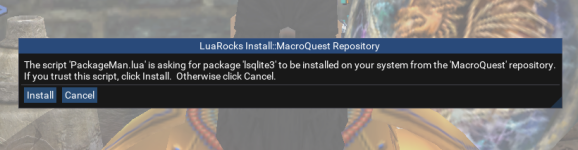
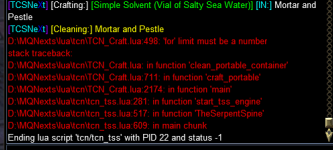
Hello. When I use command "/Lua run tcn" the toon was crashing. I received an error message relating to lfs.dll. In another post someone suggested deleting that file. Did that and now I get the attached messages (one is a popup and the other goes to my main chat).

Appreciate any helpful ideas!
 

Attachments

  • LuaRocks Install Message_1.png
    LuaRocks Install Message_1.png
    152.5 KB · Views: 4
  • LuaRocks Install Message_2.png
    LuaRocks Install Message_2.png
    42.5 KB · Views: 13
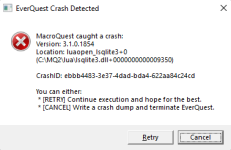
I have been in and out of the hospital this past month and I haven't really had time to play. I updated everything today and logged in and I'm getting this error message. I've reinstalled several times but nothing helps. It was working fine before. Any idea?
 

Attachments

  • crash.png
    crash.png
    11.5 KB · Views: 2
Batch Continue: ON is causing this (error message is a bit cryptic), and it would of course be great to differentiate between "hey, Im out of components, but I have that stuff in bank/tsd" (continue) "hey, Im out of components but I have auto vendor shop on and this can be bought" (continue) and "hey, Im out but either auto vendor shop is off, or I need to farm bazaar" (die, move to next item)
So, since I made TCN, I might have a statement on this.. when it says it can't make it, it means at that time you are missing something in your local inventory, if continue is on it will go check the bank and the depot and try again, and try the vendors, if not. C'est la vie.
 
keep getting this error trying to craft
View attachment 52821

Hello. When I use command "/lua run tcn" the toon was crashing. I received an error message relating to lfs.dll. In another post someone suggested deleting that file. Did that and now I get the attached messages (one is a popup and the other goes to my main chat).

Appreciate any helpful ideas!
My Lua don't use lfs , it might be used by something else you have DL'd.
 
I have been in and out of the hospital this past month and I haven't really had time to play. I updated everything today and logged in and I'm getting this error message. I've reinstalled several times but nothing helps. It was working fine before. Any idea?
delete it, there should not be any dlls in your Lua folder
 
I have been in and out of the hospital this past month and I haven't really had time to play. I updated everything today and logged in and I'm getting this error message. I've reinstalled several times but nothing helps. It was working fine before. Any idea?
I would delete it and what should it happen, is a pop-up to install the sqlite dll.
 
I would delete it and what should it happen, is a pop-up to install the sqlite dll.
I did that, and then I got this message:

luarocks-install-message_2-png.52812
 
Hello. When I use command "/lua run tcn" the toon was crashing. I received an error message relating to lfs.dll. In another post someone suggested deleting that file. Did that and now I get the attached messages (one is a popup and the other goes to my main chat).

Appreciate any helpful ideas!
delete it, there should not be any dlls in your lua folder
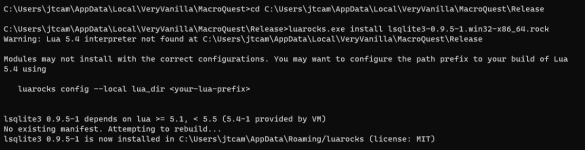
I got it to work by manually installing lsqlite3 using luarocks.exe located in the main mq2 dir. Navigate to https://luarocks.macroquest.org/ and download lsqlite3-0.9.5-1.win32-x86_64.rock. Place the file in your main mq2 directory (the same directory as luarocks.exe) Open a command prompt window and change directory to your mq2 folder. Type luarocks.exe install lsqlite3-0.9.5-1.win32-x86_64.rock That should do it.
 
I got it to work by manually installing lsqlite3 using luarocks.exe located in the main mq2 dir. Navigate to https://luarocks.macroquest.org/ and download lsqlite3-0.9.5-1.win32-x86_64.rock. Place the file in your main mq2 directory (the same directory as luarocks.exe) Open a command prompt window and change directory to your mq2 folder. Type luarocks.exe install lsqlite3-0.9.5-1.win32-x86_64.rock That should do it.

you're just inviting this same problem next time. dlls will be found by name if you put them in certain locations, but you don't want them there, they need to go into the modules folder under the proper versioned subdirectory, or you'll just crash some other time. PackageMan does all this for you
 
you're just inviting this same problem next time. dlls will be found by name if you put them in certain locations, but you don't want them there, they need to go into the modules folder under the proper versioned subdirectory, or you'll just crash some other time. PackageMan does all this for you

Unfortunately PackageMan won't install it and returns an error about an unknown variable -e which is why I did a manual install instead,
 
Getting immediate crashes with the latest updates when I issuse
Code:
/lua run tcn

Code:
---------------------------
EverQuest Crash Detected
---------------------------
MacroQuest caught a crash:
Version: 3.1.0.1854
Location: luaopen_lsqlite3+0 (C:\Users\dvrea\Desktop\MQNext\lua\lsqlite3.dll+0000000000009350)

CrashID: 5612a935-2a26-43e1-ac49-c8d85f990357

You can either:
 * [RETRY] Continue execution and hope for the best.
 * [CANCEL] Write a crash dump and terminate EverQuest.

---------------------------
Retry   Cancel   
---------------------------
 
Unfortunately PackageMan won't install it and returns an error about an unknown variable -e which is why I did a manual install instead,
I tried your suggestion but get the same error message in my Main Chat ... ]MQ2] Failed to load package lsqlite3... here is the command prompt text:

1699535914064.png

Anyone have any thoughts?
 
Unfortunately PackageMan won't install it and returns an error about an unknown variable -e which is why I did a manual install instead,
Unknown variable -e isn't the error, that's a bug in the interpreter and causes an output message but doesn't impact installation at all. We're not passing -e at all and it's telling you that it's being ignored. https://github.com/luarocks/luarocks/issues/1287 However, what you've done by doing that is made it so the next time there's an upgrade you're going to have to find that dll and delete it, wherever you installed it. I would suggest deleting it now, instead, while you know where it is and it's on your mind. If you want to test manually, you can use the PackageMan script from this post: https://www.redguides.com/community/threads/luarock-missing-in-modules-folder.87647/#post-576243 which will output the full command you can use into your chat window (which, assuming you're using the MQ Console -- ctrl ` -- you can then copy and paste into your command prompt). If you do go this route, please send me all of the output that you see so that I can determine what is going on.
Getting immediate crashes with the latest updates when I issuse
Code:
/lua run tcn
Your crash is that you have an old version of luasqlite3.dll in your Lua folder. Delete that dll, you shouldn't have that at all.
I tried your suggestion but get the same error message in my Main Chat ... ]MQ2] Failed to load package lsqlite3... here is the command prompt text:


Anyone have any thoughts?
First, you need to go into c:\users\jtcam\AppData\Roaming\luarocks and delete what you have in there -- you've installed a version of lsqlite3 for Lua 5.4.1 which is not the version that we use and will absolutely cause problems. See my instructions above for how to do a manual install if the automatic install isn't working for you, but please send me the output.
 
Your crash is that you have an old version of luasqlite3.dll in your Lua folder. Delete that dll, you shouldn't have that at all.
Was unable to find that file on my system, but there was a lsqlite3.dll in my Lua folder. So I cut and paste it out of the folder, ran TCN and got a pop up window saying it was missing and did I want to install it?. And I did want to... so I clicked "yes" and now it's working!

Many Thanks!
 
I noticed today when working on Artisan I did " request missing components" to get items I have on other toons, when It got done it had traded around 7 items, but there were another 30 ish items that others had and didn't trade. I tried doing the request individually per the item, but they still didn't trade it( I verified the item ID matched). I manually traded and they show in the count window now.. not sure why the dannet query for certain items isn't working. any suggestions?
 
I noticed today when working on Artisan I did " request missing components" to get items I have on other toons, when It got done it had traded around 7 items, but there were another 30 ish items that others had and didn't trade. I tried doing the request individually per the item, but they still didn't trade it( I verified the item ID matched). I manually traded and they show in the count window now.. not sure why the dannet query for certain items isn't working. any suggestions?
1699565055577.jpeg

If I din't change nothing.
if devs din't change nothing.
if dbg din't change nothing.
 
Unknown variable -e isn't the error, that's a bug in the interpreter and causes an output message but doesn't impact installation at all. We're not passing -e at all and it's telling you that it's being ignored. https://github.com/luarocks/luarocks/issues/1287 However, what you've done by doing that is made it so the next time there's an upgrade you're going to have to find that dll and delete it, wherever you installed it. I would suggest deleting it now, instead, while you know where it is and it's on your mind. If you want to test manually, you can use the PackageMan script from this post: https://www.redguides.com/community/threads/luarock-missing-in-modules-folder.87647/#post-576243 which will output the full command you can use into your chat window (which, assuming you're using the MQ Console -- ctrl ` -- you can then copy and paste into your command prompt). If you do go this route, please send me all of the output that you see so that I can determine what is going on.

Your crash is that you have an old version of luasqlite3.dll in your lua folder. Delete that dll, you shouldn't have that at all.

First, you need to go into c:\users\jtcam\AppData\Roaming\luarocks and delete what you have in there -- you've installed a version of lsqlite3 for lua 5.4.1 which is not the version that we use and will absolutely cause problems. See my instructions above for how to do a manual install if the automatic install isn't working for you, but please send me the output.

Thank you very much. Everything is working again.
 
Was unable to find that file on my system, but there was a lsqlite3.dll in my lua folder. So I cut and paste it out of the folder, ran TCN and got a pop up window saying it was missing and did I want to install it?. And I did want to... so I clicked "yes" and now it's working!

Many Thanks!
Same here. Deleted the dll. The system asked to install. Now everything is working fine. Thanks much for the help.
 
Problem: When requesting items from others using the request button under Craft > Artisan > Shopping the window closes to desktop without any error messages.
Problem is repeatable about 70% of the time. The other 30% of the time the others character says they have the item but do not trade or move to character.
Dannet working properly on the machine.

I did have a crash earlier on same character. Crash ID is: 0690c897-0640-431a-bec7-99281ab7e0bf
The crash pointed to mq2lua.dll in that crash.

I have updated VV and all luas are up to date as well.

Any suggestions?
 
Problem: When requesting items from others using the request button under Craft > Artisan > Shopping the window closes to desktop without any error messages.
Problem is repeatable about 70% of the time. The other 30% of the time the others character says they have the item but do not trade or move to character.
Dannet working properly on the machine.

I did have a crash earlier on same character. Crash ID is: 0690c897-0640-431a-bec7-99281ab7e0bf
The crash pointed to mq2lua.dll in that crash.

I have updated VV and all luas are up to date as well.

Any suggestions?
yea, this is recent.. but it happens for me when I try it a second time, if I restart the Lua it will work without crashing.
 
yea, this is recent.. but it happens for me when I try it a second time, if I restart the Lua it will work without crashing.
Well the Lua does restart after I log back in. Currently I'm guessing there is no way to avoid the crash other than not using the request button?
 
Well the lua does restart after I log back in. Currently I'm guessing there is no way to avoid the crash other than not using the request button?
It works the first time at least for me, when I do it subsequently, it just poofs... I am not sure if it is the Lua.dll (I mean changes) or the way I interact with dannet to refresh.

Yep, when it reloads dannet it blows up.. this has worked forever.. of course...
 
Last edited:
It works the first time at least for me, when I do it subsequently, it just poofs... I am not sure if it is the lua.dll (I mean changes) or the way I interact with dannet to refresh.

Yep, when it reloads dannet it blows up.. this has worked forever.. of course...
Oh interesting. I will have to pay attention and see if I get the same results. i.e. the first time works.
 
Oh interesting. I will have to pay attention and see if I get the same results. i.e. the first time works.
I am testing without the unload and reload of dannet when request has been pressed. I am looking for alternatives, or if it is needed.
 
I am loving this Lua, thanks for the hard work in making and upkeep on this Lua.

I have a question, not a criticism.
When skilling up a skill is there a reason why it doesn't pick from a learned recipe, add it to favorites and utilize the Make All function built into EQ?

The combinations happen a lot quicker
 
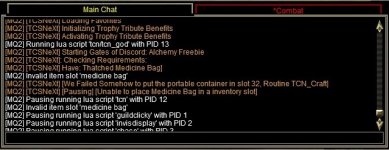
I'm having an issue with the GoD Quest for Alchemy on my shaman. So after pausing, there's a small window open called container that cannot be resized. What do I need to do?


-EQ000013.jpg
 
I got this prompt -> after clicking install it ended the Lua ...

1699728221414.png

i had this before with TCS and it was resolved by installing the filesystem byhand using the console ..

So i installed lsqlite3 using the console too and it was installed ..

1699728381952.png
When i then did /Lua run tcn .. i again got the prompt that it wants to install lsqlite3 (first picture)

So i am assuming you want it in another directory?
Pls tell me where it needs to be installed to be detected by your script )
 
I am loving this Lua, thanks for the hard work in making and upkeep on this lua.

I have a question, not a criticism.
When skilling up a skill is there a reason why it doesn't pick from a learned recipe, add it to favorites and utilize the Make All function built into EQ?

The combinations happen a lot quicker
you are in control of favorites, if you mean UI you can select UI checkbox and if it knows any of the recipes it should make them using it.
 
I got this prompt -> after clicking install it ended the lua ...

View attachment 52966

i had this before with TCS and it was resolved by installing the filesystem byhand using the console ..

So i installed lsqlite3 using the console too and it was installed ..

View attachment 52967
When i then did /lua run tcn .. i again got the prompt that it wants to install lsqlite3 (first picture)

So i am assuming you want it in another directory?
Pls tell me where it needs to be installed to be detected by your script )
Where it goes is dependent on your MQ install I believe, it is independent of the Lua script itself.

All that being said I believe it goes in the release|modules
 
Last edited:
I'm having an issue with the GoD Quest for Alchemy on my shaman. So after pausing, there's a small window open called container that cannot be resized. What do I need to do?


-View attachment 52964
It doesn't do well if you have a bunch of witch doctor bags, was there something in that bag, or did you have more than 1 witch doctor bag in inventory? The thatched is for epic.. so I try to not mess with stuff like that.
 
Release Tradeskill Construction Set NeXt

Users who are viewing this thread

Back
Top
Cart