• You've discovered RedGuides, an EverQuest multi-boxing and scripting community 🧙‍♀️⚙️. We want you to play several EQ characters at once, come join us and say hello! 👋

  • A TLP without truebox has thawed (Very Vanilla ready)
    Frostreaver
Resource icon

Release Tradeskill Construction Set NeXt 4.1991b

That sounds like batch, you can make a list of things and quantities of those things and save the list for later to run at will..

alternatively you could just do them one by one but favorite them in standard to have quick access to the recipes.
Thank you, batch works great now that I've figured out how to use it.
 
is there a way to create enchanted honed spiritual luclinite between 2 characters that I don't know about using tcg? lmfao
I believe people use this for the enchanted part:


and then

TCSNeXt for the rest..
 
I noticed something that may or may not be a concern.
When purchasing large quantities, the toon appears to buy an entire stack (1000) in a single purchase.
However, when I am doing this manually, I can only buy 100 at a time.

Were I an EQ dev looking for looking for haxxors I might run a query on merchant purchase logs (or wherever it's logged) for transactions that should not be possible unless you are bypassing the UI.
 
I noticed something that may or may not be a concern.
When purchasing large quantities, the toon appears to buy an entire stack (1000) in a single purchase.
However, when I am doing this manually, I can only buy 100 at a time.

Were I an EQ dev looking for looking for haxxors I might run a query on merchant purchase logs (or wherever it's logged) for transactions that should not be possible unless you are bypassing the UI.
I would expect that limitation to be built in here:


It allows it, so I do it. If it is verboten, then it needs to change. This was discussed about methods for purchasing a long time ago and no one batted an eye. So if it is wrong.. I can change it..
 
Not sure this is the correct place for this query, but here goes.

I ran into some crashes doing the lowest level TSS and GoD freebe quests.
When doing pottery (both TSS and GoD), one or two of my toons (some were fine) the client crashed when trying to perform a combine.
The exception does not appear to be caught or otherwise handled in any way - eq client just exits, no message.
This happedened with the same toons every time.
I run ISBoxer with 6 toons. I completed the TSS ones manually with these toons, but not the GoD ones (too time consuming).

As there is nothing in \..\VeryVanilla\MacroQuest\Release\Logs\Dumps how would I go about gathering any information to help troubleshoot cause?
 
I would expect that limitation to be built in here:


It allows it, so I do it. If it is verboten, then it needs to change. This was discussed about methods for purchasing a long time ago and no one batted an eye. So if it is wrong.. I can change it..
Not sure its right or wrong, but it does appear that the TCG (MQ) can do to be something that a player without MQ cannot.
I see it as a risk re: identifying automation. But others here are likely to be more familiar with how MQ works and whether it is cause for concern.

edit: Hmm, who would I flag to look at this re Merchant TLO?
 
Not sure its right or wrong, but it does appear that the TCG (MQ) can do to be something that a player without MQ cannot.
I see it as a risk re: identifying automation. But others here are likely to be more familiar with how MQ works and whether it is cause for concern.
Wrong to me = get put on blast and suspended/banned.
 
Last edited:
Hi jb,
Once again thank you for this incredible tool. I am currently working on getting 350 in Research, and the way I do it is farm a bunch of materials, have them in my inventory, then one of those spreadsheets at hand where you track which recipes you've got and which you still need, and then preparing a batch craft for the next -let's say 70- spells.
That led me to an idea. Would it not be absolutely awsome, if you could select the skill you want to progress from 301-350, e.g. Research, and then TCG would do a /outputfile recipes research, read the file, mark all learned recipes in the database, and then look into your inventory and create a batch of e.g. 100 recipes, starting from the lowest skill, for you, based on recipes not learned and possible to craft? All you'd need to do is click 'Execute batch' and learn all the recipes that you have material for...
One can dream... but what do you think?
 
Hi jb,
Once again thank you for this incredible tool. I am currently working on getting 350 in Research, and the way I do it is farm a bunch of materials, have them in my inventory, then one of those spreadsheets at hand where you track which recipes you've got and which you still need, and then preparing a batch craft for the next -let's say 70- spells.
That led me to an idea. Would it not be absolutely awsome, if you could select the skill you want to progress from 301-350, e.g. Research, and then TCG would do a /outputfile recipes research, read the file, mark all learned recipes in the database, and then look into your inventory and create a batch of e.g. 100 recipes, starting from the lowest skill, for you, based on recipes not learned and possible to craft? All you'd need to do is click 'Execute batch' and learn all the recipes that you have material for...
One can dream... but what do you think
that sounds almost exactly how he has artisan set up under craft
 
from what I can tell, he doesn't pull out what recipes you can complete. currently it just runs through the number of recipes you selected
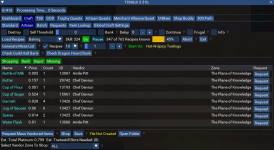
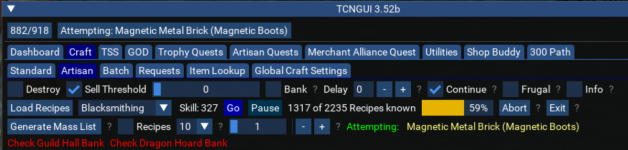
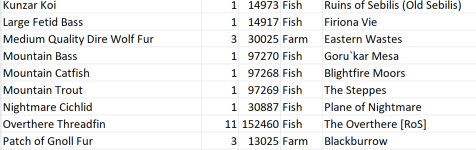
for instance here, I selected i want to go through the next 10 recipes on the list and generated a list of stuff I need to farm/buy for the next 10 recipes. the checkmark next to "generate mass list" tells tcg that I only want the next 10 recipes to try. I can uncheck that and it'll run through every recipe I don't know
1675721736495.png
 
Ah, thank you Kuhle, I missed that development. I just tried it, but got an error message.
 

Attachments

  • Artisan_Error.jpg
    Artisan_Error.jpg
    23.3 KB · Views: 3
Ah, thank you Kuhle, I missed that development. I just tried it, but got an error message.
If it's the same issue I had once upon a time, look in your tcn folder for a file called artisan.db, the size of it should not be 0. If it is "0", there should be a zip file in the folder. Extract the file inside and replace the artisan.db file. Try artisan again. It should work
 
If it's the same issue I had once upon a time, look in your tcn folder for a file called artisan.db, the size of it should not be 0. If it is "0", there should be a zip file in the folder. Extract the file inside and replace the artisan.db file. Try artisan again. It should work

Just checked, I have an artisan.db file of around 51mb, and also a Riz_Artisan zip file which is 11mb.
 
Been running into this since the last update, was thinking it might be lag or that my computer is ailing! (and it still could be one of those things!) I'm seeing this more often than not when making batch missing item request...

Screenshot 2023-02-07 052739.jpg
 
Just checked, I have an artisan.db file of around 51mb, and also a Riz_Artisan zip file which is 11mb.
it is probably prize.db not artisan.db

If you exit out of the gui and run /Lua run tcgsetup that should work, if not manually extracting the prize.zip file to the Lua\tcn directory will also work..
 
Last edited:
Been running into this since the last update, was thinking it might be lag or that my computer is ailing! (and it still could be one of those things!) I'm seeing this more often than not when making batch missing item request...

View attachment 45912
that is the result of fixing one thing and breaking another..

TLDR: I always search for the reference of what I am changing when putting out updates. However, if you reboot or restart VSC it remembers what files you had open but unless you click on the tab it won't "know" what's in it.. this is most likely the reason. I was wishing in one hand and doing something in the other imagining all would be good.
 
Last edited:
it is probably prize.db not artisan.db

If you exit out of the gui and run /lua run tcgsetup that should work, if not manually extracting the prize.zip file to the lua\tcn directory will also work..
You're my hero!
 
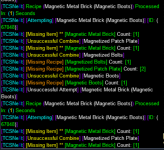
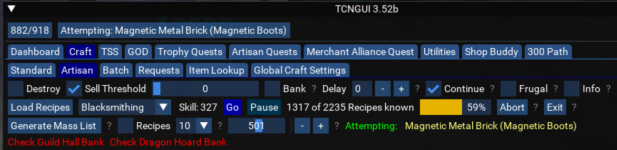
not totally sure why, but some reason when doing artisan mode I am now getting stuck on 1 recipe
1675795345472.png
it just continually cycles it, I downloaded the newest version and ran it again and once it got to the same recipe it started cycling again.
1675795489638.png
 

Attachments

  • 1675795441500.png
    1675795441500.png
    182.5 KB · Views: 2
not totally sure why, but some reason when doing artisan mode I am now getting stuck on 1 recipe
View attachment 45928
it just continually cycles it, I downloaded the newest version and ran it again and once it got to the same recipe it started cycling again.
View attachment 45930
Without really doing any research and just remembering I am guessing this is one of those it is with in itself..

what does that mean..

Well I need a magnetic brick made from magnetic boots, but I need magnetic bolts and magnetic patch plate and magnetic bricks

the way to get magnetic bricks is to use a hammer and a damaged or whatever boot/helm etc..

I did after the fact look at the recipe and it gives no way to make a magnetic brick from a sub-recipe.. and there is a very specific reason for this..

What is the easiest way to get a brick? what piece of armor should be used.. Here is the issue. If I want magnetic boots and I use the boot armor to make the brick I cannot make the magnetic boots. So how do I know what to use for what?

For now I would say choose what item you want to exhaust to make magnetic bricks.. This will require some thought and may not have a good solution..

Alternatively you can skip this recipes if you don't want to deal with them.
 
Last edited:
Without really doing any research and just remembering I am guessing this is one of those it is with in itself..

what does that mean..

Well I need a magnetic brick made from magnetic boots, but I need magnetic bolts and magnetic patch plate and magnetic bricks

the way to get magnetic bricks is to use a hammer and a damaged or whatever boot/helm etc..

I did after the fact look at the recipe and it gives no way to make a magnetic brick from a sub-recipe.. and there is a very specific reason for this..

What is the easiest way to get a brick? what piece of armor should be used.. Here is the issue. If I want magnetic boots and I use the boot armor to make the brick I cannot make the magnetic boots. So how do I know what to use for what?

For now I would say choose what item you want to exhaust to make magnetic bricks.. This will require some thought and may not have a good solution..

Alternatively you can skip this recipes if you don't want to deal with them.
well what the issue is, is that it gets stuck on it.. I'm doing artisan so its trying all recipes. As I have none of the components it use to just go by it. now in last couple versions for whatever reason it doesn't just go by it, continually tries it with no components.
 
well what the issue is, is that it gets stuck on it.. I'm doing artisan so its trying all recipes. As I have none of the components it use to just go by it. now in last couple versions for whatever reason it doesn't just go by it, continually tries it with no components.
You have continue on..
 
lol, exactly... so why is it getting stuck on 1 recipe?
If TCSNeXt thinks a recipe can be made in Artisan with continue on, it will never stop..

However, I have some 'hidden' code that would stop trying after 5 attempts..
 
I recreated the issue with a similar recipe, it seems to not register it needs magnetic bricks, or it thinks it can get those bricks from the item..

Still investigating..

For whatever reason it is ignoring adding Magnetic Metal Brick as a component item to the tables..

and.. more investigating..

This doesn't make any sense..

the recipe is to make a magnetic brick with a damaged item, to do that, it uses the damaged item and sub-recipes that need 3 magnetic bricks, what the hell is this nonsensery?

The other bricks would be made from mangled, damaged, twisted, broken, dented, cracked, gashed, bent, splintered, smashed.. which do not require a brick to make, because that would be insane.

Still: Nonsense, why do I need bricks to make the same brick?

AND NOW for the reason it doesn't see the bricks that need to be made in TCSNeXt...

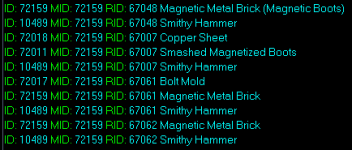
It ignores every instance of the main item ID when adding components to the table, so when it starts with the main item being a brick and then it sees brick again, it just ignores it and doesn't add it.

Example:

1675872307624.png


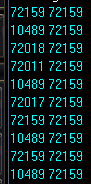
The main id is 72159 which is a brick, and then it shows up again later on for the sub-recipes.
 

Attachments

  • 1675872098889.png
    1675872098889.png
    2.5 KB · Views: 1
Last edited:
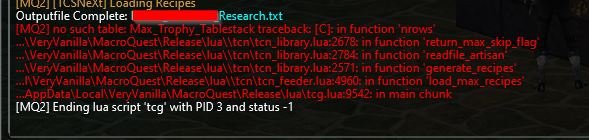
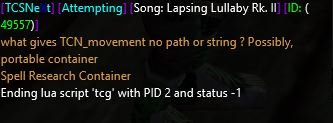
Hi Jb, I just encountered an error when using Artisan on Research. I used 'Load recipes', then 'GO' with no check in Recipes, so TCN goes through the whole list of unlearned recipes.
With roundabout 300 left to go, TCN ends with the error message as attached. ("what gives TCN_movement no path or string? Possibly, portable container. Spell Research Container. Ending Lua script...)

edit: I think its got to do with the last recipe I tried, Song: Lapsing Lullaby. I tried to do it manually without Artisan, and the same error happened.
edit2: I did the recipe manually, and then started Artisan again. Now it's continuing again, so it's probably really only this recipe.
 

Attachments

  • Artisan_error_2.jpg
    Artisan_error_2.jpg
    10.5 KB · Views: 2
Last edited:
Hi Jb, I just encountered an error when using Artisan on Research. I used 'Load recipes', then 'GO' with no check in Recipes, so TCN goes through the whole list of unlearned recipes.
With roundabout 300 left to go, TCN ends with the error message as attached. ("what gives TCN_movement no path or string? Possibly, portable container. Spell Research Container. Ending lua script...)

edit: I think its got to do with the last recipe I tried, Song: Lapsing Lullaby. I tried to do it manually without Artisan, and the same error happened.
edit2: I did the recipe manually, and then started Artisan again. Now it's continuing again, so it's probably really only this recipe.
Yep it was looking for "Spell Research Container" when it should be looking for "Spell Research Table".. fixed for next release.
 
I recreated the issue with a similar recipe, it seems to not register it needs magnetic bricks, or it thinks it can get those bricks from the item..

Still investigating..

For whatever reason it is ignoring adding Magnetic Metal Brick as a component item to the tables..

and.. more investigating..

This doesn't make any sense..

the recipe is to make a magnetic brick with a damaged item, to do that, it uses the damaged item and sub-recipes that need 3 magnetic bricks, what the hell is this nonsensery?

The other bricks would be made from mangled, damaged, twisted, broken, dented, cracked, gashed, bent, splintered, smashed.. which do not require a brick to make, because that would be insane.

Still: Nonsense, why do I need bricks to make the same brick?

AND NOW for the reason it doesn't see the bricks that need to be made in TCSNeXt...

It ignores every instance of the main item ID when adding components to the table, so when it starts with the main item being a brick and then it sees brick again, it just ignores it and doesn't add it.

Example:

View attachment 45966


The main id is 72159 which is a brick, and then it shows up again later on for the sub-recipes.
I may have a fix, testing it out.. the logic is...

Is it the main recipe and does that match the current recipe, and also is the item it is trying to add the same ID as the main recipe item id, if so.. do not add..
 
jb321 updated Tradeskill Construction Set NeXt with a new update entry:

Magentic Metal Bricks just want to be understood and seen.

2/8/2023

3.53b - ChangeLog

Fixed: Song: Lapsing Lullaby Rk. II, was asking for wrong container

Behavior: Changed method on how components are added for craft determination, should be adding magnetic metal bricks now.

[COLOR=rgb(97, 189...[/quote]

Read the rest of this update entry...
There are 10 types of items that can make a magnetic metal brick with a hammer. I am currently leaving it up to you, the user.

However, I have a multi-select that will most likely work, the method is to find any amount of a damaged, or dented, or whatever and if it has that amount use that item from the lists of 10 items.
 
Last edited:
Hi Jb and all,
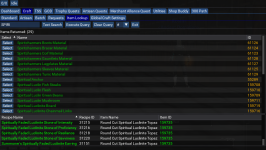
I need some help with crafting one of the NoS containers, Spiritually Faded Luclinite Stone of Proficiency. It seems that the recipe is in the database when I do an item lookup, however I cannot find it in the Craft section, neither by text search nor by selecting Research, letter S, and then Execute Query. Any idea what I am doing wrong?
Thank you
 

Attachments

  • Spirit1.png
    Spirit1.png
    269.4 KB · Views: 3
  • Spirit2.png
    Spirit2.png
    254 KB · Views: 3
On the Crafting >> Standard Tab, Type in the item name and then click Search... Select the item you wish to craft. There will be a second or so of processing. If the Craft button turns Green, click it and off you go...
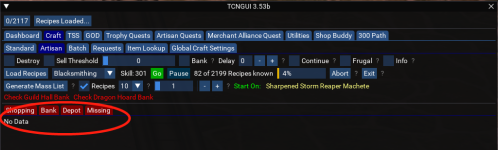
If the Craft button turns yellow/orangish you are not ready to craft the item, Click the Info check box. This brings up another window with a Missing Tab. Collect what you need and click select again, it should then turn green and you'll be good to go!
 
On the Crafting >> Standard Tab, Type in the item name and then click Search... Select the item you wish to craft. There will be a second or so of processing. If the Craft button turns Green, click it and off you go...
If the Craft button turns yellow/orangish you are not ready to craft the item, Click the Info check box. This brings up another window with a Missing Tab. Collect what you need and click select again, it should then turn green and you'll be good to go!

I know, and that works usually. However, neither 'Round Cut Spiritual Luclinite Topaz' nor 'Spiritually Faded Luclinite Stone of Proficiency' show up for me. Neither as text search, nor using the first letter and doing a search by letter...
 
I know, and that works usually. However, neither 'Round Cut Spiritual Luclinite Topaz' nor 'Spiritually Faded Luclinite Stone of Proficiency' show up for me. Neither as text search, nor using the first letter and doing a search by letter...
Did you buy the NoS DB update? although its showing, so id guess yes.. hmm odd.
 
Release Tradeskill Construction Set NeXt

Users who are viewing this thread

Back
Top
Cart