• You've discovered RedGuides, an EverQuest multi-boxing and scripting community 🧙‍♀️⚙️. We want you to play several EQ characters at once, come join us and say hello! 👋

  • A TLP without truebox has thawed (Very Vanilla ready)
    Frostreaver
Resource icon

Release Tradeskill Construction Set NeXt 4.1991b

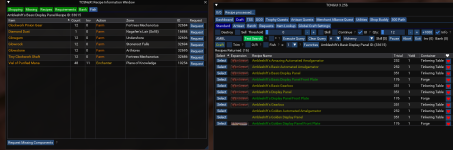
Something I noticed today, if I do Craft > Artisan it seems like the it seems like the ID is off for what I select. like I select baking and it says "Your not a shaman, begone" (so picking alchemy) then if I select Blacksmithing it gives me Baking recipes.

I.E.-View attachment 43768
make sure you update, he just fished that.
 
Something I noticed today, if I do Craft > Artisan it seems like the it seems like the ID is off for what I select. like I select baking and it says "Your not a shaman, begone" (so picking alchemy) then if I select Blacksmithing it gives me Baking recipes.

I.E.-View attachment 43768

After the update, clicking on Artisan will always select alchemy first and try to load those recipes, I have done the drop downs afterwards and it appears to work, or at least works for me.

I don't like the behavior, but I will look into ways to not auto-load..
 
After the update, clicking on Artisan will always select alchemy first and try to load those recipes, I have done the drop downs afterwards and it appears to work, or at least works for me.

I don't like the behavior, but I will look into ways to not auto-load..
you could always do a blank spot first then do the list of tradeskills as an idea
 
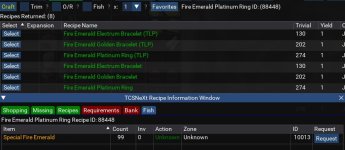
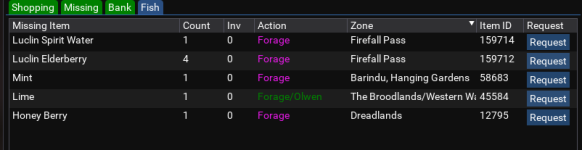
Some of the jewelry recipes are off... there are more and I'll list them when/if I find them again.. these are combines being done on a live server, so it shouldn't need a "special" gem.
Fire emerald plat.jpg
 
Having a problem with the Baker trophy. The dropdown seems to keep forcing me into the Research which crashes EQ. I have made all my other trophies with no problems using the tool, with minor manual intervention at times, but this one flat out fails -- maybe a dropdown bug?

I do have the message "Gates of Discord quest Inactive Beginner Baker Quest inactive" if that helps.
 
I just discovered this and familiarizing myself with the features, so sorry if this is a trivial question...

How do I generate a list of recipes that I haven't learned yet (Missing recipes...path to 350)?

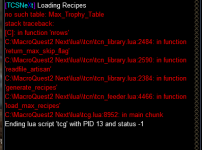
Under "Craft > Artisan" tab, I use the dropdown and select "Baking" I get the following errors (see below... I am sure it's my ignorance and missing some basic setup. I think I followed instructions when setting up, but I'm just as talented with these things as most of you are).

Also, under "Craft > Standard" tab, when I type in a recipe in the text search, and select a recipe, when I hit "craft" nothing happens. Again, I am sure it's on my end. Just trying to get the fundamentals down so I can use this awesomeness. I am reading through as I am writing this in an attempt to solve my own problems, but this looks amazing.
 

Attachments

  • LUA.png
    LUA.png
    17.6 KB · Views: 3
Last edited:
I just discovered this and familiarizing myself with the features, so sorry if this is a trivial question...

How do I generate a list of recipes that I haven't learned yet (Missing recipes...path to 350)?

Under "Craft > Artisan" tab, I use the dropdown and select "Baking" I get the following errors (see below... I am sure it's my ignorance and missing some basic setup. I think I followed instructions when setting up, but I'm just as talented with these things as most of you are).

Also, under "Craft > Standard" tab, when I type in a recipe in the text search, and select a recipe, when I hit "craft" nothing happens. Again, I am sure it's on my end. Just trying to get the fundamentals down so I can use this awesomeness. I am reading through as I am writing this in an attempt to solve my own problems, but this looks amazing.
you have to do /Lua run tcgsetup and not be in tcsnext..
 
you have to do /lua run tcgsetup and not be in tcsnext..

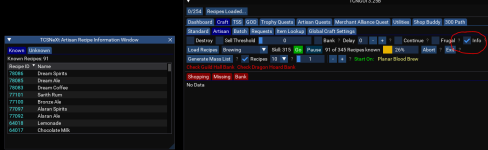
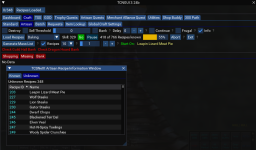
after you have it setup , to generate a full list go to the artisan tab, if you want recipes you know and don't know..


1670181946860.png

You either have to drop down or click load recipes for it to work with the info box selected, the reason it is an option because it adds processing time.

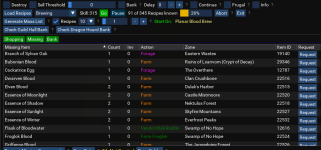
If you want a list of missing stuff.. click generate mass list, there is a checkbox next to the 10, it adheres to 10 recipes or whatever you select from the drop down, if it is unchecked it checks every recipe..

1670182427198.png


When you select a recipe is the craft button green or yellow, if it is yellow there is a checkbox called info hit that and a screen with recipe information will come up.

1670181627029.png
 
Last edited:
you have to do /lua run tcgsetup and not be in tcsnext..

Thank you so much for the quick reply.

Okay, starting from scratch, I ran: "/Lua run tcgsetup". A Windows Installer popped up, with an "OK" button, with a DOS prompt window running in the background. After selecting "OK" the prompt window flashed, and went away. In your Instructions, you said, "1st time install run /lua run tcgsetup (which I did) and follow the prompts (plural?), then to start /lua run tcg (which I also did)"... I only saw the "OK" button prompt, nothing else followed after selecting "ok" on the Windows Installer window.

I then run "/Lua run tcg" and get the window, which all seems good.

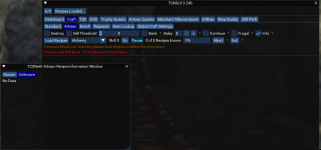
Following your instructions above, I go to "Craft > Artisan", but my window looks slightly different than your screenshot. I am missing everything below the "Load Recipe" button. The "Generate Mass List" is inactive (which may be because nothing is loaded yet). But when I try to load something this is where I run into the error, and the Lua script ends. Here is my window:

1670186492030.png

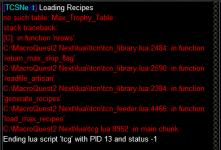
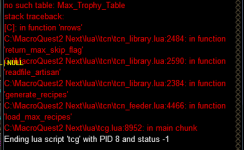
By default, "Alchemy" is selected and my MQ Window tells me, "You are not a Shaman, Begone!"... which is working. However, when I use the drop down to select any other TS the script ends with the error below. When I use the drop down arrow and try to load "Baking" for example, the script ends, with the following in the MQ Window:

1670186753947.png

I am sure it's something stupid that I am missing and need to read it 30x for it to sink in, but this is where I am having issues with loading. Again, thank you for the help. I really do appreciate it and look forward to getting this rocking and rolling.
 
Thank you so much for the quick reply.

Okay, starting from scratch, I ran: "/lua run tcgsetup". A Windows Installer popped up, with an "OK" button, with a DOS prompt window running in the background. After selecting "OK" the prompt window flashed, and went away. In your Instructions, you said, "1st time install run /lua run tcgsetup (which I did) and follow the prompts (plural?), then to start /lua run tcg (which I also did)"... I only saw the "OK" button prompt, nothing else followed after selecting "ok" on the Windows Installer window.

I then run "/lua run tcg" and get the window, which all seems good.

Following your instructions above, I go to "Craft > Artisan", but my window looks slightly different than your screenshot. I am missing everything below the "Load Recipe" button. The "Generate Mass List" is inactive (which may be because nothing is loaded yet). But when I try to load something this is where I run into the error, and the LUA script ends. Here is my window:

View attachment 43839

By default, "Alchemy" is selected and my MQ Window tells me, "You are not a Shaman, Begone!"... which is working. However, when I use the drop down to select any other TS the script ends with the error below. When I use the drop down arrow and try to load "Baking" for example, the script ends, with the following in the MQ Window:

View attachment 43840

I am sure it's something stupid that I am missing and need to read it 30x for it to sink in, but this is where I am having issues with loading. Again, thank you for the help. I really do appreciate it and look forward to getting this rocking and rolling.


ok do /Lua stop

then /Lua run tcgsetup

OR

extract prize.zip to prize.db in the \Lua\tcn folder
 
I did both of these independent of each other, and still getting the same issue where the Lua script ends, and offers the same red text in MQ Window.

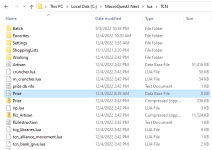
Here is my directory:

1670190417199.png

I don't know if this helps at all, but when I /Lua run tcg I get the following (which seems to be working):

1670191941891.png

and then when I try to load Baking, I get the following:

1670192095882.png
1670192142733.png

But then, after a few seconds.... I get the error:

1670192179734.png
 
Last edited:
0 means the file is locked.. please restart and extract the file without logging into EQ
I did this, and got the same problem.

BUT!!! I think I resolved it. I deleted the 0KB "Prize" file, and then extracted the same file from the zipped "Prize" folder to same directory (in the TNC folder), all without EQ loaded. I then loaded EQ, ran setup, and then /run Lua TCG. Now when I "Craft > Artisan - Load Recipes-Baking" I get what I am supposed to, without an error! Thank you so much!!! I will play around with this and explore it more later, now that I have it loading.

1670196711042.png
 
you have a bank button under utilities. is there a way to do the same thing but banking everything in your inventory relating to artisan?
 
It is the birthday of the release of TCSNeXt, it has been 1 year!
happy birthday jb (for tcsnext)! good stuff man. can't tell you how many conversations i have regularly about how much time and effort you save folks
 
happy birthday jb (for tcsnext)! good stuff man. can't tell you how many conversations i have regularly about how much time and effort you save folks
It is almost like there should be a game called EverTradekskill
 
It is almost like there should be a game called EverTradekskill
When I played SWG, I was an architect, and pretty much hung out with my droid engineer pal and just crafted stuff and sold it..

I had millions, and then I gave the account to my nephew, and went broke..
 
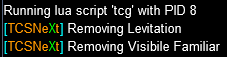
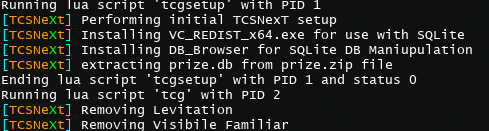
Hi there. I ran tcg setup, I run the Lua /Lua run tcg. All that happens is levitation is removed and familiar is removed. I cannot get the window to load. Lua task manager shows that tcg is running. Any clue why I can't get the window to load?
 
Was on long enough to get to a couple of new zones and see a B52 Song MOB.. and servers go down..
 
Hi there. I ran tcg setup, I run the lua /lua run tcg. All that happens is levitation is removed and familiar is removed. I cannot get the window to load. Lua task manager shows that tcg is running. Any clue why I can't get the window to load?
When the server or servers come back up, We can TS.. my first question is when you hit ctrl ~ does anything come up?
 
Last edited:
Tradeskill Depot is being worked on, but I need the servers to be up to test :P

Going with self depot first, then depot requests..
 
mq.TLO.TradeskillDepot() just shows me tradeskilldepot when I do mq.TLO.TradeskillDepot.Enabled() it craps out

I can pull items out if I go to tradeskill depot at the bank, but I can't withdraw from anywhere else in zone, EQ related fo sho
 
Last edited:
When the server or servers come back up, We can TS.. my first question is when you hit ctrl ~ does anything come up?
Yes ctrl~ brings up the mq console. Here's the output from the setup and Lua run on a completely different pc. Still no window.
 

Attachments

  • 3551d8b867c48f6a0e7bc0867b39218b.png
    3551d8b867c48f6a0e7bc0867b39218b.png
    43.5 KB · Views: 1
Have you tried any other lua gui type out there like quickhud and does it work?

also try /mqoverlay resume
/mqoverlay reload

you don't need to suggest these anymore. you get a big ANNOYING popup in the middle of the screen now that is hard to miss.
 
I use luachase and that window pops up. Would that qualify?
I hope this works as Brainiac suggested..

ctrl ~

Windows > Settings

1670374960218.png


sometimes windows or workspaces are off screen or elsewhere...
 
Last edited:
you don't need to suggest these anymore. you get a big ANNOYING popup in the middle of the screen now that is hard to miss.
While you are here, is this right?

mq.TLO.TradeskillDepot.Enabled() to get true?

I want to ensure the user has the expansion before going for it..

Code:
if not mq.TLO.Window('TradeskillDepotWnd').Open() then
    mq.TLO.Window('TradeskillDepotWnd').DoOpen()
    mq.delay(500)
  end
  
-- Wait for list to populate
  while not mq.TLO.TradeskillDepot.ItemsReceived() do mq.delay(300) end
 
While you are here, is this right?

mq.TLO.TradeskillDepot.Enabled() to get true?

I want to ensure the user has the expansion before going for it..

Code:
if not mq.TLO.Window('TradeskillDepotWnd').Open() then
    mq.TLO.Window('TradeskillDepotWnd').DoOpen()
    mq.delay(500)
  end
  
-- Wait for list to populate
  while not mq.TLO.TradeskillDepot.ItemsReceived() do mq.delay(300) end

yes

should probably print something saying what you're doing.
 
If you hover over the EQ in the taskbar does it show the window anywhere down there?
I'm not sure I understand. You mean do I see the gui for TCG in the small thumbnail preview in taskbar? Or is it supposed to show up as a separate window?
 
I'm not sure I understand. You mean do I see the gui for TCG in the small thumbnail preview in taskbar? Or is it supposed to show up as a separate window?
If you are running multiple monitors or window workspaces, we would have to figure out where..

What I mean is , is there a gui window that is not the EQ window when you hover over the EQ icon on the taskbar?
 
If you are running multiple monitors or window workspaces, we would have to figure out where..

What I mean is , is there a gui window that is not the EQ window when you hover over the EQ icon on the taskbar?
Oh no sorry. just my 6 eq instances.
 
Release Tradeskill Construction Set NeXt

Users who are viewing this thread

Back
Top
Cart