
-
 Hail, we're RedGuides. We want you to play six (yes, 6!) EverQuest characters at once. We have scripts and a friendly community to help, please join our playstyle and say hello! 👋
You are using an out of date browser. It may not display this or other websites correctly.
You should upgrade or use an alternative browser.
You should upgrade or use an alternative browser.
Resource icon
Release Tradeskill Construction Set NeXt (5 Viewers) 4.1991b
- Thread starter jb321
- Start date

Kiltmedead1
New member
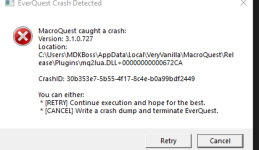
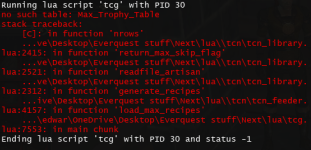
I just recently purchased and it was awesome for raising all TS to 300 and maxing trophy. I clicked on the artisan tab under crafting and switched the drop down menu to pottery and got this message:
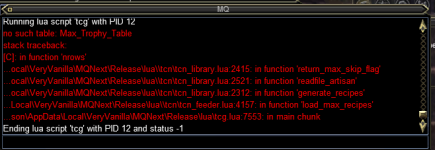
I tried other ts skills and the same thing happened. I went through my files with a friend who also has the program that is running correctly and they seem to be there. Not sure what to do at this point. I did see if you get red text to run the exe file and did so as well. Relogged a couple times, updated a few times... any help would be appreciated.
I tried other ts skills and the same thing happened. I went through my files with a friend who also has the program that is running correctly and they seem to be there. Not sure what to do at this point. I did see if you get red text to run the exe file and did so as well. Relogged a couple times, updated a few times... any help would be appreciated.
The Grilled Bloodied Fish recipe seems to be bugged. I have all the ingredients and can make it manually but TCG doesn't think I can and won't make it automatically. Maybe one of the ingredients has variations? I am using vendor bought Coarse Salt/Ground Pepper and vegetable oil from the brewing recipe that make 4 at a time.
Great tool, I can't do trade skills without it.
Great tool, I can't do trade skills without it.
- Seller
- #1,366
sounds like you don't have the correct prize.db file.. if there is a lock on the file or you are running TCSNeXt and then run the setup you are not able to update the files. If you look in the TCN directory there should be a prize.db, does it say 0 bytes?I just recently purchased and it was awesome for raising all TS to 300 and maxing trophy. I clicked on the artisan tab under crafting and switched the drop down menu to pottery and got this message:
View attachment 42446
I tried other ts skills and the same thing happened. I went through my files with a friend who also has the program that is running correctly and they seem to be there. Not sure what to do at this point. I did see if you get red text to run the exe file and did so as well. Relogged a couple times, updated a few times... any help would be appreciated.
This was done so the individual user could pick and choose what recipes to skip for their toons globally, so it wouldn't try to make something you would never get items for, or want to camp items for.
Last edited:
- Seller
- #1,367
If you have all the items, and it is not working, have you tried to select the fish swap checkbox. (this swaps the recipe from velious bluefish to clownfish or whatever, you get the idea). to see if you have one of the types of fish to use for scaling?The Grilled Bloodied Fish recipe seems to be bugged. I have all the ingredients and can make it manually but TCG doesn't think I can and won't make it automatically. Maybe one of the ingredients has variations? I am using vendor bought Coarse Salt/Ground Pepper and vegetable oil from the brewing recipe that make 4 at a time.
Great tool, I can't do trade skills without it.
If you select it it will switch to the next fish and it will also show you inventory.. if it doesn't make it, and you have items but not enough to make your total amount you can click in the O/R box to just make them with what you got..
Last edited:

Berkz
Well-known member
I will try these things and get back with you jbIf I am correct the CTD's are sent to the devs automatically. If it is behavior based I can usually troubleshoot it based on screen shots from the script. If it is a CTD, it is something I don't readily have access to knowing other than it crashed in eq.exe or mq2lua.dll or whatever the message says.
I typically want to ensure the host is good to go and ask for tests on a different machine or even in a VM, using only the most vanilla of plugins. If you have on feedme or other things that manipulate inventory it is highly suggested they are off.
If you are running overseer it is suggested that you pause TCSNeXt when running the daily.
I have the correct coarse salt at 45573. I don't have the fish but has the fillet already made by another toon, the fillet id is 166196. The id for veg oil is 20386 and ground pepper 58282. I have hundreds each and it won't make 1 for me. Using fillet instead of fish is the problem?If you have all the items, and it is not working, have you tried to select the fish swap checkbox.. to see if you have one of the types of fish to use for scaling?
If you select it it will switch to the next fish and it will also show you inventory.. if it doesn't make it, and you have items but not enough to make your total amount you can click in the O/R box to just make them with what you got..
The last part to check is the item id for the coarse salt it should be 45573.
- Seller
- #1,370
It is best you do a screen shot with the info box selected so I can see what it says for the items in the multiple windows.I have the correct coarse salt at 45573. I don't have the fish but has the fillet already made by another toon, the fillet id is 166196. The id for veg oil is 20386 and ground pepper 58282. I have hundreds each and it won't make 1 for me. Using fillet instead of fish is the problem?
- Seller
- #1,371
I know of no reason that it would not work, save for missing items, wrong fish, or the inventory goal has already been met, or option D something to do with yield calculation..It is best you do a screen shot with the info box selected so I can see what it says for the items in the multiple windows.
I know of no reason that it would not work, save for missing items, wrong fish, or the inventory goal has already been met, or option D something to do with yield calculation..
Here's the screenshot. The 4 stacks of components I have, but notice the Craft button don't turn green. Also it's saying using Bloodied Luclinite Fish Scales, which is right, but the fillet is kinda by product of that recipe. Not the main product. Not sure if that's an issue or not.
Last edited by a moderator:
- Seller
- #1,373
Can you select the info checkbox...?View attachment 42464
Here's the screenshot. The 4 stacks of components I have, but notice the Craft button don't turn green. Also it's saying using Bloodied Luclinite Fish Scales, which is right, but the fillet is kinda by product of that recipe. Not the main product. Not sure if that's an issue or not.
The craft button is yellow, if you select the info checkbox I can see the GUI windows and it 99/100 times tells us what is wrong..
- Seller
- #1,374
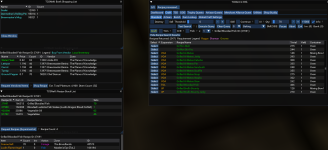
Or I could load it up myself, what a novel idea!Can you select the info checkbox...?
The craft button is yellow, if you select the info checkbox I can see the GUI windows and it 99/100 times tells us what is wrong..
- Seller
- #1,377
Can you show me the missing components window?Sorry I am a noob and didn't know about the info check box. Here's it. It seems to want to do some smithing work. For skinning the fish?
View attachment 42465
I asked for 70, it says 1 fish, so that is wrong.. it should be 35 fish for 2 fillets each..
TLDR time..
1 recipe will yield 2 different things in different yields, but they all have 1 recipe ID. one is 100 on success with x2 for fillets, or 50 on failure..
I need to make a new recipe to point to one fish and have the swap option there..
even though.. what happens when you click in the O/R box and try it.. I think (hope) it would just start crafting.
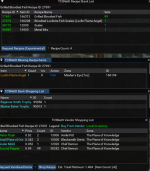
Yeah, that's one thing and another is it won't use fillet if you already have them. It will always try to make new fillets.Can you show me the missing components window?
I asked for 70, it says 1 fish, so that is wrong.. it should be 35 fish for 2 fillets each..
TLDR time..
1 recipe will yield 2 different things in different yields, but they all have 1 recipe ID. one is 100 on success with x2 for fillets, or 50 on failure..
I need to make a new recipe to point to one fish and have the swap option there..
even though.. what happens when you click in the O/R box and try it.. I think (hope) it would just start crafting.
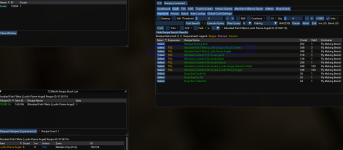
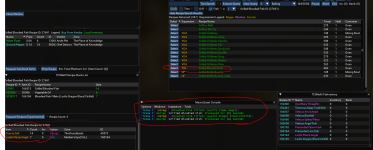
Great, looking forward to it.Step 1 Done: Add new bloodied fish fillet recipes to the DB..
View attachment 42470
Step 2: Add to Fish Swap to use different fish for Bloodied Fish Fillets..
View attachment 42473
Next Release...
- Seller
- #1,383
Well since I am in the well with the fish, I swapped the order of some velious fish, I was using the one that was hardest to get geographically first, and swapped it to the outdoor zone.
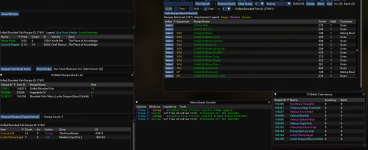
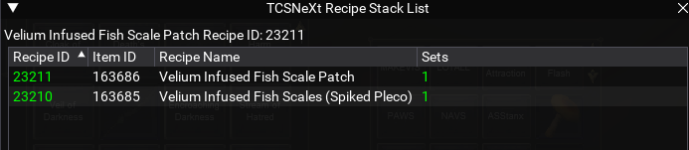
I also added the enhancement to display the proper amount of fish needed in the missing items window, instead of always showing the same fish.
Example:
If we are missing the fish you will get this missing item window:

If we are not (swapped) then you won't see anything..
I also added the enhancement to display the proper amount of fish needed in the missing items window, instead of always showing the same fish.
Example:
If we are missing the fish you will get this missing item window:
If we are not (swapped) then you won't see anything..
Attachments

I was a bit trepid to use it when you rolled it out, but its quickly become something I enjoy.Yeah I have to say the text search is... very useful, but I was against it at first, but change, is inevitable.
- Seller
- #1,385
What does the (standard) checkbox trim do?
if you have a recipe that has the same item throughout the recipe and it is untrimmed you get this:
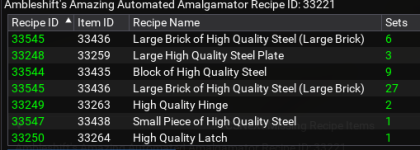
if you trim it those separated blocks of high quality steel now are made all at once:
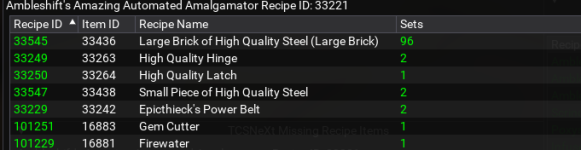
Useful for a few recipes, it takes the madness out of seeing your toon revisit the craft station to make something again after it just made it 2 recipes ago...
if you have a recipe that has the same item throughout the recipe and it is untrimmed you get this:
if you trim it those separated blocks of high quality steel now are made all at once:
Useful for a few recipes, it takes the madness out of seeing your toon revisit the craft station to make something again after it just made it 2 recipes ago...
- Seller
- #1,386
What does the (standard) checkbox O/R do?
if we want to make 400 misty thicket picnics but only have materials for say 396 and you selected 1000 or 400 for the quantity, you can just select the O/R checkbox and it will craft until everything is done or die trying without worrying about the amount of materials needed overall because of the pesky yellow craft button.
if we want to make 400 misty thicket picnics but only have materials for say 396 and you selected 1000 or 400 for the quantity, you can just select the O/R checkbox and it will craft until everything is done or die trying without worrying about the amount of materials needed overall because of the pesky yellow craft button.
Kiltmedead1
New member
Thanks for the response, I do have a prize.db and it says 0 bytes. this is a screen shot of my files.sounds like you don't have the correct prize.db file.. if there is a lock on the file or you are running TCSNeXt and then run the setup you are not able to update the files. If you look in the TCN directory there should be a prize.db, does it say 0 bytes?
This was done so the individual user could pick and choose what recipes to skip for their toons globally, so it wouldn't try to make something you would never get items for, or want to camp items for.
Attachments
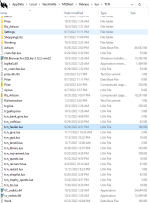
- Seller
- #1,388
If you exit out of everything and then just run /Lua run tcgsetup it should expand the prize file.Thanks for the response, I do have a prize.db and it says 0 bytes. this is a screen shot of my files.
If that doesn't work, a reboot for the demons might also do the trick and then run the command again..
or you can just extract the prize.zip file in the directory and overwrite it.
Last edited:
- Seller
- #1,389
jb321 updated Tradeskill Construction Set NeXt with a new update entry:
A mostly fishy update, mostly
Read the rest of this update entry...
A mostly fishy update, mostly
10/4/2022
2.86b - ChangeLog
Database Changes:
Changed: Master researcher test required recipe from Researcher Ceramic Clay to Spell: Focus Mass Spellcaster's Essence
Added: new expansion designation for OG everquest, just a few right now for Tae Ew armor but you can use batch with them now...
Read the rest of this update entry...
- Seller
- #1,390
What the hell (standard/batch) does this (x) drop down do??
Info: Multiplies the amount of resources to buy to account for craft failures.
If we want 1 mana battery we can multiply by 5 and it will buy 5 times the resources, it will not run back to the vendor until it has exhausted the on hand resources to make 1 battery.
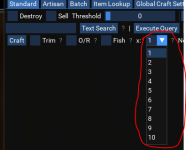
Info: Multiplies the amount of resources to buy to account for craft failures.
If we want 1 mana battery we can multiply by 5 and it will buy 5 times the resources, it will not run back to the vendor until it has exhausted the on hand resources to make 1 battery.
Last edited:

so as a follow up to my issue and to this comment, while you may be correct that certainly custom uis that are missing information can and will cause issue - that isn't the problem here.Just for everyone's info I use standard default UI and always will, There are custom UIs that just do not work.. I've tried them
the problems i have been having is because you are using
/cleanup to close the tradeskill windows - which works out great - as long as "escape to close" is enabled for those windows.if "'Esc' to Close" is not enabled /cleanup can't do anything
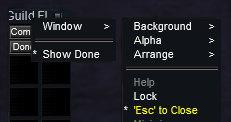
/cleanup detects some containers you have open and then presses escape repeatedly to close those windows
the window TLO does have a .Close function, but you'd have to while check that one is open and then the equivalent of
/invoke ${Window[ContainerWindow].Close}I'm not sure why my escape to close was turned off - probably when i was messing with escape to close trying to help someone with their eq not saving that state
- Seller
- #1,392
This is good stuff... I will add it to the faq..so as a follow up to my issue and to this comment, while you may be correct that certainly custom uis that are missing information can and will cause issue - that isn't the problem here.
the problems i have been having is because you are using/cleanupto close the tradeskill windows - which works out great - as long as "escape to close" is enabled for those windows.
if "'Esc' to Close" is not enabled /cleanup can't do anything
View attachment 42525
/cleanup detects some containers you have open and then presses escape repeatedly to close those windows
the window TLO does have a .Close function, but you'd have to while check that one is open and then the equivalent of/invoke ${Window[ContainerWindow].Close}
I'm not sure why my escape to close was turned off - probably when i was messing with escape to close trying to help someone with their eq not saving that state
I have to realize people make changes whether intended or not or the change was unknown, that can have consequences on the operation.
hrm, i'd suspect the better course of action would be to close the window, which is why i spent time determining how to do that, but your call.This is good stuff... I will add it to the faq..
I have to realize people make changes whether intended or not or the change was unknown, that can have consequences on the operation.
people also rebind keys and if you were keypressing W to move forward but they use E instead, you'd have a similar problem
- Seller
- #1,394
I wish it were a task, but it is a project, based on the one size fits all scenario. Will have to add to the side of the road roadmap.hrm, i'd suspect the better course of action would be to close the window, which is why i spent time determining how to do that, but your call.
people also rebind keys and if you were keypressing W to move forward but they use E instead, you'd have a similar problem
- Seller
- #1,396
the prize.db file.. is not as it should be.. if it is missing or 0 bytes, it is no good..hey bud, ran into an issue. here is what I got. Craft > Artisan > changed the drop down to baking (or any trade skill that I have). love the script btw, got all my trophies with it. ran into a small issue with blacksmithing but nothing that I couldn't do myself
View attachment 42527
If you put this on a new PC you need to run /Lua run tcgsetup
or extract prize.zip to the directory it is in.. and overwrite...
TCSNeXt cannot be running..
Last edited:

Kuhle
Sergeant
prize.db was 0 bytes. extracted as you said, works great! thanks bud!the prize.db file.. is not as it should be.. if it is missing or 0 bytes, it is no good..
If you put this on a new PC you need to run /lua run tcgsetup
or extract prize.zip to the directory it is in.. and overwrite...
TCSNeXt cannot be running..

Dragonator
Active member
Been having an issue when it grabs two trophies from the bank , equips one... but never equips the other one.
It works fine if I remember to remove my arrows and my bow so there are empty slots to put the trophies.
Is it possible to have tcg get the trophy needed from the bank... and deposit back into the bank when done... but use mq2tstrophy to do the actual swaps ?
I tried clicking off auto trophy but and using mq2tstrophy plugin but it seems the plugin gets unloaded.
Sorry if this is covered somewhere.... I searched for trophy but got overwhelmed with the results ... looked under faq...etc..
It works fine if I remember to remove my arrows and my bow so there are empty slots to put the trophies.
Is it possible to have tcg get the trophy needed from the bank... and deposit back into the bank when done... but use mq2tstrophy to do the actual swaps ?
I tried clicking off auto trophy but and using mq2tstrophy plugin but it seems the plugin gets unloaded.
Sorry if this is covered somewhere.... I searched for trophy but got overwhelmed with the results ... looked under faq...etc..
Having an issue using batch mode where the program keeps wanting to buy things that I have in my inventory as well as in the bank. Specifically in regard to Jewel craft molds and other vendor sold components like cleaning solution.
I have check boxes in Auto shop, Bank, Deposit, Plat, Trophy
I have check boxes in Auto shop, Bank, Deposit, Plat, Trophy
Users who are viewing this thread
Total: 6 (members: 0, guests: 6)
Share: