W
Wolfborn
Bored the other day I started looking for an IDE that would help when writing macros. Some of the generic IDE's do text coloring based on word lists and delimiters.
I thought, why not set up Notepad++ to use this type of coloring to make KissAssist INI files easier to work with.
Here is what I came up with.
If you're not using Notepad++ I highly suggest using it over Notepad or Wordpad in windows. Download it HERE
Before:
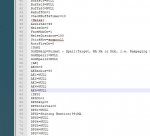
After:
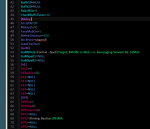
To get started, download the KissIni.xml file and place it somewhere you can find it like your C:\MQ2 folder.
Open Notepad++ and load up one of your Kissassist_ToonName.ini files.
First change the base style to give you the dark back ground.
Go to Settings >> Style Configurator....
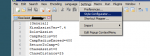
In the > Select Theme < drop down select "Zenburn" and place a check in the > Enable global background colour < check box.
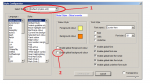
To get this:
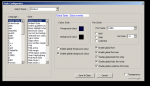
Hit > Save & Close <.
At this point you will have black text and black background.. Don't panic!!!!
It will all come together in the next steps.
Next go to menu selection > Language >> Define your language...
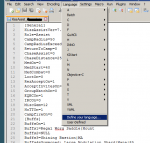
Click the > Import < button.
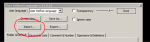
Surf to where you saved the KissIni.xml file and load it.
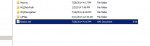
You should get a box indicating that your import was successful.
Shut down and restart Notepad++ .
Select menu item > Language < and you'll see the KissIni at the bottom. Select it like so.
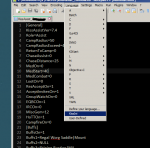
As soon as you select the KissIni entry you should see all the text pop up in colors.
Everytime you open Notepad++ you'll be running the KissIni settings.
To change back to normal:
1. Select menu item > Language > User-Defined.
2. Select menu item > Settings > Style Configurator... and in the Select Themes drop down, select > Default (styles.xml) < and uncheck the box for > Enable global background colour <
You're back to plain black and white.
Enjoy!
-Wolfborn
- - - Updated - - -
Same thing only for Macros
Follow same procedure with the Macro.xml file.
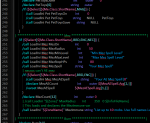
UPDATE: New XML for macro has been uploaded.
I thought, why not set up Notepad++ to use this type of coloring to make KissAssist INI files easier to work with.
Here is what I came up with.
If you're not using Notepad++ I highly suggest using it over Notepad or Wordpad in windows. Download it HERE
Before:
After:
To get started, download the KissIni.xml file and place it somewhere you can find it like your C:\MQ2 folder.
Open Notepad++ and load up one of your Kissassist_ToonName.ini files.
First change the base style to give you the dark back ground.
Go to Settings >> Style Configurator....
In the > Select Theme < drop down select "Zenburn" and place a check in the > Enable global background colour < check box.
To get this:
Hit > Save & Close <.
At this point you will have black text and black background.. Don't panic!!!!
It will all come together in the next steps.
Next go to menu selection > Language >> Define your language...
Click the > Import < button.
Surf to where you saved the KissIni.xml file and load it.
You should get a box indicating that your import was successful.
Shut down and restart Notepad++ .
Select menu item > Language < and you'll see the KissIni at the bottom. Select it like so.
As soon as you select the KissIni entry you should see all the text pop up in colors.
Everytime you open Notepad++ you'll be running the KissIni settings.
To change back to normal:
1. Select menu item > Language > User-Defined.
2. Select menu item > Settings > Style Configurator... and in the Select Themes drop down, select > Default (styles.xml) < and uncheck the box for > Enable global background colour <
You're back to plain black and white.
Enjoy!
-Wolfborn
- - - Updated - - -
Same thing only for Macros
Follow same procedure with the Macro.xml file.
UPDATE: New XML for macro has been uploaded.
Attachments
Last edited by a moderator: