• You've discovered RedGuides, an EverQuest multi-boxing and scripting community 🧙‍♀️⚙️. We want you to play several EQ characters at once, come join us and say hello! 👋

  • A TLP without truebox has thawed (Very Vanilla ready)
    Frostreaver

Guide - Tip to make reading KissAssist INI files a little easier to read in Notepad++

  • Thread starter Thread starter Wolfborn
  • Start date Start date
W

Wolfborn

Bored the other day I started looking for an IDE that would help when writing macros. Some of the generic IDE's do text coloring based on word lists and delimiters.
I thought, why not set up Notepad++ to use this type of coloring to make KissAssist INI files easier to work with.
Here is what I came up with.
If you're not using Notepad++ I highly suggest using it over Notepad or Wordpad in windows. Download it HERE

Before:
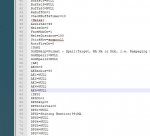
Plain Notepad++.JPG

After:
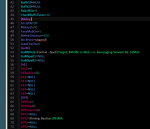
Colored Notepad++.png

To get started, download the KissIni.xml file and place it somewhere you can find it like your C:\MQ2 folder.
Open Notepad++ and load up one of your Kissassist_ToonName.ini files.

First change the base style to give you the dark back ground.
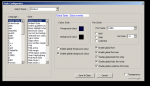
Go to Settings >> Style Configurator....
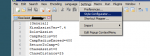
Colored Notepad++2.png

In the > Select Theme < drop down select "Zenburn" and place a check in the > Enable global background colour < check box.
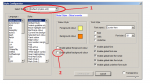
Capture1.PNG

To get this:

Capture2.PNG

Hit > Save & Close <.
At this point you will have black text and black background.. Don't panic!!!!
It will all come together in the next steps.

Next go to menu selection > Language >> Define your language...
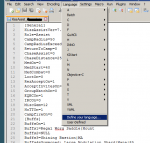
Colored Notepad++3.png

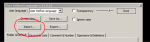
Click the > Import < button.

Capture5.PNG

Surf to where you saved the KissIni.xml file and load it.
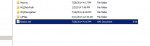
Capture4.PNG

You should get a box indicating that your import was successful.
Shut down and restart Notepad++ .

Select menu item > Language < and you'll see the KissIni at the bottom. Select it like so.
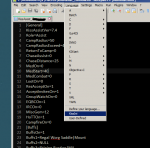
Colored Notepad++4.png

As soon as you select the KissIni entry you should see all the text pop up in colors.
Everytime you open Notepad++ you'll be running the KissIni settings.

To change back to normal:
1. Select menu item > Language > User-Defined.
2. Select menu item > Settings > Style Configurator... and in the Select Themes drop down, select > Default (styles.xml) < and uncheck the box for > Enable global background colour <
You're back to plain black and white.

Enjoy!

-Wolfborn

- - - Updated - - -

Same thing only for Macros
Follow same procedure with the Macro.xml file.
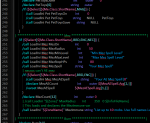

Macro.PNG

UPDATE: New XML for macro has been uploaded.
 

Attachments

Last edited by a moderator:
I have used Notepad++ for years but never set it up like this, great job! The only change I would make is to use the font: Verdana set to 12 point for super clarity
 
Update:

Experimenting with nesting, prefix and Styler I've made further advancements in usefulness of the Language Definitions when working with macros.
This latest XML allows you to pinpoint missing square brackets, parenthesis and curly brackets (braces) as well as a few improvements with the pipe symbol when not used for comments.

First shot is normal with the new macro.xml.
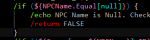
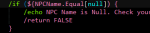
Notice the curly brackets are red, parenthesis are blue and square brackets are light light blue as well as the pair "${" & "}" are pinkish.
Notice the coloring of the other words such as /echo and /return.

Before.PNG

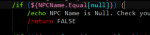
When I place the cursor on the Close Curly Bracket "}" you can see that it and the Open Curly Bracket "{" turn almost white.
This allows you to find the bracket pairs as Notepad++ now highlights the matching, open or close, bracket to the one you place your cursor near.
Same applies to Parenthesis and Square Brackets.
(Also note the vertical dotted line connecting the bracket to it's parent "/if", very useful if you follow a good indenting protocol)
Highlight Curly Brackets.PNG

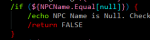
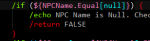
Now if I delete the closing curly bracket you can easily see that something is wrong when I place the cursor near the opening bracket.
It doesn't turn white but instead a light pink. Indicating that Notepad++ can't find the closing bracket.
Missing Curly Bracket.PNG

Highlighting Parenthesis. They turn white, same as curly brackets.
Highlight Parenthesis.PNG

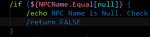
Delete the closing parenthesis on the /if statement.
We can immediately see that a lot of the text has gone blue because Notepad++ can't find the closing parenthesis.
Missing Parenthesis.PNG


Delete one of the inner curly brackets and you get this.
Easy to see that something is wrong as the text has turned pink because Notepad++ can't find the closing inner curly bracket.
Missing inner Curly Bracket.PNG

Finally I've deleted one of the inner square brackets "]".
Again, easy to see that something is wrong as the text has turned light light blue. Same story.. can't find the closing square bracket.
Missing Square Bracket.PNG


There you have it. Much easier to avoid mistakes when writing macros and easier to find when trying to debug.

Wolf
 
Last edited:
learned a HUGE tip today!
Edit two files side by side in Notepad++

Open the two files which you want to edit simultaneously. Right click on any one file's tab and then select *'Move to other view￾* which will split the screen into two for each of the file.

Of course, you can have more than 2 files open at the same and you can move any file into any view. Just follow the above said tip.
 
Great tip!

You can make them scroll together by clicking the little icon with the padlock on it.
 
i followed your instructions and it doesnt load like your pivture shows, all text is still blak, with blak baground. i did close notepad++ out and reopen but nothing
 
Hit > Save & Close <.
At this point you will have black text and black background.. Don't panic!!!!
It will all come together in the next steps.

Next go to menu selection > Language >> Define your language...

Did you import the XML file? Did it say successful import?
When you go to "Language" menu option do you see KissIni at the bottom? Did you click on it?

View attachment KissIni.bmp
 
i followed your instructions and it doesnt load like your pivture shows, all text is still blak, with blak baground. i did close notepad++ out and reopen but nothing

- - - Updated - - -

i did all those things, i updated notepad++ from 6.2 to 6.9.9 it works, thanks this is awsome
 
Love this thread. Thanks for the info Wolfborn and Razkle!
Changes implemented accordingly. Loving the side by side viewing and locked scrolling as well. I use that feature all the time in Excel. Having use of that in Notepad++ makes it even more of an Awesome tool.

Regards,
~TheFiddler~
 
Update to KissIni.xml ...

We added more parameters since the last posted version... I have updated his package post with it....

I added the new parameter labels to Keywords5 section so they are handled properly within general section.

ALso.. as a side note .... some of the color tags are wrong for certain items.. because they include partial parse matches on the keyword.

Example ... <Keywords name="Keywords2">DPS Burn AE</Keywords>

This causes the new parameter in [General] called DPSMeter to show pink.... like the entries for DPS / Burn / AE .. because its a partial match to the keyword.

This is happening for a few new parameters we added.... just a FYI Wolf.... hopefully you can fix this for exact name parsing within the keywords.

UPDATE -
Made SpellSet / Gmail / Pull ---- sections WHITE for their entries.. to let them differentiate from other similar colored sections above and below...


Reposted updated xml file for you Wolf.
 

Attachments

Last edited:
Update to KissIni.xml ...

Wolf ....

Minor update to the KissIni.xml file:

Added new General section parameters of ScatterOn and ConditionsOn

ScatterOn was added in the 9.2.4 release of KissAssist... and in anticipation of the 9.2.5 release featuring ini driven conditionals for GoM / DPS / Heals / Burn .... the ConditionsOn parameter was added as well.

I also verified that the KissInI.xml works beautifully with the new conditions.ini file what will be used in 9.2.5

I updated my posting above.. as well as your official posting on start of this thread.

Your friendly Tree Humper.
 
Last edited:
Update to KissIni.xml ...

Wolf ....

Minor update to the KissIni.xml file:

Added new General section parameter of MiscGemLW for rollout of Kiss 10

I also verified that the KissInI.xml works beautifully with the new conditions.ini file what will be used in 10.0.0

I updated my posting above.. as well as your official posting on start of this thread.

Your friendly Tree Humper.
 
This also works very well for reading kiss debug logs.

Rather than a wall of text its all colour coded, like how the regular macros look.
 
Guide - Tip to make reading KissAssist INI files a little easier to read in Notepad++

Users who are viewing this thread

Back
Top
Cart