• You've discovered RedGuides, an EverQuest multi-boxing and scripting community 🧙‍♀️⚙️. We want you to play several EQ characters at once, come join us and say hello! 👋

  • A TLP without truebox has thawed (Very Vanilla ready)
    Frostreaver
Resource icon

Release Task Hud v0.14

No permission to download
I haven't tried your Task Hud yet, but the concept looks amazing. This looks very similar to something that I was considering writing. What I wanted to do is to be able to easily ensure that my raid all has the task I want to work on, and to be able to (at a glance) verify what their current task step is. This way I could easily avoid accidentally moving on prematurely.

I'm wondering if you would consider the merit of allowing a particular task to be selected (as you have now), but then allow for a toggle switch that sorta inverts the view so that you would simultaneously see all of the characters' status with respect to that selected task? Perhaps showing just the first incomplete task stage for each character. That way at a glance you can see that your entire raid is ready to advance to the next stage, or not.

This could even be a button next to the task pulldown which would trigger a new temporary modal window to be popped up that contains this information. This approach would minimize the impact on what is already present in your UI.
 
I haven't tried your Task Hud yet, but the concept looks amazing. This looks very similar to something that I was considering writing. What I wanted to do is to be able to easily ensure that my raid all has the task I want to work on, and to be able to (at a glance) verify what their current task step is. This way I could easily avoid accidentally moving on prematurely.

I'm wondering if you would consider the merit of allowing a particular task to be selected (as you have now), but then allow for a toggle switch that sorta inverts the view so that you would simultaneously see all of the characters' status with respect to that selected task? Perhaps showing just the first incomplete task stage for each character. That way at a glance you can see that your entire raid is ready to advance to the next stage, or not.

This could even be a button next to the task pulldown which would trigger a new temporary modal window to be popped up that contains this information. This approach would minimize the impact on what is already present in your UI.

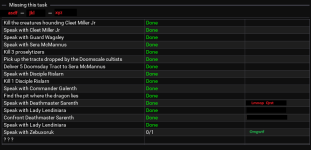
I think this functionality already exists, just not as you were expecting it.

In the attached screenshot, under the "Missing this task" seperator, there are 3 names. Those names are red, indicating that those 3 characters do not have the task you are viewing.

In the table there is a list of steps, with a whole bunch of them showing "Done" in the 2nd column, and then 1 entry of "0/1" near the bottom.

This indicates the selected characters status on this task. However further to the right are more names. Names in red indicate that the named character is behind the currently suggested character on this task step.
The green name indicates that the named character is ahead of the currently selected character on this task.

1710828664440.png

This should allow you to see the status of all characters in your selected peer group.
 
For the auto-update, I was wondering if you could register an event for the task updated message, to trigger the update.
View attachment 58247
Yes. I could do it that way. But doing so would cause the whole flickering of the window while it updates every single time a task update is received.

What I am looking into doing is on task updates, directly modifying the tables I have stored of everyone's task progress.

Unfortunately I have been devoting my time to another project, and have not had a chance to working on this.
 
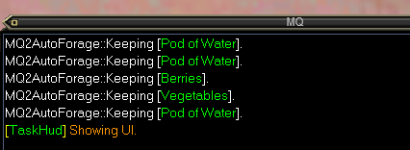
I am trying the /th show command. It opens the quest window and then closes it, no UI as shown in previous posts.

Anything I am missing?
 
I am trying the /th show command. It opens the quest window and then closes it, no UI as shown in previous posts.

Anything I am missing?

The window does not show on startup, nor after the /th show command? It simply opens the quest window and closes it, but never becomes visible itself?

If this is the case please try closing mq and all eq clients. update mq, update eq, and try again and please let me know the result.
 
I have been using it mostly without issue now for anniversary events. It occasionally crashed when being on for a while and zoning but it looks like you have updated. I will keep using it and report back more. Overall really great improvements!
 
99% sure I'm doing something wrong -- on my "driving toon" I run /lua run taskhud and then /th show.

I then get a message saying that TaskHud is showing the UI, but there is no UI anywhere.... on any toon (only CWTN UI is showing). Tried some obvious logging out all sessions and logging back in, same result.

Toons are all in a group together, all have the same quest.

Edit to add: unlike the above post, I don't even get my quest windows opened/closed when starting the plugin or using the show command.
Edit to add #2: Did quit all EQ instances, red guides launcher, and MQ. Updated MQ after launching reguides, still no luck :(
 
Last edited:
Putting the solution for me in a separate post... Lua Rocks was installed when I was looking at another plugin after the fact.. TaskHud now works great :)

Might put a requirement in the docs (and/or have the plugin prompt to install the requirements).
 
Last edited:
Putting the solution for me in a separate post... LUA Rocks was installed when I was looking at another plugin after the fact.. This plugin now works.

Might put a requirement in the docs (and/or have the plugin prompt to install the requirements).

So just to verify, this is working properly for you now?
 
I'm also experiencing the "No UI" issues seen in post 49. I also tried reboot, full repath, MQ update and no luck.

1712242270024.png

I also moved all my EQ/MQ windoes around just in case it was hiding in the background. Is there a preqreuisite I'm missing?
 
I also had the same issue. I needed to install the Lua Package Manager (running a Lua that requires it, like boxhud, triggered the dialog box prompting the download). I suspect this Lua needs to run a similar check.

(edit: restarting EQ after installing the package manager seems to have resolved this issue.)
 
Last edited:
I also had the same issue. I needed to install the Lua Package Manager (running a lua that requires it, like boxhud, triggered the dialog box prompting the download). I suspect this lua needs to run a similar check.

(edit: restarting EQ after installing the package manager seems to have resolved this issue.)
I have Boxhud running fine, but never could get a UI for TaskHud.
 
I honestly have no clue why it won't display for me. It's loaded and running. All my other LUAs run without issue. /th show won't bring up any sort of UI like pictures above show. I have restarted MQ2, restarted PC, everything. Quit Lua and reloaded, etc. It just won't show up. Buttonmaster and everything else is working no problem. I have 6 toons loaded. No clue :(
 
Putting the solution for me in a separate post... LUA Rocks was installed when I was looking at another plugin after the fact.. TaskHud now works great :)

Might put a requirement in the docs (and/or have the plugin prompt to install the requirements).
Can you share what fixed this for you? You described the exact thing happening to me. All says it should be working but no visible window anywhere.
 
Love the Lua! Just a friendly request from our 8% of the population to please make the green and red a little more distinguishable -- maybe more orange for the red and dark for the green? Or consider using yellow and blue instead. Thank you!
 
Love the lua! Just a friendly request from our 8% of the population to please make the green and red a little more distinguishable -- maybe more orange for the red and dark for the green? Or consider using yellow and blue instead. Thank you!
should make it perv.. i mean purple...
 
I'm trying to debug why TaskHud does not work on my chars. I am using things such as BoxHud as the UI is working fine, but TaskHud will not display it. So, I've been debugging it as best I can with printf statements. I think that the actors library is not loaded, but I cannot figure out how to load or enable it. The app is running the main loop, but not requesting information through actors messages. Any suggestions?
 
Can you describe what happens when you run the script? Does it open the EQ Task window and then close it? Does it do this on all your characters when you run it? Does /th show do anything? What if you do /th show on any of the other characters?

There should be no issue with actors loading, its called at line 7 or 8
 
When I run it, I get the normal start with a valid PID. I get the message about using /th help for a full list of commands. I then try /th show and it says displaying UI, but nothing happens. From my Printf statements, I see that the main loop is running, but num_updates_finished is always 0, while peers_count is correct with 6. it calls request_task_update() once, asking for 'REQUEST_TASKS', but I do not think that command is being answered because iI never see a message.content.id == ' REQUEST_TASKS'. I put a printf in the local actors = actors.register() method and nothing ever hits. So that is why I asked about actors.
 
When I run it, I get the normal start with a valid PID. I get the message about using /th help for a full list of commands. I then try /th show and it says displaying UI, but nothing happens. From my Printf statements, I see that the main loop is running, but num_updates_finished is always 0, while peers_count is correct with 6. it calls request_task_update() once, asking for 'REQUEST_TASKS', but I do not think that command is being answered because iI never see a message.content.id == ' REQUEST_TASKS'. I put a printf in the local actors = actors.register() method and nothing ever hits. So that is why I asked about actors.

Alright, thank you for the information. I will take a more in depth look at this tomorrow and see if I can tell what might be going on.

Just to eliminate any possibilities, have you insured you have the latest version of MQ? Have you tried rebooting?
 
Alright, thank you for the information. I will take a more in depth look at this tomorrow and see if I can tell what might be going on.

Just to eliminate any possibilities, have you insured you have the latest version of MQ? Have you tried rebooting?
Yes, I reboot daily and update.
 
Yes, I reboot daily and update.

I just wanted to update you. I did not have a chance to look at TaskHud today, I ate up my whole day doing a pretty significant rewrite to some of Epic Laziness. I will try to remember to do this tomorrow.
 
Thanks for looking into this. I haven't tried running any debugs and am not super versed in that but that is the exact thing happening to me and I also am update to date and rebooted. Everything loads and is supposedly running but the /th show has nothing load. No task menu pop up ever. It just doesn't show anything.
 
Thanks for looking into this. I haven't tried running any debugs and am not super versed in that but that is the exact thing happening to me and I also am update to date and rebooted. Everything loads and is supposedly running but the /th show has nothing load. No task menu pop up ever. It just doesn't show anything.
It will be at least a week before any updates will be done on this utility as stated in the Epic Laziness Lua thread.
 
Hey there, was excited for this, would really help running my group around thru quests etc, of course.
Ran it, does nothing. Ran it on all the toons, does nothing. Script is looping okay, just not showing gui or doing much of anything, presumably none of the requests are working properly.

So I went in and commented out the (line 273) return that drops out of displayGUI() if update_done is false. UI displaying properly now, although I don't care atm about other toons showing, while trying to get it working okay. It might now be showing on them, too, all the time. Doesn't matter for my purposes.
Well, UI table is empty, I see the correct group list, drop down. All the toons are listed as server_toon.
I output a bunch of debug messages from the whole script. All of the incoming message handlers (starts Line 189) are checking to see if the message is for them, but comparing against lowercase (displayname). The messages are all being sent as server_toonname (lowercase). So none of the messages actually get acted upon.
So some hackery of that, because mq.me.server is null for some reason, and I didn't want to spend ages on that, I just hardcoded the server name in. Now a bunch of the messages actually get acted upon, but the message flow still stops before I get a table of info - the quest info is never requested. I see the quest ui show up now, get iterated through, but the back and forth isn't actually passing the info correctly. I don't know the expected message flow, and it's dinnertime ;p so I am stopping my exploration here. I suspect whatever is supposed to get one of those messages back and handle it might be having a similar problem with the routing due to name being wrong.
 
Hey there, was excited for this, would really help running my group around thru quests etc, of course.
Ran it, does nothing. Ran it on all the toons, does nothing. Script is looping okay, just not showing gui or doing much of anything, presumably none of the requests are working properly.

So I went in and commented out the (line 273) return that drops out of displayGUI() if update_done is false. UI displaying properly now, although I don't care atm about other toons showing, while trying to get it working okay. It might now be showing on them, too, all the time. Doesn't matter for my purposes.
Well, UI table is empty, I see the correct group list, drop down. All the toons are listed as server_toon.
I output a bunch of debug messages from the whole script. All of the incoming message handlers (starts Line 189) are checking to see if the message is for them, but comparing against lowercase (displayname). The messages are all being sent as server_toonname (lowercase). So none of the messages actually get acted upon.
So some hackery of that, because mq.me.server is null for some reason, and I didn't want to spend ages on that, I just hardcoded the server name in. Now a bunch of the messages actually get acted upon, but the message flow still stops before I get a table of info - the quest info is never requested. I see the quest ui show up now, get iterated through, but the back and forth isn't actually passing the info correctly. I don't know the expected message flow, and it's dinnertime ;p so I am stopping my exploration here. I suspect whatever is supposed to get one of those messages back and handle it might be having a similar problem with the routing due to name being wrong.

For some reason some oddities take place with the actors sometimes, not all characters will receive messages from one another, but since they show as present in the dannet group group, it continues to wait for them to respond. Unfortunately I do not know what causes the issue or how to go about getting it fixed, because it is far to intermitent to track.
 
okay, but it's not an intermittent error I am experiencing, it will happen all the time, on all my 6 sessions, no matter the toon. So if it's that, I can run debug versions for you or alternate versions, if that's any help?
I am never getting to a point where any of the 6 sessions correctly moves to a "show the table of info" stage. also, I think tbh the messages are getting through (although my feeling is, I am getting regular crashes probably caused by dannet (despite it being much better than eqbc or whatever it was)).
 
you might already know this, but dannet has some kind of setting to control what names are used per toon. I recently returned so the default is what I am using. maybe you can use this to control whether the names I was messing round hardcoding server into are correctly selected? Bonus internet hugs if you don't just force it away from using your default, as some folks do use multiple servers and want them communicating :)
 
Can't seem to get the UI to show. I run the command and it says "Showing UI", but it doesn't appear anywhere.
 
Can't seem to get the UI to show. I run the command and it says "Showing UI", but it doesn't appear anywhere.
same here, sometimes it helps to just alt-tab to another window and then back, and it shows. But its weirdly inconsistent.
 
got this running, using /dnet fullnames off & /dnet frontdelim off

got the problem with it not showing the UI sometimes. Solved it by making a button with /dga /Lua stop taskhud
when it won't show, that kills it off and then hit the normal button to show it and back on track.

Might it be possible to provide a drop down to filter the zone list, either ALL, or the zone shown next-to the quest?
also maybe it might be handy to select the current toon's current quest on run, so it is showing what you have selected in the quest list?
 
Super cool idea here when compared with the traditional mqconsole text reporting.

Tried this today and noticed some oddities and errors.

6 toons grouped using dannet and it does not seem to update any of them per kill. I waited a few minutes before the next kill to make sure.


1723052834005.png

If you hit the refresh button next to group, it closes the imgui. typing /th show gives the error below and you need to stop the script and restart it for it to update.

1723052722914.png

It would also be handy for it to store the quest field when switching toons so you can see what step each toon is on without having to choose the quest each time, unless there is a way to display all toons with the quest as opposed to having to pick just one. Like an "all" function in the character section drop down

Just wanted to mention a couple of things as the idea behind having a window to show the steps each toon is on from your main is super valuable.
 
Just wanted to mention a couple of things as the idea behind having a window to show the steps each toon is on from your main is super valuable.
Yeah, unfortunately the refresh button is broken.

I will say though that even in it's current state that it's become an absolute asset to me while questing with 6. It is a little annoying to have to reload the Lua every time you want to check it, but this, Mimic Me, and GiveIt have made questing as 6 actually somewhat bearable. Before I had this I used to always get to a turn-in step or something and then realize one of my characters missed a hail or something back at step 4. Drove me crazy!

As it is right now, what I do is just load it when I want to check if my whole team is at the same step as my driver. It would be nice if it refreshed properly though. Maybe even have it auto-update at a configurable interval or something?

Either way, I still love this tool.
 
Yeah, unfortunately the refresh button is broken.

I will say though that even in it's current state that it's become an absolute asset to me while questing with 6. It is a little annoying to have to reload the LUA every time you want to check it, but this, Mimic Me, and GiveIt have made questing as 6 actually somewhat bearable. Before I had this I used to always get to a turn-in step or something and then realize one of my characters missed a hail or something back at step 4. Drove me crazy!

As it is right now, what I do is just load it when I want to check if my whole team is at the same step as my driver. It would be nice if it refreshed properly though. Maybe even have it auto-update at a configurable interval or something?

Either way, I still love this tool.
I totally see the value in it as I recently adjusted a tool that simply sends a note in the mqconsole when a toon obtains a quest and each time the step updates but it's just a simple msg in the console box. This is WAAAAY cooler and better.

Did you find a way to see each toons progress on the menu at one time and I missed it or did you have to select each toon in the drop down box to see their progress?
 
I totally see the value in it as I recently adjusted a tool that simply sends a note in the mqconsole when a toon obtains a quest and each time the step updates but it's just a simple msg in the console box. This is WAAAAY cooler and better.

Did you find a way to see each toons progress on the menu at one time and I missed it or did you have to select each toon in the drop down box to see their progress?
If you select a quest with TaskHUD loaded on your driver, then you will see your party members who do not have the quest or are not at that stage as red text next to the step you are on.
 
If you select a quest with TaskHUD loaded on your driver, then you will see your party members who do not have the quest or are not at that stage as red text next to the step you are on.
Thanks, I'll take a second look this evening. I saw the red toon names for the ones who didn't have the quest but I did not see red names when they were on a different step. That could be because I was waiting for the step to update tho =)
 
If you select a quest with TaskHUD loaded on your driver, then you will see your party members who do not have the quest or are not at that stage as red text next to the step you are on.
Double checked and no luck. I have one toon in the group ahead of the others by one kill and it's not showing any of the other group members.

On the plus side, I fixed the refresh so it won't crash. You can hit refresh on the driver toon and the imgui comes back updated. I'll PM Lisie the info.
 
Release Task Hud

Users who are viewing this thread

Back
Top
Cart