• Hail, we're RedGuides. We want you to play six (yes, 6!) EverQuest characters at once. We have scripts and a friendly community to help, please join our playstyle and say hello! 👋
  • We've added LLM sections to our Terms & Rules and Resource Rules, for everyone's sanity & in-game safety.
    Read more
    a. Do not replace your voice with an LLM. This goes for your posts and your scripts. Drafting and editing with a tool is fine, but don't take you out of what you share.
    b. Do not replace your EQ character's voice with an LLM. We don't want scripts that speak over /ooc, /shout or other public channels. This has been an unwritten rule that's kept casino scripts off the site for decades, but we're now compelled to make it clear: keep automated communication private.

    Why Does RG Review Scripts?
    Nearly every LLM-written Lua script we see is making your character do impossible things, and rarely in a way that's beneficial to you. We've seen heavy server hammering, /target over impossible distances when /nav spawn would passively accomplish the same thing, a spawn search that fires 20+ times per second, and other pointless actions that are likely annoying GMs.

    You are welcome to use LLMs as a tool to structure, draft, and edit your work, but please read critically before hitting /lua run
SharedDataClient

Release SharedDataClient 03/31/2024

Download
aquietone submitted a new resource:

SharedDataClient - Its kinda like DanNet or NetBots built on top of the actors system

Implements an actor based SharedData TLO for MacroQuest

The script will broadcast messages over the actor system at the configured frequency containing key/value pairs of all configured properties.
Properties include a key (the name the property will be exposed as in the character data) and an expression (a parsable line of macroscript like ${Me.PctHPs}).
Properties will only be included in messages when the value has changed.
Properties will be rebroadcast even if they haven't...

Read more about this resource...
 
One random application of this:

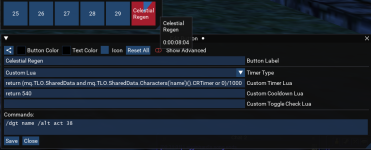
Using it to broadcast timers which can then be used within buttonmaster, so that you can have hotkeys with cooldown timers for remote characters abilities:

The button created on some character other than the cleric:
1711413365031.png

The property added to SharedDataClient on the cleric:
image.png


Saw someone do this on project lazarus with e3next and thought it'd be neat to be able to do this without e3next.You could do similar with pre-configured DanNet observers as well.
 
Thanks aquietone I will try it asap, by now using Rekka one, but will transfer to this one soon
Wow checking it and its a great solution to use on Buttonmaster and on ui.
Azote
 
One random application of this:

Using it to broadcast timers which can then be used within buttonmaster, so that you can have hotkeys with cooldown timers for remote characters abilities:

The button created on some character other than the cleric:
View attachment 59530

The property added to SharedDataClient on the cleric:
image.png


Saw someone do this on project lazarus with e3next and thought it'd be neat to be able to do this without e3next.You could do similar with pre-configured DanNet observers as well.
AQ, you are saying that this would be able to have a (lets say) 6 Button master bars, one for your driver and the other 5 with these 'broadcast timers' for far more stay on your driver character window?
 
I am struggling with the indentation of tables, but I dont know whether it is intended.

I have the following script (which is added to Custom Sources) to store all my current buffs into a table:

Code:
local function MyBuffsFunction()

    local MyBuffs = {}
    local BuffStatus = false
    local BuffName = "abc"

    for i = 1 , 20 do
        if mq.TLO.Me.Buff(i)() ~= nil then
            BuffStatus = true
            BuffName = mq.TLO.Me.Buff(i)()
            MyBuffs[BuffName] = {BuffStatus}
        end
    end

    return {MyBuffs}
   
end

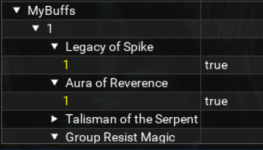
The problem is that the UI indents the Keys (in yellow) into different layers, adding a "1" layer (in white) in between. See screenshot:

Screenshot 2024-05-23 193931.png

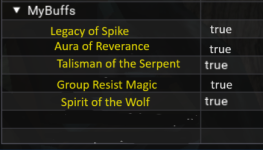
Instead, ideally, what I would like to see if the Key (in yellow) immediately underneath the table name, such as the hypothetical example below:

Screenshot 2024-05-23 193931w.png

Any idea why the UI automatically adds those "1" in there?
 
Last edited:
Release SharedDataClient

Users who are viewing this thread

Back
Top
Cart