
Logging in works, getting to the server screen works, when I go to pick my character it seems the whole screen is frozen, when i look at task manager.. says eq not responding. This is on all toons i try to log in with. MQ is not running btw. Any help with this please..

Install the app
How to install the app on iOS
Follow along with the video below to see how to install our site as a web app on your home screen.
Note: This feature may not be available in some browsers.
-
 You've discovered RedGuides, an EverQuest multi-boxing and scripting community 🧙♀️⚙️. We want you to play several EQ characters at once, come join us and say hello! 👋
You are using an out of date browser. It may not display this or other websites correctly.
You should upgrade or use an alternative browser.
You should upgrade or use an alternative browser.
Problem - Screen Froze not MQ issue
- Thread starter Sshanty
- Start date


Ill try that process again..I'd do the ol "restart pc and grab some water while it reboots" and try again
and no sir!! no problems with other gamesAfter that hit'em with the ol vid driver update
Do you have issues on other games?
No its on all toons.. Ill try that.. Its crazy tho. played yesterday fine and today nothingin that case lots of stuff on official forums
Try another character to see if its specific to a character file/etc
Change out of window mode/fullscreen, play around with it
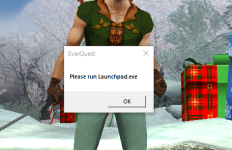

Have you tried running launchpad ?View attachment 67498This is what im getting.. Its like its froze.. The only thing that has changed is my internet, im using the net at work.. when it closes i go back and it says i still have a toon logged in?

- Joined
- Dec 1, 2006
- RedCents
- 1,889¢
It also could be a firewall issue at work. Possibly some ports are blocked, or sites are blocked (known gaming sites). Maybe try tethering temporarily to see if it goes away.
I had a similiar problem .
What helped me was I turned off all unnecessary background applications. Basically just run EQ as priority !!
When you do this reboot the computer as well. Turn off completely and turn on
What helped me was I turned off all unnecessary background applications. Basically just run EQ as priority !!
When you do this reboot the computer as well. Turn off completely and turn on
Until launchpad is run and the "please run launchpad" goes away, everything else is mootI had a similiar problem .
What helped me was I turned off all unnecessary background applications. Basically just run EQ as priority !!
When you do this reboot the computer as well. Turn off completely and turn on
Users who are viewing this thread
Total: 1 (members: 0, guests: 1)
Share: