• Hail, we're RedGuides. We want you to play six (yes, 6!) EverQuest characters at once. We have scripts and a friendly community to help, please join our playstyle and say hello! 👋
  • We've added LLM sections to our Terms & Rules and Resource Rules, for everyone's sanity & in-game safety.
    Read more
    a. Do not replace your voice with an LLM. This goes for your posts and your scripts. Drafting and editing with a tool is fine, but don't take you out of what you share.
    b. Do not replace your EQ character's voice with an LLM. We don't want scripts that speak over /ooc, /shout or other public channels. This has been an unwritten rule that's kept casino scripts off the site for decades, but we're now compelled to make it clear: keep automated communication private.

    Why Does RG Review Scripts?
    Nearly every LLM-written Lua script we see is making your character do impossible things, and rarely in a way that's beneficial to you. We've seen heavy server hammering, /target over impossible distances when /nav spawn would passively accomplish the same thing, a spawn search that fires 20+ times per second, and other pointless actions that are likely annoying GMs.

    You are welcome to use LLMs as a tool to structure, draft, and edit your work, but please read critically before hitting /lua run

Problem - rgmercs and kissassist not working on one charactor.

MadaSnave

Active member
I've been using rgmercs for about 2 months and had no real issues once i learned the commands. but yesterday with the patch my druid started to have issues with a /prase so i switched her over to kissassist and copied a level 100 ini file to her kissassist ini, rgmercs would just shut off after starting, but kissassist is running and she isn't casting a single spell or targeting any one or buffing them, healing them debuffing mobs damaging mobs. any idea what might be causing this account to be the only one to not have macro's work properly on. should i reinstall the macro files and redo the ini files compeately, all the accounts use the same eq file so i don't think that is a factor.
 
Solution
I've been using rgmercs for about 2 months and had no real issues once i learned the commands. but yesterday with the patch my druid started to have issues with a /prase so i switched her over to kissassist and copied a level 100 ini file to her kissassist ini, rgmercs would just shut off after starting, but kissassist is running and she isn't casting a single spell or targeting any one or buffing them, healing them debuffing mobs damaging mobs. any idea what might be causing this account to be the only one to not have macro's work properly on. should i reinstall the macro files and redo the ini files compeately, all the accounts use the same eq file so i don't think that is a factor.
what is a /prase?

you can only run 1...
I've been using rgmercs for about 2 months and had no real issues once i learned the commands. but yesterday with the patch my druid started to have issues with a /prase so i switched her over to kissassist and copied a level 100 ini file to her kissassist ini, rgmercs would just shut off after starting, but kissassist is running and she isn't casting a single spell or targeting any one or buffing them, healing them debuffing mobs damaging mobs. any idea what might be causing this account to be the only one to not have macro's work properly on. should i reinstall the macro files and redo the ini files compeately, all the accounts use the same eq file so i don't think that is a factor.
what is a /prase?

you can only run 1 macro at a time - either rgmercs or kissassist, you can't run both.

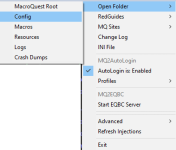
I would ensure you're editing the ini file that is location in your > CONFIG < folder and not the macro folder

you can get there by here:

1655399595988.png
 
Solution
ok had the wrong ini for kissassist got it working. i don't know what phase is wrong with the rgmercs (yes was running just rgmercs at the time) if i could copy all the stuff from the macroquest window that it says at the end i would but its about 500 characters and i don't want to mess up code language by typing it out incorrectly due to my dyslexia.

but at least with kissassist on her she is helping now. are the ini that rgmercs going to be in the same config folder if so then i might be able to delete her ini from installing it and reinstall rgmercs and see if that works.

*edit* its there, rgmerc folder ini for chractror deleted, rgmerc reinstalled and functioning!

thanks for the help sic and the guys who helped on rgmercs support page as well (would of keep this all there but when i couldn't figure out why kissassist was also not working i didn't want to bog down one macro support page with multiple issues from more then one macro)
 
np Mada, no one wants you to type all that out!

windows has a built-in screensnip feature:

Take an easy screen snip with Shift+Windows Key+S, then select the area you wish to copy, then Control+V to paste it in the reply.

by and large, all configuration files are going to be in the config folder these days - here are some notes on the MQ2 -> MQ changes


There are a couple of small, yet important changes with MacroQuest vs the old MQ2 as explained > HERE <

Moving to MacroQuest mental notes:
1. mq2map click is Control+Shift+Click
2. new easyfind self travel is Control+Click (reminder in find window title bar)
3. new easyfind group travel is Control+Shift+Click
4. If you selected a destination in your zone guide and want to activate it you /travelto activate
5. /yes and /no are now aliases
6. your ini configuration files (like for kissassist) now reside in your "Config" folder and not your "Macro" folder
7. if you want the functionality of the MQ2 "MQ2TargetInfo" - They are now in 3 separate plugins: /plugin groupinfo /plugin targetinfo /plugin xtarinfo
 
Problem - rgmercs and kissassist not working on one charactor.

Users who are viewing this thread

Back
Top
Cart