• You've discovered RedGuides, an EverQuest multi-boxing and scripting community 🧙‍♀️⚙️. We want you to play several EQ characters at once, come join us and say hello! 👋

  • A TLP without truebox has thawed (Very Vanilla ready)
    Frostreaver

Problem - RewardSelectionWnd and Changing Tabs

Joined
Jun 13, 2016
RedCents
31,901¢
Overseer macro is attempting to Smart-claim rewards. There seems to be no way to make this work properly without actively changing tabs.

I have worked this from 100 different angles but I'll leave those details off for initial-post brevity.
Hoping someone has worked on this or has a work-around for it.

INI:
/notify RewardSelectionWnd RewardPageTabWindow tabselect 3
results in:
Window 'RewardSelectionWnd' child 'RewardPageTabWindow' not found.

This appears to be a problem due to dynamically-created tabs as this works on all static-tab windows like AA, Overseer, Inventory, and others.

Hoping to be able to solve this without having to write a Reward helper Plug-in.
 
Overseer macro is attempting to Smart-claim rewards. There seems to be no way to make this work properly without actively changing tabs.

I have worked this from 100 different angles but I'll leave those details off for initial-post brevity.
Hoping someone has worked on this or has a work-around for it.

INI:
/notify RewardSelectionWnd RewardPageTabWindow tabselect 3
results in:
Window 'RewardSelectionWnd' child 'RewardPageTabWindow' not found.

This appears to be a problem due to dynamically-created tabs as this works on all static-tab windows like AA, Overseer, Inventory, and others.

Hoping to be able to solve this without having to write a Reward helper Plug-in.


are you able to read these windows to index or is that a no go also?
 
I made a Lua that will pop the overseer items and go down the list and claim each one from a missing collection based on whatever expansion you choose that has shinys . I am adding a gui and cleaning up and adding a bunch of useless functions... because that is what I do..

the one thing I could not do was "read" the selected reward window (i.e couldn' get .Items or use .List) mq2rewards solved that problem....

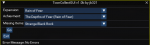
1634544534951.png
 
I am missing.. something..

Code:
mq.TLO.Window('RewardSelectionWnd').Child(
                          'RewardPageTabWindow').CurrentTabIndex()
mq.TLO.Window('RewardSelectionWnd').Child('RewardPageTabWindow').SetCurrentTab(
    'Ruins of Decay (Plane of Health)')
print(mq.TLO.Window('RewardSelectionWnd').Child('RewardPageTabWindow').Child(
          'RewardSelectionOptionList').CurrentTab.Items())
print(mq.TLO.Window('RewardSelectionWnd').Child('RewardSelectionOptionList')
          .CurrentTab.Items())
print(mq.TLO.Window('RewardSelectionWnd').Child('RewardSelectionOptionList')
          .Items())
print(mq.TLO.Window('RewardSelectionWnd').Child('RewardSelectionOptionList')
          .GetCurSel())
print(mq.TLO.Window('RewardSelectionWnd').Child('RewardSelectionOptionList')
          .Tab('Ruins of Decay (Plane of Health').Items())

I have looked at the TLO , but coming up empty

for testing I am only using 1 reward window no other tabs
 
Last edited:
Well

I ain't never seen that combo before..

Code:
print(mq.TLO.Window('RewardSelectionWnd/RewardPageTabWindow').Tab('Ruins of Decay (Plane of Health)').Child('RewardSelectionOptionList').List(2))

Code:
local select_reward_choice = mq.TLO.Window(
                                 'RewardSelectionWnd/RewardPageTabWindow').Tab(
                                 'Ruins of Decay (Plane of Health)')
                                 .Child('RewardSelectionOptionList').List(1)()

I still think MQ2Rewards is caviar
 
You should also use the window inspector to make sure you're targeting the right window controls. I don't mind MQ2Rewards but it was created because these members weren't available at the time.
 
You should also use the window inspector to make sure you're targeting the right window controls. I don't mind MQ2Rewards but it was created because these members weren't available at the time.
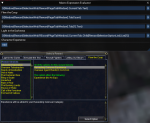
The inspector pops out this

in tab:

${Window[RewardSelectionWnd].Child[RewardPageTabWindow]}

in reward window:

${Window[RewardSelectionWnd].Child[RewardSelectionOptionList]}
 
I don't know what this means. Extract what?


this specifically :

RewardSelectionWnd/RewardPageTabWindow

the TLO copy does one or the other but not both.. not a world ender but wanted to know if that is by design..
 
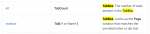
From the docs: you need the TabBox
1634590393291.png

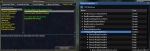
Thats the one selected here, and highlighted in yellow:
1634590420561.png

You always need the Screen as the main parameter to Window, like ${Window[<screen>]} or ${Window[<Screen>/<Child>]}
The child can be any child in the hierarchy. The reason why we need to pick the tab is because multiple tabs all have children with the same names, so you want to scope it to just the tab that you are interested in.
 
Within the MQ console under the window inspector.. I have the option to 'Copy Window Child TLO'

I am using Lua for the statements..

I get either one of these

mq.TLO.Window('RewardSelectionWnd')()

mq.TLO.Window('RewardPageTabWindow')()


but I don't get this

mq.TLO.Window('RewardSelectionWnd/RewardPageTabWindow')()

I understand how to operate it, I just wanted to know, because it is quite different from anything else I have seen, should it be copied as mq.TLO.Window('RewardSelectionWnd/RewardPageTabWindow')()

It is not in here:
 
"${Window[RewardSelectionWnd].Child[RewardPageTabWindow]}"

and

"${Window[RewardSelectionWnd/RewardPageTabWindow]}"

are the same. The second one is just faster. You have to type it yourself.

"mq.TLO.Window('RewardPageTabWindow')()"

doesn't work because RewardPageTabWindow isn't a Screen as I mentioned above your post.
 
"${Window[RewardSelectionWnd].Child[RewardPageTabWindow]}"

and

"${Window[RewardSelectionWnd/RewardPageTabWindow]}"

are the same. The second one is just faster. You have to type it yourself.

"mq.TLO.Window('RewardPageTabWindow')()"

doesn't work because RewardPageTabWindow isn't a Screen as I mentioned above your post.


Understood..

The 'whatever normal' way is:

Code:
print(mq.TLO.Window('RewardSelectionWnd').Child('RewardPageTabWindow').Tab(
          'Traitorous Thoughts').Child('RewardSelectionOptionList').Items())

So, in this whole equation I was missing

.Tab('Traitorous Thoughts')
 
The preferred way would be to combine the .Window and .Child calls into this:

INI:
print(mq.TLO.Window('RewardSelectionWnd/RewardPageTabWindow').Tab(
          'Traitorous Thoughts').Child('RewardSelectionOptionList').Items())
 
From the docs: you need the TabBox
View attachment 34094


You always need the Screen as the main parameter to Window, like ${Window[<screen>]} or ${Window[<Screen>/<Child>]}
The child can be any child in the hierarchy. The reason why we need to pick the tab is because multiple tabs all have children with the same names, so you want to scope it to just the tab that you are interested in.


Sorry for coming in late here. I'm missing something - is this for MQNext or so? None of the Tab-related TLO in this doc are recognized by my current RedGuide build.
https://docs.macroquest.org/macroquest/data-types-and-top-level-objects/data-types/datatype-window
 
Sorry for coming in late here. I'm missing something - is this for MQNext or so? None of the Tab-related TLO in this doc are recognized by my current RedGuide build.
https://docs.macroquest.org/macroquest/data-types-and-top-level-objects/data-types/datatype-window
yup next - you definitely want to swap sooner than later

I have a quick guide if that is helpful

1. download next via the RG launcher
2. hit the migrator tool (will move any configs/macros etc from old install https://www.redguides.com/community/resources/macroquest-migrator.2156/
3. setup framelimiter https://www.redguides.com/community/threads/mqnext-framelimiter-demo.78448/
4. load mq2lua /plugin Lua 5. if you want the functionality of the MQ2 "MQ2TargetInfo" - They are now in 3 separate plugins: /plugin groupinfo
/plugin targetinfo
/plugin xtarinfo
mental notes:
1. mq2map click is Control+Shift+Click
2. new easyfind self travel is Control+Click (reminder in find window title bar)
3. new easyfind group travel is Control+Shift+Click
4. If you selected a destination in your zone guide and want to activate it you /travelto activate
 
Problem - RewardSelectionWnd and Changing Tabs

Users who are viewing this thread

Back
Top
Cart