• You've discovered RedGuides, an EverQuest multi-boxing and scripting community 🧙‍♀️⚙️. We want you to play several EQ characters at once, come join us and say hello! 👋

  • A TLP without truebox has thawed (Very Vanilla ready)
    Frostreaver
QKI "Quicky Kiss It" - A KissAssist UI.

Release QKI "Quicky Kiss It" - A KissAssist UI. 2.61

No permission to download
About to give the latest update a go and see if it fixes the crashes.

Will edit shortly.

BB~

EDIT-

NICE Jeff! That fixed it man. Awesome job. Appreciate you taking the time to help us out with your great resource! Can't wait to get my group running and give the new version a whirl.
 
Last edited:
About to give the latest update a go and see if it fixes the crashes.

Will edit shortly.

BB~

EDIT-

NICE Jeff! That fixed it man. Awesome job. Appreciate you taking the time to help us out with your great resource! Can't wait to get my group running and give the new version a whirl.
Nice, keep me posted if you see any bugs.
 
this is a sweet start!

any chance you plan on adding tabs to adjust/view conditions+ the different sections?
Good question. Yes, and No on this.

Yes, the tabs will eventually grow and likely closer match the different kiss ini sections. Some ini sections and their matching tab might grow in complexity to add functions that may need to be changed on the fly for situational changes in gameplay, while keeping it multi-class, and with in reason.

For example the ability to load and change things like: PetSpell=Minion of Itzal, or PullWith=Parlay for Power or MezSpell=Slumber of the Diabo|2 or MezDebuffSpell=Your Debuff Spell.

These sort of things are pretty easy to implement and I think fit in the scope of what we want/need QKI to do.

Also things like stick how adjustments are in the works, and maybe even for the bards the twist what field, and other twist field adjustment ability could be very handy, but those are things down the road. Other things in the works are even functions that are not so reliant on kissassist, that use other plugins and parts of MQ that go well with QKI and Kiss, and how it all plays with the game.

And No, Because of the complexity and variation of conditions and specifics for whole sections, like buffs, burn, heals being used in all the different classes with so many potential values that can be used cross all the levels, spells, number of possible fields used, and abilities for each class, its hard to do much more than provide something like the existing **edit ini button that uses MQ2Notepad on the main tab to allow the user to manually edit the ini from within the game to edit everything in every section. (**Kiss needs to be running, and MQ2Notepad loaded for this button to work).

For example trying to add something like text input fields to edit 20 something different dps commands in 1 tab for example, then another for 20 something conditions in another tab and so on so that a user can type out something like this:

"${Me.ActiveDisc.ID} && ${Me.ActiveDisc.Name.NotEqual[Impenitent Influence]} && ${Me.CombatAbilityReady[${Spell[Impenitent Influence].RankName}]} || ${Me.ActiveDisc.ID} && ${Me.ActiveDisc.Name.NotEqual[Restless Mantle]} && ${Me.CombatAbilityReady[${Spell[Restless Mantle].RankName}]} || ${Me.ActiveDisc.ID} && ${Me.ActiveDisc.Name.NotEqual[Deflection Discipline]} && ${Me.CombatAbilityReady[${Spell[Deflection Discipline].RankName}]}"

Into each condition field, from within the a tab in the QKI gui and commit it is probably not going to happen. Its just too much. At that point we may as well just keep the ini open in VS code and just reload the ini when you make changes.
 
Motojeff updated Quicky Kiss It "A clunky little kissassist variable tool" with a new update entry:

QKI 2.3 Now less clunky here, but also more clunk over there...

Happy Thanksgiving!

View attachment 53482

I know this time of year has always been a sweet spot for EQ play time for me. I think I received EQ with Kunark as an early christmas gift some time around thanksgiving 2000, and created my own account and first Barbarian Shaman, prior to that my friend would let me play his druid from time to time. I spent most of that winter getting chased around everfrost by polar bears..

Anyway in the spirit of Thanksgiving, and...

Read the rest of this update entry...
 
thanks for this, liking it so far

ran into a crash that happens if you toggle fade over pulls if you dont have the fade skill selected in the dropdown

also using isboxer when you go to load the ini sometimes it doesn't pop on top of the isboxer eq windows. is there any way to get it to autoload the last ini that was loaded?

thanks!
 
thanks for this, liking it so far

ran into a crash that happens if you toggle fade over pulls if you dont have the fade skill selected in the dropdown

also using isboxer when you go to load the ini sometimes it doesn't pop on top of the isboxer eq windows. is there any way to get it to autoload the last ini that was loaded?

thanks!
Thanks for the call out on the crash with the fade over pulls. I just uploaded an update to fix this.

On the load ini dialog box being under isboxer, that is strange, but I also don't know much about isboxer. You can drag the dialog box to another monitor, the next time it opens it should be in the same place you last moved it to.

The way this opens the window to nav to the ini is not really the greatest overall. I have some near term updates planned that will hopefully make it better, and maybe I can figure out a way to force it to the top. It would be awesome to have it retain prior ini files or a few last used, that is something I have been looking into. I have a couple ideas on how I might make something like this happen.
 
isboxer windows do some forced over the top thing it does it with other windows too, then the window is hidden behind and you can't move it. looks like the open dialogue stayed where i put it so thanks for the tip!

bad news though i think the fade over pulls isn't giving a confirmation message when toggled and doesn't appear to save to the ini between exit/restarts of qki; also not sure its actually working when turned on either
 
isboxer windows do some forced over the top thing it does it with other windows too, then the window is hidden behind and you can't move it. looks like the open dialogue stayed where i put it so thanks for the tip!

bad news though i think the fade over pulls isn't giving a confirmation message when toggled and doesn't appear to save to the ini between exit/restarts of qki; also not sure its actually working when turned on either
Good to hear on the window staying.

What class are you running? I haven't tested all the class fade abilities, something not triggering could be class specific.

One of the quick easy ways for testing this is for example taking a character to an unpopulated zone like plane of fire where the mobs will aggro and not just die from looking at my character but also cant damage me faster than I regen. Then set it to hunter mode, pause kiss and then just run around until conditions are met and it should trigger the selected action so long as you character has it. Its hard to test every character type in actual group pulling situations, so this just confirms things are firing. Give something like this a try and let me know if it fires for you.

At the moment it is normal for it to not give a message when toggled, it will give a message when conditions are met and it tries to cast. You also have a puller role set with kissassist for it to work, So be running in Hunter, Puller, or Puller Tank roles.

The toggled on/off message I have written in here also tracked current hater count in x target and it spammed the mq console for debugging. So for simplicity while I get some feedback and play with tuning this function more I just turned that messaging off in the version uploaded.

For it not saving/writing to the ini, Because the kiss ini does not specifically have such a section I just kept it local to QKI to keep it simple for now while we work out the kinks and unfortunately that means these settings will not stick between sessions.

I have played with it writing this to the kiss ini, but this also in a way goes back to keeping the ini previous loaded and its settings persistent between sessions, along with the potential to expand into some functions outside of kissassist like this fade over pulls function. So that leaves me on the fence about how to go about handling things like this in future updates. What I mean by that is, the solution might be to have a separate QKI specific ini as well, that loads things that are not kiss related values and settings, while giving some place to retain data like previous kiss inis used and that sort of thing or even settings for adjusting the qki ui like opacity or something like that.
 
bard. ill have to do some more in depth monitoring on it. i just know that i have it set to fade at 3 and she will end up with 6 at times but it could be group healing or some other aggro prop that im not catching

thanks again for the response!
 
bard. ill have to do some more in depth monitoring on it. i just know that i have it set to fade at 3 and she will end up with 6 at times but it could be group healing or some other aggro prop that im not catching

thanks again for the response!
I am going add in to trigger some stop commands with the fades, I think what happens some times is that the bard in this case will continue to sing, or in the case of other classes might start casting and loose fade and regain aggro. I will probably get them added sometime this week along with a few other things. Let me know if you see anything else weird or not working.
 
bard. ill have to do some more in depth monitoring on it. i just know that i have it set to fade at 3 and she will end up with 6 at times but it could be group healing or some other aggro prop that im not catching

thanks again for the response!
This week I found a couple of bugs with bard fade specifically not triggering, have also been testing some stop cast / stop twist commands mixed in with the fade over pulls to help keep from regaining aggro after fade for all fade types . I will have hopefully have an update with the bard fix and some other new stuff ready tomorrow sometime.
 
Motojeff updated QKI "Quicky Kiss It" - A Clunky KissAssist UI. with a new update entry:

QKI 2.4

View attachment 53783

Added Tab colors, now better identifying of what tab we are on currently at a quick glance.

Fixed Bard Fade issue.

Added stop commands to all fade commands.

Added support for MQ2Melee options from KissAssist.

Added Set Melee Distance.

Added StickHow and for now, some basic/limited options more to come after some testing.

Added backend stuff for fontsize, opacity and things that may be adjustable in something like a ui settings tab later...

Read the rest of this update entry...
 
Motojeff updated QKI "Quicky Kiss It" - A Clunky KissAssist UI. with a new update entry:

2.41 Small Fix

Noticed that in some lag when selecting an ini and setting a role to start kiss for the first time after opening qki that some times the ui would stay greyed out and look as if kiss was not running when it was and would revert to no ini loaded.

Added a small delay before QKI performs its initial checks with in the checkMacroStatus function. This should prevent this issue.

Read the rest of this update entry...
 
I am aware of a bug that causes a crash when trying to apply new values for things with the function to write to ini instead of using a built in kiss command, and a bug in one of the roles that is preventing the role from being used. I will have an update here soon.
 
Motojeff updated QKI "Quicky Kiss It" - A Clunky KissAssist UI. with a new update entry:

Fixed a bug causing a crash and some other stuff.

Fixed an error with stickhow handling causing a few of the other input field commitments to lead to a crash.
Fixed a spelling error that prevented the tank role from working correctly.
Fixed some errors in the tool tips that caused the code to display unwanted numerical values in in the tool tip text.

Read the rest of this update entry...
 
Motojeff updated QKI "Quicky Kiss It" - A Clunky KissAssist UI. with a new update entry:

2.43 Lag Fixes

Did lots of testing last night, and decided we needed another quick update.

I noticed a lot of lag that was associated with the way some timer code to check if kissassist is running or not.

Updated some logic for most timers that qki uses. This should clear up that lag after you set a role that looked almost like a 1-2 second freeze around every 10-15 seconds while kiss is running.

Read the rest of this update entry...
 
Jeff, Can you check the addignore please? I can't say its the Lua, or operator error or an oddball bug. So I'm lost. I had to stop Oki, stop KA and re run, do addignore in the ini manually then rerun KA and rerun Oki, and it worked. Besides that I really enjoy this. Thank you.
 
Jeff, Can you check the addignore please? I can't say its the lua, or operator error or an oddball bug. So I'm lost. I had to stop Oki, stop KA and re run, do addignore in the ini manually then rerun KA and rerun Oki, and it worked. Besides that I really enjoy this. Thank you.
Are you getting add ignore messaging in the console? Kiss needs to be running to add to ignore, if you are paused you should see a message in the console that says added or is already on the ignore list as soon as you unpause. Everything seems to be working that I can see, you shouldn't have to restart kiss or reset a role or anything like that. let me know if you are not seeing anything in the console or seeing something weird.
 
fade over pulls w/ a bard the bard will fade and then stay in camp and not resume pulling
In the current version this feature does not check/wait a set time for aggro and mobs to clear and to resume pulling it only fades the bad pull. An auto resume pulls setting will be added in an upcoming update hopefully.
 
Motojeff updated QKI "Quicky Kiss It" - A Clunky KissAssist UI. with a new update entry:

QKI 2.5

Hey! Hope everyone had a great 2024, a Merry Christmas, and wish everyone a Happy New Year! I apologize for not having any updates sooner, We moved in the summer this year and it was a bit of an ordeal since spring. I had to take a break from EQ for a bit and had not had a chance to work on QKI until now. The good news is I have some updates today, and more planned for 2025.

QKI 2.5 Updates:

1.
Added Group Watch...

Read the rest of this update entry...
 
Motojeff updated QKI "Quicky Kiss It" - A Clunky KissAssist UI. with a new update entry:

QKI 2.51

Hey everyone,

We have a couple of updates for QKI.

First is a big thanks to @ctaylor22 fixing up the is macro running sections of QKI so that we check if KissAssist is running on initial start of QKI. This fixes a few situations, like one that caused QKI to fail to see a macro running you may have encountered if you loaded an ini and then randomly set a role and the QKI ui would dim and show as if KissAssist was not running when KissAssist is actually was running...

Read the rest of this update entry...
 
Motojeff updated QKI "Quicky Kiss It" - A Clunky KissAssist UI. with a new update entry:

QKI 2.6

We have a good update for QKI for everyone, some big improvements and a good list of added functionalities.

@ctaylor22 Put in a lot of work on this update making what was a big list of mixed ideas/things/functions come to life on this, making updates to KissAssist to allow us to improve how handle changing KA ini settings from QKI. Big thanks for all the help and work on this update!

There is a lot of complexity to some of the added KissAssist "Modes" that require you...

Read the rest of this update entry...
 
Any chance of adding something to check/pause the Lua on long zoning times? Everytime I zone into somewhere that has to spin up, such as guild hall, the imgui dialog comes up saying it is paused, then need to unpause and restart qki. Other luas I use do not have this happen, and those reopen automatically when the unpause button is pushed.
 
Any chance of adding something to check/pause the lua on long zoning times? Everytime I zone into somewhere that has to spin up, such as guild hall, the imgui dialog comes up saying it is paused, then need to unpause and restart qki. Other luas I use do not have this happen, and those reopen automatically when the unpause button is pushed.
Thank you for reporting this and sorry you are having problems.

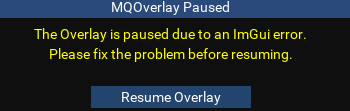
It sounds like you are seeing the Imgui overlay "resume" button on long zone loads right? The resume overlay dialog is something seen when most any Lua crashes, and is not exactly specific to QKI but because your other Lua's stay running, and QKI needs the restart its most certainly QKI causing the crash.

lua resume.png

I have not encountered or heard of anyone encountering this situation recently, but I would guess it has to do with how QKI is checking for KissAssist running or other timer related functions and that the long zone time is causing the checks to stall and QKI to crash maybe? I will have to look into this as there are so many variables that could cause each individual users zone times to vary.

As a possible temporary fix, If you are willing to make some edits your self In the config.Lua file in your /Lua/qki/ folder you can use vscode (if you dont have it you should download) or a text editor to try and modify line 8. I would count 1 Mississippi, 2 Mississippi, and so on for your worst zone in time like the guild hall then update config.macroCheckInterval = 5 to whatever your count is.

If no change it might be in the init.Lua line 110-111:

while openGUI do
mq.delay(500)

This is 1/10ths of a second so 500 = 50 seconds try 600 or whatever your longest zone time is close to and see if there is improvement.

Let me know the results, and in the mean time I will try and figure out a more permanent solution that is more encompassing for all users and situations.
 
QKI is the only Lua I've got going that doesn't come back when I unpause.
Neither fixed it. mq.delay(500) is actually in milliseconds, so that's .5 seconds. changed it up to mq.delay('50s') which is 50 seconds, and still bombs out.

If I figure out something, will let you know. Digging around in some other scripts to see if I can find something. I think it should be something along the lines of:

while zoning do
mq.delay('1s')
end

But haven't found a TLO that seems like it would indicate a zoning state. In MAUI, there is a TLO used mq.TLO.MacroQuest.GameState, but the MQ docs reference don't seem to list that under either the TLO page or the datatypes page, so not sure if that might indicate a zoning state. If you wanted to take a look there, its 1273 - 1281, called from line 1335, which is a do loop.

time to get ready for raid, will poke at it later.
 
QKI is the only lua I've got going that doesn't come back when I unpause.
Neither fixed it. mq.delay(500) is actually in milliseconds, so that's .5 seconds. changed it up to mq.delay('50s') which is 50 seconds, and still bombs out.

If I figure out something, will let you know. Digging around in some other scripts to see if I can find something. I think it should be something along the lines of:

while zoning do
mq.delay('1s')
end

But haven't found a TLO that seems like it would indicate a zoning state. In MAUI, there is a TLO used mq.TLO.MacroQuest.GameState, but the MQ docs reference don't seem to list that under either the TLO page or the datatypes page, so not sure if that might indicate a zoning state. If you wanted to take a look there, its 1273 - 1281, called from line 1335, which is a do loop.

time to get ready for raid, will poke at it later.
Strictly for your edification, since you seem interested:

Does not really appear to be what you are looking for, unfortunately. But now you know where you might find the info, at least!

Guessing Motojeff has the other stuff covered, don't want to step on his fun. Some scripts handle zoning by comparing current zone against a stored zone variable, but that may not necessarily be what is called for or what the true issue is here.
 
Yeah, I've spent plenty of time digging through TLO and datatypes there for various efforts. The Macroquest TLO and datatype pages don't list that particular TLO.
 
QKI is the only lua I've got going that doesn't come back when I unpause.
Neither fixed it. mq.delay(500) is actually in milliseconds, so that's .5 seconds. changed it up to mq.delay('50s') which is 50 seconds, and still bombs out.

If I figure out something, will let you know. Digging around in some other scripts to see if I can find something. I think it should be something along the lines of:

while zoning do
mq.delay('1s')
end

But haven't found a TLO that seems like it would indicate a zoning state. In MAUI, there is a TLO used mq.TLO.MacroQuest.GameState, but the MQ docs reference don't seem to list that under either the TLO page or the datatypes page, so not sure if that might indicate a zoning state. If you wanted to take a look there, its 1273 - 1281, called from line 1335, which is a do loop.

time to get ready for raid, will poke at it later.
You are correct milliseconds its /delay that I was thinking of in 1/10ths, anyhow are you seeing any error stuff in the console when this happens? There should be some output when it crashes if you could provide that it would help a bunch. The macro check being the cause is just a guess.

It would look something like this for example:

...VeryVanilla\MacroQuest\Release\Lua\overseer\overseer.Lua:1176: Error in mq.delay callback: ...VeryVanilla\MacroQuest\Release\Lua\overseer\overseer.Lua:1176: attempt to index field 'Rewards' (a nil value)
stack traceback:
...VeryVanilla\MacroQuest\Release\Lua\overseer\overseer.Lua:1176: in function <...VeryVanilla\MacroQuest\Release\Lua\overseer\overseer.Lua:1176>
stack traceback:
[C]: in function 'delay'
...VeryVanilla\MacroQuest\Release\Lua\overseer\overseer.Lua:1176: in function 'LoadAvailableQuestsExtraData'
...VeryVanilla\MacroQuest\Release\Lua\overseer\overseer.Lua:1286: in function 'LoadAvailableQuests'
...VeryVanilla\MacroQuest\Release\Lua\overseer\overseer.Lua:1127: in function 'ReloadAvailableQuests'
...VeryVanilla\MacroQuest\Release\Lua\overseer\overseer.Lua:1405: in function 'RunGeneralQuestPriorityGroups'
...VeryVanilla\MacroQuest\Release\Lua\overseer\overseer.Lua:1320: in function 'RunGeneralQuests'
...VeryVanilla\MacroQuest\Release\Lua\overseer\overseer.Lua:329: in function 'RunCompleteCycle'
...VeryVanilla\MacroQuest\Release\Lua\overseer\overseer.Lua:67: in function 'Main'
...cal\VeryVanilla\MacroQuest\Release\Lua\Overseer\init.Lua:36: in main chunk
 
Yeah, I've spent plenty of time digging through TLO and datatypes there for various efforts. The Macroquest TLO and datatype pages don't list that particular TLO.
try clicking the link. its an EverQuest data type.

Anyhow thats side convo ig

1740537807920.png
 
I may have replicated the problem.

ImGui Failure:
...ta\Local\VeryVanilla\MacroQuest\Release\Lua\qki\init.Lua:20: attempt to concatenate field 'myClass' (a nil value)
stack traceback:
...ta\Local\VeryVanilla\MacroQuest\Release\Lua\qki\init.Lua: in function 'windowTitle'
...ta\Local\VeryVanilla\MacroQuest\Release\Lua\qki\init.Lua:30: in function <...ta\Local\VeryVanilla\MacroQuest\Release\Lua\qki\init.Lua:23>
ImGui Critical Failure: Missing PopStyleVar()
Plugin ImGui has been temporarily paused. To resume imgui, run: /mqoverlay resume
Ending Lua script 'qki' with PID 4 and status -1

This is result of the class info being displayed and the crash happens when it cant get a value for the tlo.me.class. I will have a fix for this in a sec.
 
Motojeff updated QKI "Quicky Kiss It" - A KissAssist UI. with a new update entry:

QKI 2.61

Quick update to fix a crash that happens when character info is not available due to long zoning or being on the character select screen. Now when the tlo.me.** for the function that puts the class name is not available QKI will default display UNKNOWN - UNKNOWN until the info is again available.

config.myName = mq.TLO.Me.CleanName() or "Unknown"
config.myClass = mq.TLO.Me.Class.ShortName() or "Unknown"

Read the rest of this update entry...
 
Release QKI "Quicky Kiss It" - A KissAssist UI.

Users who are viewing this thread

Back
Top
Cart