• You've discovered RedGuides, an EverQuest multi-boxing and scripting community 🧙‍♀️⚙️. We want you to play several EQ characters at once, come join us and say hello! 👋
QKI "Quicky Kiss It" - A KissAssist UI.

Release QKI "Quicky Kiss It" - A KissAssist UI. 2.61

No permission to download
Joined
Oct 26, 2015
RedCents
1,730¢
Motojeff submitted a new resource:

Quicky Kiss It.lua "A clunky little kissassist variable tool" - A Lua script with a little clunky gui that allows you to adjust kissassist variables on the fly.

-- Quicky Kiss It.lua V1 By MotoJeff. A clunky little lua GUI that allows on the fly modification to KissAssist ini variables and stuff.--

The idea behind this is to allow to quickly modify kiss variables in game on the fly with a simple click when game play situations change per character running KissAssist.

For example:

Maybe I want the bard to ae mez some fights and not at all for others and single target mez for some fights, with this I can just check or uncheck what I want to...

Read more about this resource...
 
Last edited:
@Motojeff

can you please change this to be init.Lua inside a folder named "QKI" the /Lua run QKI would check inside the QKI folder for "init.Lua" and run it like that. this allows for better version control and integration should you expand to needing additional files and resources or libraries.

going to approve, if you could please do that before i approve, i'll approve
 
Last edited:
@Motojeff

might consider adding a "click this to add target to ignore" button (probably not that many words) to issue a mq.cmd('/addignore "${Target.CleanName}"')
 
Motojeff updated Quicky Kiss It.lua "A clunky little kissassist variable tool" with a new update entry:

New Additions to the tool

Actual changes: Added "pull radius", "Pull Arc", and "Z Range" settings, Added button for "add target to pull list", "Add target to mez immune list", added settings for "Med Start" and "Assist At" values. Also adjusted size of buttons to small buttons.

The text input boxes are taken as strings, and I don't have any error checking on these, you should have an idea of what is ok to put in here. for example if you want your max z range to be "poop" or "Z598!L:--" instead of the actual range...

Read the rest of this update entry...
 
Motojeff updated Quicky Kiss It "A clunky little kissassist variable tool" with a new update entry:

06/01/23 Update 1.3

Sorry for dropping updates everyday I know a few people just downloaded this, but these changes will make this tool better.

  • Updated layout. This should feel better, certainly looks better. Will probably make some changes down the road.
  • Changed check box sort order. There is some logic to how I sorted them, mostly trying to keep the most important or frequently used check boxes at the top of the columns. Some more testing will probably move them around some on the next...

Read the rest of this update entry...
 
Will this write the updated from the click to the actual Kissassist ini file? or if not can you add a button to save it to ini as that would make it much easier for us to just save have same action once we like it. There used to be a good mac Kissini that would update as I grew a toon but alas it is no more. This looks nice and thanks for your efforts!!
 
Thanks! Yes the changes are stored to the toons kiss ini file. So if you check a box or set you med at number and then log out those settings will be saved in the your kiss ini for next time, but I haven't worked out the bugs for the Lua to display the initial settings from the kiss ini when you launch qki. So every time you open qki everything will look blank/unchecked even if there are values set. I hope to have an update soon where it will load the values into qki on start up.
 
Motojeff updated Quicky Kiss It "A clunky little kissassist variable tool" with a new update entry:

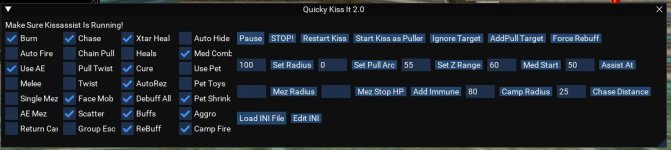
qki2sh.JPG

11/11/23

QKI 2.0! Update 11/11/23:

Been a bit, but I got some big updates in this version.

Looks like a lot of people have downloaded and given it a try at least, that’s inspiring me to tune this up some, and so I am proud to announce QKI 2.0.

FIRST AND FOREMOST, !!!!STOP!!!!! BACK UP YOU KISS INI FILES BEFORE YOU USE THIS VERSION FOR THE FIRST TIME!!

[COLOR=rgb(247, 218...[/quote]

Read the rest of this update entry...
 
My dude, love the show.

This update crashes on loading. Wish I could give more info but dumps out completely.


BB~
 
My dude, love the show.

This update crashes on loading. Wish I could give more info but dumps out completely.


BB~
Is it crashing you out of EQ all together when the Lua is loaded? or just the Lua crashes when loaded? or is it crashing when you try and load an ini file?
 
qki SOUNDS interesting cant wait to try, i always seeem to post in the wrong areas, so forgive me if i have don it again, i have been playing around with kissassist and muleassist... currently using muleassist puller tank on my monk ....generally works pretty good, my SK and Mage are running muleassist tank options, my problem is my mage will assist on the first pull then pauses the macro... i open maui and hit resume and he sends his pet in again but once those 2 or 3 mobs are killed the macro pauses again, i click resume and seems to work but if i dont click resume it stays paused even tho there is a mob right next to the mage beating on my monk....any suggestions i can try...and where can i read about how to run the debugger and use that...no a programmer here
thanks for the help as always you guys are great...ill wait for the noticed i stumbled on an old post again to read your replys
Hank
 
qki SOUNDS interesting cant wait to try, i always seeem to post in the wrong areas, so forgive me if i have don it again, i have been playing around with kissassist and muleassist... currently using muleassist puller tank on my monk ....generally works pretty good, my SK and Mage are running muleassist tank options, my problem is my mage will assist on the first pull then pauses the macro... i open maui and hit resume and he sends his pet in again but once those 2 or 3 mobs are killed the macro pauses again, i click resume and seems to work but if i dont click resume it stays paused even tho there is a mob right next to the mage beating on my monk....any suggestions i can try...and where can i read about how to run the debugger and use that...no a programmer here
thanks for the help as always you guys are great...ill wait for the noticed i stumbled on an old post again to read your replys
Hank
I don't know much about muleassist and maui, but I would check to see if you might be broadcasting a pause or something like that to the mage by a button or hot key? Watch your MQ console box for something that may be pausing the mage or that will help you see what might be going wrong. Also are you certain that its pausing, or maybe you just have your camp radius set too small on the mage and your mage is not attacking what the monk brings back because its just outside your camp radius setting? (just a little to far from the mage to get them to assist)?

QKI should work pretty well for pulling with a monk, its probably just ok to use with a mage as far as features. I need to add some more functions more specific to pet classes. It really boils down to your kiss ini, QKI just helps make quick on the fly adjustments to settings that you may want to change based on the in game situations you encounter without having to actually open and edit the ini.
 
I don't know much about muleassist and maui, but I would check to see if you might be broadcasting a pause or something like that to the mage by a button or hot key? Watch your MQ console box for something that may be pausing the mage or that will help you see what might be going wrong. Also are you certain that its pausing, or maybe you just have your camp radius set too small on the mage and your mage is not attacking what the monk brings back because its just outside your camp radius setting? (just a little to far from the mage to get them to assist)?

QKI should work pretty well for pulling with a monk, its probably just ok to use with a mage as far as features. I need to add some more functions more specific to pet classes. It really boils down to your kiss ini, QKI just helps make quick on the fly adjustments to settings that you may want to change based on the in game situations you encounter without having to actually open and edit the ini.
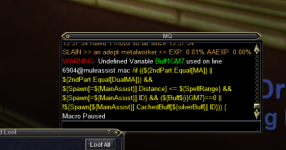
Thanks for the reply, as I tried to state earlier im no programmer but i did manage to clip and paste what it says on my screen

1699814662948.png
 
Thanks for the reply, as I tried to state earlier im no programmer but i did manage to clip and paste what it says on my screen

View attachment 53084
That looks like its trying to cast something a buff on the ma and there is something wrong with what is written there? not sure if that is causing the pause but it is pausing, it could just be a fluke that you are seeing the error and the pause at the same time and could still be that something is being broadcast to cause a pause.
 
Is it crashing you out of EQ all together when the lua is loaded? or just the Lua crashes when loaded? or is it crashing when you try and load an ini file?
Guess I should have included that information, was dog tired yesterday morning after work.

I'll load in KA, then QKI. That single toon will crash EQ completely without an error message. Using the latest KissAssist version that auto-downloads with RG loader.

Thanks Jeff-

BB~

EDIT- Saw something in another post about Lua crashes and Viewport. So I wanted to add that I DO use viewport to have other LUAs running on a second monitor but not QKI if that adds anything.
Tried loading QKI prior to KA also when I got home this morning and that crashed my toon also, which is a bard if that makes any difference.
 
Last edited:
Guess I should have included that information, was dog tired yesterday morning after work.

I'll load in KA, then QKI. That single toon will crash EQ completely without an error message. Using the latest KissAssist version that auto-downloads with RG loader.

Thanks Jeff-

BB~

EDIT- Saw something in another post about LUA crashes and Viewport. So I wanted to add that I DO use viewport to have other LUAs running on a second monitor but not QKI if that adds anything.
Tried loading QKI prior to KA also when I got home this morning and that crashed my toon also, which is a bard if that makes any difference.
Ok I was going to say, I was also reading about the viewport issue. I don't usually use viewport but I tried it and it works just fine for me, not sure if any others are having issues as well? Have you tried running any other Lua files do they seem to work? I know after one of the updates from RG on Wednesday I had to delete the lfs.dll from the Lua folder because I was crashing right when I got into game but I also have it set to load a couple Lua files right away and it would crash right way.
 
Ok I was going to say, I was also reading about the viewport issue. I don't usually use viewport but I tried it and it works just fine for me, not sure if any others are having issues as well? Have you tried running any other lua files do they seem to work? I know after one of the updates from RG on Wednesday I had to delete the lfs.dll from the lua folder because I was crashing right when I got into game but I also have it set to load a couple lua files right away and it would crash right way.
Yes, I have 4 LUAs on auto start using the autoexec folder. I just checked and don't have any .dlls in my Lua folder. When I get home from dinner I'll try switching the viewport on that toon to see if it makes a difference on my end.


Thanks,

BB~
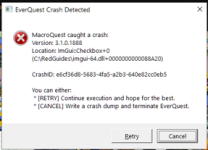
QKI Crash.PNG
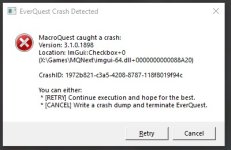
EDIT- Did the above. Disabled viewport in settings and got a crash message this time.Of course, I have no idea what it means except something about imgui.
 
Last edited:
Yes, I have 4 LUAs on auto start using the autoexec folder. I just checked and don't have any .dlls in my LUA folder. When I get home from dinner I'll try switching the viewport on that toon to see if it makes a difference on my end.


Thanks,

BB~
View attachment 53151
EDIT- Did the above. Disabled viewport in settings and got a crash message this time.Of course, I have no idea what it means except something about imgui.
My guess is that the crash happens when imgui tries to render the checkboxes in qki. So is there an actual imgui-64.dll in your redguides directory? if not I attached it, could try placing one in there? it could also be corrupt maybe if it is in there? Or anytime imgui is called to do something?

I have been looking around and not finding much for a solution. It looks like you had this same issue with quickhud recently? https://www.redguides.com/community/threads/crash-calctextsize.87353/
Did you resolve that or just stop using it? You noted an error on that thread, and it looks to have crashed when imgui tried to render some text with imgui?:

---------------------------
EverQuest Crash Detected
---------------------------
MacroQuest caught a crash:
Version: 3.1.0.1546
Location: ImFont::CalcTextSizeA+0 (C:\RedGuides\imgui-64.dll+0000000000073C10)

CrashID: 43ca287e-45b4-41e6-a86c-b840e1ac3dd2

Another thing possibly. I am not sure and this is more speculative guess or more like blinded fold dart throwing at solutions, but it may also be related to the similar overseer Lua issues or other Lua issues folks have been having as well. Its random shot in the dark but maybe try placing these files that Cannonballdex mentions into the modules folder and see if that helps https://www.redguides.com/community/threads/overseer.83631/post-582832 My thought on this is that the somewhat recent updates to change to use packageman and modules folder has been giving people trouble because its been installing in folders other than the modules folder. Possibly because of a mismatch of the default mq directory and people installing mq in a custom path other than the default, or even a permissions issue installing the modules? So then we end up with modules being installed in weird places or not being installed at all or something like that maybe? but that also may be way-out in left field.

I was having errors like "failed to load package luafilesystem with require lfs" or "failed to load package lsqlite3" messages on some Lua files and I manually installed the files Cannonballdex provided in that link above to my modules folder so it looks like this C:\Users\soandso\Desktop\next\MacroQuest\modules\luarocks and a bunch of Lua errors and problems went away. I was seeing this using boxhud, similar to quickhud and had been trying some of the stuff in the boxhud faq to fix it but nothing worked, I suspect it was a permissions issue for me I gave all the files and directories read/write but that didnt seem to help either.

Let me know if any of that helps.
 

Attachments

Last edited:
crash.jpg

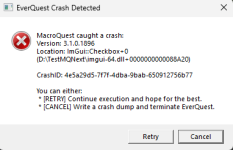
Same issue here. I did verify that I have the imgui-64 but still crashing. :shrug:
 
View attachment 53180

Same issue here. I did verify that I have the imgui-64 but still crashing. :shrug:
Thanks for mentioning you are having the same issue, I am seeing several people download but you guys are the only ones to drop a line with some feedback so far. I am thinking it has something to do with the packagman module stuff possibly? Have there been any other Lua sqripts that have recently given you a crash or a similar error? It could be something in my code too, I am working on another update hopefully will have it finished up later tonight or tomorrow sometime that with any luck might help clear this up.
 
Thanks for mentioning you are having the same issue, I am seeing several people download but you guys are the only ones to drop a line with some feedback so far. I am thinking it has something to do with the packagman module stuff possibly? Have there been any other lua sqripts that have recently given you a crash or a similar error? It could be something in my code too, I am working on another update hopefully will have it finished up later tonight or tomorrow sometime that with any luck might help clear this up.
Only other issue lately is Guicldclicky UI. It runs but closes immediately. So the Lua still runs.

I'm about to try the fix you have posted above. Just woke up.

BB~!

EDIT- Did have the .dll in my RG base folder. Didn't work. I just replaced the "Lua ricks" folder with the link you posted. For now though I reverted back to QKI 1.3. LOVE the resource. Just getting on for the night so am gonna use that for now.
 
Last edited:
Having the same issue as above:
1700020889356.png

Unloaded all other luas and ran this one. I tried your imgui-64 file as well, but no joy.
 
Ok, updated the Luarock folder as suggested and still no dice. Got the same pop-up error message again.

Back to 1.3 =)

BB~
 
Thanks for mentioning you are having the same issue, I am seeing several people download but you guys are the only ones to drop a line with some feedback so far. I am thinking it has something to do with the packagman module stuff possibly? Have there been any other lua sqripts that have recently given you a crash or a similar error? It could be something in my code too, I am working on another update hopefully will have it finished up later tonight or tomorrow sometime that with any luck might help clear this up.

Nothing else crashing that I use but I only use a few LUAs.

Of note, I did kill all running LUAs, and try to restart and then run QKI and it still crashed instantly.

Also worthy of note I DO have my MQ in a non-standard directory "X:\Games\MQNext\Lua" but I verified the files so I am not sure if that could really be a factor.
 
Thanks for the reply, as I tried to state earlier im no programmer but i did manage to clip and paste what it says on my screen

View attachment 53084
There is an undefined variable in what looks like the buffs area maybe Buff1 in your ini. So because there is nothing set here or something is not correctly, look for something like a missing = sign in your ini like buff1=blashspell. or some typos, when mule or kiss hits this undefined variable in the ini it pauses the macro on its own.
 
thanks ill check it out, i found a work around but not a fix...i made a \dex /pause =off button, with my mages name i just hit it when i see he has started pausing and then he resumes running the macro again...
 
Motojeff updated Quicky Kiss It "A clunky little kissassist variable tool" with a new update entry:

QKI 2.1

A lot of people had troubles with the 2.0 update so here is 2.1. hopefully this clears some stuff up its a big difference from 1.3. and if you did get 2.0 to work you might notice some big changes here in 2.1 as well.

First thing: if you like this tool WATCH THIS THREAD, this way you will be notified when updates are released. This is still buggy and will need some adjustments.

Next thing: BACK UP ANY KISS INI...

Read the rest of this update entry...
 
Motojeff updated Quicky Kiss It "A clunky little kissassist variable tool" with a new update entry:

2.2 Mostly Fixes for Imgui/overlay crashes when minimizing or docking with other luas

View attachment 53257

2.2 Mostly Fixes for Imgui/overlay crashes when minimizing the qki window or docking with other luas.

As always back up your Kiss INI files before using this.
  • Found a problem that was causing overlay and imgui crashes and fixed it.
  • Fixed the roll selection so that it retains the selected role you no longer have to repick it from the drop down before hitting the set roll button again.
  • Spent a bunch of time breaking things up into smaller...

Read the rest of this update entry...
 
Whatever you did fixed the crash issue. Working great! Thank you!

Awesome good to hear! Let me know if you find any bugs.

One bit of a bug I am working on already is if someone has what I call a "lazy ini" that isn't formatted just as the kiss documentation shows it with the same cases and stuff, it may not import values from the ini. For example PullRadiusToUse= vs something like pullradiustouse = and that sort of thing. I am working up a function for the code that will ignore cases, trim out stuff so that if someone has "lazy ini" it will still load values. Just been busy at work and probably wont get around to loading the fixes until tomorrow sometime.
 
Release QKI "Quicky Kiss It" - A KissAssist UI.

Users who are viewing this thread

Back
Top
Cart