• You've discovered RedGuides, an EverQuest multi-boxing and scripting community 🧙‍♀️⚙️. We want you to play several EQ characters at once, come join us and say hello! 👋

  • A TLP without truebox has thawed (Very Vanilla ready)
    Frostreaver

Question - Pop up when starting MQ

Turaj Steelfist

Seasoned veteran member
Joined
Apr 3, 2020
RedCents
3,350¢
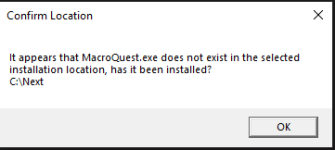
So I just got the following when I started MQ. I have made zero changes to anything other than updating MQ after the patch yesterday and when I logged in last night it did not happen. When I hit OK it opens up my eqbcs window like normal, but there is no MQ icon in my systray.
1682013980080.png
 
So I just got the following when I started MQ. I have made zero changes to anything other than updating MQ after the patch yesterday and when I logged in last night it did not happen. When I hit OK it opens up my eqbcs window like normal, but there is no MQ icon in my systray.

View attachment 47931
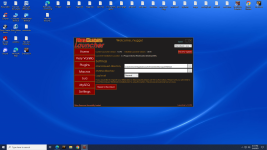
try opening the launcher and see if the settings says somthing like this C:\Users\Owner\Appdata\Local\VeryVanilla\Macroquest\Release if its blank paste this in and try it macroquest spot
 

Attachments

  • Screenshot (2).png
    Screenshot (2).png
    475.5 KB · Views: 2
Question - Pop up when starting MQ

Users who are viewing this thread

Back
Top
Cart