• You've discovered RedGuides, an EverQuest multi-boxing and scripting community 🧙‍♀️⚙️. We want you to play several EQ characters at once, come join us and say hello! 👋

  • A TLP without truebox has thawed (Very Vanilla ready)
    Frostreaver
Resource icon

Release Overseer (3 Viewers) 04/27/2026

No permission to download
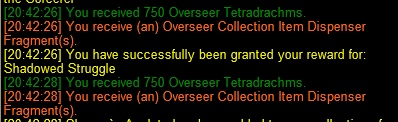
I tried this and still no luck. It goes straight to the Tetradachms.

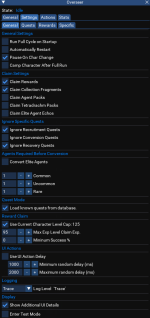
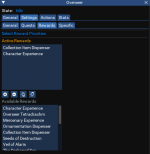
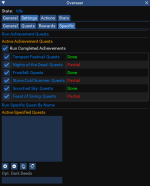
When I start a cycle, it now filters through every quest to check what the possible rewards are and "looks" at the Tetradachms, which takes a bit. Used to just quickly scroll through the quests. Then, the cycle goes through any possible conversions, selects rewards, and selects new quests. Here are the screen shots of the four Settings tabs.

Am I doing something wrong?

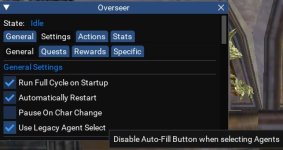
As for the speed, you may want to try checking this box

1723218199815.png

I'm no expert but since it is working for me and I don't see any other posts about the same issue, it would appear it's isolated. I would try removing all the active rewards from the list, reload the Lua, then select just the one you want. Run the Lua and see what happens. If it works, add others back in one at a time and see if/when it does not act as intended again. If you can find more detail about what is causing the unintended behavior, it may help GoldenFrog determine if something needs to be changed/updated. I have found finding problems you do not have and can not recreate to be among some of the toughest to address.

I would start with diagnosing item 2 in the active rewards since it appears to be accepting mine in spot 2 with the collection items and your item 2 is the Tetra's. I ran all of mine this morning already but I will move the 2nd reward around on a few toons myself this evening and see if I can determine if it's merely selecting item 2 only =) Maybe together we can find the issue, which would be a big help to GF.
 
As for the speed, you may want to try checking this box

View attachment 63986

I'm no expert but since it is working for me and I don't see any other posts about the same issue, it would appear it's isolated. I would try removing all the active rewards from the list, reload the lua, then select just the one you want. Run the lua and see what happens. If it works, add others back in one at a time and see if/when it does not act as intended again. If you can find more detail about what is causing the unintended behavior, it may help GoldenFrog determine if something needs to be changed/updated. I have found finding problems you do not have and can not recreate to be among some of the toughest to address.

I would start with diagnosing item 2 in the active rewards since it appears to be accepting mine in spot 2 with the collection items and your item 2 is the Tetra's. I ran all of mine this morning already but I will move the 2nd reward around on a few toons myself this evening and see if I can determine if it's merely selecting item 2 only =) Maybe together we can find the issue, which would be a big help to GF.

Will do. I will take everything out but the collection fragments and do the same this evening. If it takes them, then I will add Tetras in at the second spot and see what happens.
 
. If it takes them, then I will add Tetras in at the second spot and see what happens.
You may also want to consider trying other choices if you have more than one toon. I have a "couple" (/snicker) I can test with so I planned on using several selections and see what I find out. This testing process can be longer than other Lua's since we only get "X" amount of attempts when the quests cycle without using DB cash to end them early. The more scenarios that produce the same undesired result, the more we can try to narrow it down.

EDIT - Don't forget to remove this before the next set of quests complete.

1723225503209.png
 
You may also want to consider trying other choices if you have more than one toon. I have a "couple" (/snicker) I can test with so I planned on using several selections and see what I find out. This testing process can be longer than other lua's since we only get "X" amount of attempts when the quests cycle without using DB cash to end them early. The more scenarios that produce the same undesired result, the more we can try to narrow it down.

EDIT - Don't forget to remove this before the next set of quests complete.

View attachment 63988
Good point
 
I have been encountering issues with Overseer bombing out on my as per the error

Overseer is setup to only do Trading / Exploration / Diplomacy and Collect Items are set as the default
This eventually happens to every toon
Looking into this - quick guess is it's related to if there isn't enough quests that match your criteria to fill all 5 (or 3 in F2P) slots ... this happens. I'll test that and correct, if that's the problem.
 
As for the speed, you may want to try checking this box

View attachment 63986
This is a great suggestion - and should be checked by default for everyone.
However with that NOT checked, it shouldn't do what he was describing so may be a bug there. I'll dig in.

But Check that box. I made it an option when that feature went in in case it caused problems and we needed an easy out. May just remove that check-box.

Got back from time away again - so will dig into these past handful of posts and address what I can.
 
@Mattheux - I moved around the rewards for Tetra, collection items, toon xp, and TS items. In all cases it seemed to grant the reward from top to bottom priority. I'm curious to know what you found.


1723261912282.png
 
Hiya,

Just had it bomb out on a toon again and ran overseer manually.

There were 5 missions available within the Trading/Explore/Diplomacy tasks available.
Lua stopped before trying to start any of them too

I did notice on the toon thats been crashing the most, i only had Types and Durations set, i have enabled Rareties and Levels too, will see how it goes next time it goes to run
 
Just had it bomb out on a toon again and ran overseer manually.
Did you happen to save the error message? A bit more details would be helpful here =)

Was it the same error as this post? - https://www.redguides.com/community/threads/overseer.83631/post-627113

There were 5 missions available within the Trading/Explore/Diplomacy tasks available.
Lua stopped before trying to start any of them too
stopped trying? Did it error, did it skip them and select others, did it say it was on a union-sanctioned coffee break? :)

Good thought on the settings! Trouble shooting and reporting is the best way for folks to assist. Maybe consider sharing your settings. Mattheux had a great example here - https://www.redguides.com/community/threads/overseer.83631/post-627147
 
GoldenFrog updated Overseer with a new update entry:

3.66: Honor Deselected Priorities

  • Corrected crash reported by @whatsaname when a priority type is unselected
    • View attachment 64013
    • Info: The screenshot above says: "Take any rarity in any order when considering what quests to run".
      • This can speed up the quest-search phase of a cycle, though not by a lot.
      • I imagine it's very uncommon (if ever) an option someone intentionally wants selected.
      • If you do care, make sure all 4 are checked.
      ...

Read the rest of this update entry...
 
@Mattheux - I moved around the rewards for Tetra, collection items, toon xp, and TS items. In all cases it seemed to grant the reward from top to bottom priority. I'm curious to know what you found.


View attachment 63997

I have six toons. I first tried running it with just one item, different on each toon. Except for Collection, it worked the way it was supposed to. Refused the XP because I am maxed, chose Ornament, Tetras, Mercenary. With Collection as the only option, Tetras were still selected.

Next I tried everything again with Tetras listed second. Same results. Except for Collection, the top item was chosen if available, then Tetras.

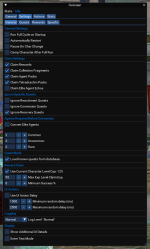
Makes me wonder if it is something to do with the checked boxes on Settings:General. Here is a picture of mine currently because I turned off Run on Startup. What is your configuration?
 

Attachments

  • Screenshot (6).png
    Screenshot (6).png
    177.4 KB · Views: 0
Okay. I don't believe anything in those areas has changed in a bit - but definitely seems to be some impacts to multiple peoples.

I'll spend time today and see if we can get this nailed down.

If you want to test a full reset, all that would be required is deleting (with a backup) the configuration for each character:
{mq_dir}\configs\overseer

You'll see appropriate CharName_PersonaClass files to rename/remove for the test.
 
Okay. I don't believe anything in those areas has changed in a bit - but definitely seems to be some impacts to multiple peoples.

I'll spend time today and see if we can get this nailed down.

If you want to test a full reset, all that would be required is deleting (with a backup) the configuration for each character:
{mq_dir}\configs\overseer

You'll see appropriate CharName_PersonaClass files to rename/remove for the test.
I did a full reinstall, saving the configs as a backup. Will report back when I get some info for you.
 
Okay. I don't believe anything in those areas has changed in a bit - but definitely seems to be some impacts to multiple peoples.

I'll spend time today and see if we can get this nailed down.

If you want to test a full reset, all that would be required is deleting (with a backup) the configuration for each character:
{mq_dir}\configs\overseer

You'll see appropriate CharName_PersonaClass files to rename/remove for the test.

I also experienced an issue with Rewards after the more recent updates. My level 120 ftp characters would no longer take character experience until I adjusted "Max Exp Level Claim Exp" to 125 even though I had the box Unchecked to "Use Current Char Level Cap".

Even though the characters are at max level for ftp I'm still trying to max out their Merc exp.

This of course was just me misunderstanding how the settings work for that section.
 
I also experienced an issue with Rewards after the more recent updates. My level 120 ftp characters would no longer take character experience until I adjusted "Max Exp Level Claim Exp" to 125 even though I had the box Unchecked to "Use Current Char Level Cap".

Even though the characters are at max level for ftp I'm still trying to max out their Merc exp.

This of course was just me misunderstanding how the settings work for that section.
Ah. Using char exp as the merc boost rather than "Merc Experience". (It used to be always better to take Char Exp, probably still is).

Yeah, it's not the most intuitive section, but you should also be able to solve it by setting the % into level to 100
  • 1723569383450.png
That says: "If I'm lower than 125, OR less than 100% into level..."
Hm, now that I typed it out - obviously that won't do it either. Would need 101%.

Oh well. Your answer works for now - guess we need a toggle to just turn the whole thing off when that's the desire.
 
@GoldenFrog - So, first round after the complete reinstall and it worked the way it was supposed to. Will keep an eye on it.

Maybe with all of the improvements you have made, people need to do a complete delete and clean install?
 
@GoldenFrog - So, first round after the complete reinstall and it worked the way it was supposed to. Will keep an eye on it.

Maybe with all of the improvements you have made, people need to do a complete delete and clean install?
I guess that may be possible. Have tried very hard to not break things - but obviously this has become a pretty complicated system.

Will propose that to a few of the others having issues and see if things get corrected that way.

To that point - if you happen to have a copy of the "Bad" or original/backup config, it would be great if you could message that to me directly. Just rename the file as that's the only place private (char name) exists.
 
I guess that may be possible. Have tried very hard to not break things - but obviously this has become a pretty complicated system.

Will propose that to a few of the others having issues and see if things get corrected that way.

To that point - if you happen to have a copy of the "Bad" or original/backup config, it would be great if you could message that to me directly. Just rename the file as that's the only place private (char name) exists.
Sent
 
GoldenFrog updated Overseer with a new update entry:

3.68: Responsiveness Improvements

  • Replaced large quantities of naked delays (mq.delay(#)) with conditionals
    • Improves speed and reactiveness of script (dramatically in some places)
    • EQ gameplay stuttering during overseer runs should be addressed or reduced
    • More improvements need to be made in this area
Still an issue not resolved if character has maximum rewards pending (10). Script does not handle and loops until manual intervention occurs.
Further updates planned around this.

Read the rest of this update entry...
 

Edited to add that I'm running this on 6 clients simultaneously!

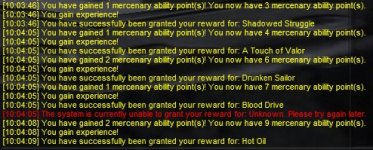
Since implementing this version my characters are routinely unable to claim the reward for some single mission out of the five total. It almost appears like the macro is too quick for my client to respond.

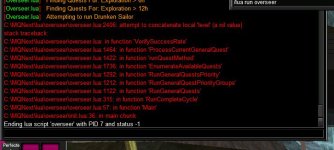
For now I'm going to try implementing the UI delay feature with something like 100ms minimum and 300ms maximum. I'm attaching a couple screen shots of what I saw in my logs.
(Edited to add that setting these delay values didn't make any difference, the client still missed a single reward out of the 5 possible)

Not a major deal because it always catches the missed rewards on the next cycle!

Screenshot 2024-09-24 100725.PNG.jpg

Screenshot 2024-09-24 100828.jpg
 
Last edited:
Edited to add that I'm running this on 6 clients simultaneously!

Since implementing this version my characters are routinely unable to claim the reward for some single mission out of the five total. It almost appears like the macro is too quick for my client to respond.

For now I'm going to try implementing the UI delay feature with something like 100ms minimum and 300ms maximum. I'm attaching a couple screen shots of what I saw in my logs.
(Edited to add that setting these delay values didn't make any difference, the client still missed a single reward out of the 5 possible)

Not a major deal because it always catches the missed rewards on the next cycle!
That's fascinating - I do test with 6-7 as well. But timings are such a tricky thing. (And some have more).

A delay could be the answer but I want to look at reacting to that at the moment, rather than waiting for the next cycle. Thank you for raising that issue.
("Option selection issue. Attempting again." is part of our intended handling for those types of situations, but not specifically what you saw above.)
 
More interesting stuff...

If I have 5 rewards to claim I'm still getting the error I reported before. Adjusting the UI delay time made no difference.

Now this morning I got a new error message... Screenshot 2024-09-28 101702.jpg

I saved the current database and renamed the backup which was saved in July and problem resolved itself using the older copy!

Just in case I'll message you the faulty database if you want to look at it?

Thanks!
 
More interesting stuff...

If I have 5 rewards to claim I'm still getting the error I reported before. Adjusting the UI delay time made no difference.
...

Just in case I'll message you the faulty database if you want to look at it?
Yow. Thanks for sending. Hadn't seen that - and will definitely give it a look when back home.

Each "update" of overseer pulls down and overwrites your current database. So if you don't have a backup you can always just refresh the download from Redguides.

I'm also tweaking the reward claiming system to hopefully identify and fix the situation you're seeing. Will see how that goes.
 
Edited to add that I'm running this on 6 clients simultaneously!

Since implementing this version my characters are routinely unable to claim the reward for some single mission out of the five total. It almost appears like the macro is too quick for my client to respond.

Not a major deal because it always catches the missed rewards on the next cycle!
In researching this I have now seen it happen on two occasions. As you say, recoverable, but needs to be addressed. Working on that.
 
GoldenFrog updated Overseer with a new update entry:

3.70: Additional timing optimizations, possible fix for Reward granting issue

NOTE: When the script runs missions, EQ stutters or hesitates. This is due to EQ's handling of [Auto Fill] unable to easily work around.
You can see this by auto-running a character and clicking [Auto Fill] yourself manually. 0.5-1 second pause. (Not my fault!)

  • Additional improvement in timing and responsiveness to Claiming completed missions
  • Tentative correction for Granting Reward issue that sometimes skips one reward
    • As mentioned by B_I_G_D_A_D_D_Y...

Read the rest of this update entry...
 
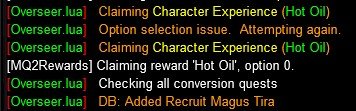
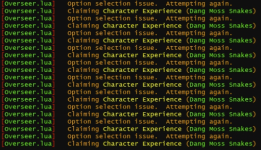
Hey babe, the latest version is also getting stuck trying to claim rewards. I have no rewards available but the script keeps looping this:
1728154387314.png

Fucking tunnel snakes
 
Hey babe, the latest version is also getting stuck trying to claim rewards. I have no rewards available but the script keeps looping this:


Fucking tunnel snakes
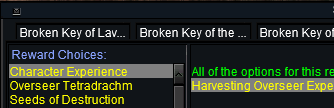
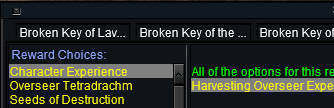
Interesting. This happens only when we try to select an option (i.e. "Character Experience") and the Rewards window reports that one isn't actually selected, or the text is dif't:


Would you happen to know or remember if the "Character Experience" was actually selected? Or the "Damned Slithery Things" reward?

How did you get out of it? Manually choose the reward or just re-start the mission?
 

Attachments

  • 1728165489126.png
    1728165489126.png
    7.4 KB · Views: 0
  • 1728165505222.png
    1728165505222.png
    7.4 KB · Views: 0
I had one quest critically fail on all toons. I had to click it to manually finish the quest reward, and then they all started working again.
 
Hey babe, the latest version is also getting stuck trying to claim rewards. I have no rewards available but the script keeps looping this:
View attachment 65315

Fucking tunnel snakes

Toy Story Dog GIF by Nebraska Humane Society
Snl Season 47 GIF by Saturday Night Live
 
GoldenFrog updated Overseer with a new update entry:

3.71: Minor Code and Logic Cleanup


Note: Changing from [Auto Fill] to manual does not make EQ stuttering better. The in-game delay is actually when loading the "Available Agents" at the bottom window. The larger the stable of Agents grows, the more pronounced this delay is. No way around this that I have yet found.

Read the rest of this update entry...
 
Interesting. This happens only when we try to select an option (i.e. "Character Experience") and the Rewards window reports that one isn't actually selected, or the text is dif't:


Would you happen to know or remember if the "Character Experience" was actually selected? Or the "Damned Slithery Things" reward?

How did you get out of it? Manually choose the reward or just re-start the mission?
Had to restart the script altogether since there were no rewards available within the window. HOW INCONVENIENT, I joked.
 
I'm still getting the failure on the quest and it stops the progress of the cycle unless I click complete quest.
 
I'm still getting the failure on the quest and it stops the progress of the cycle unless I click complete quest.
I have a tweak to reward claiming - haven't been able to reproduce the errors discussed so was hoping a few days of testing would reveal.

Probably push this next step out later today/tomorrow to see if it corrects your issues.
 
Release Overseer

Users who are viewing this thread

Back
Top
Cart