• You've discovered RedGuides, an EverQuest multi-boxing and scripting community 🧙‍♀️⚙️. We want you to play several EQ characters at once, come join us and say hello! 👋

  • A TLP without truebox has thawed (Very Vanilla ready)
    Frostreaver
Resource icon

Release Overseer (1 Viewer) 04/27/2026

No permission to download
I keep coming back to this Lua as I want it to work so bad. But it's very inconstant for me. On one machine I have all my overseer.ini copy paste. So they are all the same. I run multiple accounts and some of them will run perfect, some will continue to loop without stopping, and some will freeze up at reward claims and it's random when and which do it.
On the 2nd machine I just leveled a group to 85 and was so excited to start this from scratch on them. Again, those 6 toons are copy/paste overseer.inis. I ran the tutorial, and then tried to run this Lua. Some would take some missions, some wouldn't some didn't have the HUD dispayed, some did. Some would run a cycle then continue to run cycles in an endless loop. I scroll through the comments in this discussion and I see similar issues. Some are being resolved with stop and restart. I haven't had much luck unfortunately.

As a side note of another issue I'm having with that new Krono FTP group. After my tutorial1 has 4 / 1 max active missions (how he got 4 active with 1 max is beyond me), 4 accounts have 1/1max active missions and the 6th toon has 5/5max active missions. I have no clue what that is about, all 6 are brand new accounts I made this past week and I have only put 1 krono in each for the AAs.
 
Last edited:
Hi @Twinkeltoes. I've experienced some of the issues that you're discussing. I too had guys that were new to overseer, so I wanted to prioritize "recruit" missions. I looked at the .ini and found that the default ini's "Priorities" field didn't include "Types" at all, and so I modified the .ini. What I *thought* I could do was like this:

Code:
[QuestPriority]
Priorities=Types|Rarities|Levels|Durations
Types=Recruitment
Rarities=Elite|Rare|Uncommon|Common|Easy
Levels=5|4|3|2|1
Durations=24h|12h|6h

I figured that this would prioritize recruitment (due to Types being the first Priority), then when it couldn't do recruitment, it would move on to Rarities (the second entry in the Priority field), etc. This is not how it worked. I found that it would only do recruitment missions and no others. I guess the subsequent priority entries are only tie breakers for the first priority.

So I ended up listing all of the mission types (as shown below) and that fixed my issue. I now pull all 3 or 5 missions. The only issue that I see is that I will max out my exploration very early and never touch stealth, so my intention is to rotate the second entry in the Types section (presently Exploration) to the end of the "Types" list every couple of weeks.

Code:
[QuestPriority]
Priorities=Types|Rarities|Levels|Durations
Types=Recruitment|Exploration|Diplomacy|Trade|Crafting|Harvesting|Research|Plunder|Military|Stealth
Rarities=Elite|Rare|Uncommon|Common|Easy
Levels=5|4|3|2|1
Durations=24h|12h|6h

As far as your issue about not claiming rewards successfully, I've also seen that. It is a crash in the script. From what I have seen, (A) you can tell by seeing the red exception text in the MQ window, and (B) just run the overseer script again and I've never seen it fail the second time. It sounds like they're aware of this issue and are planning to squish this bug, but until then I'm perfectly happy with my workaround.

I've also seen the looping forever issue, but not for a while now. I feel like once I had enough agents to always get my max number of missions this issue went away. So I'd just tough this one out and either manually run recruit missions, or try my above [QuestPriority] section to see if that works for you.
 
I also want to say that I appreciate GoldenFrogs work on this Lua. I know it's not easy and I don't want to come across ungrateful. I keep coming back to it because I know how diligently he has been working on improving it and the potential is there for sure.
 
Hello :)

It's me again, sorry...

Code:
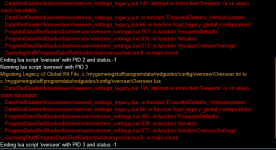
Migrating Legacy v3 Global INI File: c:/users/xxx/appdata/local/veryvanilla/macroquest/release/config/overseer\Overseer.ini to c:/users/xxx/appdata/local/veryvanilla/macroquest/release/config/overseer\Overseer.lua
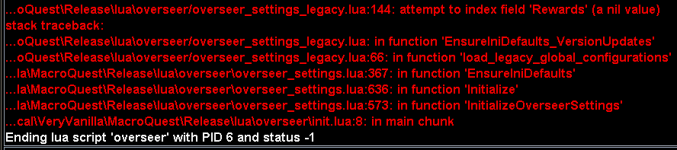
...oQuest\Release\lua\overseer/overseer_settings_legacy.lua:144: attempt to index field 'Rewards' (a nil value)
stack traceback:
    ...oQuest\Release\lua\overseer/overseer_settings_legacy.lua: in function 'EnsureIniDefaults_VersionUpdates'
    ...oQuest\Release\lua\overseer/overseer_settings_legacy.lua:66: in function 'load_legacy_global_configurations'
    ...la\MacroQuest\Release\lua\overseer\overseer_settings.lua:367: in function 'EnsureIniDefaults'
    ...la\MacroQuest\Release\lua\overseer\overseer_settings.lua:636: in function 'Initialize'
    ...la\MacroQuest\Release\lua\overseer\overseer_settings.lua:573: in function 'InitializeOverseerSettings'
    ...cal\VeryVanilla\MacroQuest\Release\lua\overseer\init.lua:8: in main chunk
Ending lua script 'overseer' with PID 3 and status -1

I cleaned up the REWARDS section in my toon profiles (no clue why but there were double and triple reward entries, and added the whole REWARDS section to my overseer.ini, then it worked fine.
 
Hello :)

It's me again, sorry...

Code:
Migrating Legacy v3 Global INI File: c:/users/xxx/appdata/local/veryvanilla/macroquest/release/config/overseer\Overseer.ini to c:/users/xxx/appdata/local/veryvanilla/macroquest/release/config/overseer\Overseer.lua
...oQuest\Release\lua\overseer/overseer_settings_legacy.lua:144: attempt to index field 'Rewards' (a nil value)
...1

I cleaned up the REWARDS section in my toon profiles (no clue why but there were double and triple reward entries, and added the whole REWARDS section to my overseer.ini, then it worked fine.
That is a bit odd, and sorry you had issues. Tried to cover all of the migration patterns but maybe something you had was unique.

So to be clear, right now it's working for you?
 
I think that has to do with either migrating from old ini files in the config folder or missing the rewards in the creation of the new file.
 
I cleaned up the REWARDS section in my toon profiles (no clue why but there were double and triple reward entries, and added the whole REWARDS section to my overseer.ini, then it worked fine.
@a_moss_snake If you are able to share the contents of the original INI file, that would be great.

"config\overseer\Overseer_{charName}.ini"
- The INI version, not the new Lua one.

And if you paste the file, make sure to rename so the char name isn't included
 
Have same/similar issue on all my chars. I do have custom rewards sections in all:

1679770682317.png

[CODE lang="ini" title="Example 1:"][QuestPriority]
Durations=24h|12h|6h
Levels=5|4|3|2|1
Priorities=Types|Rarities|Durations|Levels
Types=Research|Harvesting|Crafting|Exploration|Diplomacy|Trade
Rarities=Elite|Rare|Uncommon|Common|Easy

[Debug]
doNotFindAgents=false
allowTestMode=false
doNotRunQuests=false

[QuestPriority_Unsubscribed]
Durations=6h|12h
Levels=5|4|3|2|1
Priorities=Levels|Durations|Rarities|Types
Types=Any
Rarities=Elite|Rare|Uncommon|Common|Easy

[Rewards]
1=Veil of Alaris
2=Overseer Tetradrachm
3=Character Experience
index=3

[General]
minimumSuccessPercent=0
ignoreRecruitmentQuests=true
version=4
onCharacterChange=2
maxLevelForClaimingExpReward=120
autoRestartEachCycle=true
agentCountForConversionUncommon=3
maxLevelPctForClaimingExpReward=95
agentCountForConversionCommon=3
claimRewards=true
agentCountForConversionRare=3
showUi=false
ignoreConversionQuests=false
runFullCycleOnStartup=true
logLevel=2
countAgentsBetweenCycles=false
pauseOnCharacterChange=false
minimumQuestExperience=0.0099999999999995
claimTetradrachmPacks=true
claimAgentPacks=true
[/CODE]
[CODE lang="ini" title="Example 2"][QuestPriority]
Durations=24h|12h|6h
Levels=5|4|3|2|1
Priorities=Durations|Rarities|Levels|Types
Rarities=Elite|Rare|Uncommon|Common|Easy
Types=Plunder|Military|Stealth|Exploration|Diplomacy|Trade|Crafting|Harvesting|Research

[Debug]
allowTestMode=false
doNotFindAgents=false
doNotRunQuests=false

[QuestPriority_Unsubscribed]
Durations=6h|12h
Levels=5|4|3|2|1
Priorities=Levels|Durations|Rarities|Types
Rarities=Elite|Rare|Uncommon|Common|Easy
Types=Plunder|Military|Stealth|Exploration|Diplomacy|Trade|Crafting|Harvesting|Research

[General]
minimumSuccessPercent=0
ignoreRecruitmentQuests=false
version=4
onCharacterChange=2
maxLevelForClaimingExpReward=120
claimAgentPacks=true
agentCountForConversionUncommon=3
maxLevelPctForClaimingExpReward=95
agentCountForConversionCommon=3
claimRewards=true
agentCountForConversionRare=3
showUi=false
ignoreConversionQuests=false
runFullCycleOnStartup=true
logLevel=2
countAgentsBetweenCycles=false
autoRestartEachCycle=true
claimTetradrachmPacks=true
minimumQuestExperience=0.0099999999999997

[Rewards]
1=Character Experience
2=Overseer Tetradrachm
3=The Burning Lands
index=3
[/CODE]
 
Since the error is at line 144, that looks to be for upgrading from settings file 3.0 to 4.0, but my files are already 4.0... so I suspect the script is not properly recognizing I am already at 4.0 needing an upgrade to 5.0?

Thats not it, its something else.... even when I delete my ini files, expecting the script to create new one... I get the same error as above.
 
Last edited:
Since the error is at line 144, that looks to be for upgrading from settings file 3.0 to 4.0, but my files are already 4.0... so I suspect the script is not properly recognizing I am already at 4.0 needing an upgrade to 5.0?
Are you using global INI or per-character?
 
@a_moss_snake If you are able to share the contents of the original INI file, that would be great.

"config\overseer\Overseer_{charName}.ini"
- The INI version, not the new LUA one.

And if you paste the file, make sure to rename so the char name isn't included
I wish I could - but I modified all the ini files to let the convert run :-/ (now it's working fine :)) what I did was:
  1. Remove the double/triple rewards sections (no idea how they got created)
  2. added the REWARDS section to the overseer.ini
  3. fixed "duration" for one char (had "" instead of "12h|6h")
Here is a char in the way it probably was:

Code:
[QuestPriority]
Durations=12h|6h
Levels=5|4|3|2|1
Priorities=Levels|Durations|Rarities|Types
Rarities=Elite|Rare|Uncommon|Common|Easy
Types=Any

[General]
minimumSuccessPercent=0
ignoreRecruitmentQuests=false
version=4
maxLevelForClaimingExpReward=120
claimAgentPacks=true
agentCountForConversionUncommon=2
maxLevelPctForClaimingExpReward=95
agentCountForConversionCommon=2
claimRewards=true
agentCountForConversionRare=2
showUi=true
ignoreConversionQuests=false
runFullCycleOnStartup=true
logLevel=2
pauseOnCharacterChange=true
countAgentsBetweenCycles=false
autoRestartEachCycle=true
claimTetradrachmPacks=true
minimumQuestExperience=0.01

[QuestPriority_Unsubscribed]
Durations=6h|12h
Levels=5|4|3|2|1
Priorities=Levels|Durations|Rarities|Types
Rarities=Elite|Rare|Uncommon|Common|Easy
Types=Any

[Debug]
allowTestMode=false
doNotFindAgents=false
doNotRunQuests=false

[Rewards]
6=Overseer Tetradrachm
5=Character Experience
4=Overseer Tetradrachm
3=Character Experience
2=Overseer Tetradrachm
1=Character Experience
index=6

and this is the overseer.ini as it was:

Code:
[General]
claimRewards=false
agentCountForConversionRare=2
version=3
onCharacterChange=2
showUi=true
claimTetradrachmPacks=false
autoRestartEachCycle=true
agentCountForConversionUncommon=2
runFullCycleOnStartup=true
claimAgentPacks=false
ignoreRecruitmentQuests=false
countAgentsBetweenCycles=false
ignoreConversionQuests=false
useCharacterConfigurations=true
agentCountForConversionCommon=2

[Debug]
doNotFindAgents=false
allowTestMode=false
doNotRunQuests=false
 
I wish I could - but I modified all the ini files to let the convert run :-/ (now it's working fine :)) what I did was:
  1. Remove the double/triple rewards sections (no idea how they got created)
  2. added the REWARDS section to the overseer.ini
  3. fixed "duration" for one char (had "" instead of "12h|6h")
Here is a char in the way it probably was:

Code:
[QuestPriority]
Durations=12h|6h
Levels=5|4|3|2|1
Priorities=Levels|Durations|Rarities|Types
Rarities=Elite|Rare|Uncommon|Common|Easy
Types=Any

[General]
minimumSuccessPercent=0
ignoreRecruitmentQuests=false
version=4
maxLevelForClaimingExpReward=120
claimAgentPacks=true
agentCountForConversionUncommon=2
maxLevelPctForClaimingExpReward=95
agentCountForConversionCommon=2
claimRewards=true
agentCountForConversionRare=2
showUi=true
ignoreConversionQuests=false
runFullCycleOnStartup=true
logLevel=2
pauseOnCharacterChange=true
countAgentsBetweenCycles=false
autoRestartEachCycle=true
claimTetradrachmPacks=true
minimumQuestExperience=0.01

[QuestPriority_Unsubscribed]
Durations=6h|12h
Levels=5|4|3|2|1
Priorities=Levels|Durations|Rarities|Types
Rarities=Elite|Rare|Uncommon|Common|Easy
Types=Any

[Debug]
allowTestMode=false
doNotFindAgents=false
doNotRunQuests=false

[Rewards]
6=Overseer Tetradrachm
5=Character Experience
4=Overseer Tetradrachm
3=Character Experience
2=Overseer Tetradrachm
1=Character Experience
index=6

and this is the overseer.ini as it was:

Code:
[General]
claimRewards=false
agentCountForConversionRare=2
version=3
onCharacterChange=2
showUi=true
claimTetradrachmPacks=false
autoRestartEachCycle=true
agentCountForConversionUncommon=2
runFullCycleOnStartup=true
claimAgentPacks=false
ignoreRecruitmentQuests=false
countAgentsBetweenCycles=false
ignoreConversionQuests=false
useCharacterConfigurations=true
agentCountForConversionCommon=2

[Debug]
doNotFindAgents=false
allowTestMode=false
doNotRunQuests=false
That second file looks like it's missing a few things. Is that the ini file from the old overseer.mac ?

Here is what a new character.Lua file in the config/overseer should look like.

Code:
-- Persistent Data
local multiRefObjects = {
} -- multiRefObjects
local obj1 = {
    ["QuestPriority"] = {
        ["Durations"] = "6h|12h";
        ["Levels"] = "5|4|3|2|1";
        ["Priorities"] = "Levels|Durations|Rarities|Types";
        ["Rarities"] = "Elite|Rare|Uncommon|Common|Easy";
        ["Types"] = "Exploration|Diplomacy|Trade";
    };
    ["SpecificQuests"] = {
        ["index"] = 0;
    };
    ["Debug"] = {
        ["allowTestMode"] = false;
        ["doNotFindAgents"] = false;
        ["doNotRunQuests"] = false;
    };
    ["Rewards"] = {
        [1] = "Collection Item Dispenser";
        [2] = "Overseer Tetradrachm";
        [3] = "Terror of Luclin";
        [4] = "Character Experience";
        ["eliteAgentEchoReward"] = "";
        ["index"] = 4;
    };
    ["Display"] = {
        ["showDetailed"] = false;
    };
    ["General"] = {
        ["minimumSuccessPercent"] = 0;
        ["ignoreRecruitmentQuests"] = false;
        ["version"] = 6;
        ["maxLevelForClaimingExpReward"] = 120;
        ["autoRestartEachCycle"] = true;
        ["agentCountForConversionUncommon"] = 3;
        ["maxLevelPctForClaimingExpReward"] = 95;
        ["claimEliteAgentEchos"] = false;
        ["agentCountForConversionCommon"] = 3;
        ["claimRewards"] = true;
        ["minimumQuestExperience"] = 0;
        ["convertEliteAgents"] = false;
        ["showUi"] = true;
        ["agentCountForConversionRare"] = 3;
        ["ignoreConversionQuests"] = false;
        ["claimCollectionFragments"] = true;
        ["runFullCycleOnStartup"] = true;
        ["logLevel"] = 1;
        ["countAgentsBetweenCycles"] = false;
        ["pauseOnCharacterChange"] = false;
        ["agentCountForConversionElite"] = 150;
        ["claimTetradrachmPacks"] = true;
        ["claimAgentPacks"] = true;
    };
}
return obj1
 
Last edited:
I actually never used the non-lua version, if I remember correctly
Something probably got converted wrong prior and then the newest version tried to convert that. The ini file was definitely missing the rewards info. I don't think the
[QuestPriority_Unsubscribed]
isn't being used anymore. At least for now.
 
Last edited:
After yesterday's update my overseer Lua is running on my lap top, but not on my PC, both appear to be the same other than on my lap top there are sections in function InitializedAgentCounts that have 'xxx Iconic' that for some reason isn't in my pc file. I deleted all overseer Lua files on my pc and reinstalled fresh and still not there. I don't think that is the issue but I could be wrong. All my characters on my PC have the same copy/paste overseer.ini file

First error was on character load up, then I tried to /Lua run overseer again and got the same error.

1679932461594.png


[General]
minimumSuccessPercent=82
ignoreRecruitmentQuests=0
version=2
maxLevelForClaimingExpReward=120
claimAgentPacks=1
maxLevelPctForClaimingExpReward=95
agentCountForConversion=5
claimRewards=1
minimumQuestExperience=1
questSelectionType=Priority
useFastAgentSelection=1
ignoreConversionQuests=0
monitorQuestRotation=0
logLevel=2
countAgentsBetweenCycles=0
storeQuestExperienceHistory=0
claimTetradrachmPacks=1
repeatTimeMinutes=-1
requireMercToClaimExpRewards =**Obsolete**

[QuestPriority_Unsubscribed]
Durations=6h|12h|24
Levels=5|4|3|2|1
Priorities=Levels|Durations|Rarities|Types
Rarities=Elite|Rare|Uncommon|Common|Easy
Types=Any

[Rewards]
1=Call of the Forsaken
2=Overseer Tetradrachm
3=Mercenary Experience
index=3

[QuestPriority]
Durations=6h|12h|24
Levels=5|4|3|2|1
Priorities=Levels|Durations|Rarities|Types
Types=Research|Crafting|Trade
Rarities=Elite|Rare|Uncommon|Common|Easy

[Debug]
doNotFindAgents=0
doNotRunQuests=0


My ini file is almost the same on PC and Laptop, the only 2 differences are the [Rewards] section I have a different order, On my pc the order is
[Rewards]
1=Call of the Forsaken
2=Overseer Tetradrachm
3=Mercenary Experience
index=3

where as my Lap top it is

[Rewards]
1=Collection Item Dispenser
2=Character Experience
3=Overseer Tetradrachm
index=3

The 2nd difference is my Gold toons are on my PC while my FTP (currently krono) toons are on my lap top (which I don't know if it matters for the subscribed/unsubscribed checks)
 
After yesterday's update my overseer Lua is running on my lap top, but not on my PC, both appear to be the same other than on my lap top there are sections in function InitializedAgentCounts that have 'xxx Iconic' that for some reason isn't in my pc file. I deleted all overseer lua files on my pc and reinstalled fresh and still not there. I don't think that is the issue but I could be wrong. All my characters on my PC have the same copy/paste overseer.ini file

First error was on character load up, then I tried to /lua run overseer again and got the same error.

View attachment 47424


The 2nd difference is my Gold toons are on my PC while my FTP (currently krono) toons are on my lap top (which I don't know if it matters for the subscribed/unsubscribed checks)

First thing, can you check that you have the latest. There was a tentative fix for that problem that I haven't been able to reproduce.

Line 145 should be:
if (Settings.Rewards == nil or Settings.Rewards.index == 0) then

Also the latest version changed something with the "xxx Iconic" to remove the "Iconic". I think one of your systems is on the previous ver.
 
First thing, can you check that you have the latest. There was a tentative fix for that problem that I haven't been able to reproduce.

Line 145 should be:
if (Settings.Rewards == nil or Settings.Rewards.index == 0) then

Also the latest version changed something with the "xxx Iconic" to remove the "Iconic". I think one of your systems is on the previous ver.

I found "if (Settings.Rewards == nil or Settings.Rewards.index == 0) then" as Line 144 in overseer_settings_legacy.Lua
 
Is there any way to remove the /clean call at the beginning and end of each cycle? It's really not necessary, and sucks when I'm AFK auto-grinding tradeskills/trophies and I come back and all the windows are closed.
<3
 
This has been working really well for me up until last night when for some reason the window has closed down to a tiny box with an "X" to close it right up in the top left of my screen. No matter how many times I mash the "X" button it won't close or re-open the window.
This is on all my chars too, they're all minimised to the top left for some reason.
Other than that everything still seems to be working, it's still claiming rewards etc.
It doesn't come back up after a re-boot either so I just don't know what to do.
**Update**
And today it's back to normal again :D
 
Last edited:
This has been working really well for me up until last night when for some reason the window has closed down to a tiny box with an "X" to close it right up in the top left of my screen. No matter how many times I mash the "X" button it won't close or re-open the window.
This is on all my chars too, they're all minimised to the top left for some reason.
Other than that everything still seems to be working, it's still claiming rewards etc.
It doesn't come back up after a re-boot either so I just don't know what to do.
**Update**
And today it's back to normal again :D
Curious. I'll look at if we properly handle the 'X' click. Don't recall.

You can try /mqoverseer hide/show to toggle display of the window, however since that doesn't otherwise change the window state, probably won't help you.
 
When I start the Overseer script, my open windows get closed. Plugin Mangaer, Quest Log, AAs, Ach, etc.
 
Curious. I'll look at if we properly handle the 'X' click. Don't recall.

You can try /mqoverseer hide/show to toggle display of the window, however since that doesn't otherwise change the window state, probably won't help you.
I've never been able to click the X to close the window. There is an option on General Tab to "Hide This Window" which is what I end up having to use.
 
I've never been able to click the X to close the window. There is an option on General Tab to "Hide This Window" which is what I end up having to use.
You are 100% correct. Have a release going out maybe today which includes a fix to the 'X' thing. (CBD gets credit again for that one).
 
I found those two lines in the function ClaimAllAdditionalItems

By comment out, do you mean delete? And if I do, will that keep the reward window open afterwards?
You can comment them out by putting --mq.cmd('/cleanup') (--) in front, or remove those two lines. Will have the same effect. This command only forces the close of all open windows. So It won't affect opening any windows.

It's really just a preference, do you want to cleanup all open windows after or leave the windows open. Some people like having other windows open and /cleanup would close them all. I personally like to just open the inventory bags to claim stuff then close the bags after.
mq.cmd('/keypress OPEN_INV_BAGS')
mq.cmd('/keypress CLOSE_INV_BAGS')
 
Last edited:
You can comment them out by putting --mq.cmd('/cleanup') (--) in front, or remove those two lines. Will have the same effect. This command only forces the close of all open windows. So It won't affect opening any windows.

It's really just a preference, do you want to cleanup all open windows after or leave the windows open. Some people like having other windows open and /cleanup would close them all. I personally like to just open the inventory bags to claim stuff then close the bags after.
mq.cmd('/keypress OPEN_INV_BAGS')
mq.cmd('/keypress CLOSE_INV_BAGS')

Ok, I follow.

So, in my upper left hand, I keep the MQ Window, Plugin Manager, Quest Journal, Achievements, AAs, and CWTN windows for non-main toons open at all times, just minimized, so that I can drop max/min the window when I need.

When I run the Overseer Lua, it opens the Overseer interface, Overseer window, and Reward Window. At same time, it closes the other windows. Once the Lua is done claiming rewards, it closes that window. Once the Lua is done with the quests, it closes that window. The only thing left open is the Overseer interface.

What I believe you to be telling me is that the function that is closing the windows, the ClaimAllAdditionalItems section that appears to only deal with settings for Collection, Packs and Bonuses, will be unaffected by commenting them out. If I modify it like that, the rewards should work just fine, open and close, etc. I just will not get the general open window cleanup that is built in.

Do I have that right?
 
/cleanup is what is closing all of your windows. Has nothing to do with opening or minimizing windows or what windows get opened. Anything else that might close those windows or minimize them would be other commands to do so.

If you do not want overseer closing all of your windows just remove the two line that contain /cleanup.

If you just want the inventory bags to close after a full cycle, replace the second instance of /cleanup with mq.cmd('/keypress CLOSE_INV_BAGS')
and the inventory window itself mq.cmd('/keypress i')

like so
Code:
function ClaimAllAdditionalItems()
    if (Settings.General.claimAgentPacks == false and Settings.General.claimTetradrachmPacks == false and Settings.General.claimFrags == false) then
        return
    end

    if Settings.General.claimCollectionFragments then
        ClaimCollectionFragments('Overseer Collection Item Dispenser Fragment')
    end

    if Settings.General.claimAgentPacks then
        ClaimAdditionalItems('Overseer Agent Pack')
        ClaimAdditionalItems('Overseer Bonus Uncommon Agent')
        -- TODO: Elite Retire
        -- ClaimAdditionalItems('Elite Agent Echo')
    end

    if Settings.General.claimTetradrachmPacks then
        if (ClaimAdditionalItems('Sealed Tetradrachm Coffer')) then
            logger.log2(string.format("    You now have %s Overseer Tetradrachm", mq.TLO.Me.OverseerTetradrachm()))
        end
    end
    mq.cmd('/keypress CLOSE_INV_BAGS')
    mq.cmd('/keypress i')
end
 
Last edited:
Two questions:

1. Is the interface available for this now? I tried a few days ago and couldn’t get the window to open up so I figured it was being worked on. A big reason I’m wanting it is to set up auto claims for rewards.

2. I ran this on a toon quite awhile back.. (like maybe a year or two) anyways somehow I think he failed during the tutorial or something because he hasn’t been able to run overseer since. I tried messing with the character ini but nothing worked and I just gave up. Wondering if anyone knows a fix. I debated petitioning in-game but was afraid to draw attention to myself.

Any help or advice is appreciated!!! Thanks!
 
Two questions:

1. Is the interface available for this now? I tried a few days ago and couldn’t get the window to open up so I figured it was being worked on. A big reason I’m wanting it is to set up auto claims for rewards.

2. I ran this on a toon quite awhile back.. (like maybe a year or two) anyways somehow I think he failed during the tutorial or something because he hasn’t been able to run overseer since. I tried messing with the character ini but nothing worked and I just gave up. Wondering if anyone knows a fix. I debated petitioning in-game but was afraid to draw attention to myself.

Any help or advice is appreciated!!! Thanks!
1. The UI has been available for the Lua version for about a month. If your using the MAC it wont have a ui.

2. There was a discussion here on the overseer.mac thread, about 2 years ago, discussing the 85 quest being bugged, afaik, petitioning ended up being the fix.

PS adding this *claimRewards=true* to the mac ini [General] settings will have it claim rewards based on your settings in [Rewards] .
 
Release Overseer

Users who are viewing this thread

Back
Top
Cart