
I just use this and just sat back in astonishment (once it started working). One note: I had to go through the tutorial first before it would begin to work. GF you might want to let folks know in the Overview that they first need to complete the Overseer Tutorial before using. (ooooorrrrrr not)

-
 Hail, we're RedGuides. We want you to play six (yes, 6!) EverQuest characters at once. We have scripts and a friendly community to help, please join our playstyle and say hello! 👋
You are using an out of date browser. It may not display this or other websites correctly.
You should upgrade or use an alternative browser.
You should upgrade or use an alternative browser.

Release Overseer Automation (1 Viewer) 1.9
- Thread starter GoldenFrog
- Start date
- Commits
- 6
I just use this and just sat back in astonishment (once it started working). One note: I had to go through the tutorial first before it would begin to work. GF you might want to let folks know in the Overview that they first need to complete the Overseer Tutorial before using. (ooooorrrrrr not)
Actually funny you bring that up. I was JUST setting things up on Test and had to go through the whole thing again. Think I'll add a "Detect Tutorial Need And Walk Though" option
But for now, you're right, a notice is deserved.
- Commits
- 6
GoldenFrog updated Overseer Automation with a new update entry:
1.8
Read the rest of this update entry...
1.8
Not a priority but I'm working on Test server and /testcopy doesn't carry over status. I was frequently having to redo tutorial.
- Identifies when Overseer tutorial has not run and stops macro.
- Added 'runTutorial' parameter to walk character through Tutorial
When Tutorial has not completed:
/mac overseer
Tutorial not run. To automatically complete, run '/mac overseer runTutorial'
Macro ends
Read the rest of this update entry...
- Commits
- 6
I have only caught this once actually happening to me. And to be honest it didn't seem to be the macro. It looked like the MQ UI wasn't giving the right answers to clicks.
I'll leave a character running longer and see if it happens to me.
So on a fresh log in and run - this happened. "ConfirmationDialogBox" isn't clicking [Yes].
This has nothing to do with the macro. Manually clicking [Start Quest] displays dialog.
- /echo ${Window[ConfirmationDialogBox].Open}
- outputs FALSE
- /echo ${Window[ConfirmationDialogBox].Enabled}
- outputs TRUE
- /notify ConfirmationDialogBox Yes_Button leftmouseup
- no actions, text, or other information occurs
- /invoke ${Window[ConfirmationDialogBox].Child[Yes_Button].LeftMouseUp}
- no action, text, or other information occurs
- /echo ${Window[ConfirmationDialogBox].Child[Yes_Button].Text}
- Displays "Yes"

- Commits
- 6
Ah hah! Good to know. Apparently there are two in memory though it looks the same whether things work or not. So if this is the same issue, then it's indeterminate if we're looking at the first/second in the window list.
Thanks. If you have any work-around that's great. If not, I'll experiment.
/windows ConfirmationDialogBox
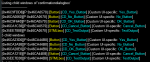
Thanks. If you have any work-around that's great. If not, I'll experiment.
/windows ConfirmationDialogBox

craggyisland
Unwise Decision Designator
Just noticed this mac, amazing work!
@GoldenFrog I am on 1.8, and for some reason it does not run the quests.
It attempts the conversion quests, but does not run the recruit quests, or the general quests.
I have tried the new command for running the general quests, but that does not work either.
Re installing MQ2 fixed my issue, I think something got messed up.
It attempts the conversion quests, but does not run the recruit quests, or the general quests.
I have tried the new command for running the general quests, but that does not work either.
Re installing MQ2 fixed my issue, I think something got messed up.
Last edited:

Sum1
Warriors are inferior (read: crybaby) tanks
@GoldenFrog I am on 1.8, and for some reason it does not run the quests.
It attempts the conversion quests, but does not run the recruit quests, or the general quests.
I have tried the new command for running the general quests, but that does not work either.
Re installing MQ2 fixed my issue, I think something got messed up.
next time just log out to character select and come back. It should work then.

- Commits
- 6
@GoldenFrog
Re installing MQ2 fixed my issue, I think something got messed up.
All my chars stopped after Rare conversion today. Did not work after logging to char select. Had to quit and start EQ again.
I had all of them on trader and I guess they been online a day or two, but on other chars btw.
Robban you were able to run after a restart of EQ? And freeferli, I'm sorry you had to reinstall. Did it work after that?
I just successfully ran 7 different characters just now - some F2P, some not. Some at max reward, etc. All succeeded. But the computer got rebooted last night.
Can you PM me the log file ([eq]\Logs\overseer.mac.log) if not too big - or the last relevant parts.
As Sum1 mentioned, it may be the Confirmation dialog issue. That issue appears to be something with MQ2 that we can't control (yet). That dialog only stays up for like 15 seconds then auto-closes.
Live servers going down now for a while. But I'll add more logging around the Confirmation Dialog to at least catch if that's where it's at.
I also had the same issue as robban on three toons. I’ll try to find my logs. Worked yesterday fine but not this AM.
- Commits
- 6
I also had the same issue as robban on three toons. I’ll try to find my logs. Worked yesterday fine but not this AM.
Thank you.
The bug I'm expecting this to be is:
- Macro is attempting to start a quest
- Macro clicks [Start Quest] and Confirmation Dialog appears
- Macro is unable to click [Yes] so dialog auto-closes eventually (15 seconds?)
- Macro goes into sad mode.
If this is what's happening, you can help prove it's an MQ2 bug by:
- Manually clicking [Start Quest]
- Running the following command on the command-line
- /echo ${Window[ConfirmationDialogBox].Open}
- If you see "TRUE", then it's not the bug.
- If you see "FALSE", then it is. (Dialog is open but MQ2 doesn't think so)
- Commits
- 6
GoldenFrog updated Overseer Automation with a new update entry:
1.8.1
Read the rest of this update entry...
1.8.1
- Corrected issue where 'Recruit' quest could get skipped
Have major rework for rewards and more hopefully completed in the next day or so.
Read the rest of this update entry...

don't forget to hit "Watch" on this resource so you can quick update on the redguide's launcher

>>> Watch This Resource <<<
>>> Watch This Resource <<<
Thanks for this brilliant resource.
I noticed a bit of a quirk, when the macro gets to the first conversion quest it doesn't pause long enough for the quest to complete. The macro then starts the first quest in the list regardless of what you have selected in the ini file. instead of selecting the conversion quest again. This only seems to happen on the first conversion quest, the macro does wait long enough to complete subsequent conversions.
I noticed a bit of a quirk, when the macro gets to the first conversion quest it doesn't pause long enough for the quest to complete. The macro then starts the first quest in the list regardless of what you have selected in the ini file. instead of selecting the conversion quest again. This only seems to happen on the first conversion quest, the macro does wait long enough to complete subsequent conversions.
- Commits
- 6
Thanks for this brilliant resource.
I noticed a bit of a quirk, when the macro gets to the first conversion quest it doesn't pause long enough for the quest to complete. The macro then starts the first quest in the list regardless of what you have selected in the ini file. instead of selecting the conversion quest again. This only seems to happen on the first conversion quest, the macro does wait long enough to complete subsequent conversions.
Make sure you have the latest. The logic used to only give like 12 seconds. Now it's up to 30. Should be sufficient there.
If you have latest (1.8?) then I'll dig in there - can't be missing conversions!
Make sure you have the latest. The logic used to only give like 12 seconds. Now it's up to 30. Should be sufficient there.
If you have latest (1.8?) then I'll dig in there - can't be missing conversions!
Just reinstalled the latest version to be sure but still happening. I noticed that it only seems to happen when the active quests window is completely empty if that helps.
- Commits
- 6
Just reinstalled the latest version to be sure but still happening. I noticed that it only seems to happen when the active quests window is completely empty if that helps.
Excellent information, thanks. This is a tricky macro to have to work on with the 6-12+ hour delays, optional quest types, and reward issues.
- Commits
- 6
Do you check for recovery quests to see if the quest is longer than the agent is unavailable?
No, currently Recovery quests are 100% ignored and skipped. I haven't taken the time to truly understand their value. If anyone wants to 'splain a set of rules, I'm glad to put the options in place.
Sum1
Warriors are inferior (read: crybaby) tanks
Are you sure they’re ignored? My guys keep doing recovery quests.No, currently Recovery quests are 100% ignored and skipped. I haven't taken the time to truly understand their value. If anyone wants to 'splain a set of rules, I'm glad to put the options in place.
yep, saw mine do one tooAre you sure they’re ignored? My guys keep doing recovery quests.
- Commits
- 6
Bugger it all. They've changed the naming convention. Previously all 'Recover' quests started with the name 'Recover Xxxxx'.
I will change it now to handle the actual Type "Recovery".
(Apparently mine did too and I didn't catch it. Side bonus to get exp? Heh)
I will change it now to handle the actual Type "Recovery".
(Apparently mine did too and I didn't catch it. Side bonus to get exp? Heh)
- Commits
- 6
Is this macro supposed to be going through the rewards claim, and aiming the rewards or not? Mine says on the mq window that it's claiming, but never actually claims anything.
Slightly tricky question. Yes, it should. However at this moment there's not good macro support to do it, so things aren't 100%. There's active efforts to fix this in the near future, though.
- If you have no rewards except Overseer rewards, it should work as you expect.
- If you have pending rewards from other quests, then it doesn't work 100%
Do you have non-Overseer pending rewards, TVCChiver?
- Commits
- 6
GoldenFrog updated Overseer Automation with a new update entry:
1.8.3
Read the rest of this update entry...
1.8.3
- Ensure 'Recovery' quests are always skipped.
Read the rest of this update entry...
Slightly tricky question. Yes, it should. However at this moment there's not good macro support to do it, so things aren't 100%. There's active efforts to fix this in the near future, though.
- If you have no rewards except Overseer rewards, it should work as you expect.
- If you have pending rewards from other quests, then it doesn't work 100%
Do you have non-Overseer pending rewards, TVCChiver?
I do not, I only have pending overseer rewards
- Commits
- 6
Just learned about the "Easy" modifier tag. As it stands, the macro should not be running any quests marked as "Easy" because they aren't ALSO marked with the rarity (i.e. Common, Uncommon....).
I'm working on a change to do this.
I'm working on a change to do this.
@GoldenFrog Do you know what the "Easy" tag does?
I noticed it makes the success rate higher, does it make the rewards lower? Less likley to get a recruit reward?
I was not clear what the disadvantage was.
I noticed it makes the success rate higher, does it make the rewards lower? Less likley to get a recruit reward?
I was not clear what the disadvantage was.
- Commits
- 6
@GoldenFrog Do you know what the "Easy" tag does?
It appears to require fewer agents but adds to the potential rewards. I was working a chart when I found it. So you'll see an Easy Crafting gives almost double the experience and coin (or other rewards).
This makes me think I WANT to do Easy over other options.

However right now I'm not sure how to TELL it's a Common except from the color - which the macro doesn't have access to. Might be another advantage of MQ2Overseer plugin when that gets further along :\
| Easy? | Rarity | Type | Duration | Experience | Coin | Merc Exp | Reward |
| Easy | Common | Crafting | 6h | 0.41 | 413 | 41 scale, 4 radiance, 1... | |
| Common | Crafting | 6h | 0.28 | 275 | 28 scale, 3 radiance, 1 mephit meat, legume, fruit, leaves, blood | ||
| Common | Diplomacy | 12h | 0.5 | 500 | |||
| Common | Exploration | 12h | 0.5 | 500 | |||
| Common | Harvesting | 6h | 0.28 | 275 | 28 scale, 3 radiance, 1 mephit meat, legume, fruit, leaves, blood | ||
| Common | Military | 12h | 0.5 | 500 | 12.5 | ||
| Common | Plunder | 6h | 0.28 | 275 | 6.88 | ||
| Common | Research | 24h | 0.9 | 900 | Plating, 90 scale, 9 radiance, 2 mephit meat, legume, fruit, leaves, blood | ||
| Common | Stealth | 12h | 0.5 | 500 | 12.5 | ||
| Easy | Common | Trade | 12h | 0.63 | 625 | ||
| Common | Trade | 12h | 0.5 | 500 | |||
| Elite | Military | 12h | 1 | 1000 | 25 | ||
| Uncommon | Crafting | 6h | 0.37 | 367 | 37 scale, 4 radiance, 1 meat, meat, legume | ||
| Uncommon | Diplomacy | 12h | 0.83 | 833 | |||
| Uncommon | Plunder | 6h | 0.37 | 367 | |||
| Uncommon | Trade | 12h | 0.67 | 667 |
I have changed the order of my quest and thought I would share for anyone else wanting to do the same. This will run the quests in order from Elite-Rare-Uncommon-Common, running the shortest one first.
INI:
index=12
1=Elite|6h
2=Elite|12h
3=Elite|24h
4=Rare|6h
5=Rare|12h
6=Rare|24h
7=Uncommon|6h
8=Uncommon|12h
9=Uncommon|24h
10=Common|6h
11=Common|12h
12=Common|24h- Commits
- 6
GoldenFrog updated Overseer Automation with a new update entry:
1.9
Read the rest of this update entry...
1.9
- Reworked Quest Priority system. Better control over quest ordering. Previous system still used until you opt in with configuration
- Now allows for separate quest selection based on Gold and Non-Gold accounts
Read the rest of this update entry...
- Commits
- 6
It would make more sense to have mission duration be nested within the the mission type loop. Ppl looking for specific mission type should have that mission type scanned for all duration before moving onto a lower priority mission.
@GoldenFrog One thought that I had was, maybe it should have different INI files depending if the character is gold or not.
Finally got to both of these. Reworked the Quest Order (Prioity) system. Old one stays. You can opt into new one.
[QuestPriorities]
[QuestPriorities_Unsubscribed]
Hope these changes help with what you were looking for. If not - gives us a holler.


Love this macro! But I'm getting confused on the options. I'm using Overseer for Character Experience to level up my mercs. I do however like to claim my own rewards. After upgrading today to 1.9 and running the macro here is my INI file. Am I doing this right?
Overseer.ini
Overseer.ini
INI:
[General]
claimRewards=0
repeatTimeMinutes=-1
useCharacterConfigurations=0
minimumSuccessPercent=81
requireMercToClaimExpRewards=1
logLevel=2
useQuestPriorities=0

[QuestTypeOrder]
index=7
1=Plunder
2=Military
3=Stealth
4=Exploration
5=Diplomacy
6=Trade
7=Any

[QuestOrder]
index=12
1=Elite|6h
2=Elite|12h
3=Elite|24h
4=Rare|6h
5=Rare|12h
6=Rare|24h
7=Uncommon|6h
8=Uncommon|12h
9=Uncommon|24h
10=Common|6h
11=Common|12h
12=Common|24h

[Rewards]
index=4
1=Character Experience
2=Overseer Tetradrachm
3=Collection Item Dispenser
4=Mercenary Experience

[QuestPriority]
Priorities=Durations|Rarities|Types
Durations=6h|12h
Rarities=Elite|Rare|Uncommon|Common
Types=Any

[QuestPriority_Unsubscribed]
Priorities=Durations|Rarities|Types
Durations=12h|6h
Rarities=Common|Elite|Rare|Uncommon
Types=AnyLove this macro! But I'm getting confused on the options. I'm using Overseer for Character Experience to level up my mercs. I do however like to claim my own rewards. After upgrading today to 1.9 and running the macro here is my INI file. Am I doing this right?
Overseer.ini
INI:[General] claimRewards=0 repeatTimeMinutes=-1 useCharacterConfigurations=0 minimumSuccessPercent=81 requireMercToClaimExpRewards=1 logLevel=2 useQuestPriorities=0 [QuestTypeOrder] index=7 1=Plunder 2=Military 3=Stealth 4=Exploration 5=Diplomacy 6=Trade 7=Any [QuestOrder] index=12 1=Elite|6h 2=Elite|12h 3=Elite|24h 4=Rare|6h 5=Rare|12h 6=Rare|24h 7=Uncommon|6h 8=Uncommon|12h 9=Uncommon|24h 10=Common|6h 11=Common|12h 12=Common|24h [Rewards] index=4 1=Character Experience 2=Overseer Tetradrachm 3=Collection Item Dispenser 4=Mercenary Experience [QuestPriority] Priorities=Durations|Rarities|Types Durations=6h|12h Rarities=Elite|Rare|Uncommon|Common Types=Any [QuestPriority_Unsubscribed] Priorities=Durations|Rarities|Types Durations=12h|6h Rarities=Common|Elite|Rare|Uncommon Types=Any
From the looks of it you have claimRewards=0 which means it turn it off. It should NOT be claiming rewards with that 0 being there. It should only claim rewards if that was a 1.
From the looks of it you have claimRewards=0 which means it turn it off. It should NOT be claiming rewards with that 0 being there. It should only claim rewards if that was a 1.
Yeah, that part is working good, what about my quest selections?
- Commits
- 6
Yeah, that part is working good, what about my quest selections?
First, you can test the current order the macro will look at quests by running the command below. It will run through things and spit out the order it will try to run quests. None will actually be run, and success % is not factored in (thus the "fast" part)
/mac overseer generalListFast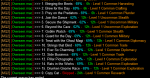
The lineup you have:
Code:
[QuestTypeOrder]
index=7
1=Plunder
2=Military
3=Stealth
4=Exploration
5=Diplomacy
6=Trade
7=Any

[QuestOrder]
index=12
1=Elite|6h
2=Elite|12h
3=Elite|24h
4=Rare|6h
5=Rare|12h
6=Rare|24h
7=Uncommon|6h
8=Uncommon|12h
9=Uncommon|24h
10=Common|6h
11=Common|12h
12=Common|24h
Looks right. It will run them as:
- Elite > 6h > Plunder...through Trade (in that order), then any others
- Elite > 12h > Plunder...through Trade (in that order), then any others
- Elite > 24h > ...ditto
- .... continue
1.9 added a different way to order quests, if you wish. You can accomplish the same thing with:
Code:
[General]
useQuestPriorities=1

[QuestPriority]
Priorities=Rarities|Durations|Types
Rarities=Elite|Rare|Uncommon|Common
Durations=6h|12h|24h
Types=Plunder|Military|Stealth|Exploration|Diplomacy|Trade|Any
This will replace [QuestOrder] and [QuestTypes]. Help clean things up a bit.
Users who are viewing this thread
Total: 2 (members: 0, guests: 2)
Share: