• You've discovered RedGuides, an EverQuest multi-boxing and scripting community 🧙‍♀️⚙️. We want you to play several EQ characters at once, come join us and say hello! 👋

  • A TLP without truebox has thawed (Very Vanilla ready)
    Frostreaver

Utility - Organizing your Kissassist Ini file with an auto-populating Excel Template Viewer (JJB's OCD mania...)

joojoobee

A Member to Remember
Creator
Joined
May 15, 2016
RedCents
4,327¢
Version 1.8 -- JJB's Kiss_OCD Ini Template Viewer (a macro-enabled Excel File) for easy viewing and comparisons of your INI files and INI design.

Version 1.8 FIXES HEALS section pointed out by Hylander. Several other minor additions/fixes/tweaks.

I am always interested to see other people's DPS strategies for a given character Class. The power of Kiss is its ability to accommodate customization. However, the flexibility of the INI file structure can make comparing two INIs difficult (because there is no required implicit order of the settings under a given heading).

This Excel-based MACRO is meant to alleviate that issue by templating your INI file in a standardized format. This MACRO utility:
  • Inputs your character INI file.
    • Organizes the contents according to the format of the EXCEL template (that you can customize).
    • Auto-colors and auto-formats the results for easy viewing.
    • It breaks out the "|" delimited fields for easy viewing, and for the KConditions it breaks out according to && delimiters.
      • Option to "click" a button on appropriate tabs to pull in the cognate condition for viewing.
    • For spells and actions (as in DPS, Buffs, Heals, etc.), the macro auto-determines the SIZE (count) of the actions (according to the highest # it finds) and auto-populates the DPSSize (for instance) field.
  • Changes made in the fields of each tab are auto-populated into their respective parsed fields or back into the "INPUT/OUTPUT" column.
  • The "Save" button then re-outputs your file according to the new template order.
    • Gives you the option to overwrite the current file or make a backup of your prior file (defaults to backup using the time and date appended to the file name).
  • Recently added in 1.7:
    • Reading in INI file now also auto parses the data into the right Tabs.
    • Update and Parse button makes sure your changes are reflected now in the INI Input tab (does not save... you have to do a click "Save as INI File" button.
    • Made buttons pretty and less Soviet-era...
There is a "fresh" Template file to start with your own INI file (Opening a new INI file CLEARS entirely the prior data, so it is designed to work with multiple INI files one after the other). This is a MACRO-ENABLED Excel file. It simply will not work without macros/VBA. If you want to run it, you need to enable macro running in Excel (and possibly ignore virus detection warnings). If you want to see the software behind it, you need to enable the DEVELOPER tab in Excel and you can read the code (see the VBA project viewer and the "ThisWorkbook" object).

Info Tab-- key information to fill out (only 3 fields for the user). The rest of this page is auto-populated & used as a reference by the internal macros.
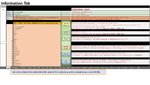
Slide1 - Copy.JPG
Example General Tab-- The order of your output INI is customized using the Template column.
As the program reads in your file and "parses" the headings to different tabs, it populates the ordering of the list by the TEMPLATE order you customize/provide.
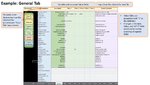
  • I've filled in most of the possible variables and given an example Template order (blue field column).
    • If the program finds something that is not in the list, it creates a small side list on the page so you can add to the template listing.
  • The macro then auto-extracts and populates the Variable name, and the Values (as delimited by the "|" separator for Kissassist (green fields below)
  • Changes to the Variable, Value fields are auto-updated to the Input/Output column (purple fields), and vice versa.
  • The Input/Output column contents are ultimately what is used to build the organized final Kiss INI file.
  • You customize the order by changing the Template column and hitting the "Update and Parse" button.
Slide2 - Copy.JPG


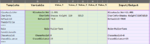
Example DPS Tab-- The order of your output INI is customized using the Template column.
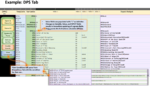
  • Same as above, but an example Tab with spells and abilities parsed into Value fields.
  • DPSSize is auto-determined according to the HIGHEST detected DPS#. This does not COUNT the list total... just parses for highest # using the A2 field as the search guide. You'll see the search guide in cell "A2" on pages where an ordered action list is relevant for this. Where it's not relevant, you will see "XXX" in that Excel cell.
  • You customize the order by changing the Template column and hitting the "Update & Parse" button.
Capture.PNG

Example Conditions Tab-- The order is determined by the Template column.
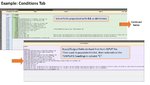
  • Same as above, but an example Tab with Conditions parsed into Value fields.
  • Here, "&&" is used as the delimiter to search for and separate the Condition tests. It only parses "&&", not "||" (too complicated to present in a simple format with both of those).
  • CondSize is auto-determined according to the HIGHEST detected Cond#. This does not COUNT the different cond... just parses for highest # using the A2 field as the search guide. You'll see the search guide in cell "A2".
  • You customize the order by changing the Template column and hitting the "Update & Parse" button.
Slide4 - Copy.JPG
 

Attachments

Last edited:
Next Version (maybe... no rush):
  1. Better Source control for choosing INI files,
  2. An option to simply reformat all your files at once.
  3. Support old conditions (i.e. back compatibility to Kiss 10.x)
 
Last edited:
This is pretty awesome, thanks for sharing!
 
Version 1.2 with default backup file generation, Cond lookup, and some tidying of the formatting. Apart from bug fixes, I won't be doing any more updates on this for a while now.
 
downloaded this but get "file is corrupt" when I try to open in Excel
downloaded with and without virus checker etc.
 
Version 1.5. Fixed a minor bug in the parsing that occurs when editing the J column fields.
 
downloaded this but get "file is corrupt" when I try to open in Excel
downloaded with and without virus checker etc.

Not sure what's going on there, Scots. I uploaded a new version (ZIP file), and it downloads perfectly well for me and opens. If you are still having issues, what version of Excel are you using, and is your excel able to run macros (I have Office 365)? You might have something turned off somewhere that disallows macros?
 
Not sure what's going on there, Scots. I uploaded a new version (ZIP file), and it downloads perfectly well for me and opens. If you are still having issues, what version of Excel are you using, and is your excel able to run macros (I have Office 365)? You might have something turned off somewhere that disallows macros?


on further examination, thinking it may be a problem with my office installation, will check into it later thanks.
 
  • Version 1.6
  • Recently added:
    • Reading in INI file does auto extract.
    • Update and Parse button makes sure your changes are reflected now in the Ini Input tab (does not save... you have do click "Save as Ini File button"
    • Made buttons pretty and less Soviet-era...
Got most of the major bugs :bug:bug:bug I think. Please let me know if anything is wonky.
 
Man, Joojoobee this thing looks amazing. I'm gonna need to re-read it a few times lol
 
Man, Joojoobee this thing looks amazing. I'm gonna need to re-read it a few times lol

It's pretty easy, really.
  • All you have to do is on the INFO tab:
    • Type in the Name of your Character, the Server, and the Folder Path (should be in the format: Kissassist_Server_CharName.ini (not with the level in the name).
    • Click "Open and Parse" INI.
    • Your file is read and all the attributes are added to the corresponding Tabs in the order defined by the Template column (3rd column across, or C column).
    • ---
  • Multi-part attributes that were separated by "|" (like DPS17=Refute for Power|99|Cond9) are separated into columns for easy reading
    • 1557066466989.png
    • or for conditionals separated by "&&"
    • 1557066625698.png
    • ---
  • You can type in the green regions and the changes will be reflected back to the purple region in the same row on the write,
  • Or type in the purple and the changes are reflected in the green.
  • To SAVE the file with the new order, just click "Save as Ini File" button.
    • The macro will copy what is in the purple column into the output file tab, and then write the organized INI file.
    • Remember:
      • You can rearrange the order of variables in the C column (best to do before you Parse/Extract the data) and then save the new order
      • You can arrange the subheadings (DPS, PULL, BUFFS) by changing the order of the tabs. Macro will use the tab order to determine the output order
    • ---
  • Putting **** in the Template column puts a separator *********** in the output file (Kiss ignores it, so don't worry).
    • 1557066878579.png
    • ---
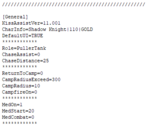
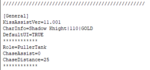
  • This translates as the below in the INI file. At least for me helps my reading of the INI when scanning for text changes-- I tried to group the Template field into similar groups with the key variable setting--like Role, or ReturntoCamp, or MedOn) at the top of each subheading screenshot from the resulting INI below:
    • 1557067058611.png
    • ---
  • There are a couple of other features like it can pull your conditional information ONTO, say, the DPS page for viewing (only) so you don't have to flip back and forth between tabs, or if there's a new field added that's not in the current Template, the macro lists them as "orphans" and you can decide whether to move them into the Template.
I made a copy of the excel file and read in another file I might be comparing it to (for instance, when trying to design an optimal Shadow Knight ini, I had several of these open for the various INIs from the library and did a head to head visual comparison). Obviously, this is more for "designers" of INIs... or if you want to understand what's actually IN an INI...

Hope this helps summarize the capabilities for a quick start up.

JJB
 

Attachments

  • 1557066952954.png
    1557066952954.png
    3.9 KB · Views: 2
Last edited:
JooJoo,

Quality work as always (in love with monk pulling). One thing i found was the [Heals] sections of my inis were not being parsed. I needed to change the name of the worksheet Tab from 'Heal' to 'Heals' and then everything came.

Regards,

Hylander
 
JooJoo,

Quality work as always (in love with monk pulling). One thing i found was the [Heals] sections of my inis were not being parsed. I needed to change the name of the worksheet Tab from 'Heal' to 'Heals' and then everything came.

Regards,
Hylander

Thanks, Hylander... I missed that and was wondering why my "Horn of Unity" (in my Heals section) was not going off on any characters. Now fixed. Several other tweaks that fix rare situations. New version 1.8 has been uploaded.
 
Utility - Organizing your Kissassist Ini file with an auto-populating Excel Template Viewer (JJB's OCD mania...)

Users who are viewing this thread

Back
Top
Cart