• You've discovered RedGuides, an EverQuest multi-boxing and scripting community 🧙‍♀️⚙️. We want you to play several EQ characters at once, come join us and say hello! 👋

  • A TLP without truebox has thawed (Very Vanilla ready)
    Frostreaver
optimize.mac | character setup | plugin optimization | settings | block buffs!

Release optimize.mac | character setup | plugin optimization | settings | block buffs! 2022-03-06

No permission to download

Ladon

Birthplace: Grobb
Creator
Joined
Oct 17, 2012
RedCents
5,836¢
"This may be useless to anybody but me."

Over the last 18 years I've spent more time than I'd like to admit creating characters and wasting time setting them up.
Even though I'm below a beginner level coder, I decided to make a macro that does the following:
  • Loads a multitude of plugins for all characters and writes "optimal" settings for them.
  • Changes every grouped characters' settings in the Options window. Alts don't need a lot of visible data.
  • Creates quality-of-life hotbuttons for your main.

| THIS WILL OVERWRITE "SOME" DATA.
| MAKE A BACKUP OF YOUR MACROS FOLDER, EQCLIENT.ini, AND UI FILES TO BE SAFE.
| I'M NOT RESPONSIBLE FOR ANY DAMAGE THAT THIS MAY CAUSE.

Note, MQ2AutoLoot has to be manually downloaded and EQBC has to be set up, enabled, and running. As of v0.170327 there is an included ini that needs to be set up for everything to run.

As a bonus I'm including a very whittled down eqclient.ini for your second installation folder that you run your alts out of. Background characters don't need all graphics and can run using extremely low resources.
Between the eqclient.ini and the functions of this macro I hope to replace all of the disparate optimization guides that are scattered around the internet. My goal is to have boxes use almost no resources (and they run at 1440p, minus the toolbar)!

Currently a couple of open issues that I could use help with:
008 - Figure out UI copy section. Slash command returns "Copying layout from the file i layout UI_${UI}_${EverQuest.Server}.in over to the current layout."
Why does the EQ client insist on moving the final i in ini to the beginning of the command? May be a limitation of EQ.
If resolved will require ${UI} to be defined and added to the ini.
019 - Can't get the helptext to appear after one of the subs are complete. If I put it in :endless it spams it every 1 second. Probably a better way to do this.

If you have any suggestions for other plugins that I should include with settings to set or, more favorably, hotbutton ideas please let me know. I'll look into adding it!
All change or upgrade suggestions welcomed. You pointing out better methods of handling this enhances the macro and my abilities.

Please download the latest macro, ini, and eqclient.ini. Follow all directions and have fun!
Macro can be run multiple times with the same group or from the same main.
 
Last edited:
Re: optimize.mac release | plugin setup | hotkeys | low-mem alt eqclient.ini

Tell me more about this "alts running out of a separate installation" ?? What for?
 
Re: optimize.mac release | plugin setup | hotkeys | low-mem alt eqclient.ini

I have any "main" character running in what I'd call my primary EverQuest folder. It has the settings as high as possible and looks great (for EverQuest), music, etc.
The alts all run on a secondary folder with minimal settings, most options off, super close fog, modified eqclient.ini to use stickfigs.

CPU:
Mains: ~10%, spikes to 20%
Alts: ~2%, spikes to ~10%

Mem:
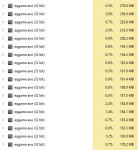
Mains: start ~1G, slowly drop to ~400M
Alts: start ~675M, slowly drop to ~150-200M

It's a way to save resources and get more characters online. I could probably run 18 on an i5-4570k. I ran 15 on EQEMU with the same rig when I built it in 2012.
 
Last edited:
Re: optimize.mac release | plugin setup | hotkeys | low-mem alt eqclient.ini

the only real change I would make is
Rich (BB code):
/bcaa //maxfps bg 10
this is NOT enough. It needs to be
Rich (BB code):
/bcaa //maxfps bg 15 or even /bcaa //maxfps bg 20

Healers miss heals at 10! Casters can miss the start of a cast but healers need to not be 10!

- - - Updated - - -

Keep I mind EMU vs LIVE is a whole different memset and you will see an improvement, I love this work. But as much of an improvement as with an older emu compile.

- - - Updated - - -

AS WITH ANY OTHER MAJOR CHANED TO YOUR EVERQUEST, BACKUP YOUR SHIT! Before making changes! You have been warned.
 
Re: optimize.mac release | plugin setup | hotkeys | low-mem alt eqclient.ini

Hearing that a simple macro is loved by you makes me feel great about this. The most I've ever worked with are Excel macros and light VBA.
 
Last edited:
Re: optimize.mac release | plugin setup | hotkeys | low-mem alt eqclient.ini

This is great, thank you!
 
Re: optimize.mac release | plugin setup | hotkeys | low-mem alt eqclient.ini

Thank you, Redbot! I updated the main post and included the latest version, v0.20170327. The macro is 4x larger than it was the last time that you saw it and it's handling more and more of the pesky setup steps for your characters.

Still more upgrades to come. I plan to finish the Settings section and then hunt down what else I can do with the macro.

Please let me know what you think of the new version!

______________________________________________
Updated the macro and the ini to remove all fake Greek God names to comply with rules. Sorry. I was being cute.
 
Last edited:
Re: optimize.mac release | plugin setup | hotkeys | low-mem alt eqclient.ini

Posted update v0.20170328. Macro now changes ALL general/display settings to make background characters use less memory.
If you have any proposed changes for the settings or hotbutton ideas please post them. I'm trying to find other positive things this could do.

Updated optimize.ini; now lets you set the macro to run for 2-6 characters. It only took a few lines to add support for this!. Please set #C in the ini.

Also includes optimize_guildinvite.mac. This will invite characters 2-6 into the main characters' guild. If you start a second group up make sure to invite their main and make them an officer!

Trying to learn how to have user provide input and break it out into pieces.

all - run all loops
settings - change main/alt settings
hotbuttons - create hotbuttons (figure out updating..)
guildinvite - invite defined characters
more - coming soon?!
 
Last edited:
Re: optimize.mac release | plugin setup | hotkeys | low-mem alt eqclient.ini

just want to confirm, is it correct that I should not use this for setting up first team on LIVE servers?
 
Re: optimize.mac release | plugin setup | hotkeys | low-mem alt eqclient.ini

You can use it to set up any of your teams on the live servers, Nat be sure to run it from your main!

I have an update coming when I have enough free time. Few minor changes before I split the macro into different parts (settings, hotkeys, etc)

Sent from my Nexus 6P using Tapatalk
 
Re: optimize.mac release | plugin setup | hotkeys | low-mem alt eqclient.ini

I like the idea behind this ( spend a good 30-45m on new toons just getting things set up, even when I copy layout)

Most of the time though it is window manipulation (I use reduces size hotbuttons, always seems to screw up hotbar 1 and 2 size when you copy the lay out) as well as some chatwindow placement (and of course EQBC and MQ window placements) Does your macro happen to touch on window manipulation?
 
Re: optimize.mac release | plugin setup | hotkeys | low-mem alt eqclient.ini

Unfortunately, no. All of that is subjective to individual users. There's a block to copy over another layout but the command is broken in EQ. Once I get that figured out it should be relatively easy to set up one character and then copy it over to the others. (My 5 all use the same layout and the main is different).

Goal of the macro is to set up alts, have them use as few resources as possible, and to function as a QoL booster.

Haven't decided if I want to split it into multiple macros or learn how to break it into Subs and have the user choose what they want to run.

I've added more plugin setup and hotkeys but it's in no state to post. There are some other macros that I've found that I could cannibalize into this, also.

Sent from my Nexus 6P using Tapatalk
 
Re: optimize.mac release | plugin setup | hotkeys | low-mem alt eqclient.ini

thanks for doing this, i am sure this will help out more people than u expect!
 
Posted a huge update! Added a few hotbuttons, moved everything to subs so that you don't have to run everything if you only want, say, hotbuttons.

Still a few issues I have to resolve but I decided to post it as-is to see if anybody has recommendations.

UI / Helptext repeat / Invite hotbutton delays to invite chars in order / more hotbutton ideas.
 
It will create a few social pages of hotbuttons, things like "tell my group to cast invis and ivu," "chase me instead of camping," "camp instead of chasing," "mage, give group pets toys!" etc. I've been working on building out more hotbuttons but the present macro will load a basic set. If I could get in I'd take a picture.
 
ALL no longer works in the new version. Also, if you are like me and see # as a comment, DO NOT remove it on the line for #c=6. If you do, you will not get the macro to work. You can do /echo plugins,/echo settings,/echo hottbuttons,/echo main (which does all I think), /echo ui, and /echo end. These commands will change your settings and override almost everything you already have set up USE WITH CAUTION
 
Ladon updated optimize.mac release | plugin optimization | hotbuttons | settings | low-mem! with a new update entry:

Goodbye INI, Hello DanNet!

Pretty big change to the macro. I cut out the broken pieces, added settings that've been added over the last two years, and changed the approach to optimizing alts.
No longer sets up groups. EQBC is set up, DanNet is called, and the rest of the macro works through dannet.

My setup is based on Innerspace and virtualized eqclient.ini files so it's not necessary to utilize separate installation folders for different characters or "classes" of chars (mains/alts).
I ran this with my main and one...

Read the rest of this update entry...
 
Line 147-148 should be :
/noparse /dgge /if (${Window[OptionsGeneralPage].Child[OGP_AutojoinCheckbox].Checked}) /notify OptionsGeneralPage OGP_AutojoinCheckbox leftmouseup /if (!${Window[OptionsGeneralPage].Child[OGP_AutojoinCheckbox].Checked}) /notify OptionsGeneralPage OGP_AutojoinCheckbox leftmouseup

Instead of :
/noparse /dgge /if (${Window[OptionsGeneralPage].Child[OGP_Autojoin].Checked}) /notify OptionsGeneralPage OGP_Autojoin leftmouseup /if (!${Window[OptionsGeneralPage].Child[OGP_Autojoin].Checked}) /notify OptionsGeneralPage OGP_AutojoinOGP_AutoConsentGuildCheckbox
 
Awesome, thank you for pointing that out- and to think that thought I was perfect.

I'm reworking this (again) to be a one-shot macro to change alts settings on-the-fly with a call like /mac optimize alt low but work has been cumbersome.
It's like I'm bailing water from a toilet that's backed up and, coincidentally, that five guys are shitting in at the same time after a night of heavy drinking, Five Guys, and laxatives. Corporate laxatives.
 
That's a very nice macro, going to use it on my crew, but just wanted to see what it was doing before using it, that's how i pointed that out.
 
The Dannet optimizing part does not work.
And you can remove the target group buff part. It's now on by default.
 
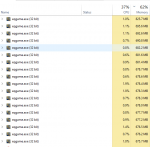
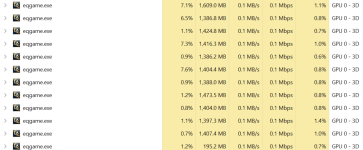
I'm sitting closer to 675MB of mem usage after running this macro on the background "alt" clients. Is there something I could have missed? Seems like a drastic difference between 300 that Ladon mentioned in his update. I do no run ISboxer, does that or eqwindower(or eqplaynice can't remember name) make a difference in memory usage?

Edit: I'm seeing that after running for ~30 minutes memory usage significantly drops, have some boxes as low as 300, most are hovering around...um i don't know what happened, but as i was typing this, almost all boxes in the alt category dropped to 200MB or less! This is ~30 minutes after login...

After killing stuff in PoSky for 30 mins:
1621588769236.png


At Launch:
1621585947404.png
 
Last edited:
that's how eq is - loads high then settles down - sometimes will do this upon zoning to a new spot as well
 
so ive been playing for about a half an hour with two seprate installs of eq
1. Mem usage on all accounts is well over 1 gig
2. ive used this mac
3. some of my toons are stick figures while others not ( on the secoundary install where all the other toons are at)
4.now my windows bar disapears when im in everquest ( i dont like)
i have 32 gb of ram i shouldnt be at 41% mem useage with just 6 accounts, 3 firefox tabs and discord
I literly had 20 accounts open, 5 firefox tabs, discord and spotify and wasnt over 47% usage. i feel like this somehow made my ram useage worst.
any advice?
 
Last edited:
If you have the RAM available then EverQuest will use it. My Bazaar mules that run my Main setup will settle down to ~200MB on a 1440 instance. If you zone a lot then it will keep loading stuff to memory. I'm assuming that you're running 64GB+?
 
|Fast Drop Confirmation % Enabled - Maybe change.
/notify OptionsGeneralPage OGP_ItemDroppingCombobox listselect 1

I think you have a copy and paste error.
 
Does the block buffs part, stop you from getting the mass buffs people give out in the PoK? If so how can i allow them. They help new players like me.
 
Release optimize.mac | character setup | plugin optimization | settings | block buffs!

Users who are viewing this thread

Back
Top
Cart