• You've discovered RedGuides, an EverQuest multi-boxing and scripting community 🧙‍♀️⚙️. We want you to play several EQ characters at once, come join us and say hello! 👋

  • A TLP without truebox has thawed (Very Vanilla ready)
    Frostreaver

Fork / Mod Only Pull From A Certain Direction

Joined
Jan 13, 2018
RedCents
3,352¢
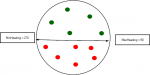
Simple modification that adds two extra parameters to the Pull section of your ini, MinHeading and MaxHeading. It will only pull mobs that are clockwise of MinHeading, and anticlockwise of MaxHeading. 0 is north, 90 is east, 180 is south, 270 is west.

E.g. with
Rich (BB code):
[Pull]
MinHeading=90
MaxHeading=180

It'll only pull stuff that's southeast of you:
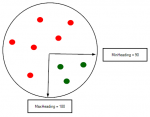
2018-07-21 11_51_21-Untitled - Paint.png

Or to only pull things north of you:

Rich (BB code):
[Pull]
MinHeading=270
MaxHeading=90

2018-07-21 11_57_42-Untitled - Paint.png

Changes, this is from eqmule version but should be the same in the regular version. Add the bold stuff. In Sub Main:

Rich (BB code):
     /call LoadIni Pull PullWith                 string      "Melee"
     /call LoadIni Pull PullMeleeStick           int         0
     /call LoadIni Pull MaxRadius                int         350
     /call LoadIni Pull MinHeading               int         0
     /call LoadIni Pull MaxHeading               int         360
     /call LoadIni Pull MaxZRange                int         50
     /call LoadIni Pull CheckForMemblurredMobsInCamp                 int         0
     /call LoadIni Pull PullWait                 int         5

In Sub PullValidate, at the start:

Rich (BB code):
     Sub PullValidate(PVPullMob, int PFlag, int checksec)
         /declare j int local
         /declare headingFromCampToMob float local 0
           /if (!${MobsToPull.Find[All for all]} && ${MobsToPull.NotEqual[All]}) {
         /for j 1 to 25
                     /if (${DebugPull}) {

In Sub PullValidate, at the end:

Rich (BB code):
             /if (${DebugPull}) /echo \atDEBUGPULL PullValidate: PFlag: ${PFlag} ${Spawn[${PVPullMob}].CleanName} invalid target Reason: No Pull Names with Mobs in Camp \agLine#: ${Macro.CurLine}
             /return 0
         }
        | Check if heading from camp is within allowed range
        /varset headingFromCampToMob ${Math.Calc[${Spawn[${PVPullMob}].HeadingTo[${CampYLoc},${CampXLoc}].Degrees}]}
        | If MinHeading is higher than max heading, reverse the comparison
        /if (((${MaxHeading}>${MinHeading}) && !${Range.Inside[${MinHeading},${MaxHeading}:${headingFromCampToMob}]}) || ((${MaxHeading}<${MinHeading}) && ${Range.Inside[${MaxHeading},${MinHeading}:${headingFromCampToMob}]})) {
            /if (${DebugPull}) /echo \atDEBUGPULL PullValidate: PFlag: ${PFlag} ${Spawn[${PVPullMob}].CleanName} invalid target Reason: Wrong heading \agLine#: ${Macro.CurLine}
            /return 0
        }
     /if (${Spawn[${PVPullMob}].Named}) {
         /echo Found a named to pull: ${Spawn[${PVPullMob}].Name}
     }

This calculation looks "wrong", but it gives a heading where 0/360 is north, 90 is east, 180 is south, and 270 is west. Makes sense to me.
 
Yea, I did something similar to this, but I had it set where you used 1 ini setting. It used the direction you were facing and split the degrees(cone) you want to use. So if you were facing due North(0 degrees) and wanted to pull 180 degrees from where you were facing. You would only pull mobs from 270 Degrees to 90 Degrees from where you were facing. That would only pulls mobs that are in front of your east/west access.

It is cool to see someone else working on this as well. I have been saving this for a later version of kiss.
 
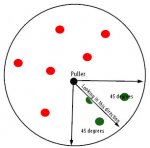
I think this would would better as an arc and a command.
Face your toon the direction you want to pull.
Rich (BB code):
/pullarc 90
Kiss then would calculate the arc 45 degress on either side of your heading creating a 90 degree arc of the circle.

pull-45.jpg

Less thinking and ini vars. Only pulls in one direction when you use the command otherwise pulls normally
 
Last edited:
I agree that makes more sense than the min/max heading, but I'd rather have it set in the ini than have to run a command or worry about what direction I'm facing when I start the macro. Have changed mine to:

Rich (BB code):
    /call LoadIni Pull PullDirection            int         0
    /call LoadIni Pull PullArc                  int         360
    /declare MinHeading int outer ${Math.Calc[(${PullDirection} + 360 - ${PullArc}/2) % 360].Int}
    /declare MaxHeading int outer ${Math.Calc[(${PullDirection} + 360 + ${PullArc}/2) % 360].Int}
 
you will forget to change ini then only pull that arc in other zones.
command is keep it simple stupid
 
Having it as a fixed Min/Max will work fine, but when you change zones and forget to turn off directional pulling, and not change your min/max for your new zone/camp.

If this was added to the RG version of KA. Then we the developers have to think about everyone. I can already imagine the tech request/trouble tickets.

By having it turned on/off with a command will solve some of the issues. Maskoi and myself aren't in total agreement when it comes to the Arch. I want to add an ini entry so the width of the arc can be controlled because a width of 90 may be too wide. Maybe even build into the command the ability to pass the width as a parameter. Something like:

/kdirectionpull on|off #(Width - Default=90)

so using:

/kdirectionpull on - would turn on direction pulling setting the width to 90.
/kdirectionpull on 60 - would turn on direction pulling setting the width to 60.
/kdirectionpull on 180 - would turn on direction pulling setting the width to 180.
/kdirectionpull off - would turn off direction pulling.

Also remember the direction your puller is facing becomes the center point of your cone. Also your CampX and CampY locations play a huge part in what mobs will fall in and out of the arch area.

So I Personally would create a hot key that did the following things:
/moveto loc ##.## ##.## mdist 2
/delay 50
/face heading ###.##
/mac kissassist.mac MAName Puller

Then after kiss has started I would hit my hotkey to turn on Directional pulling.
 
PullArc=0 ;in the ini to turn off directional pulling

/setpullface 0 ;to point north , or some other heading.
/setpullarc 80 ;as command to turn it on the way you facing.
/setpullarc save ;saves the pullarch in the ini.


/backoff off - returns to pulling
 
90 was just an example for the arc. Its not a permanent setting just default.
/agree it should be able to be reset with the command.

Rich (BB code):
/kpullarc on 60
/kplullarc 180
/kpullarc off
 
Even for simply camping a specific named without pulling the other direction spawning an alternate names that just wastes burns!

- - - Updated - - -

And sharing camp spots....

- - - Updated - - -

If only I actually had time to play!
 
Simpler solution would be to have multiple advpath pull support in KA! Still dreaming one day this will happen instead of just 1 pull path support!

This way you could just make 4-5 paths that arc from your starting pointing or w/e direction you wanted like 1 path N, then 2nd path S if you wanted to go opposite direction. Or if you are in a maze like area (some zones have pyramids with mazes), then you could just create paths from your camp point.
 
aspire2008 wake up dude its not 2008 no more its 2018, we use mqnav, but yeah, i do agree with you could make that same functionality with loc waypoints in your pull section.

pull towards this loc, and clear 50 aroudn it
pull towards loc2 and clear 100 around it. and so on.
 
only just started to test this today, i can't redcent or thank enough this is the best!
 
Agree with Rooster, this made so many new camps work for KA pulling. Dungeons with funky map overlaps, that one ugly room you don't want to keep re-breaking, little pockets of mobs you really don't want but are mixed in with mob names you can't add to ignore, this mod makes those camps work.

I did have to make a cheat sheet of 360 degree angles again though, hadn't exercised that part of my brain since high school.
 
Fork / Mod Only Pull From A Certain Direction

Users who are viewing this thread

Back
Top
Cart