• You've discovered RedGuides, an EverQuest multi-boxing and scripting community 🧙‍♀️⚙️. We want you to play several EQ characters at once, come join us and say hello! 👋

  • A TLP without truebox has thawed (Very Vanilla ready)
    Frostreaver

Question - Newb Questions

RebelHeartActual

Well-known member
Joined
Apr 9, 2023
RedCents
606¢
Hi Friends, Newb here, so take it to light burns only please =P

Looking to get the UI set in the top left corner that shows Exp percentages so i dont have to keep opening invin to check progress. Ayy ideas?

Also, looking to figure out how to get the chat box to tell me how much EXP each kill is earning me so i can best calculate the camps and per hour mobs etc.

Anyone able to point me in the right direction here?
 
BoxHUD is great for monitoring your whole group. If you want to monitor a single toon, QuickHUD is also pretty excellent. (I run both.)
 
No problem at all! So what you want to do is the following:
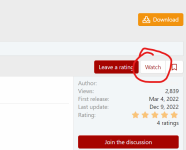
1) On this site, go to the BoxHUD and QuickHUD resources and click the "Watch" link in the upper right.
1681342600244.png
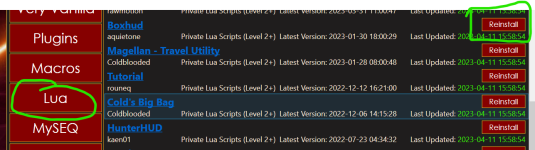
2) In your RedGuides Launcher, click on the Lua tab: you should see the resources that you've "watched" show up here. In my snip here, it says "Reinstall" but on yours it'll likely say "Install". Click that.
1681342738420.png
3) Now you want to run the things you've installed. Get into EQ, then type:

/lua run boxhud /lua run quickhud

Now you're good to go! If you don't want to start the HUDs manually every time you log in, go to your Macroquest config folder. Either edit your existing ingame.cfg file, or create a new one if you don't already have it, then add the two /Lua run statements from step 3 to that file. Now, those will run every time you log in. If you don't want to run them on every character you log in with, instead of using the ingame.cfg file, instead use a file called <server shortname>_<character name>.cfg. So, if I had a character on Vox named Chungus, the file would be vox_chungus.cfg.

If any of this is confusing, ask!
 
No problem at all! So what you want to do is the following:
1) On this site, go to the BoxHUD and QuickHUD resources and click the "Watch" link in the upper right.
View attachment 47787
2) In your RedGuides Launcher, click on the LUA tab: you should see the resources that you've "watched" show up here. In my snip here, it says "Reinstall" but on yours it'll likely say "Install". Click that.
View attachment 47788
3) Now you want to run the things you've installed. Get into EQ, then type:

/lua run boxhud /lua run quickhud

Now you're good to go! If you don't want to start the HUDs manually every time you log in, go to your Macroquest config folder. Either edit your existing ingame.cfg file, or create a new one if you don't already have it, then add the two /lua run statements from step 3 to that file. Now, those will run every time you log in. If you don't want to run them on every character you log in with, instead of using the ingame.cfg file, instead use a file called <server shortname>_<character name>.cfg. So, if I had a character on Vox named Chungus, the file would be vox_chungus.cfg.

If any of this is confusing, ask!

YOU are the real MVP. Thank you SIR!
 
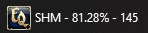
You should still check out the HUD luas, but I use this in my .cfg files and other places to see XP at all times on my taskbar:

/setwintitle ${Me.Class.ShortName} - ${Me.PctExp}% - ${Me.AAPoints}
 
You should still check out the HUD luas, but I use this in my .cfg files and other places to see XP at all times on my taskbar:

/setwintitle ${Me.Class.ShortName} - ${Me.PctExp}% - ${Me.AAPoints}
i need to figure out how to use this part ^^
 
You can add the command to either the ingame.cfg or the vox_chungus.cfg (or whatever) discussed earlier! Those files aren't just for Lua stuff.

Yeah I have an MQ2Events entry:

Code:
[Zoning]
trigger=LOADING, PLEASE WAIT...
command=/setwintitle ${Me.Class.ShortName} - ZONING

And then a zoned.cfg line:

/timed 1 /setwintitle ${Me.Class.ShortName} - ${Me.PctExp}% - ${Me.AAPoints}

Then I can see on my task bar if my boxes are zoning and when they finish zoning.
 
Yeah I have an MQ2Events entry:

Code:
[Zoning]
trigger=LOADING, PLEASE WAIT...
command=/setwintitle ${Me.Class.ShortName} - ZONING

And then a zoned.cfg line:

/timed 1 /setwintitle ${Me.Class.ShortName} - ${Me.PctExp}% - ${Me.AAPoints}

Then I can see on my task bar if my boxes are zoning and when they finish zoning.
Oh, that's super clever. I like that.
 
Question - Newb Questions

Users who are viewing this thread

Back
Top
Cart