• Hail, we're RedGuides. We want you to play six (yes, 6!) EverQuest characters at once. We have scripts and a friendly community to help, please join our playstyle and say hello! 👋
  • We've added LLM sections to our Terms & Rules and Resource Rules, for everyone's sanity & in-game safety.
    Read more
    a. Do not replace your voice with an LLM. This goes for your posts and your scripts. Drafting and editing with a tool is fine, but don't take you out of what you share.
    b. Do not replace your EQ character's voice with an LLM. We don't want scripts that speak over /ooc, /shout or other public channels. This has been an unwritten rule that's kept casino scripts off the site for decades, but we're now compelled to make it clear: keep automated communication private.

    Why Does RG Review Scripts?
    Nearly every LLM-written Lua script we see is making your character do impossible things, and rarely in a way that's beneficial to you. We've seen heavy server hammering, /target over impossible distances when /nav spawn would passively accomplish the same thing, a spawn search that fires 20+ times per second, and other pointless actions that are likely annoying GMs.

    You are welcome to use LLMs as a tool to structure, draft, and edit your work, but please read critically before hitting /lua run

Question - Newb Questions

RebelHeartActual

Well-known member
Hi Friends, Newb here, so take it to light burns only please =P

Looking to get the UI set in the top left corner that shows Exp percentages so i dont have to keep opening invin to check progress. Ayy ideas?

Also, looking to figure out how to get the chat box to tell me how much EXP each kill is earning me so i can best calculate the camps and per hour mobs etc.

Anyone able to point me in the right direction here?
 
BoxHUD is great for monitoring your whole group. If you want to monitor a single toon, QuickHUD is also pretty excellent. (I run both.)
 
No problem at all! So what you want to do is the following:
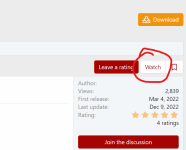
1) On this site, go to the BoxHUD and QuickHUD resources and click the "Watch" link in the upper right.
1681342600244.png
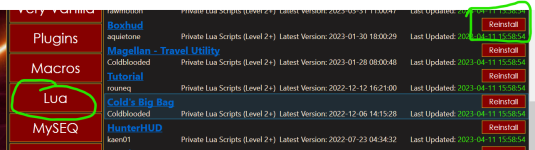
2) In your RedGuides Launcher, click on the Lua tab: you should see the resources that you've "watched" show up here. In my snip here, it says "Reinstall" but on yours it'll likely say "Install". Click that.
1681342738420.png
3) Now you want to run the things you've installed. Get into EQ, then type:

/lua run boxhud /lua run quickhud

Now you're good to go! If you don't want to start the HUDs manually every time you log in, go to your Macroquest config folder. Either edit your existing ingame.cfg file, or create a new one if you don't already have it, then add the two /Lua run statements from step 3 to that file. Now, those will run every time you log in. If you don't want to run them on every character you log in with, instead of using the ingame.cfg file, instead use a file called <server shortname>_<character name>.cfg. So, if I had a character on Vox named Chungus, the file would be vox_chungus.cfg.

If any of this is confusing, ask!
 
No problem at all! So what you want to do is the following:
1) On this site, go to the BoxHUD and QuickHUD resources and click the "Watch" link in the upper right.
View attachment 47787
2) In your RedGuides Launcher, click on the LUA tab: you should see the resources that you've "watched" show up here. In my snip here, it says "Reinstall" but on yours it'll likely say "Install". Click that.
View attachment 47788
3) Now you want to run the things you've installed. Get into EQ, then type:

/lua run boxhud /lua run quickhud

Now you're good to go! If you don't want to start the HUDs manually every time you log in, go to your Macroquest config folder. Either edit your existing ingame.cfg file, or create a new one if you don't already have it, then add the two /lua run statements from step 3 to that file. Now, those will run every time you log in. If you don't want to run them on every character you log in with, instead of using the ingame.cfg file, instead use a file called <server shortname>_<character name>.cfg. So, if I had a character on Vox named Chungus, the file would be vox_chungus.cfg.

If any of this is confusing, ask!

YOU are the real MVP. Thank you SIR!
 
You should still check out the HUD luas, but I use this in my .cfg files and other places to see XP at all times on my taskbar:

/setwintitle ${Me.Class.ShortName} - ${Me.PctExp}% - ${Me.AAPoints}
 
You can add the command to either the ingame.cfg or the vox_chungus.cfg (or whatever) discussed earlier! Those files aren't just for Lua stuff.

Yeah I have an MQ2Events entry:

Code:
[Zoning]
trigger=LOADING, PLEASE WAIT...
command=/setwintitle ${Me.Class.ShortName} - ZONING

And then a zoned.cfg line:

/timed 1 /setwintitle ${Me.Class.ShortName} - ${Me.PctExp}% - ${Me.AAPoints}

Then I can see on my task bar if my boxes are zoning and when they finish zoning.
Oh, that's super clever. I like that.
 
Question - Newb Questions

Users who are viewing this thread

Back
Top
Cart