• Hail, we're RedGuides. We want you to play six (yes, 6!) EverQuest characters at once. We have scripts and a friendly community to help, please join our playstyle and say hello! 👋
  • We've added LLM sections to our Terms & Rules and Resource Rules, for everyone's sanity & in-game safety.
    Read more
    a. Do not replace your voice with an LLM. This goes for your posts and your scripts. Drafting and editing with a tool is fine, but don't take you out of what you share.
    b. Do not replace your EQ character's voice with an LLM. We don't want scripts that speak over /ooc, /shout or other public channels. This has been an unwritten rule that's kept casino scripts off the site for decades, but we're now compelled to make it clear: keep automated communication private.

    Why Does RG Review Scripts?
    Nearly every LLM-written Lua script we see is making your character do impossible things, and rarely in a way that's beneficial to you. We've seen heavy server hammering, /target over impossible distances when /nav spawn would passively accomplish the same thing, a spawn search that fires 20+ times per second, and other pointless actions that are likely annoying GMs.

    You are welcome to use LLMs as a tool to structure, draft, and edit your work, but please read critically before hitting /lua run

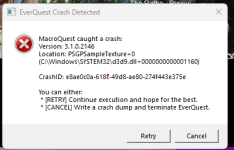
Problem - new error trying to start up mq2

Here is an old thread from folks having a similar problem. I'm not sure if you're using the same hardware, but it may provide you with things to try.

 
Have you ever had everything running well on this particular PC? If the answer is Yes, then it would just be process of elimination to find out what would have changed to make it crash. Did up update drivers recently? Have you performed Win 11 updates?
 
thanks for the reply.. Everything worked great before.

After the errors I ended up updating win 11 and doing a file scan as well.

EQ works fine as long as i don't try to load MQ2... then i get the error.
When I load MQ2 first then load up eq i get the error.

It started after I installed LS

Things I tried:
Updating Win11 - no joy
Reinstalled DirectX - no joy
Reinstalled DirectX 9.0c - no joy
Reinstalled MQ2 - no joy
Complete file scan of EQ - no joy

Not really sure where to go from there.
 
Was getting a similar crash while using a custom UI, switch to default UI and seems to work fine now. Not sure if its the same issue but worth a try if your using a custom UI
 
thanks for the reply.. Everything worked great before.

After the errors I ended up updating win 11 and doing a file scan as well.

EQ works fine as long as i don't try to load MQ2... then i get the error.
When I load MQ2 first then load up eq i get the error.

It started after I installed LS

Things I tried:
Updating Win11 - no joy
Reinstalled DirectX - no joy
Reinstalled DirectX 9.0c - no joy
Reinstalled MQ2 - no joy
Complete file scan of EQ - no joy

Not really sure where to go from there.
Do you have any aftermarket Task bar mods for Win 11?
 
thanks for the reply.. Everything worked great before.

After the errors I ended up updating win 11 and doing a file scan as well.

EQ works fine as long as i don't try to load MQ2... then i get the error.
When I load MQ2 first then load up eq i get the error.

It started after I installed LS

Things I tried:
Updating Win11 - no joy
Reinstalled DirectX - no joy
Reinstalled DirectX 9.0c - no joy
Reinstalled MQ2 - no joy
Complete file scan of EQ - no joy

Not really sure where to go from there.
So to be more specific here. With the following assumption of "LS" meaning Laurions Song expansion. You state "It started after I installed LS". Do you mean this all started after you patched on the LS patch day? Have you also tried to disable the new UI in the options menu? Some people having weird crashes with the new UI enabled for the time being.

One thing that comes to mind here, is that I have known people to have issues when they were on a machine that was upgraded from Windows 7 to Windows 10 and then to Windows 11. Is this something you did? Or is your Windows 11 installation fresh from Windows 11 installation media? If not, I would consider doing a fresh install of Windows 11 from scratch. These upgrades seem to mess with things in very odd ways. I even had a situation myself with a box where the only things that resolved it was perform a fresh Windows 11 installation. That fixed all of my weird issues.
 
Problem - new error trying to start up mq2

Users who are viewing this thread

Back
Top
Cart