• You've discovered RedGuides, an EverQuest multi-boxing and scripting community 🧙‍♀️⚙️. We want you to play several EQ characters at once, come join us and say hello! 👋

  • A TLP without truebox has thawed (Very Vanilla ready)
    Frostreaver
MyUI

Release MyUI (1 Viewer) v8.5

Download
Hello !

Tried this today for the first time and seem to have some troubles.

Code:
\Next\lua\mq/ImguiHelper.lua:41: Cannot delay while importing a modulestack traceback:    
[C]: in function 'require'    \Next\lua\myui\init.lua:15: in main chunk
Ending lua script 'myui' with PID 7 and status 2

Can you offer some advice ?

I searched to see if it was mentioned previously but I did not locate anything on it.
 
Hello !

Tried this today for the first time and seem to have some troubles.

Code:
\Next\lua\mq/ImguiHelper.lua:41: Cannot delay while importing a modulestack traceback:   
[C]: in function 'require'    \Next\lua\myui\init.lua:15: in main chunk
Ending lua script 'myui' with PID 7 and status 2

Can you offer some advice ?

I searched to see if it was mentioned previously but I did not locate anything on it.
oops fix incoming.
 
Hi Grim,

Thanks for these resources and modules. I have watched a lot of your videos and it looks like your screen looks a little different and I was unable to reproduce what I saw. So I have a couple of questions.

On all of these, I am using the Modularized scripts from MyUI, so I am going to ask here vs those individual stand alones.

1) In Buffs, I saw on some video (and I'll be damned if I can find it again but I think it was calling myui Grimui) I see where you had another column for duration. I have Icon|Name if I hover I can see the timer. I thought I saw Icon|Duration|Name
2) In Settings for Buffs, if you select the option to remove the menu, how do you turn it back on if need be?
3) Your alertmaster window looks so much different than what I am getting from MyUI/AlertMaster. I assume that is alertmaster with the spawnlist distance and heading right?

Thanks for your help and I appreciate all the amazing stuff you are cranking out.
 
Hi Grim,

Thanks for these resources and modules. I have watched a lot of your videos and it looks like your screen looks a little different and I was unable to reproduce what I saw. So I have a couple of questions.

On all of these, I am using the Modularized scripts from MyUI, so I am going to ask here vs those individual stand alones.

1) In Buffs, I saw on some video (and I'll be damned if I can find it again but I think it was calling myui Grimui) I see where you had another column for duration. I have Icon|Name if I hover I can see the timer. I thought I saw Icon|Duration|Name
2) In Settings for Buffs, if you select the option to remove the menu, how do you turn it back on if need be?
3) Your alertmaster window looks so much different than what I am getting from MyUI/AlertMaster. I assume that is alertmaster with the spawnlist distance and heading right?

Thanks for your help and I appreciate all the amazing stuff you are cranking out.
1) timers can be shown you may need to adjust the min threshold in the config. anything with a timer less than that will show up. and you can change the color for the timer.
2) Right click the title bar or outside of the buffs area around the edges to bring up a context menu. you can access settings from there to toggle the menu.
3) I keep the Alertmaster search window open all the time, just lock it and it will always show up on load. You can right click a table column to turn off any of the columns you don't want to see. Typically i only show name, lvl, dist, aggro meter, and direction arrow.
 
the grimgui video is for a plugin i am working on where i did switch to using a table over just text lines for the buff list, keeps things lined up nicely.
 
1) timers can be shown you may need to adjust the min threshold in the config. anything with a timer less than that will show up. and you can change the color for the timer.
Ahah. I was taking the timer to zero. When I went to type in some obnoxiously large number, it showed up.
2) Right click the title bar or outside of the buffs area around the edges to bring up a context menu. you can access settings from there to toggle the menu.
Worked.
3) I keep the Alertmaster search window open all the time, just lock it and it will always show up on load. You can right click a table column to turn off any of the columns you don't want to see. Typically i only show name, lvl, dist, aggro meter, and direction arrow.
I assume that is /am show? Its not showing any window.

Thanks again.
 
Ahah. I was taking the timer to zero. When I went to type in some obnoxiously large number, it showed up.

Worked.

I assume that is /am show? Its not showing any window.

Thanks again.
the /am command conflicted with a live eq command try /alertmaster instead so /alertmaster show

Hope i didn;t miss the help for that. all /am commands are /alertmaster
well they were always both but now only /alertmaster
 
Yay. It was /alertmaster. I think I was getting /am from the Alert Master overview screenshots.

Hopefully tomorrow, I can do more than mess with my UI--like RGMercs and LootnScoot.
 
Hi Grim,

I am getting an error in MyUI. It seems fine for hours, but when I go start to hunt on my driver, it crashes out. I am running RG-Mercs Lua.

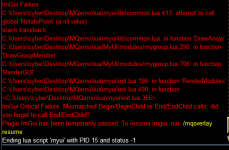
Here is the output error. If I resume overlay, it gives me back my driver RGMercs window and Mybuttons. All the modules under MyUI do not function until I relog (I have not tried to force a restart).

ImGui Failure:
G:\RG-MQ2-EMU\Lua/MyUI/modules/myspells.Lua:317: attempt to index field 'Cast' (a nil value)
stack traceback:
G:\RG-MQ2-EMU\Lua/MyUI/modules/myspells.Lua: in function 'DrawInspectableSpellIcon'
G:\RG-MQ2-EMU\Lua/MyUI/modules/myspells.Lua:600: in function 'RenderGUI'
G:\RG-MQ2-EMU\Lua\myui\init.Lua:196: in function 'RenderModules'
G:\RG-MQ2-EMU\Lua\myui\init.Lua:450: in function <G:\RG-MQ2-EMU\Lua\myui\init.Lua:315>
ImGui Critical Failure: Mismatched Begin/BeginChild vs End/EndChild calls: did you forget to call End/EndChild?
Plugin ImGui has been temporarily paused. To resume imgui, run: /mqoverlay resume

Is there anything else, I can provide?
 
Hi Grim,

I am getting an error in MyUI. It seems fine for hours, but when I go start to hunt on my driver, it crashes out. I am running RG-Mercs Lua.

Here is the output error. If I resume overlay, it gives me back my driver RGMercs window and Mybuttons. All the modules under MyUI do not function until I relog (I have not tried to force a restart).

ImGui Failure:
G:\RG-MQ2-EMU\lua/MyUI/modules/myspells.lua:317: attempt to index field 'Cast' (a nil value)
stack traceback:
G:\RG-MQ2-EMU\lua/MyUI/modules/myspells.lua: in function 'DrawInspectableSpellIcon'
G:\RG-MQ2-EMU\lua/MyUI/modules/myspells.lua:600: in function 'RenderGUI'
G:\RG-MQ2-EMU\lua\myui\init.lua:196: in function 'RenderModules'
G:\RG-MQ2-EMU\lua\myui\init.lua:450: in function <G:\RG-MQ2-EMU\lua\myui\init.lua:315>
ImGui Critical Failure: Mismatched Begin/BeginChild vs End/EndChild calls: did you forget to call End/EndChild?
Plugin ImGui has been temporarily paused. To resume imgui, run: /mqoverlay resume

Is there anything else, I can provide?
try making sure mq2cast plugin is on. I think that TLO belongs to the cast plugin

/plugin cast
 
It looks like it was not loaded. I will load it up and see how it goes.

Thanks.

Updated: That appears to have fixed this issue. I would usually bug out on the first or second pull. Thanks again.
 
grimmier updated MyUI with a new update entry:

v2.7

[2.7] - 2025-01-16​


〰️Commits​


- Save\Load Paths, Breath Meter
Added Save Load Chains to MyPaths,
you can now save Path Chains and load them later. Saves rebuilding chains you use between zones often.

Added Breath meter to the AA status window since this also shows group members. The bar hides unless your breath remaining is below 100%.
...

Read the rest of this update entry...
 
grimmier updated MyUI with a new update entry:

v2.8

[2.8] - 2025-01-19​


Features⛲


- Some features, fixes and minor tweaks
MyGroup
* supports actors and will relay cur\max hp, mana, end if running on same pc.
this works when not in the same zone as well, the health bar will go purple.

MyChat
* Added option for logging commands to file.

AlertMaster
* Added Level to the pop up window.

MySpells
* will auto start mq2cast if not running.

MyUI
* Added some options to the right click context for...

Read the rest of this update entry...
 
My BM, run on tank/Driver:
1738435252622.png
1738435202554.png

Clients work fine though and all running. The driver has the Overlay resume thing upon crash. Also ran manually as /Lua run Myui and /Lua run myui driver
 
@grimmier Not sure if you are aware but the My Group part of this doesn't update on EMU. I tried toggling the dynamic check boxes thinking that would fix it but it doesn't seem to update health or mana.
 
@grimmier Not sure if you are aware but the My Group part of this doesn't update on EMU. I tried toggling the dynamic check boxes thinking that would fix it but it doesn't seem to update health or mana.
ahh i thnk that is when the others aren't running mygroup in the background to send real data.

I will look into this when i get home from work.

if all of them have it running it should send real data aka 1234 mana of 2345 etc.
 
Gotcha, yeah I was only running it on the driver. I'll run it on the entire group and see if that changes things. Thanks!
I did this also.. once I loaded it on all the group it was realtime updates. It does not have to be visible window, just loaded.
 
yeah if you start the others in client mode the gui is hidden on them but they will send data over actors so the driver can see the updates.
I pushed a fix to the bug though. was a slight oversight on my part.

/mygroup show
will show\hide the gui on any char though =)
 
Got another one for you. I guess myui uses MQ2Cast? Issue I'm now having is Kissassist does not want MQ2Cast to be running for some reason and unloads it whenever you run that macro so it causes myui to crash.
 
Release MyUI

Users who are viewing this thread

  • J
Back
Top
Cart