• You've discovered RedGuides, an EverQuest multi-boxing and scripting community 🧙‍♀️⚙️. We want you to play several EQ characters at once, come join us and say hello! 👋

  • A TLP without truebox has thawed (Very Vanilla ready)
    Frostreaver
MySEQ Open (Live server offsets)

💾Software MySEQ Open (Live server offsets) (2 Viewers) 2026-05-28

No permission to download
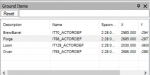
So I did notice this section:
1598816620635.png

But I don't know how to input items into this table, or how to modify it.

Is this the location you're referring to, that I need to modify? Since I do have the NPC name and ground spawn item name in the Zone XML already.
 
it starts getting tricky with certain things that are "unlabeled" like many collectibles and random ground things
1598816703773.png
 
So I did notice this section:

View attachment 24043

But I don't know how to input items into this table, or how to modify it.

Is this the location you're referring to, that I need to modify? Since I do have the NPC name and ground spawn item name in the Zone XML already.
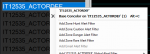
no, I'm talking about your filter needs to match the groundspawn you're looking for. you can right click on that item and then add it from the menu

You have Name:GroundSpawn 1 Flask
1598816872774.png
You'd want to get the actual name that myseq shows for it, and then add it from there (or at least match up the name)


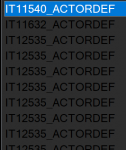
it adds it as <oldfilter><regex>Name:IT12535_ACTORDEF</regex></oldfilter>
1598816768917.png
 
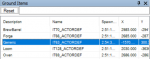
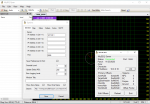
Ahh, I think I understand. So, focusing on the ground spawn item first, the trouble is that I don't see the ground spawn item name listed in that table, so there's nothing for me to right click. Is there a way I can get the item into that table?
 
Ahh, I think I understand. So, focusing on the ground spawn item first, the trouble is that I don't see the ground spawn item name listed in that table, so there's nothing for me to right click. Is there a way I can get the item into that table?
no, that table is what myseq sees for ground items - including crafting stuff, and harvested items etc
 
Ahh, so it's impossible to set up an audio alert for something that doesn't actually exist someone in the zone yet?
I'm not sure if you're asking "can i set up a trigger for something that never exists in the zone" or "can i set up a trigger for something that doesn't currently exist in the zone"

the second one you can, if you know what it is called (like i demonstrated before adding it by its name).

if it is something that never exists in the zone, then adding it wouldn't do anything because its not there to be "seen"
 
I actually just added in an item that I currently possess (ie. a water flask), and then dropped it on the ground. However, in the list, it shows up as:

1598817380935.png

So, maybe... just to make sure I'm understanding, would it be possible to start at the beginning so I'm understanding all of the steps involved?
 
I meant the second thing, "can I set up a trigger for something that doesn't currently exist in the zone"

If I could get all the steps involved, that would be great. I have the feeling I must be missing something.
 
Ahh, so it's impossible to set up an audio alert for something that doesn't actually exist someone in the zone yet?
IF you know that it shows up with a certain name, and you know the name. It is possible. But as Sic says, many groundspawns dont have their name shown in Myseq, just a generic name like the Actordef for example
 
I think I understand. So, switching over to audio alerts for NPCs, what would explain my audio alert not working for that? I've configured everything in the manner shown above in my screenshot, and even when the NPC spawns, I don't receive an audio alert. Trying to figure out what I am missing there.
 
I think I understand. So, switching over to audio alerts for NPCs, what would explain my audio alert not working for that? I've configured everything in the manner shown above in my screenshot, and even when the NPC spawns, I don't receive an audio alert. Trying to figure out what I am missing there.
Do you have something like this?

INI:
<section name="Alert">
        <oldfilter><regex>Name:#a forgotten raid leader</regex></oldfilter>
 
Okay, so I switched over to 'Speak' as recommended by Robban and it is working. Now I'm just playing around with the ground spawns. Thanks everyone!
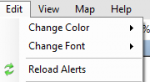
if you manually adjust edits in the .xml file, make sure you hit the reload alerts thing afterwards

1598818556453.png
 
Will do! Thanks so much for the responses, everyone!

My final question - there is no way to modify the way MySEQ sees certain items? Like there aren't any XMLs or databases that can be modified?
 
Will do! Thanks so much for the responses, everyone!

My final question - there is no way to modify the way MySEQ sees certain items? Like there aren't any XMLs or databases that can be modified?
the information that myseq is showing is the information the server is sending it and then being allocated into different areas based on offsets, so its not something you could *tell* myseq to display - unless the item is some random lone-wolf offset that isn't natively in myseq

someone like @dannuic might be able to give some better information
 
Actually, just thought of one more question - so if MySEQ is just interpreting data that the EQ server is sending out, is there a list or database that contains that data? Perfectly fine if not, and I am even assuming there is no such data out there, but I figured I'd ask. :)
 
Actually, just thought of one more question - so if MySEQ is just interpreting data that the EQ server is sending out, is there a list or database that contains that data? Perfectly fine if not, and I am even assuming there is no such data out there, but I figured I'd ask. :)
its more like I have a bucket called ground spawns, and the lid of that bucket is shaped so only ground spawn items can "square peg" go into the ground spawns bucket

Then the eq server tosses me a bunch of information (like a coin sorter) and the buckets catch the things that fit through their lid.

Ground spawns are all ground spawns
Spawns are all spawns
PC Corpses go into the PC Corpse bucket
 
Hi guys,

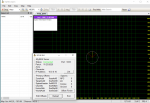
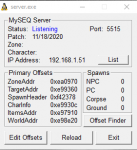
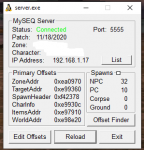
Download SEQ and followed all the instructions. I've searched for trouble shooting but couldn't find anything useful. This is what I see any tips on how to get it working would be greatly appreciated.
Thanks in advance.

1606964742762.png
 
Hi guys,

Download SEQ and followed all the instructions. I've searched for trouble shooting but couldn't find anything useful. This is what I see any tips on how to get it working would be greatly appreciated.
Thanks in advance.

View attachment 26199
assuming you're running the correct offesets

did you try hitting stop and then then go again?
1606965166882.png

if you fired up the server afterwards sometimes you need to do that

and like teichou said if you haven't either already a: copied your maps, or b: pointed the options to your existing maps you need to
 
as Sic said you may need to hit go.
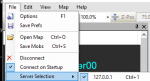
I see this happen more now that I’m not Single PC per Toon boxing. Often I need to go under the File menu and select the character. To me this looks to be the issue. After that you need maps. :)
 
I've copied the maps. I've hit go. I have the right offset. Nothing shows up under character select. It says connected. Any other ideas?
 
@portsmagee before you open my seq, you need to open the server icon and select reload. After you’ve hit reload, then minimize that window and open myseq.

I’m assuming you have the proper offsets? If not, look up the MySeq page on this website and instructions will be there.
 
@JerkChicken see my server says 11/23/2020 and thats what i download from the page you linked.
 
is the myseq server on the same computer? I'm assuming so.

you have your server ip for 10.0.0.10 is this correct?

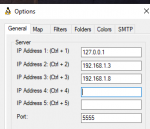
this is what mine looks like the 127.0.0.1 is just the "home" computer. then i have 2 other ip addresses in there for other computers i have here in case i want to swap around

(F1 or file->options)
1606971160889.png

you can see here my server select is the 127.0.0.1 - the actual "on network" local ip is 192.168.1.17, but the 127.0.0.1 just looks inward
1606971219235.png
 
💾Software MySEQ Open (Live server offsets)

Users who are viewing this thread

Back
Top
Cart