Can i set it to watch Me and Cleric... I dont see a setting for that.change your group watch setting in the pull tab.

-
 Hail, we're RedGuides. We want you to play six (yes, 6!) EverQuest characters at once. We have scripts and a friendly community to help, please join our playstyle and say hello! 👋
You are using an out of date browser. It may not display this or other websites correctly.
You should upgrade or use an alternative browser.
You should upgrade or use an alternative browser.

Plugin - MQ2War (2 Viewers) 3.1.52471.42
- Thread starter ChatWithThisName
- Start date

aye - you always watch yourself, and then the group watch options allow you to specify otherwise
from the commands tab
/war Groupwatch - 0|1|2|3 - Everyone, Healer, CC&Healer, Self
from the commands tab
/war Groupwatch - 0|1|2|3 - Everyone, Healer, CC&Healer, Self


ellsa20
Active member
you would want to make sure your switchwithma is on on your box toons - but there are still some hiccups until next rebuild of VV so just use a switch target hotkey/bcg //target id ${Target.ID}
yeah, thats kinda what i was doing but more like /bcg //assist TANK and they work fine,
been noticing alot of things lately, off topic here but will the spell book stuck issue be fixed soon also?
EDIt- i have keys for a switch with and a dont switch with, so it was just recent must just be a cov thing
the spellbook thing is addressed in each of the FAQ of each of the plugins. it is 99% likely that it is a *you* issue and not a plugin issue.yeah, thats kinda what i was doing but more like /bcg //assist TANK and they work fine,
been noticing alot of things lately, off topic here but will the spell book stuck issue be fixed soon also?
Unfortunately, if you have too low of a background fps set, and "instructions are missed" or whatnot - mq2 won't be able to report back the correct information about it. The is the same thing that will happen with follow or nav or even combat routine skipping stuff when your background fps is too low - just in this instance we're not being given correct information about the state of your window.
Q. I sometimes get stuck in my spell book?
A. This is often due to your background fps not being high enough. It is strongly advised to utilize at LEAST 30 fps for background, recommended 60+ background fps. The fps cycle for eq is where "work" is done. If your background fps is set to "min" you can and will have undesired results with all sorts of automation activities.
Alt-O -> Display -> Advanced - > Max Background FPS
Someone (not my group) dropped a ward of some kind in my camp (show's as XXXX's ward, 115 Invisible Man Warrior) and my warrior puller is just stuck trying to pull it as long as it is there. Yes I was able to add it to ignore and that worked. But I figured it might be something worth fixing.
Edit: Wierdness... all of sudden he has picked up on my XXX's pet (my shaman, but not his regular pet some random swarm pet maybe that is stuck and wandered off). Ignore doesn't seem to be working on this one. Finally despawned.
Edit: Wierdness... all of sudden he has picked up on my XXX's pet (my shaman, but not his regular pet some random swarm pet maybe that is stuck and wandered off). Ignore doesn't seem to be working on this one. Finally despawned.
Last edited:
what is your alt-o in game background fps set to? and what are you having your isboxer limit your background frames to?@Sic yeah i run isboxer and eqwire and did the setup in the eq inis and such
those should be 60+ otherwise you're likely going to run into those issues i spoke about.
eq does "work" during the fps cycle - if it is set too low --- work is skipped. the normal meming kicks you out of your book - and we check if the book is open more faster than you can count.
but if you are in manual mode - and the instruction after you memorized a spell was skipped due to your low frame rate - then you can and will get skipped because manual mode only takes you out of the book if you memorized a spell - if you manually open the book, then we don't kick you out - so if your frames being too low skips that communication and you're in manual mode - you're gonna be chilling in the book because it looks like you wanted to be in the book.
tl;dr - you need to check your in game fps settings in your alt-o window -> advanced as well as check what you have isboxer limiting your frames to.
limiting background frames is sweet for boxing - until you need them to do automation. since you already run eqwire you shouldn't need to limit those frames anyhow - eqwire just makes it not "draw" the stuff, but the "fps cycle" still occurs

Redbot updated MQ2War with a new update entry:
12/21/2020
Read the rest of this update entry...
12/21/2020
- Made updates to Warlord's Grasp.
-- Usage with toggle.
-- Will use to regain aggro.
- Added Grappling Strike.
-- Usage with toggle.
-- Will use to regain aggro.
Read the rest of this update entry...
Is there a way to turn off automatic use of disciplines? I'm tired of seeing my warrior burn Defensive on a grey or green con mob.
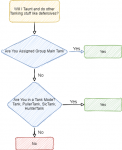

uncheck BurnAlways and BurnAllNamedIs there a way to turn off automatic use of disciplines? I'm tired of seeing my warrior burn Defensive on a grey or green con mob.

is there a way to issue a command through the EQBC server to tell my warrior to use the /war pause on/off feature to make it easier to move camps without switching characters and doing it on each chars screen?
/noparse /bcga //docommand /${Me.Class.ShortName} pause on
Same line, just change pause on too pause off, too unpause
This will broadcast and pause/unpause any character using CWTN plugins
thanks a million/noparse /bcga //docommand /${Me.Class.ShortName} pause on
Same line, just change pause on too pause off, too unpause
This will broadcast and pause/unpause any character using CWTN plugins
/bct warriorname //war pause onthanks a million
works too if you're on another toon.
I have a "how i move my toons" guide video and a slew of hotkeys that you're going to find usefulis there a way to issue a command through the EQBC server to tell my warrior to use the /war pause on/off feature to make it easier to move camps without switching characters and doing it on each chars screen?
> HERE <
howdy @oogeyComplete noob here out of my depth. Do I just copy and paste this into kissassist file and my war will pull and tank automatically? looking to play dps and wanted my war to pull and tank
nah. you don't use kissassist at all.
there isn't anything to copy and paste either - just let the VV launcher download it and then you load it and go - ez plz
You'll want to review the following information/guides:
Start here and go in this order
CWTNUI Video <--- this will explain how to load the plugin and go over the "general" window stuff
MQ2War Video <--- this goes over some of the mq2war stuff as well as basics in pulling (this was when we first introduced pull modes)
Move Your Toons + Hotkey Guide <--- this demonstrates how to operate your team and set up hotkeys to manage that.
MQ2War Commands Tab
MQ2War FAQ Tab
Happy hunting and welcome to RedGuides!
/face heading # where number is the direction you want to face - then go in pull mode.is there a way to rotate your pull area if you use an pull arc of less than 360 degrees? I set it to 200, which would be good, but i need to rotate the 200 degree pulling arc 90% to avoid half of it being in the wrong spot.
alternatively you can set your pull minimum to a high number like 200
/war levelmin 200
then go in pull mode (so you can see your pull arc, but you won't pull any mobs because of the level min)
then /face heading # where # is the degree you want to face
then /war resetcamp
then /war levelmin 1
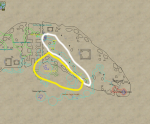
you can do one or the other.Probably beyond the scope of the plugin here, but what im trying to do is pull the area in white (cause it has the mobs i want to kill) then pull the yellow area when there's nothing left up in the other area.
View attachment 26931
either you can pull all the stuff in both areas, or you can pull the stuff in one of the areas by setting a pullarc/radius combo that encompasses the area from which you would like to pull.

howdy Motd - thanks for your feedback.first test of the WAR macro. good aggro control. lots of endurance use. I'm glad that breather is being used between combats, way more efficient ... but in long fights (and raids) if end is running out, I'd recommend popping relax. (lvl 115 war, live server)
We don't plan on having any of the cwtn plugins use hiatus due to how hiatus works - but nothing would prohibit you from using it manually if you wanted to
you can do one or the other.
either you can pull all the stuff in both areas, or you can pull the stuff in one of the areas by setting a pullarc/radius combo that encompasses the area from which you would like to pull.
Is there a way I can hotkey the pull arc settings back and forth using socials?
are you asking if you canIs there a way I can hotkey the pull arc settings back and forth using socials?
/war pullarc 360or
/war pullarc 180in a hotkey? if so, yes
you can adjust anything with slash commands, and those you can make a hotkey.
You can run the original defensive discipline in that case as I believe it uses no endurance and gives the same mitigation at least. Not sure if cwtn will do that, but i have manually.No problemo. Just considered it in case someone ran all the way out of endurance and lost their running defensive discipline or reentered combat immediately on a rez.
Anyway to prioritize certain mobs over others when pulling or to exclude certain spots or certain specific spawn points from your pull region?
I have 6 an amorphous mass and 5 a restless paebala in my pull region. I want the masses every time there's not a rat in the way to it regardless of how far it is. I will even take extra pulls to get them.
I also have a spot where there's 2 massses that they are just far enough away that i wont always get both of them. If i get the 2nd one I will always get the first as well... Every 2-3-4 pull i get lowers the amount of time mobs are up without me killing them.
I have 6 an amorphous mass and 5 a restless paebala in my pull region. I want the masses every time there's not a rat in the way to it regardless of how far it is. I will even take extra pulls to get them.
I also have a spot where there's 2 massses that they are just far enough away that i wont always get both of them. If i get the 2nd one I will always get the first as well... Every 2-3-4 pull i get lowers the amount of time mobs are up without me killing them.
Last edited:
no built-in way to do thatAnyway to prioritize certain mobs over others when pulling or to exclude certain spots or certain specific spawn points from your pull region?
I have 6 an amorphous mass and 5 a restless paebala in my pull region. I want the masses every time there's not a rat in the way to it regardless of how far it is. I will even take extra pulls to get them.
I also have a spot where there's 2 massses that they are just far enough away that i wont always get both of them. If i get the 2nd one I will always get the first as well... Every 2-3-4 pull i get lowers the amount of time mobs are up without me killing them.
howdy @oogey
no. you don't use kissassist at all.
there isn't anything to copy and paste.
this is a plugin that automates warrior skills.
You'll want to review the following information/guides
Start here and go in this order
CWTNUI Video <--- this will explain how to load the plugin and go over the "general" window stuff
MQ2War Video <--- this goes over some of the mq2war stuff as well as basics in pulling (this was when we first introduced pull modes)
Move Your Toons + Hotkey Guide <--- this demonstrates how to operate your team and set up hotkeys to manage that.
MQ2War Commands Tab
MQ2War FAQ Tab
Okay thank you. Would there be any issue using this with kissassit for the rest of my group? Do I need too to automate my group so I can move between roles
Thank you that was a big help. it was working great, but just ran into an issue where no matter what zone I am in, It says I need to make a mesh for the zone any time I try to go outside of manual mode. I have run updaters on mq2nav and restarti mutliple times. Nothing so far has seemed to fix it any advice?howdy @oogey
nah. you don't use kissassist at all.
there isn't anything to copy and paste either - just let the VV launcher download it and then you load it and go - ez plz
You'll want to review the following information/guides:
Start here and go in this order
CWTNUI Video <--- this will explain how to load the plugin and go over the "general" window stuff
MQ2War Video <--- this goes over some of the mq2war stuff as well as basics in pulling (this was when we first introduced pull modes)
Move Your Toons + Hotkey Guide <--- this demonstrates how to operate your team and set up hotkeys to manage that.
MQ2War Commands Tab
MQ2War FAQ Tab
Happy hunting and welcome to RedGuides!
Did you run the "Launch Mesh Updater"?Okay thank you. Would there be any issue using this with kissassit for the rest of my group? Do I need too to automate my group so I can move between roles
Thank you that was a big help. it was working great, but just ran into an issue where no matter what zone I am in, It says I need to make a mesh for the zone any time I try to go outside of manual mode. I have run updaters on mq2nav and restarti mutliple times. Nothing so far has seemed to fix it any advice?
> MQ2Nav and Mesh Video <
if you did and it doesn't work you can manually download the meshes > HERE <
these meshes go in your MQ2 -> Release -> MQ2Nav folder
again, all modes that are not manual mode require mq2nav loaded and a valid mesh for the zone you're in - the mesh updater and the mesh link i provided above has a mesh for every zone.
re: other toons - mq2warrior doesn't care if your other toons are running kissassist, a real person, empty_chair, or offline - mq2war does their warrior job, and let's those others worry about what they're doing or not doing.
Thank you for such a fast reply. I ran the updater several times per the video. mq2nav says loaded every time I try it and ALT left click in map still takes my characters places. It also tells my characters that the Meshes are loaded for every zone they go in as well.Did you run the "Launch Mesh Updater"?
> MQ2Nav and Mesh Video <
View attachment 27053
View attachment 27054
if you did and it doesn't work you can manually download the meshes > HERE <
these meshes go in your MQ2 -> Release -> MQ2Nav folder
again, all modes that are not manual mode require mq2nav loaded and a valid mesh for the zone you're in - the mesh updater and the mesh link i provided above has a mesh for every zone.
re: other toons - mq2warrior doesn't care if your other toons are running kissassist, a real person, empty_chair, or offline - mq2war does their warrior job, and let's those others worry about what they're doing or not doing.
update: just replaced all files with the "all" download, still tells me "Tank mode requires a mesh for the zone you are in. Make one and try again. switching to manual mode" I can Alt left-click travel with this char as well.
alt-click travel uses easyfind, which will use advpath if you don't have a mesh loaded.Thank you for such a fast reply. I ran the updater several times per the video. mq2nav says loaded every time I try it and ALT left click in map still takes my characters places. It also tells my characters that the Meshes are loaded for every zone they go in as well.
update: just replaced all files with the "all" download, still tells me "Tank mode requires a mesh for the zone you are in. Make one and try again. switching to manual mode" I can Alt left-click travel with this char as well.
do a
/nav reload if it says you have successfully loaded a mesh, then you have one and are good to go - if it didn't then you don't have a mesh or mq2nav is unloaded.you can also
/echo ${Nav.MeshLoaded} and see if it says TRUE, FALSE, or NULLTrue would be you do have a mesh loaded
False would be you do not have a mesh loaded
Null would likely be that mq2nav isn't loaded
it say "true"/echo ${Nav.MeshLoaded}
What does it say?
Users who are viewing this thread
Total: 3 (members: 0, guests: 3)
Share: